@matt-janda-kingston_9734 my old friend! I am just now seeing this. I hope you are well! Hit me up at my email in my profile if you see this!
Welcome to the Inedo Forums! Check out the Forums Guide for help getting started.
If you are experiencing any issues with the forum software, please visit the Contact Form on our website and let us know!
 M
Offline
M
Offline
Posts
-
RE: upack repack doesn't use complete version string from CLI
-
Tile View partially working in RPM feed, not at all in Assets
Hi, I like the idea of Tile View, but it doesn't seem to work in my install. I am on Version 2023.22 (Build 6).
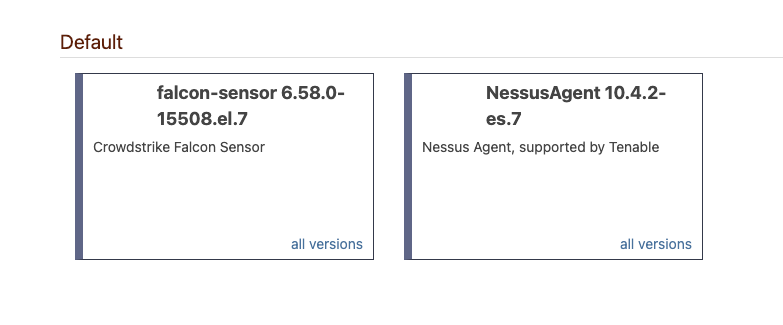
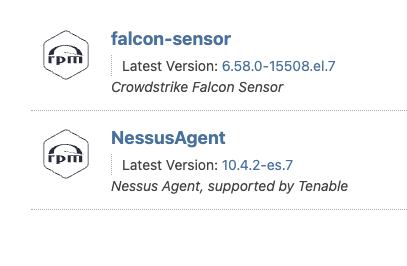
In an RPM feed, it shows tiles, but no icon, just text.
In an Asset feed, it has no effect - the Asset directory is always shown in List view.
Settings:
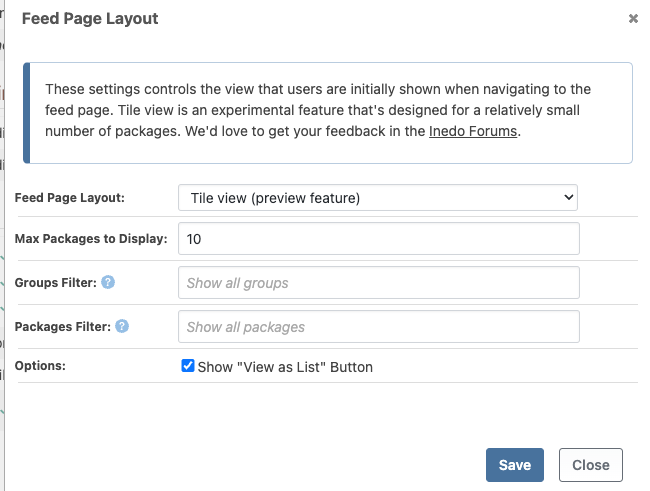
RPM Feed:
List view has an icon:
Asset dir:

-
RE: Unable to upload Debian Package.
It appears this has been implemented and released!
https://inedo.myjetbrains.com/youtrack/issue/PG-2530 -
RE: Unable to upload Debian Package.
@hwittenborn Thanks! I had to install
binutilsfirst, and then got what looks like a valid tree in both packages I had:root@e6c7c176bb0d:/tmp# ar tf NessusAgent.deb debian-binary control.tar.xz data.tar.xz root@e6c7c176bb0d:/tmp# ar tf NessusAgent-10.4.2-ubuntu1404_amd64.deb debian-binary control.tar.gz data.tar.gzThe former is a repackaged version of the latter; using @luke_1024's mechanism above.
FWIW,
ar tfwas not a valid command on MacOS (bash 5.2) withbinutilsinstalled, but works as expected on the Ubuntu container (above). -
RE: Unable to upload Debian Package.
I too am having this problem right now, and I don't even know how to look into the package to see if @hwittenborn 's fix is possible.
The file in question is not a
cargo rustartifact but pulled from a provider's website.I know the package still installs successfully, so as a workaround, I plan to put the deb pkg in ProGet as a simple file to be downloaded to the target.
-
RE: Need to change my forum email address
@atripp I'm sorry to revive this old thread but I am having this exact same problem. Old email is <<redacted>>, I no longer work there; new email <<redacted>>. I think two new accounts got created somehow due to my failing efforts. Please help?
-
Solved: SQL containers on Mac M1
On my MacBook Pro M1, I was trying to follow the ProGet Docker-Compose instructions, but the SQL container was continuously restarting.
I found the answer here: https://github.com/microsoft/mssql-docker/issues/668#issuecomment-1436802153
TL;DR: In the Docker Desktop app, enable "Use Rosetta..." in the "Features In Development" settings pane.
Voila', it works!
-
RE: upack repack doesn't use complete version string from CLI
@stevedennis , is there perhaps a switch or param that can enable no-ssl-checking in the upack cli? Somethink like
-k --insecureincurl? -
RE: upack repack doesn't use complete version string from CLI
Hi, I'm just using
curlto workaround the connectivity issue.It works fine locally but I found that one of our Jenkins agents is rather old and doesn't have
curlon it. As a workaround to that, for the time being, I'm using the curl installed as part of git:This is the Jenkins code:
def publishNewPackage(String path, String dest, String feed) {
  // can't use the plugin to upload since we already have a upack
  // so just push it as-is.
  // as mentioned elsewhere there's an issue with upack connectivity
  // (https://forums.inedo.com/topic/3626/upack-repack-doesn-t-use-complete-version-string-from-cli)
  // so just use curl for now.
  // specifically pointing to the git curl, it's not in all versions of windows
  echo "Publishing ${path} to ${dest}/${feed}"
  String curlCmd = ". 'C:/Program Files/Git/mingw64/bin/curl.exe'"
  retry(3) {
    withCredentials([usernameColonPassword(credentialsId: 'proget-creds', variable: 'userpass')]) {
      pwsh "${curlCmd} ${dest}/${feed} --user \$env:userpass --upload-file ${path} --silent"
    }
  }
}
(The
retryis because proget sometimes fails on the first LDAP lookup, but always works on a retry. I think it's more of an issue with our internal AD setup than with Proget.) -
RE: upack repack doesn't use complete version string from CLI
I've got a wireshark capture of the conversation between my local and proget via upack. I can't seem to upload it here, which is probably for the best, can i email it to you?
Any ETA on the filename fix? (every engineer's favorite question)
-
upack repack doesn't use complete version string from CLI
Hi, I'm playing around with
upack, and seeing some confusing behavior.If i
repacka package with version1.0.11-develop-2041to1.0.11-develop-2043-repack, the new upack filename does not represent that version, nor the original version:> ls | select name myApp-1.0.11-develop-2041.upack > upack repack .\myApp-1.0.11-develop-2041.upack --newVersion='1.0.11-develop-2043-repack' --note='repackaged from old version' Package: myGroup/myApp Version: 1.0.11-develop-2043-repack > ls | select name myApp-1.0.11-develop-2041.upack myApp-1.0.11.upack <-- shouldn't this be '1.0.11-develop-2043-repack'?The new version is correctly shown in the
upack.json:{ "group": "myGroup", "name": "myApp", "version": "1.0.11-develop-2043-repack", "description": "myApp", "_git_commit": "<a hash>", "_built_by": "Jenkins", "_build_link": "<a jenkins url>", "repackageHistory": [ { "id": "myGroup/myApp:1.0.11-develop-2041:<a hash>", "date": "2022-10-11 21:23:51Z", "using": "upack/2.2.6", "by": "mcascone1", "reason": "repackaged from old version" } ] }Am I doing something wrong, or is this an issue with
upack? Would you rather I submit this as a upack github repo issue?> upack version upack 2.2.6.1One more thing! I can't push or pull with upack:
> upack install myGroup/myApp 1.0.13-POLLY-Test-75 --source=https://proget.myOrg.com/upack/Platdev_dev --user=mcascone1@myOrg.com:<redacted pw> The underlying connection was closed: An unexpected error occurred on a send. -
Proget: API for release versions only/Hide prerelease?
Hi,
I'm wondering if there's a way to pull only non-prerelease versions from the Proget Api.In the UI, in the All Versions tab, you can click
Hide Prerelease, and this only shows versions withMajor.Minor.Patchand no attached metadata. The URL bar shows it tacks on the param?HidePrerelease=Trueto the URL.I can't seem to duplicate this behavior in the api:
Invoke-WebRequest "https://proget.myorg.com/upack/$FeedName/versions?group=$GroupName&name=$PackageName&HidePrerelease=True"doesn't filter the prerelease versions out for me.
I can build a thing to parse for only the MMP versions, but is there an accessible API for this?
This doesn't work:
iwr "https://proget.myorg.com/upack/$FeedName/$GroupName/$PackageName/versions/all?HidePrerelease=True" -
RE: ProGet as ClickOnce publish target?
Just thought I'd drop in and describe where we ended up with this. It works for us, YMMV.
This is running in the context of a Jenkins deploy run, but the concepts should apply to most other use cases.
There are a lot of env vars floating around in all of this; i know it's not ideal, but it's really the easiest way to move values around in Jenkins without going crazy with OO classes that are really hard to get working in the Jenkins context. I have recently come up with a pattern to store more complex objects in env vars as json strings, and convert them when needed.
Happy to answer any questions from anyone interested in using this admittedly obscure functionality.
// this is called from vars/deploy.groovy when appropriate clickOnceDeploy([clickAppName:env.clickOnceName, clickAppPath:env.clickOnceDir, targetEnv:targetMap.key]) // defined in vars/deploy.groovy def clickOnceDeploy(HashMap clickParms) { // find the zip in the download folder String dlFolder = "${WORKSPACE}/${env.packageDownloadDir}" String clickOncePackage = "${dlFolder}/${env.releasePath}/${clickParms.clickAppPath}.zip" String targetEnv = clickParms.targetEnv String zipFileName = "${clickOncePackage.replace('.zip', '')}-${targetEnv}.zip" // extract the zip - select the target env folder unzip zipFile: clickOncePackage, glob: "${targetEnv}/**", quiet: true // zip that folder up, use powershell to get the dir included pwsh "Compress-Archive -Path ${targetEnv} -DestinationPath ${zipFileName} -Force" // publish it to proget asset dir HashMap publishParams = [assetDir:"${clickParms.clickAppName}", zipFilePath:zipFileName] addToInfoMessages("Publishing ClickOnce App: ${clickParms.clickAppName}/${targetEnv}") publish.publishProGetAssetFromZip(publishParams) // defined in vars/publish.groovy def publishProGetAssetFromZip(HashMap publishParams) { // check for required params assert publishParams.assetDir != null assert publishParams.zipFilePath != null // sane defaults publishParams.get('progetBase', env.progetUrl) publishParams.get('overwrite', true) publishParams.get('format', 'zip') // build the api endpoint String progetAssetImportApi = "endpoints/${publishParams.assetDir}/import/?format=${publishParams.format}&overwrite=${publishParams.overwrite.toString()}" String assetUrl = "${publishParams.progetBase}/${progetAssetImportApi}" // need to pass the api token, so pull it from the jenkins cred store withCredentials([string(credentialsId: 'proget-api-key', variable: 'token')]) { retry(3) { httpRequest httpMode: 'POST', url: assetUrl, uploadFile: publishParams.zipFilePath, customHeaders: [[maskValue: true, name: 'X-APIKey', value: token]], ignoreSslErrors: true, responseHandle: 'NONE', contentType: 'APPLICATION_OCTETSTREAM', wrapAsMultipart: false, quiet: true } } addToInfoMessages("Published to ${publishParams.progetBase}/assets/${publishParams.assetDir}") } -
RE: ProGet: Unable to create new Asset folder with same name as deleted folder
Thanks Alana, I continue to be impressed with your and Inedo's responses to these issues!
We are not on v2022 yet, we are on the latest v6 as of a few weeks ago, but now we have a real reason to do it!
Thanks again!
Max -
ProGet: Unable to create new Asset folder with same name as deleted folder
Hi,
A few of our users have reported that they are unable to create Asset folders with the same name as a recently-deleted folder:-
I had to clear out a Proget asset folder so I deleted it and then I tried to add it back both through the UI and the API. It says it’s created successfully but not showing up. Can you please assist?
-
I created a folder ‘astest’, deleted it successfully earlier. However, now if I try to recreate the folder ‘astest’ it does nothing, no error no nothing.
It feels like a proget issue where it remembers old folders for some reason.
I suppose you could alternatively name this "unable to re-create an Asset folder".
The devs have been working around the issue by using varied names, but it might become more of an issue if we have to automate it.
Is this expected behavior? We are on
Version 6.0.18 (Build 2-proget6)Thanks!
-
-
RE: Proget: custom download instructions for Assets
cool, you guys are the best!
I've updated the instructions for feeds to make it copy-pasteable for users, rather than having to edit out the options/variables. Naturally I
hidethe originals and only show the updated ones.Example: the builtin CURL instructions for a package:
To download $PackageFullName from cURL, run the following command:
curl $DownloadUrl[?contentOnly=[zip|tgz]] --output $PackageName.$PackageVersion.[zip|tgz] --user <user>:<password>I simplified it to:
To download $PackageFullName from cURL, run the following command:
curl $DownloadUrl?contentOnly=zip --output $PackageName.$PackageVersion.zipPowershell example:
To download $PackageFullName from PowerShell, run the following command:
Invoke-WebRequest $DownloadUrl[?contentOnly=[zip|tgz]] -Headers @{"AUTHORIZATION"="Basic " + [System.Convert]::ToBase64String([System.Text.Encoding]::UTF8.GetBytes("<user>:<password>"))} -OutFile $PackageName.$PackageVersion.[zip|tgz]simplified:
To download $PackageFullName from PowerShell, run the following command:
Invoke-WebRequest $DownloadUrl?contentOnly=zip -OutFile $PackageName.$PackageVersion.zip -
Proget: custom download instructions for Assets
Hi! I love being able to create our own download instructions for packages. This doesn't seem to be available for Assets. Am I missing something? Can it be added?
thanks!
-
Feature request: Image labels shown in UI
based on https://forums.inedo.com/topic/2612/docker-container-documentation?_=1651176207029
I'm interested in this feature too.
We are adding
LABELs when building docker images of the jenkins_url and commit_hash. We do the same thing for our regular packages.The LABEL metadata is buried in the rest of the image's json. Is there any way to expose our own labels in the ProGet UI?
thanks!
-
RE: Proget: some metadata sent with Jenkins uploadProgetPackage plugin not applied
Thanks, yeah, that seems to work.
I changed my pipeline code to not send any
titlemetadata to ProGet, which returned that field in the UI to its original behavior.I also found that rebuilding an existing package, and sent to ProGet with the updated pipeline, has the same effect.
-
RE: Proget: some metadata sent with Jenkins uploadProgetPackage plugin not applied
Hi there!
I just updated our instance to 6.0.12, and this change appears to have been made. Thanks!
...however, now a lot of the packages show "place title here" in the package listing, which is causing a lot of confusion:
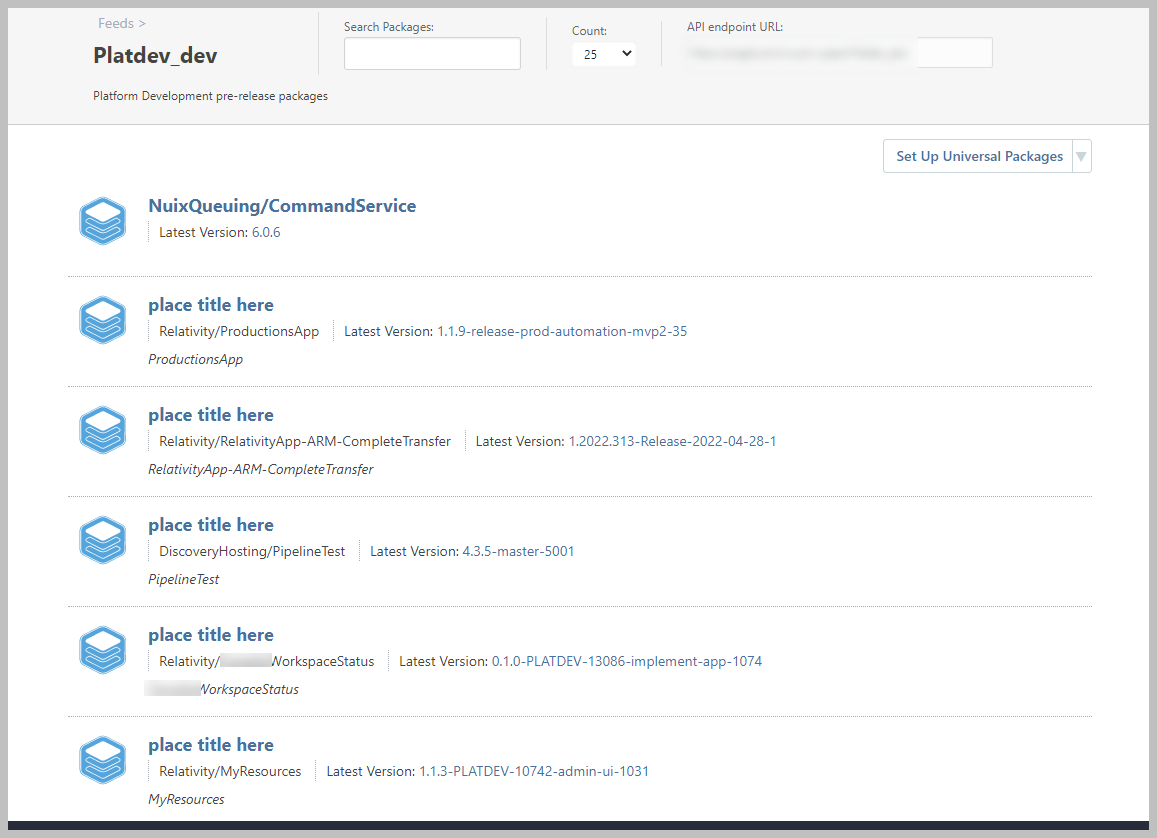
I will have to update the jenkins pipeline that sends the title metadata to send the package name, so this stops happening.
Is there any way to fix the existing data? I don't seem to be able to alter any of the metadata in the UI - which is by design, I'm sure, but in this case it's a bit of an issue.
thanks
max