Welcome to the Inedo Forums! Check out the Forums Guide for help getting started.
If you are experiencing any issues with the forum software, please visit the Contact Form on our website and let us know!
Unable to upload Debian Package.
-
Hello, I am trying to upload a .deb created using the cargo-deb rust crate, but proget seems to think it is missing the control file. I am able to extract the file using dpkg-deb -R and see that the file structure seems to be correct.
If I extract and rebuild the package using the following commands it seems to upload just fine.
dpkg-deb -R myfile.deb tempfolder
dpkg-deb -b tempfolder myfile.deb
I can only assume that since the repackage works that the folder structure is fine but some other format is wrong.
I am currently using ProGet Version 5.2.22 (Build 4) so maybe upgrading might help if this is a known issue.
Output
% Total % Received % Xferd Average Speed Time Time Time Current
19:53:17 Dload Upload Total Spent Left Speed
19:53:17
19:53:17 0 0 0 0 0 0 0 0 --:--:-- --:--:-- --:--:-- 0
19:53:18
19:53:18 46 832k 0 0 46 384k 0 611k 0:00:01 --:--:-- 0:00:01 611k
19:53:18 Invalid Debian package.
19:53:18
19:53:18 missing control file
19:53:18
19:53:18 100 832k 100 46 100 832k 34 624k 0:00:01 0:00:01 --:--:-- 624k
19:53:19 Process exited with code 0
Thanks.
-
Hi @luke_1024,
I just wanted to let you know that we are currently researching your issue and we should have more information for you tomorrow.
Thanks,
Rich -
Hi @luke_1024,
Would you be able to share the .deb file created by cargo-deb and the one created by
dpkg-deb -b? I think I see where the issue is, but that would allow me to confirm the issue. You can share these via email by sending it tosupport@inedo.comwith a subject of[QA-816] Package File Examples.Thanks,
Rich -
Hi @luke_1024,
Could you also try using gz compression instead of xz compression on your control and data archive? I don't know cargo-deb, but what I see in their docs, it looks like you need to do this:
deb_contents.push(compress::gz(&control_archive, &control_base_path)?);
deb_contents.push(compress::gz(&data_archive, &data_base_path)?);
Thanks,
Rich -
Sorry for the delayed response. I sent both version to the email supplied above. They are in separate emails due to file size. Let me know if you need anything else.
It looks like the code snippet you posted above is from an older version of cargo deb and is no longer used that way in the version I am using as I am just running the "cargo deb" command to create the package. I will look into what the current compression is for cargo-deb and see if there is a way to change it if needed.
Thanks.
-
Hi @luke_1024,
It looks like the error happens when trying to decompress your control file in the deb package. Something that cargo-deb is doing compresses and attaches that differently than dpkg-deb does. I took a quick look through cargo-deb's docs, but couldn't find anything to specify the compression. Something to try would be using the
--fastflag when runningcargo deb.Please let me know if
--fastfixes it. If not, I will set aside some time next week to debug through these packages more.Thanks,
Rich -
Thanks for looking into it but unfortunately the
--fastflag did not solve the issue. -
Hi @luke_1024 ,
Unfortunately this just doesn't look like something that's going to be easy/trivial to fix. Maybe it's a bug in the compression library we're using, or maybe
cargo-debis doing something unusual with the compression format that we're not expecting, or isn't documented in the normal debian commands.It looks like you recreate the package with
dpkg-debthen it works.We will upgrade the libraries in the next major version, and maybe it will go away - but for now it doesn't seem worthwhile fixing, To date, just a single user (you
 ) has reported this, and if we hear from customers, we'll consider it too.
In the meantime, the workaround of repackaging should do the trick.
-
I know this is an old issue (no clue if it's still relevant), but I experienced this issue with a program I was working on a while back and I thought I'd post the fix I had here:
If I recall correctly, ProGet thinks a deb is invalid when the first file in a
.debarchive isn'tcontrol.tar.gz, or something like that. The main thing I remember is that I had to ensure files got added into the.debarchive in the correct order for ProGet to recognize it, and I'm assumingcargo-debisn't doing that part correctly. -
I too am having this problem right now, and I don't even know how to look into the package to see if @hwittenborn 's fix is possible.
The file in question is not a
cargo rustartifact but pulled from a provider's website.I know the package still installs successfully, so as a workaround, I plan to put the deb pkg in ProGet as a simple file to be downloaded to the target.
-
Hey @mcascone, my previous comment was slightly incorrect - my testing showed that ProGet requires the first file in a Debian package to be
debian-binary(see this commit I made in a project a while back).It looks like you're able to verify such is the case on a Debian archive by running the following on a Linux system:
ar tf name-of-package.debAnd the first line in the output should be
debian-binary. -
@hwittenborn Thanks! I had to install
binutilsfirst, and then got what looks like a valid tree in both packages I had:root@e6c7c176bb0d:/tmp# ar tf NessusAgent.deb debian-binary control.tar.xz data.tar.xz root@e6c7c176bb0d:/tmp# ar tf NessusAgent-10.4.2-ubuntu1404_amd64.deb debian-binary control.tar.gz data.tar.gzThe former is a repackaged version of the latter; using @luke_1024's mechanism above.
FWIW,
ar tfwas not a valid command on MacOS (bash 5.2) withbinutilsinstalled, but works as expected on the Ubuntu container (above). -
It appears this has been implemented and released!
https://inedo.myjetbrains.com/youtrack/issue/PG-2530 -
I still encounter this issue with my packages built by aptly.
If the first file in the DEBIAN folder for the package is not "control", proget refuses the upload with: Package does not have a control file.
ar tf or compression doesn't seem to be the issue.
This deb fails:
admin@aptlyrepo:/tmp/pkg-test# ar tf tomedo-samba_1.1-2_amd64.deb
debian-binary
control.tar
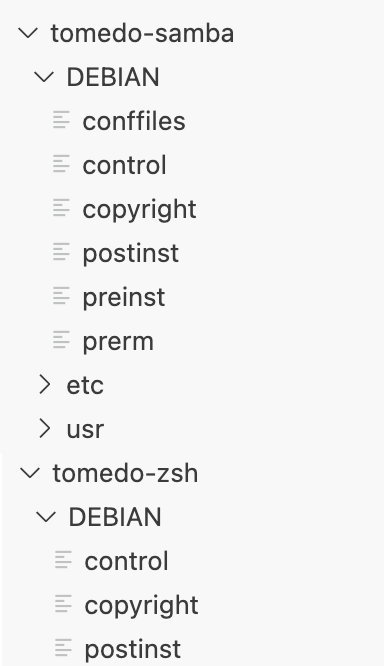
data.tarThis deb works fine:
admin@aptlyrepo:/tmp/pkg-test# ar tf tomedo-zsh_1.0-3_amd64.deb
debian-binary
control.tar
data.tarThe difference is that the samba-package has a DEBIAN/conffiles file, which is enumerated earlier than the control file I guess.
-
@frei_zs I'm also replied to your ticket (EDO-10276), but wanted to reply here as well. I'm going to lock this thread after, since it's a different issue.
Unfortunately "tar" files are more of a convention than a standard, and not all libraries can read files created with different libraries. We are using one of the most "forgiving" tar libraries (we use four different ones!) in this particular scenario, but maybe
aptlyconventions aren't forgiving enough?FYI - here is what we're doing with the library
public byte[] ReadControlBytes()
{
    using var control = TarReader.Open(this.Control);
    while (control.MoveToNextEntry())
    {
        if (control.Entry.Key == "./control")
        {
            var bytes = new byte[control.Entry.Size];
            using var entry = control.OpenEntryStream();
            ReadBlock(entry, bytes);
            return bytes;
        }
    }

    throw new InvalidPackageException("Package does not have a control file.");
}
We will need to inspect the file and see if we can determine what's wrong, and if it's an easy fix, we'll do it.




Hello! It looks like you're interested in this conversation, but you don't have an account yet.
Getting fed up of having to scroll through the same posts each visit? When you register for an account, you'll always come back to exactly where you were before, and choose to be notified of new replies (either via email, or push notification). You'll also be able to save bookmarks and upvote posts to show your appreciation to other community members.
With your input, this post could be even better 💗
Register Login