Inedo Community Forums Forums
    • Recent
    • Tags
    • Popular
    • Login
    1. Home
    2. MaxCascone
    3. Topics

    Welcome to the Inedo Forums! Check out the Forums Guide for help getting started.

    If you are experiencing any issues with the forum software, please visit the Contact Form on our website and let us know!

    MaxCasconeM Offline
    • Profile
    • Following 1
    • Followers 1
    • Topics 31
    • Posts 105
    • Groups 0

    Topics

    • MaxCasconeM

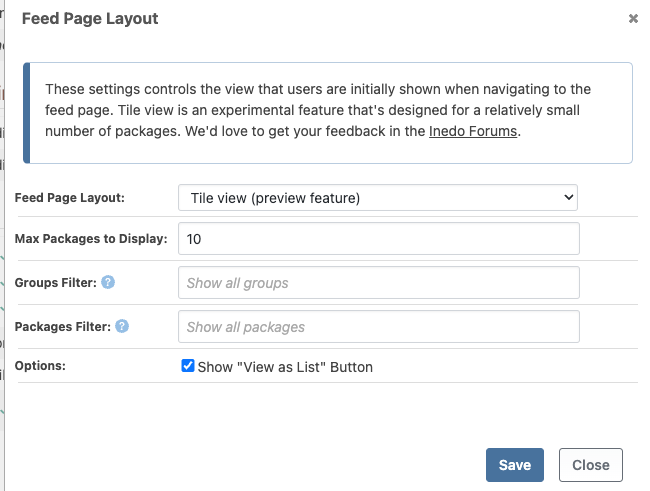
      Tile View partially working in RPM feed, not at all in Assets

      Watching Ignoring Scheduled Pinned Locked Moved Support
      2
      4
      0 Votes
      2 Posts
      8 Views
      dean-houstonD
      Hi @MaxCascone , Thanks for pointing these out; we will get the RPM icon fixed (probably a minor CSS thing), and then then hide the option on the Manage Asset Directory page (via PG-2540). This view is intended mostly for ProGet ISV Edition use cases, and we likely won't expand on this in ProGet 2024, since you're probably first person who commented on it Cheers, Dean
    • MaxCasconeM

      Solved: SQL containers on Mac M1

      Watching Ignoring Scheduled Pinned Locked Moved Support sql macos mac-m1 docker proget
      1
      0 Votes
      1 Posts
      5 Views
      No one has replied
    • MaxCasconeM

      upack repack doesn't use complete version string from CLI

      Watching Ignoring Scheduled Pinned Locked Moved Support
      8
      0 Votes
      8 Posts
      25 Views
      MaxCasconeM
      @matt-janda-kingston_9734 my old friend! I am just now seeing this. I hope you are well! Hit me up at my email in my profile if you see this!
    • MaxCasconeM

      Proget: API for release versions only/Hide prerelease?

      Watching Ignoring Scheduled Pinned Locked Moved Support
      2
      0 Votes
      2 Posts
      11 Views
      atrippA
      Hi @mcascone, There isn't an API/endpoint for that at this time, but it's easy enough to handle at the consumer/client-level. To tell if something is prerelease, you can just do versionNumber.Contains('-'). In the case of the all versions page, the "client" (i.e. the page) just queries the versions and displays non-prerelease. Cheers, Alana
    • MaxCasconeM

      ProGet: Unable to create new Asset folder with same name as deleted folder

      Watching Ignoring Scheduled Pinned Locked Moved Support proget asset proget asset
      5
      0 Votes
      5 Posts
      12 Views
      atrippA
      Hi @bushman_3007, Can you clarify the request some more, i.e. why are you wanting to delete soft-deleted directories? I don't know the reason directories are soft deleted, but I suspect it has to do with preserving versioning history. Thanks, Alana
    • MaxCasconeM

      Proget: custom download instructions for Assets

      Watching Ignoring Scheduled Pinned Locked Moved Support proget assets proget
      3
      0 Votes
      3 Posts
      16 Views
      MaxCasconeM
      cool, you guys are the best! I've updated the instructions for feeds to make it copy-pasteable for users, rather than having to edit out the options/variables. Naturally I hide the originals and only show the updated ones. Example: the builtin CURL instructions for a package: To download $PackageFullName from cURL, run the following command: curl $DownloadUrl[?contentOnly=[zip|tgz]] --output $PackageName.$PackageVersion.[zip|tgz] --user <user>:<password> I simplified it to: To download $PackageFullName from cURL, run the following command: curl $DownloadUrl?contentOnly=zip --output $PackageName.$PackageVersion.zip Powershell example: To download $PackageFullName from PowerShell, run the following command: Invoke-WebRequest $DownloadUrl[?contentOnly=[zip|tgz]] -Headers @{"AUTHORIZATION"="Basic " + [System.Convert]::ToBase64String([System.Text.Encoding]::UTF8.GetBytes("<user>:<password>"))} -OutFile $PackageName.$PackageVersion.[zip|tgz] simplified: To download $PackageFullName from PowerShell, run the following command: Invoke-WebRequest $DownloadUrl?contentOnly=zip -OutFile $PackageName.$PackageVersion.zip
    • MaxCasconeM

      Feature request: Image labels shown in UI

      Watching Ignoring Scheduled Pinned Locked Moved Support
      2
      0 Votes
      2 Posts
      11 Views
      atrippA
      Hi @mcascone , I think that was a feature that got lost in 5.3, with the new UI. Easy enough to bring back, I think, so we'll add it via PG-2134 Cheers, Alana
    • MaxCasconeM

      ProGet: move storage paths

      Watching Ignoring Scheduled Pinned Locked Moved Support
      6
      0 Votes
      6 Posts
      26 Views
      rhessingerR
      Hi @mcascone, Thanks for following up and letting us know this worked! Thanks, Rich
    • MaxCasconeM

      Forum Feature request: default category

      Watching Ignoring Scheduled Pinned Locked Moved Support
      8
      0 Votes
      8 Posts
      10 Views
      MaxCasconeM
      It seems to work normally now with the homepage setting to none. The default category is support. So I'm happy! Thanks!
    • MaxCasconeM

      Proget: retention policy for branches in a package

      Watching Ignoring Scheduled Pinned Locked Moved Support proget retention jenkins
      6
      0 Votes
      6 Posts
      14 Views
      atrippA
      @mcascone said in Proget: retention policy for branches in a package: This means mybranch and mybranch2 can be reduced to mybranch2. Sorry but wouldn't this be the reverse: *mybranch* will match *mybranch2*? What I mean to say.... because it's an AND conditional, the *mybranch* is effectively ignored. Everything that matches *mybranch2* will also match *mybranch*, but the opposite isn't true. E.g. mybranch1 won't match both conditions. @mcascone said in Proget: retention policy for branches in a package: in this feed, delete matches of 'mybranch', except the latest 3 versions of those matches, which would only impact the versions matching mybranch and leave all other non-matches untouched; Correct. And do note that you can set retention policies to run in dry mode, where nothing is deleted, to verify it's the behavior you want.
    • MaxCasconeM

      ProGet: no groupname option

      Watching Ignoring Scheduled Pinned Locked Moved Support
      3
      0 Votes
      3 Posts
      7 Views
      MaxCasconeM
      Hi, thanks - yep, it appears that plugin is assuming that field is not null. Good find! There aren't any errors from proget either in the output of the plugin upload in the jenkins console, or in the proget error logs, as far as i can tell. Plugin issue: https://issues.jenkins.io/browse/JENKINS-67923 Thanks again for all your great help!
    • MaxCasconeM

      Proget: Gradle connector?

      Watching Ignoring Scheduled Pinned Locked Moved Support
      6
      0 Votes
      6 Posts
      22 Views
      atrippA
      Hi @mcascone, We don't have that functionality in ProGet, but it should be pretty easy to do with a pair of Invoke-WebRequest PowerShell commands :) You could probably parse/scrape the HTML and download / upload in bulk as well. Please share the script if you end up doing that, it might be useful for other usecases as well! Cheers, Alana
    • MaxCasconeM

      Can the Jenkins ProGet plugin upload to an Asset dir?

      Watching Ignoring Scheduled Pinned Locked Moved Support
      3
      0 Votes
      3 Posts
      13 Views
      MaxCasconeM
      It is pretty easy; I just wanted to know. Thanks for the reply!
    • MaxCasconeM

      ProGet: Feature Request: Allow disabling repackaging OR promotion while keeping the other

      Watching Ignoring Scheduled Pinned Locked Moved Support promotions permissions proget
      2
      0 Votes
      2 Posts
      7 Views
      atrippA
      Hi @mcascone , I admit this can be confusing and is unintuitive because these were added separately over time, and the weren't originally designed for how they're used today. We need to rethink/redesign this based on the use cases. I'm going to add this thread under the "promotion/repackaging workflows" topic for our next major version of ProGet. Once we know what we want to do, we can may be able to implement some changes as a preview feature in v6. FYI, this is exactly how the big API Key changes and feed/package usage instructions came about! https://forums.inedo.com/topic/3204/proget-feature-request-api-key-admin-per-user So stay tuned :)
    • MaxCasconeM

      ProGet: Issue: Latest versions listed at bottom of list

      Watching Ignoring Scheduled Pinned Locked Moved Support
      2
      0 Votes
      2 Posts
      13 Views
      Dan_WoolfD
      Hi @mcascone, So this is actually working as expected. We order by the version number itself instead of the upload date, which is why you are seeing that version on the bottom. When ordering, we order first by major, then minor, then patch. So in this case 1-PLATDEV > 1-develop, which is why 2.1.1-develop-2018 drops to the bottom. I believe we have sent this to you before, but just in case we have not. We have created an article for Best Practices for Versioning NuGet Packages in the Enterprise. This goes into a lot more detail on NuGet versioning. Thanks, Dan
    • MaxCasconeM

      ProGet: Feature Request: Promoted/Repackaged flag on package listing

      Watching Ignoring Scheduled Pinned Locked Moved Support promotions features proget
      4
      0 Votes
      4 Posts
      14 Views
      atrippA
      Thanks @mcascone , I also added this to our "Promotion / Repackaging Visibility & Permissions Rethinking" task - sounds like something we can consider :)
    • MaxCasconeM

      ProGet: Feature Request: native integration with GitHub to perform automated tasks

      Watching Ignoring Scheduled Pinned Locked Moved Support
      3
      0 Votes
      3 Posts
      10 Views
      MaxCasconeM
      Thanks, I knew this one was a bit of a stretch. It'll be tough if not impossible to automate this in Jenkins, and is another tick on the "check out buildmaster" list.
    • MaxCasconeM

      ProGet: Feature Request: lock Repackaging to specific feeds, same as Promotions

      Watching Ignoring Scheduled Pinned Locked Moved Support
      7
      0 Votes
      7 Posts
      21 Views
      MaxCasconeM
      Hi, just wanted to say that i happened to look at the new releases available for v5, and saw that this is fixed in the latest release, 5.3.44. Awesome! Thanks!
    • MaxCasconeM

      ProGet: Feature Request: Customizable Notifications on events

      Watching Ignoring Scheduled Pinned Locked Moved Support
      5
      0 Votes
      5 Posts
      10 Views
      MaxCasconeM
      Thanks for the insight into your process on this. It's interesting. For our part, I put everything I can on Confluence. I probably like Confluence as much as I hate Sharepoint and OneNote. (At least with OneNote I can actually create a document successfully.) Flow charts help a lot, which are super easy to create and maintain with the Draw.io integration into Confluence. I like confluence for its deep-linking into Jira as well.
    • MaxCasconeM

      buildmaster linux docker install: sa login failures

      Watching Ignoring Scheduled Pinned Locked Moved Support docker linux buildmaster centos
      3
      0 Votes
      3 Posts
      15 Views
      O
      @rhessinger said in buildmaster linux docker install: sa login failures: @mcascone slope game said in buildmaster linux docker install: sa login failures: docker exec -it inedo-sql /opt/mssql-tools/bin/sqlcmd -S localhost -U SA -P 'redacted' -Q 'CREATE DATABASE [ProGet] COLLATE SQL_Latin1_General_CP1_CI_AS' Hi @mcascone, This line has the issue. You created a database named [ProGet] instead of a database name [BuildMaster] as you stated in the connection string on the third command. Thanks, Rich Thank you very much for the explanation. It works now.
    • 1
    • 2
    • 1 / 2