Inedo Community Forums Forums
    • Recent
    • Tags
    • Popular
    • Login
    1. Home
    2. philippe.camelio_3885
    3. Posts

    Welcome to the Inedo Forums! Check out the Forums Guide for help getting started.

    If you are experiencing any issues with the forum software, please visit the Contact Form on our website and let us know!

    P Offline
    • Profile
    • Following 0
    • Followers 0
    • Topics 81
    • Posts 272
    • Groups 0

    Posts

    Recent Best Controversial
    • [BM / OT] Renaming "user/password" or "private key" credentials breaks Linux config

      Hello

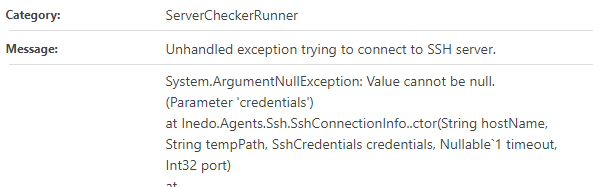
      I had to rename few existing credentials for linux server ( type user/password or private key) on Otter and Buildmaster.
      It breaks the server config and I had to reconfigure the servers (which are using the modified credential).

      After editing and saving server configs, pb is gone.
      (Mass edition for server in Buildmaster is missing 😧 )

      Buildmaster Error msg:

      521830b6-926f-4df7-ac91-b96d0b7e563f-image.png

      Otter error message:
      1c92c8d0-faf6-46c6-a41b-25ec44286823-image.png

      Best regards
      PhilippeC.

      posted in Support
      P
      philippe.camelio_3885
    • RE: [BM] /!\ Proget Integration broken - given key was not present

      @atripp 🤗
      Thanks for the fast reply and the bypass.
      Best regards
      PhilippeC.

      posted in Support
      P
      philippe.camelio_3885
    • RE: [BM] /!\ Proget Integration broken - given key was not present

      @atripp
      The result of the api.
      But the error is more like BM wasn't able to validate the token
      Is there any way to trace the call made by BM ?

      [{"name":"fsrm-rules","alternateNames":[],"feedType":"asset","description":"Json des extensions interdites pour les serveurs de fichiers","active":true,"cacheConnectors":true,"allowedLicenses":[],"blockedLicenses":[],"connectors":[],"vulnerabilitySources":[],"retentionRules":[],"packageFilters":{},"packageAccessRules":{},"variables":{},"canPublish":true,"packageStatisticsEnabled":false,"restrictPackageStatistics":false,"deploymentRecordsEnabled":true,"usageRecordsEnabled":true,"vulnerabilitiesEnabled":false,"licensesEnabled":false,"useWithProjects":true},{"name":"internal-docker","alternateNames":[],"feedType":"docker","active":true,"cacheConnectors":true,"allowedLicenses":[],"blockedLicenses":[],"connectors":[],"vulnerabilitySources":["PGVC","My PVGC"],"retentionRules":[{"deletePrereleaseVersions":false,"keepVersionsCount":null,"keepUsedWithinDays":90,"deletePackageIds":null,"keepPackageIds":null,"keepVersions":null,"deleteVersions":["*-pre*"],"deleteCached":false,"sizeTriggerKb":null,"sizeExclusive":false,"triggerDownloadCount":null,"keepConsumedWithinDays":null,"keepIfActivelyConsumed":false,"keepPackageUsageRemovedDays":180}],"packageFilters":{},"packageAccessRules":{},"variables":{},"canPublish":true,"packageStatisticsEnabled":true,"restrictPackageStatistics":false,"deploymentRecordsEnabled":true,"usageRecordsEnabled":true,"vulnerabilitiesEnabled":true,"licensesEnabled":false,"useWithProjects":false},{"name":"internal-files","alternateNames":[],"feedType":"asset","description":"Assets de Buildmaster","active":true,"cacheConnectors":true,"allowedLicenses":[],"blockedLicenses":[],"connectors":[],"vulnerabilitySources":[],"retentionRules":[],"packageFilters":{},"packageAccessRules":{},"variables":{},"canPublish":true,"packageStatisticsEnabled":false,"restrictPackageStatistics":false,"deploymentRecordsEnabled":true,"usageRecordsEnabled":true,"vulnerabilitiesEnabled":false,"licensesEnabled":false,"useWithProjects":true},{"name":"internal-psm","alternateNames":[],"feedType":"powershell","active":true,"cacheConnectors":true,"allowedLicenses":[],"blockedLicenses":[],"symbolServerEnabled":false,"stripSymbols":false,"stripSource":false,"endpointUrl":"https://proget-2023.ocapiat.fr/nuget/internal-psm/","connectors":[],"vulnerabilitySources":["PGVC","My PVGC"],"retentionRules":[],"packageFilters":{},"packageAccessRules":{},"variables":{},"canPublish":true,"packageStatisticsEnabled":true,"restrictPackageStatistics":true,"deploymentRecordsEnabled":true,"usageRecordsEnabled":true,"vulnerabilitiesEnabled":true,"licensesEnabled":true,"useWithProjects":true},{"name":"mariadb-backup","alternateNames":[],"feedType":"asset","active":true,"cacheConnectors":true,"allowUnknownLicenses":true,"allowedLicenses":[],"blockedLicenses":[],"connectors":[],"vulnerabilitySources":[],"retentionRules":[],"packageFilters":{},"packageAccessRules":{},"variables":{},"canPublish":true,"packageStatisticsEnabled":false,"restrictPackageStatistics":false,"deploymentRecordsEnabled":true,"usageRecordsEnabled":true,"vulnerabilitiesEnabled":false,"licensesEnabled":false,"useWithProjects":true},{"name":"public-docker","alternateNames":[],"feedType":"docker","active":true,"cacheConnectors":true,"allowedLicenses":[],"blockedLicenses":[],"connectors":["Docker Hub","Microsoft Container Registry","Google Container Registry"],"vulnerabilitySources":["PGVC","My PVGC"],"retentionRules":[],"packageFilters":{},"packageAccessRules":{},"variables":{},"canPublish":true,"packageStatisticsEnabled":true,"restrictPackageStatistics":false,"deploymentRecordsEnabled":true,"usageRecordsEnabled":true,"vulnerabilitiesEnabled":true,"licensesEnabled":false,"useWithProjects":false},{"name":"public-npm","alternateNames":[],"feedType":"npm","active":true,"cacheConnectors":true,"allowedLicenses":[],"blockedLicenses":[],"endpointUrl":"https://proget-2023.ocapiat.fr/npm/public-npm/","connectors":["registry.npmjs.org"],"vulnerabilitySources":["PGVC","My PVGC"],"retentionRules":[],"packageFilters":{},"packageAccessRules":{},"variables":{},"canPublish":true,"packageStatisticsEnabled":true,"restrictPackageStatistics":false,"deploymentRecordsEnabled":true,"usageRecordsEnabled":true,"vulnerabilitiesEnabled":true,"licensesEnabled":true,"useWithProjects":true},{"name":"public-psm","alternateNames":[],"feedType":"powershell","description":"PowerShell Gallery","active":true,"cacheConnectors":true,"allowedLicenses":[],"blockedLicenses":[],"symbolServerEnabled":false,"stripSymbols":false,"stripSource":false,"endpointUrl":"https://proget-2023.ocapiat.fr/nuget/public-psm/","connectors":["PowerShellGallery.com"],"vulnerabilitySources":["PGVC","My PVGC"],"retentionRules":[],"packageFilters":{},"packageAccessRules":{},"variables":{},"canPublish":true,"packageStatisticsEnabled":true,"restrictPackageStatistics":true,"deploymentRecordsEnabled":true,"usageRecordsEnabled":true,"vulnerabilitiesEnabled":true,"licensesEnabled":true,"useWithProjects":true},{"name":"public-ubuntu","alternateNames":[],"active":true,"cacheConnectors":true,"allowedLicenses":[],"blockedLicenses":[],"endpointUrl":"https://proget-2023.ocapiat.fr/debian/public-ubuntu/","connectors":["jammy"],"vulnerabilitySources":[],"retentionRules":[{"deletePrereleaseVersions":false,"keepVersionsCount":10,"keepUsedWithinDays":90,"deletePackageIds":null,"keepPackageIds":null,"keepVersions":null,"deleteVersions":null,"deleteCached":false,"sizeTriggerKb":null,"sizeExclusive":false,"triggerDownloadCount":null,"keepConsumedWithinDays":null,"keepIfActivelyConsumed":false,"keepPackageUsageRemovedDays":90}],"packageFilters":{},"packageAccessRules":{},"variables":{},"canPublish":true,"packageStatisticsEnabled":true,"restrictPackageStatistics":false,"deploymentRecordsEnabled":true,"usageRecordsEnabled":true,"vulnerabilitiesEnabled":true,"licensesEnabled":true,"useWithProjects":true},{"name":"public-zabbix","alternateNames":[],"description":"Packages pour Zabbix","active":true,"cacheConnectors":true,"allowedLicenses":[],"blockedLicenses":[],"endpointUrl":"https://proget-2023.ocapiat.fr/debian/public-zabbix/","connectors":["zabbix-jammy-6.4","zabbix-focal-6.4"],"vulnerabilitySources":["PGVC","My PVGC"],"retentionRules":[],"packageFilters":{},"packageAccessRules":{},"variables":{},"canPublish":true,"packageStatisticsEnabled":true,"restrictPackageStatistics":false,"deploymentRecordsEnabled":true,"usageRecordsEnabled":true,"vulnerabilitiesEnabled":true,"licensesEnabled":true,"useWithProjects":true},{"name":"test","alternateNames":[],"feedType":"powershell","active":true,"cacheConnectors":true,"allowedLicenses":[],"blockedLicenses":[],"symbolServerEnabled":false,"stripSymbols":false,"stripSource":false,"endpointUrl":"https://proget-2023.ocapiat.fr/nuget/test/","connectors":[],"vulnerabilitySources":[],"retentionRules":[],"packageFilters":{},"packageAccessRules":{},"variables":{},"canPublish":true,"packageStatisticsEnabled":false,"restrictPackageStatistics":false,"deploymentRecordsEnabled":true,"usageRecordsEnabled":true,"vulnerabilitiesEnabled":true,"licensesEnabled":true,"useWithProjects":false}]
      
      posted in Support
      P
      philippe.camelio_3885
    • RE: Sync BM from OT

      @atripp said in Sync BM from OT:

      aybe try syncing again? The sync is really just an automated version of the manual process, and uses the same code base.
      Cheers,

      +1
      After almost a year, I try again to sync BM with Otter

      Starting from a fresh Buildmaster (docker 2023.13) with an existing Otter instance (docker 2023.4)

      I still have this damned error message

      Response body from "https://**************/api/infrastructure/all/list" could not be loaded as JSON.
      Newtonsoft.Json.JsonSerializationException: Property "Value" was not expected.
      at Inedo.BuildMaster.Infrastructure.VariableValueJsonModel.Converter.ReadJson(JsonReader reader, Type objectType, Object existingValue, JsonSerializer
      blablabla
      

      The results of the api https://**************/api/infrastructure/all/list is looking.

      posted in Support
      P
      philippe.camelio_3885
    • RE: [BM] /!\ Proget Integration broken - given key was not present

      I installed fresh BM and Proget. (last docker version)

      • Proget Integration is working fine

      I tried:

      • Fresh BM with fresh Proget => OK
      • Fresh BM with fresh Proget => KO
      • Existing BM with fresh Proget => OK
      • Existing BM with existing Proget => KO

      Something is broken in the existing Proget 😕

      Whatever the APIKey I create, Proget integration is unsuccessfull

      posted in Support
      P
      philippe.camelio_3885
    • RE: [BM] /!\ Proget Integration broken - given key was not present

      @stevedennis said in [BM] /!\ Proget Integration broken - given key was not present:

      /api/management/feeds/list

      Hell @stevedennis
      Both commands are working fine on Proget

      {
        "applicationName": "ProGet",
        "databaseStatus": "OK",
        "databaseStatusDetails": null,
        "extensionsInstalled": {
          "ProGetCoreEx": "23.0.32",
          "Inedo.SDK": "2.3.0",
          "Sonatype": "2.0.1",
          "Azure": "2.0.1",
          "InedoCore": "2.3.2",
          "Amazon AWS": "2.0.3"
        },
        "licenseStatus": "OK",
        "licenseStatusDetail": null,
        "versionNumber": "2023.32 (Build 3)",
        "releaseNumber": "23.0.32",
        "serviceStatus": "OK",
        "serviceStatusDetail": null,
        "replicationStatus": {
        "serverStatus": null,
        "serverError": null,
        "clientStatus": null,
        "clienterror": null,
        "incoming": [],
        "outgoing": []
      }
      

      On Buildmaster /health returns this:

      {
        "applicationName": "BuildMaster",
        "databaseStatus": "OK",
        "databaseStatusDetails": null,
        "extensionsInstalled": {
          "BuildMaster Core Extensions": "23.0.13",
          "BuildMaster": "23.0.13",
          "Inedo.SDK": "2.4.0",
          "Git": "2.4.2",
          "Node": "2.2.0",
          "Scripting": "2.4.0",
          "Windows": "2.0.3",
          "Bitbucket": "2.4.0",
          "Azure": "2.0.1",
          "Jira": "2.4.2",
          "TeamCity": "2.4.0",
          "InedoCore": "2.4.1",
          "Python": "2.2.0",
          "Gitea": "2.4.0",
          "Docker": "2.4.3",
          "GitHub": "2.4.2",
          "Jenkins": "2.4.0",
          "Java": "2.2.0",
          "AzureDevOps": "2.4.0",
          "GitLab": "2.4.0",
          "DotNet": "2.2.9",
          "PHP": "2.0.0",
          "Linux": "2.0.0"
        },
        "instanceName": null,
        "licenseStatus": "OK",
        "licenseStatusDetail": null,
        "versionNumber": "2023.13 (Build 1)",
        "releaseNumber": "23.0.13",
        "serviceStatus": "OK",
        "serviceStatusDetail": null
      }
      
      posted in Support
      P
      philippe.camelio_3885
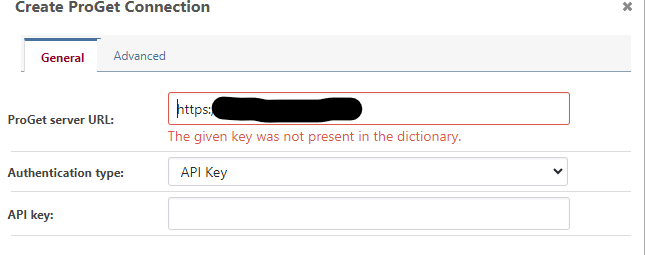
    • [BM] /!\ Proget Integration broken - given key was not present

      Hi,

      Proget integration is broken.
      I am using docker version

      • Proget 2023.32
      • Buildmaster : 2023.13

      9a2aa9aa-973f-4648-8c4f-cb895db72cfe-image.png

      It was working iprevious versions (beginning of february, this was working)

      Integration with older version of proget (5.X) is working

      Any solution is welcome
      Best regards

      PhilippeC.

      posted in Support proget buildmaster
      P
      philippe.camelio_3885
    • |OTTER] Status filter not working for "any error"

      Hi,
      Just to report a small bug and and an observation
      The bug :
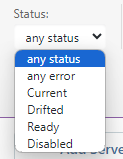
      In the server section, the status filter is not working for "any error"

      The observation:
      The filter list
      ffed0a4e-5569-4d7e-bc07-d9b848f367e7-image.png

      is not consistant with existing status
      875dbeea-7026-4283-8680-4ce4679c58c1-image.png

      65b84700-89b4-4506-b0d0-2a06dba4c883-image.png

      Otter last docker version
      Best regards
      PhilippeC.

      posted in Support otter
      P
      philippe.camelio_3885
    • RE: [OTTER]Gitlab Secure Ressource gone

      Hi @apxltd
      Thanks for the answer.
      Please, don't give up Otter, it is the most efficient and simple tool to manage scripts from a single point for both Windows and Linux.

      Best regards
      PhilippeC.

      posted in Support
      P
      philippe.camelio_3885
    • RE: [OTTER]Gitlab Secure Ressource gone

      Hello @atripp

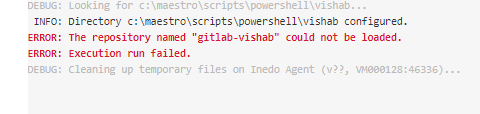
      New error :
      92af092a-dc3c-47d9-bb9c-435557344a62-image.png
      Code:

       Vishab
      {
          set $DossierVisHab = c:\maestro\scripts\powershell\vishab;
      
          set $commit = master;
         
          Ensure-Directory $DossierVisHab;
      
      Git::Checkout-Code
      (
          To: $DossierVisHab,
          From: gitlab-vishab,
          BranchOrCommit: master,
       );
      }
      

      I really like Otter, but with each major version too many functions change or broken, it's frustrating 😥

      Migration is a lot of work, we have to retest every otter script we have done.

      Best regards
      PhilippeC.

      posted in Support
      P
      philippe.camelio_3885
    • RE: Create Feed via API Timeout

      Hi,
      Which platform do you use ? Windows or Docker.
      We use Docker and we have timeout on inedo apps (mainly Otter) when using api.

      Have you try 2 times in a row your command ?
      It sounds weird, but for us, the second time it worked ...

      Cordially
      PhilippeC.

      posted in Support
      P
      philippe.camelio_3885
    • RE: [OTTER] Create new server thru API hangs

      Update

      Even on a large server, the problem occurs, but the server recovers faster

      Using this exemple, Otter hangs after server1 registration.
      and display this error message
      f8c1c5ca-b774-46a4-92db-93e5b621b2e5-image.png

      If I execute again the same command, everything is OK

      function Register-OT(){
      Param(
         [Parameter(Mandatory=$false)]
         [string]$API = "https://otter.local/api", 
       
         [Parameter(Mandatory=$false)]
         [string]$ApiKey= "apikey", 
       
         [Parameter(Mandatory=$false)]
         [string]$Environment= "someenv", 
       
         [Parameter(Mandatory=$false)]
         [string]$Role= "os-l-base", 
      
         [Parameter(Mandatory=$false)]
         [ValidateSet('none','manuallyRemediate')]
         [string]$drift="none",
       
         [Parameter(Mandatory=$false)]
         [string]$CredentialsName="some-credentiel",
       
         [Parameter(Mandatory=$false)]
         [string]$TempPath="/tmp/otter",
      
         [Parameter(Mandatory=$false)]
         [string]$Port="22",
       
         [Parameter(Mandatory=$false)]
         [string]$FQDN = "somehost.local"
      ) 
      
      $Serveur=$FQDN.Split(".")[0]
       
      $URI=$API+"/infrastructure/servers/list"
      $aListServer=Invoke-RestMethod -Method Post -Uri $URI -Headers @{'X-ApiKey' = $ApiKey}
       
      if ($aListServer.Name -contains $Serveur){
            write-host "Le serveur $Serveur existe deja"
       }else{
          $URI=$API+"/infrastructure/servers/create/"+$Serveur
          $body = @{
              name="$Serveur";
              hostname="$FQDN";
              serverType="ssh";
              active=$true;
              drift=$drift;
              port="$port";
              roles=@($Role);
              environments=@($Environment);
              CredentialsName=$CredentialsName;
              TempPath=$TempPath
          }
      }
      #
      # Appel de l'API
      #
      [Net.ServicePointManager]::SecurityProtocol = [Net.SecurityProtocolType]::Tls12
      
      Invoke-RestMethod -Method Post -ContentType 'application/json;' -Uri $URI -Body (ConvertTo-Json $body) -Headers @{'X-ApiKey' = $ApiKey}
      }
      Register-OT -FQDN "server1.local" 
      Register-OT -FQDN "server2.local" 
      Register-OT -FQDN "server3.local" 
      Register-OT -FQDN "server4.local" 
      
      posted in Support
      P
      philippe.camelio_3885
    • Reverse proxy - otter behind path

      Hello

      Otter is on docker container and available from this URL http://container.local:8090.
      I am looking to get access to Otter with this URL https://test.local/otter over HAPROXY.

      I have done this rule for the haproxy backend :

      backend be_prd_otter
          http-request set-path %[path,regsub(^/otter(/|$),/)]
          server ontainer.local:8090 X.X.X.X:8090 check fall 3 rise 2 cookie node1
      

      But, this is not working.
      The response location is /log-in?ReturnUrl=%2F instead of /otter/log-in?ReturnUrl=%2F

      Such kind of config working fine for a lot of our applications.

      Reverse proxy from https://test.local to http://container.local:8090 is working fine

      Any tips ?

      Best regards

      posted in Support
      P
      philippe.camelio_3885
    • RE: [OTTER]Gitlab Secure Ressource gone

      @atripp said in [OTTER]Gitlab Secure Ressource gone:

      Git::Checkout-Code
      (
      To: $DossierVisHab,
      From: gitlab-vishab,
      BranchOrCommit: master
      );

      Thanks for the explanation.
      I made a new test with your suggestion but I still have the same error message.

      posted in Support
      P
      philippe.camelio_3885
    • [OTTER] How to create File as asset

      Hello
      I am lost with the new version 😞
      I want to create a file as an asset and use Ensure-Asset function.

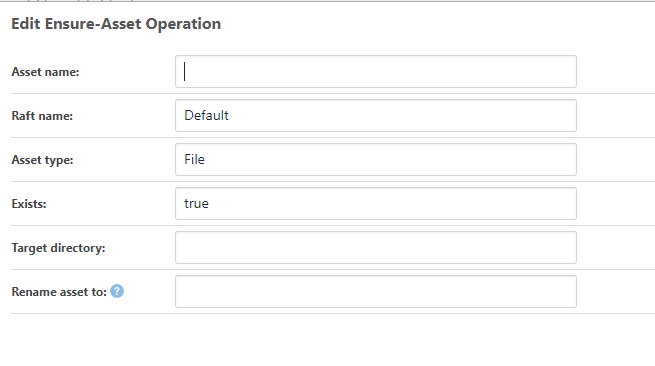
      e7cb52b1-c1d8-40aa-888c-b67cfc70a9ec-image.png

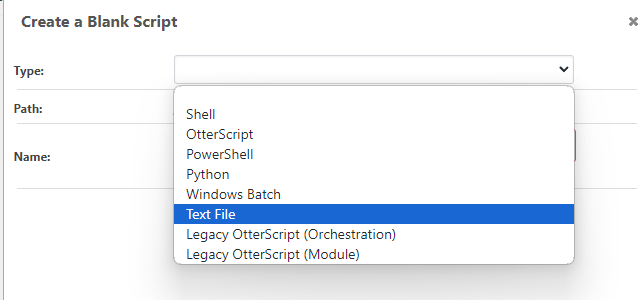
      I create a File in the default asset, but is like as text template
      035c2c0f-b78c-4c0a-b424-65396ef9f23a-image.png

      7c05a0b0-c30d-4c1b-bd74-b2898697d6fb-image.png

      And the Ensure-Asset did not work whether I define "TextTemplate "or "File"

          Ensure-Asset
          (
              Directory: /tmp,
              Name: test,
              Type: TextTemplate,
              FileName: test,
              Raft: Default
          );


      74650755-58ed-4dd2-9433-8efa3cd76f72-image.png

      Best regards
      PhilippeC.

      posted in Support
      P
      philippe.camelio_3885
    • RE: [OTTER]Gitlab Secure Ressource gone

      @philippe-camelio_3885

      Small question, why don't you use the same extension for both Otter and BM ?

      posted in Support
      P
      philippe.camelio_3885
    • RE: [OTTER]Gitlab Secure Ressource gone

      @atripp said in [OTTER]Gitlab Secure Ressource gone:

      I would just use Generic Git repository, since the Git-base doperations will all be the same.

      😬 This was possible from in Otter 3

      9983cef4-7fc5-4c0d-954b-8fd7ef3e0c83-image.png

      I tried to create a Generic Git, but it always asks me for a $commit, 😦

      d8d7dc63-72da-4a46-86d8-b987e48096ca-image.png

      My script

          Git::Checkout-Code
          (
              To: $DossierVisHab,
              From: gitlab-vishab
          );
      

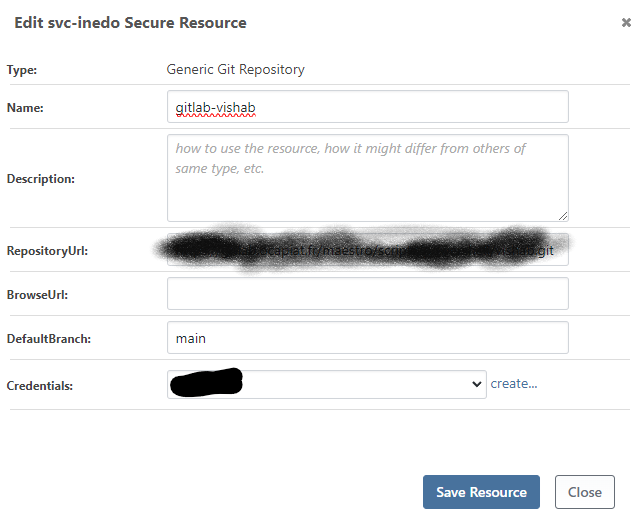
      Git Ressource :
      57095cd2-197f-4e85-8c72-e91502329347-image.png

      Any advice ?

      posted in Support
      P
      philippe.camelio_3885
    • RE: [OTTER] Create new server thru API hangs

      I moved the otter stack (otter / sql express) on a larger server (72 cores/256 Go ram), and obviously it works well.
      As the first server wasn't very small - at least for our environment (8vcpus, 32 Go RAM), is it possible you make some tuning at the .net level or the database level ?

      I never had performance problem from older versions but there were running on Windows.

      Best regards

      PhilippeC.

      posted in Support
      P
      philippe.camelio_3885
    • [OTTER]Gitlab Secure Ressource gone

      Hi,
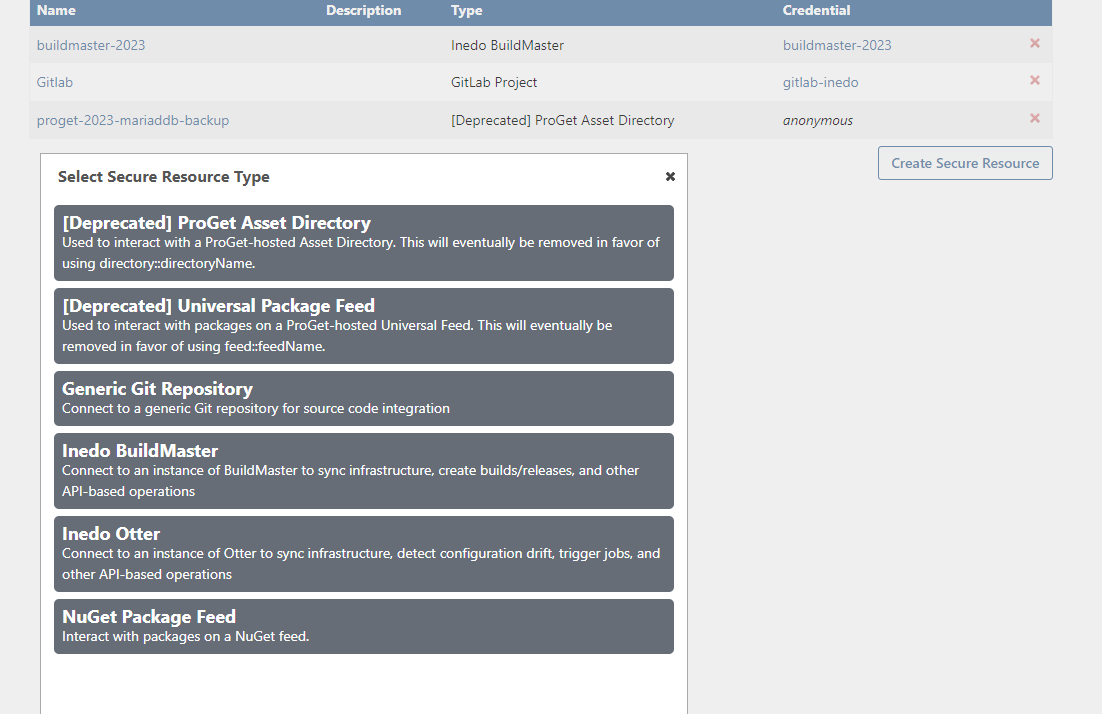
      I can't create a gitlab secure resource :(

      8108b6a8-c8f6-42d3-b8fc-bf40933a3f4f-image.png

      From a previous 2023 version, it was possible :(

      Gitlab extension is installed

      Any help is welcome
      Best regards
      PhilippeC.

      posted in Support
      P
      philippe.camelio_3885
    • [OTTER] Create new server thru API hangs

      Hi,
      When I create a list of hosts using API, otter hangs and restart.
      If I restart the script, it is running fine.

      I have seen in the logs, that a status check start on the first call.


      Error logs report:

      Microsoft.Data.SqlClient.SqlException (0x80131904): Execution Timeout Expired. The timeout period elapsed prior to completion of the operation or the server is not responding.
      ---> System.ComponentModel.Win32Exception (258): Unknown error 258
      at Microsoft.Data.SqlClient.SqlCommand.<>c.<ExecuteDbDataReaderAsync>b__209_0(Task`1 result)
      at System.Threading.Tasks.ContinuationResultTaskFromResultTask`2.InnerInvoke()
      at System.Threading.ExecutionContext.RunInternal(ExecutionContext executionContext, ContextCallback callback, Object state)
      --- End of stack trace from previous location ---
      at System.Threading.Tasks.Task.ExecuteWithThreadLocal(Task& currentTaskSlot, Thread threadPoolThread)
      --- End of stack trace from previous location ---
      at Inedo.Data.DatabaseContext.DbResult.CreateAsync(DbCommand command, DatabaseContext context, DateTimeOffset startTime, Stopwatch stopwatch)
      at Inedo.Data.DatabaseContext.ExecuteInternalAsync(String storedProcName, GenericDbParameter[] parameters)
      at Inedo.Data.SqlServerDatabaseContext.ExecuteInternalAsync(String storedProcName, GenericDbParameter[] parameters)
      at Inedo.Data.DatabaseContext.ExecuteTableAsync[TRow](String storedProcName, GenericDbParameter[] parameters)
      at Inedo.Otter.Service.TaskRunners.ExecutionDispatcherRunner.GetExecutionsToExecuteOrCancelAsync() in C:\Users\builds\AppData\Local\Temp\InedoAgent\BuildMaster\192.168.44.60\Temp\_E423767\Src\src\Otter.Service\TaskRunners\ExecutionDispatcherRunner.cs:line 107
      at Inedo.Otter.Service.TaskRunners.ExecutionDispatcherRunner.RunAsync(CancellationToken cancellationToken, Object arguments) in C:\Users\builds\AppData\Local\Temp\InedoAgent\BuildMaster\192.168.44.60\Temp\_E423767\Src\src\Otter.Service\TaskRunners\ExecutionDispatcherRunner.cs:line 33
      at Inedo.TaskRunner.RunInternalAsync(Object args)
      

      But I can see any error at SQL level.

      I am running Otter 2023.4 / SQL Server on docker

      Any advice ?

      Best regards
      PhilippeC.

      posted in Support
      P
      philippe.camelio_3885
    • 1
    • 2
    • 3
    • 4
    • 5
    • 13
    • 14
    • 2 / 14