Hello @andy222
One way is to use $PipelineStageName variable in your deployment script to block deployemnt at the required stage according your channelname var.
The other way could be a stage requirement, but I haven't try this way.
Best regards
PhilippeC.
Welcome to the Inedo Forums! Check out the Forums Guide for help getting started.
If you are experiencing any issues with the forum software, please visit the Contact Form on our website and let us know!
P
Offline
Posts
-
RE: [BM] Preventing Build from deploying into further stage based on variable
-
RE: [BM] Proget::scan usage - I am looking for example
@atripp said in [BM] Proget::scan usage - I am looking for example:
I missed package-lock.json.
This is working fine now.
Thank you{ ProGet::Scan ( To: global::proget-2023, Project: package-lock.json, ScanType: Npm ); }Best Regards
-
RE: [OT] Collecting Powershell/DSC modules - empty version
I am using the docker version of OTTER.
About the Get-DsCResource, it is working fine on the server.
I will see if can make a test case.
Best reagrds
PhilippeC. -
RE: [BM] mail body missing from a send mail action in an Event Listener
@atripp
I can wait, thank you
Best Regards -
RE: [OT] Ensure-DSC for WindowsFeatures broken
I got around with a PSEnsure (v2) powershell script.
-
[OT] Collecting Powershell/DSC modules - empty version
Hi,
collectiing DSC Modules or Powershell Modules did not work properly:
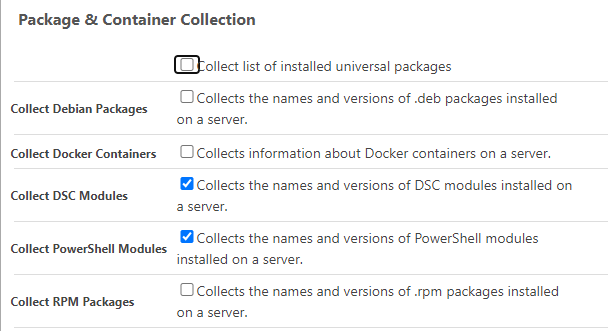
The version is missing:


Cheers
PhilippeC.
-
[OT] Ensure-DSC for WindowsFeatures broken
Hi,
I'm moving slowly from Otter 3.0.24 to otter 2023.3 (docker).
I am using Ensure-DSC functiuon to deploy WindowsFeatures like this:
For a specific role:
- set up a variable :
@ListofWFeatures : @(RSAT-AD-PowerShell, RSAT-DNS-Server)Desired configuration
# WindowsFeatures
{
    foreach $WindowsFeature in @ListofWFeatures
    {
        Log-Information ===== $WindowsFeature;
            Ensure-DscResource
            (
                Name: WindowsFeature,
                Properties: %(Name:$WindowsFeature,IncludeAllSubFeature:true)
            );
    }
}
On version 3.X, this is working fine (target w2022 / inedo agent 49)
On version 2023, it is broken (target windows 2022 with Inedo agent 51)Error Unhandled exception: System.Management.Automation.Remoting.PSRemotingTransportException: Serialized XML is nested too deeply. Line 1, position 3508. at System.Management.Automation.Runspaces.AsyncResult.EndInvoke() at System.Management.Automation.PowerShell.EndInvoke(IAsyncResult asyncResult) at System.Threading.Tasks.TaskFactory`1.FromAsyncCoreLogic(IAsyncResult iar, Func`2 endFunction, Action`1 endAction, Task`1 promise, Boolean requiresSynchronization) ....Any help is welcome.
Best regards
PhilippeC. -
[BM] mail body missing from a send mail action in an Event Listener
Hi
The mail body is not send from a send mail action in an Event Listener
Test case:
- From a pipeline:
- Create an event Listener : Send Mail for a Stage Deployement Failed
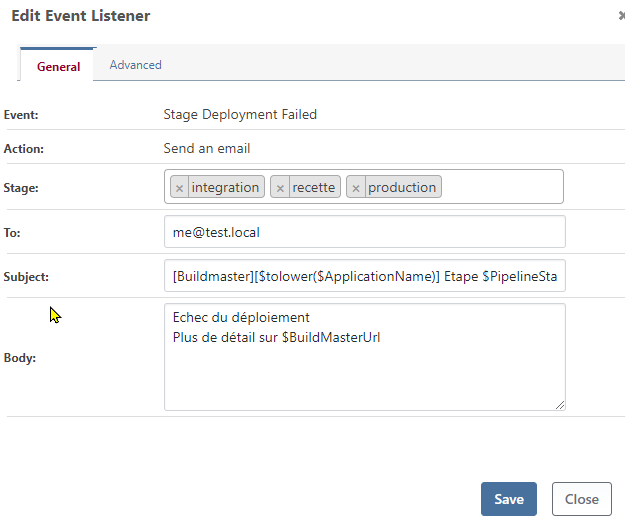
The received email only contains the header, the body is empty
Same thing for a Send Mail for Stage Deployement Successfull
Cheers
PhilippeC. -
[BM] Proget::scan usage - I am looking for example
Hello
I deploy a npm app using BM
I would like to use proget::scan function to scan for package dependencies and send them to Proget but I can 't found out how to configure this correctly.Running a scan returns a warning message "Project not found"
Proget is configured in Buildmaster.
I am using the lastest PG and BM docker versionsAny advice is welcome
Best regards
PhiippeC. -
RE: Otter and Buildmaster
Hi @Jon
Based on my experience, you need to add a configuration to each role
like an ensure-file a dummy file to force the drift detection and the remediation for each role.
Having a role without a configuration leave the status in unknown state.Hope this help
Best regards
PhilippeC. -
RE: Examples of configuring PowerShell on a fresh server (win 2019 or 2022)
For the modules, 2 ways
-
Create a second role which depend on the previous one and use
Ensure-psmodule function to add the required module -
You don t need the set psgallery to be trusted if you use the Force in the Ensure-psmodule
Cf https://docs.inedo.com/docs/otter-reference-operations-powershell-ensure-powershell-module
-
-
RE: Examples of configuring PowerShell on a fresh server (win 2019 or 2022)
Make a role with this desired configuration
Ensure-PsRepository
    (
        Exists: true,
        InstallationPolicy: trusted,
        SourceLocation: https://www.powershellgallery.com/api/v2,
        Name: PSGallery
    );
Assign the role to the server
RemediateEt voilà

This should workCheers
PhilippeC. -
RE: [PROGET] PowershellGallery Feed on v2023.27 cannot find some modules, v5.3.38 yes
Hello @atripp
You save my day.
Increasing the timeout resolve the pb.Thank you
-
[OTTER] register PSGallery using Ensure-PsRepository failed
Hi
We are using Ensure-PsRepository to remove PSGallery from our server (at least for inedo agent).
This is working fine.
Role : os-w-baseEnsure-PsRepository ( Exists: false, InstallationPolicy: Untrusted, SourceLocation: https://www.powershellgallery.com/api/v2, Name: PSGallery );As there is a mess with PSGallery some Powershell modules cannot be installed thru Proget (used as proxy for PSGallery).
So, I decided to reconfigure PSGallery using Ensure-PsRepository to be able to install theses modules.
Role : os-w-base
    Ensure-PsRepository
    (
        Exists: true,
        InstallationPolicy: Untrusted,
        SourceLocation: https://www.powershellgallery.com/api/v2,
        Name: PSGallery
    );
I try a remediation on a server (w2022), and the result is killing me

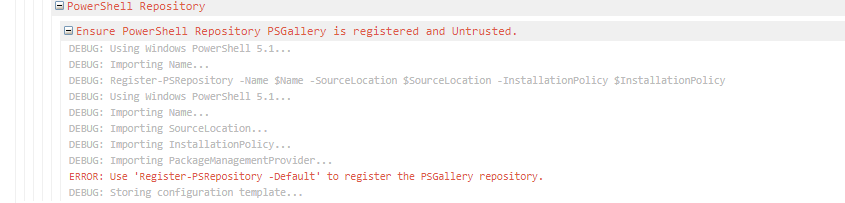
is it possible you update the Ensure-PsRepository function ?
Cheers
PhilippeC. -
RE: [OTTER] long time to change status for server and assigned server roles
Hum, difficult to reproduce.
it happens with new server.
I will see if I can make a simple reproducible test case -
RE: [PROGET] PowershellGallery Feed on v2023.27 cannot find some modules, v5.3.38 yes
I made a small test with Proget (Frre) on Windows - last version.
Same result
-
RE: [OTTER] long time to change status for server and assigned server roles
Hello @atripp
No, the older one Version 3.0.24
