Welcome to the Inedo Forums! Check out the Forums Guide for help getting started.
If you are experiencing any issues with the forum software, please visit the Contact Form on our website and let us know!
[OTTER] register PSGallery using Ensure-PsRepository failed
-
Hi
We are using Ensure-PsRepository to remove PSGallery from our server (at least for inedo agent).
This is working fine.
Role : os-w-baseEnsure-PsRepository ( Exists: false, InstallationPolicy: Untrusted, SourceLocation: https://www.powershellgallery.com/api/v2, Name: PSGallery );As there is a mess with PSGallery some Powershell modules cannot be installed thru Proget (used as proxy for PSGallery).
So, I decided to reconfigure PSGallery using Ensure-PsRepository to be able to install theses modules.
Role : os-w-base
    Ensure-PsRepository
    (
        Exists: true,
        InstallationPolicy: Untrusted,
        SourceLocation: https://www.powershellgallery.com/api/v2,
        Name: PSGallery
    );
I try a remediation on a server (w2022), and the result is killing me

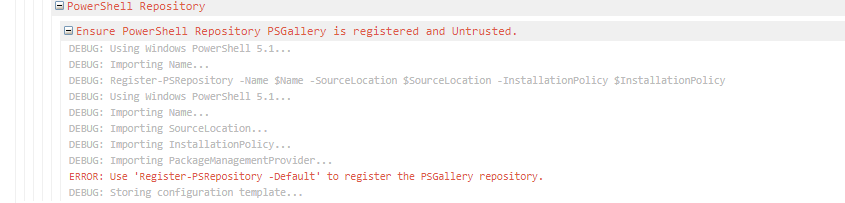
is it possible you update the Ensure-PsRepository function ?
Cheers
PhilippeC. -
Hi @philippe-camelio_3885,
We didn't change the operation that I can tell, but I researched/tested it using the CmdLets that Otter invokes:
Register-PSRepositoryandUnregister-PSRepository.Here's what I discovered:
Unregister-PSRepository -Name PSGalleryis fineRegister-PSRepository -Name PSGallery -Source ...is not allowed at allRegister-PSRepository -Default -Source ...is also not allowedRegister-PSRepository -Defaultis apparently the only allowed option
You can see the Unregister/Register approach that we use in PsRepositoryConfiguration.cs#L187. So that's why you get this error....
How about doing this as a work-around?
{
    Ensure-PsRepository
    (
        Exists: false,
        Name: PSGallery
    );
    PSExec Register-PSRepository -Default;
}
That should have the same effect of restoring to the default values...
Thanks,
AlanaCheers,
Alana -

Hello! It looks like you're interested in this conversation, but you don't have an account yet.
Getting fed up of having to scroll through the same posts each visit? When you register for an account, you'll always come back to exactly where you were before, and choose to be notified of new replies (either via email, or push notification). You'll also be able to save bookmarks and upvote posts to show your appreciation to other community members.
With your input, this post could be even better 💗
Register Login