Hi @atripp
I made a test with empty npm feed.
The proget is the docker version.
Welcome to the Inedo Forums! Check out the Forums Guide for help getting started.
If you are experiencing any issues with the forum software, please visit the Contact Form on our website and let us know!
Hi @atripp
I made a test with empty npm feed.
The proget is the docker version.
Hi,
We are looking to migrate our Proget from 5.3.38 to 2023.22.
We have a NPM feed (proxy to https://registry.npmjs.org) and we have a terrible loss of performance using the new Proget - especially during the first compilation. We never saw this behaviour with Proget 5.3
Furthermore, the compilation fails with an error as some packages are not available (FileNotFoundException) while the package have been cached on Proget 2023.22.
Removing a package from the cache solved the problem 
But a lot of packages have problems
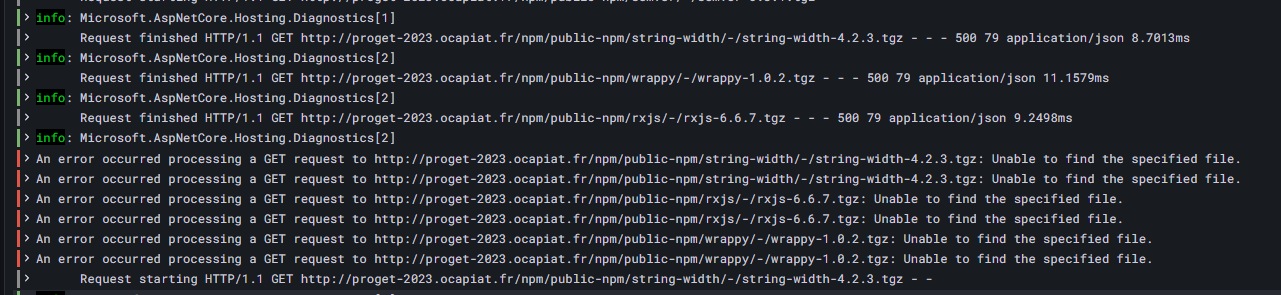
The same compilation is OK when using the old Proget 5.3.38
Any thoughts ?
New proget is on Docker
Best Regards
PhilippeC.
Go to Administration
Global Components
Variables
Select a scope
Click on Edit as JSON
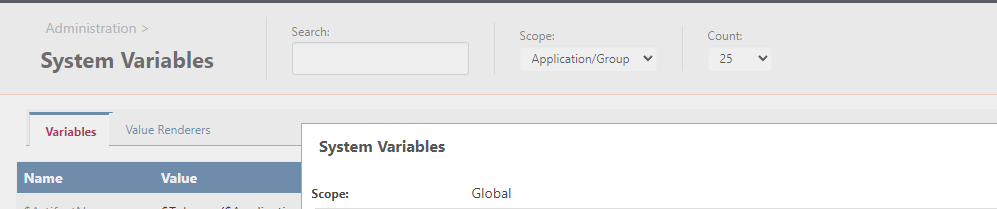
Only variables from Scope Global are displayed as json whatever the scope you select
Hi Dean
Thanks for your reply. It was just a question, finally useless.
And Thanks you for your time
Best regards
Philippe
 hi dean
Good french but poor english sorry about that
In an application, variables can be set as text, checkbox or dropdown list and be select when you start a new release.
Is it possible to do so at the group applications level or system level and use it in several applications. Just to avoid to duplicate the variable.
I would like to define a variable with a type as list at the group level or system level ?
Actually, I can do it at the release level for an application.
Any ideas ?
Best regards
Hi,
Everything is in the title ...
Whatever the variables you select, you have the system variables in a json form
Buildmaster version: docker 2023.5 (Build 4)
Best regards
Philippe
I finally found how to handle properly (I guess) the variable
The Dockerfile looks like:
ARG SOME_VAR=default_var

FROM some_image:some_version

WORKDIR /usr/src/app
RUN ....
and the Deploy script like :
Git::Checkout-Code();
Docker::Build-Image
(
    DockerfileVariables: %(SOME_VAR:myvar),
    Tag: $ReleaseNumber-pre.$BuildNumber,
    RemoveAfterPush: true
);
bur I have signing problem to push container in proget. => I start a new thread
Hi @rhessinger
I will dig in this direction.
I let you know.
Thanks for the tip.
Best regards
Hi guys,
I am looking for some help. I am trying to build a container using BM, and can't figure out how to pass env file to docker build
I am using a simple git repo which contains:
How to config Docker::Build-Image to use myapp.env
I am using a very simple script :
Git::Checkout-Code();
Docker::Build-Image();
Any advice or sample is welcome
Hi @rhessinger
Pb solved,
Thanks for your fast correction
Hi,
I migrate from 2022.14 to 2023 and SSH connection is broken 
Unhandled exception: The type initializer for 'Inedo.Agents.Ssh.Libssh2.NativeMethods' threw an exception.
Details:System.TypeInitializationException: The type initializer for 'Inedo.Agents.Ssh.Libssh2.NativeMethods' threw an exception.
---> System.DllNotFoundException: Unable to load shared library 'libssh2' or one of its dependencies. In order to help diagnose loading problems, consider setting the LD_DEBUG environment variable: liblibssh2: cannot open shared object file: No such file or directory
at Inedo.Agents.Ssh.Libssh2.NativeMethods.libssh2_init(Int32 flags)
at Inedo.Agents.Ssh.Libssh2.NativeMethods..cctor()
--- End of inner exception stack trace ---
at Inedo.Agents.Ssh.Libssh2.NativeMethods.libssh2_session_init_ex(IntPtr myalloc, IntPtr myfree, IntPtr myrealloc, IntPtr context)
at Inedo.Agents.Ssh.Libssh2.Libssh2Session..ctor()
I rollback and SSH is OK.
I am using the docker image tagged 23
Best regards
Hi @atripp
I may have found the pb:
The list contains an extra character \r
 "ListValues": [
    "%(env:INT,site:www1,serveur:VMXXXXXX)\r",
    "%(env:DEV,site:www2,serveur:VMXXXXXX)\r",
    "%(env:PRD,site:www3r,serveur:VMXXXXXX)\r",
    "%(env:CLO,site:www4,serveur:VMXXXXXX)\r",
    "%(env:SEC,site:www5,serveur:VMXXXXXX)"
  ],
I removed it, and now it is working fine.
      "ListValues": [
         "%(env:INT,site:www1,serveur:VMXXXXXX)",
         "%(env:DEV,site:www2,serveur:VMXXXXXX)",
         "%(env:PRD,site:www3r,serveur:VMXXXXXX)",
         "%(env:CLO,site:www4,serveur:VMXXXXXX)",
         "%(env:SEC,site:www5,serveur:VMXXXXXX)"
       ],
Problem comes from the editor of the job.
I made few tests, add a new value, remove one and the extra character is always added when I save the job 
At least, the pb can be overcome.
Having access to the raw content of the Raft is very usefull,
Thanks for your time
Best regards
Hello
I have problems to make scheduled jobs running in v 2023.1.
Create a small pipeline with 2 stages
Assign variables
Pipeline Deployement targets :
run test otter script
Log-Information $VAR1 $VAR2;
When I create the scheduled job I have this error message :
Logged:09/19/2023 12:10:00
Level:Error
Category:Automatic Builds
Message:Unhandled exception: Failed to compare two elements in the array.
Details:System.InvalidOperationException: Failed to compare two elements in the array.
---> System.ArgumentException: Object must be of type String.
at System.String.CompareTo(Object value)
at System.Collections.Generic.ArraySortHelper`1.BinarySearch(T[] array, Int32 index, Int32 length, T value, IComparer`1 comparer)
--- End of inner exception stack trace ---
at System.Collections.Generic.ArraySortHelper`1.BinarySearch(T[] array, Int32 index, Int32 length, T value, IComparer`1 comparer)
at System.Collections.Generic.SortedList`2.IndexOfKey(TKey key)
at Inedo.TaskRunner.RunSubtaskInternalAsync[TTaskId](TTaskId id, Func`2 runAsync, String description, Object logContext, CancellationToken cancellationToken, Boolean background)
This was working in previous version
BM version : 2023.1 (docker)
Any advice is welcome
Best regards
Philippe
Hi @gdivis
Thanks for the update
I moved to docker recently - much more flexible than Microsoft 
Hi Julien,
Yes, it is the manual install they are talking about.
You have to go to my.inedo.com to get the offline installers.
Best regards
PhilippeC.
Hello Julien
You can look here https://forums.inedo.com/topic/2549/cannot-add-the-principal-nt-authority-network-service-because-it-does-not-exist-or-you-do-not-have-permission?_=1693918947116
but I moved to docker since
It is a much straightforward way to deploy Proget
I had a lot of trouble in the past with this kind of configuration (French OS) sometimes it breaks the update :(
Best regards
PhilippeC.