Inedo Community Forums Forums
    • Recent
    • Tags
    • Popular
    • Login
    1. Home
    2. msimkin_1572
    3. Posts

    Welcome to the Inedo Forums! Check out the Forums Guide for help getting started.

    If you are experiencing any issues with the forum software, please visit the Contact Form on our website and let us know!

    M Offline
    • Profile
    • Following 0
    • Followers 0
    • Topics 8
    • Posts 26
    • Groups 0

    Posts

    Recent Best Controversial
    • RE: upack cli --version and --manifest

      Hi @atripp:

      Thank you for the clarification.

      The documentation on this page https://docs.inedo.com/docs/upack-tools-and-libraries-upack-cli should be updated to clarify that you need to either provide the command line arguments or the manifest file, but not both.

      -marc

      posted in Support
      M
      msimkin_1572
    • upack cli --version and --manifest

      version: upack 3.1.1.0

      When I attempt to execute the upack pack command:

      upack pack folder/ --version=1.0.1 --manifest=manifest.json --tragetDirectory=packagefolder/

      I receive the error:

      Invalid upack.json: missing or invalid version

      I would like to override the version from the command line. I have tried manifest.json files that omit the version tag or set the version tag to null.

      When using a manifest file, can the version be provided on the command line or must it be in the file?

      Also, I did try placing the version tag with a value in the manifest file, however, the value in the file is used, not the value on the command line.

      Thanks

      posted in Support
      M
      msimkin_1572
    • RE: Question about the ProGet 2023 Symbol Server Preview implementation

      Hi @atripp. Yes, that worked. Thank you for all the help. -marc

      posted in Support
      M
      msimkin_1572
    • RE: Question about the ProGet 2023 Symbol Server Preview implementation

      @rhessinger, I have confirmed that the feed has both OData (v2) and JSON-LD (v3) enabled as Supported APIs.

      posted in Support
      M
      msimkin_1572
    • RE: Question about the ProGet 2023 Symbol Server Preview implementation

      Hi @atripp, unfortunately that doesn't work. When I execute the following from a command shell:

      dotnet nuget push mypackage.nupkg --source http://my-internal-server/nuget/InternalLibs/index.json --api-key 1234567890

      I receive an error:

      error: Unable to load the service index for source http://my-internal-server/nuget/InternalLibs/index.json. error: Response status code does not indicate success: 404 (Not Found).

      When I attempt to just navigate via a browser to:

      http://my-internal-server/nuget/InternalLibs/index.json

      I get this response:

      OData method is not implemented.

      I also tried running nuget.exe directly from the command line. Same response as dotnet nuget push

      -marc

      posted in Support
      M
      msimkin_1572
    • RE: Question about the ProGet 2023 Symbol Server Preview implementation

      Yes, the feed was enabled to support the standard symbol server on the feed.

      Yes, the .snupkg file exists in the same folder as the .nupkg file.

      FYI, the only way I have ever gotten this to work was to use a drop folder.

      From stepping through the nuget push code, when a push happens, the first step in the process is to pull the feed description document. Then is looks for the @type of SymbolPackagePublish. If that type is not found, a symbol file will not be found.

      I have not tracked code back to the specific nuget version this dependency was introduced, I know I started to have issues when using nuget versions from 4.4 to current.

      posted in Support
      M
      msimkin_1572
    • RE: Question about the ProGet 2023 Symbol Server Preview implementation

      Hi @atripp. My apologies for taking so long to get back to you on this.

      I have been doing some testing. Neither
      dotnet nuget push or nuget push with the --source <url> doesn't push the symbol file.

      I have checked that my feed has been configured to server symbols and is set for Standard format.

      After executing the push command, I go to the package details and there is no information for under the symbol tab.

      I have checked the feed's folder on the hard drive and I don't see any snupkg files.

      I even tried NuGet push mypackage.nupkg -apikey ******** -source http://progetserver/nuget/InternalLibs -symbolapikey ******** -symbolsource http://progetserver/nuget/InternalLibs -verbosity detailed

      That also didn't push the symbol file.

      I'm currently running ProGet Free ver 2022.26 (Build 6).

      Any thoughts as to why this is not working?

      -marc

      posted in Support
      M
      msimkin_1572
    • RE: Question about the ProGet 2023 Symbol Server Preview implementation

      @atripp , thank you.

      posted in Support
      M
      msimkin_1572
    • Question about the ProGet 2023 Symbol Server Preview implementation

      The blog posting on Feb 9th, 2023 about ProGet 2023: What's Coming and When discusses improved NuGet Symbol Support. It points to a preview feature that is currently available in the latest build (2022.26).

      I have two questions.

      1. It is my impression that the symbols package will need to be stored in the same feed as the library package. Is that correct?

      2. The posting states that when this feature is enabled, you should use the --symbol option on the dotnet nuget push command.

      The dotnet nuget push doesn't have a --symbol option. The only available options are --symbol-api-key and --symbol-source

      What is the correct syntax for pushing symbols at the same time as the package?

      I remember reading someplace that --symbol-source verifies that the feed description contains the SymbolPackagePublish @type?

      Is the correct URL to add to Visual Studio http://server/symbols/feed?

      Thank you.

      -marc

      posted in Support
      M
      msimkin_1572
    • RE: Symbol Packages (snupkg) and Drop Folders

      Renaming the file works. ProGet is still able to server the symbols contained within the file to Visual Studio for debugging.

      Thank you for your help.

      Please consider this resolved.

      posted in Support
      M
      msimkin_1572
    • RE: Symbol Packages (snupkg) and Drop Folders

      @atripp If I rename the file will it be treated as a symbol file? It will only have the PDB inside, no other files.

      posted in Support
      M
      msimkin_1572
    • RE: Symbol Packages (snupkg) and Drop Folders

      They are not overwriting each other.

      There are two feeds, one for the actual library package and a different feed for the symbol package. The library package is pushed using nuget push. The symbol package is placed in the drop folder.

      I looked at the drop folder for the symbol feed when I got in this morning and it was still there. Proget didn't import it.

      The symbol feed is configured as a nuget feed. Will the code that monitors the drop folder look for a snupkg file or only nupkg?

      Besides using a combined feed, which is a non-starter, too many jobs in Team City will need to be changed. Is there a work around that can be used?

      Otherwise, I will have to write a very opinionated console app or PowerShell script to be called from the Team City jobs. Which is still significant work, as I would need to change all the jobs.

      Thanks

      posted in Support
      M
      msimkin_1572
    • Symbol Packages (snupkg) and Drop Folders

      ProGet version: 2022.0 (Build 37)
      Windows Server 2012 R2 Standard

      I've been trying for the last few days to get symbol packages to be pushed reliable to a symbol specific feed in ProGet.

      I've configured the feed as per the ProGet Docs. I've noticed that sometimes nuget push will work as expected and other times the symbol file never appears in the feed.

      I've seen the other forum discussions, the note about future enhancement for next year, the bug report in the Nuget GitHub repo.

      In order to get something reliable to work, I decided to use a drop folder. I made sure that the ProGet Service account (Network Service) has full permissions to the drop folder.

      I created a network share to with the correct permissions for the build server to use. I have the Team City build job copy the symbol file to the appropriate folder under the network share.

      I see the file in that drop folder after the build complete.

      However, it never gets imported into the associated feed by ProGet. I confirmed that the drop folder is configured for the feed. I've checked the frequency of when the folders are checked.

      Everything seems to be configured ok, just no file is being imported.

      I looked for any log in the diagnostic center and the event log. There is no entries at all. Nothing informing that even an attempt was made to process the package.

      Any ideas why the symbol file is not being imported?

      Thanks

      -marc
      posted in Support
      M
      msimkin_1572
    • RE: ProGet: How to verify package feeds?

      Thanks everyone for the help.

      -marc

      posted in Support
      M
      msimkin_1572
    • RE: ProGet: How to verify package feeds?

      Most of the feeds are Nuget. There might be one or two others types.

      posted in Support
      M
      msimkin_1572
    • ProGet: How to verify package feeds?

      Hi:

      I'm in a situation where the server that hosted my ProGet environment has become corrupt.

      I'm working on bring ProGet up on my DR server.

      Once I get the database restored, I would like to verify all the files in each feed vs what is on disk.

      Is there a way to verify that all packages and versions listed in the feed are actually on disk? Also is there a way to verify that all files on disk exist in the feed?

      I will be using ProGet free as part of the rebuild.

      Thanks

      -marc

      posted in Support
      M
      msimkin_1572
    • RE: After upgrade to 5.3.11, Extensions not loaded

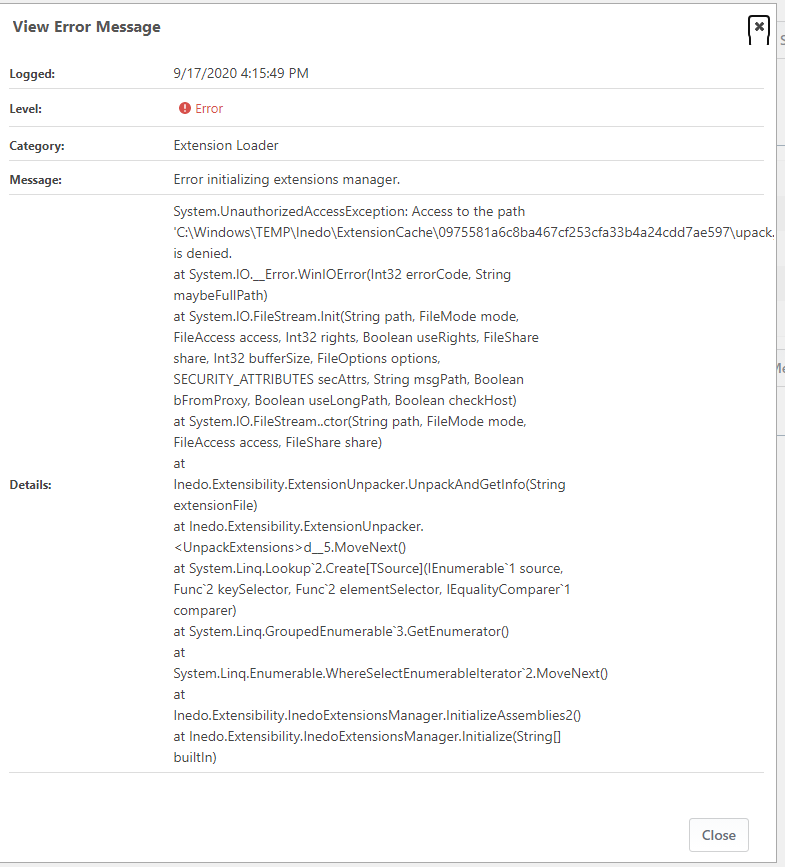
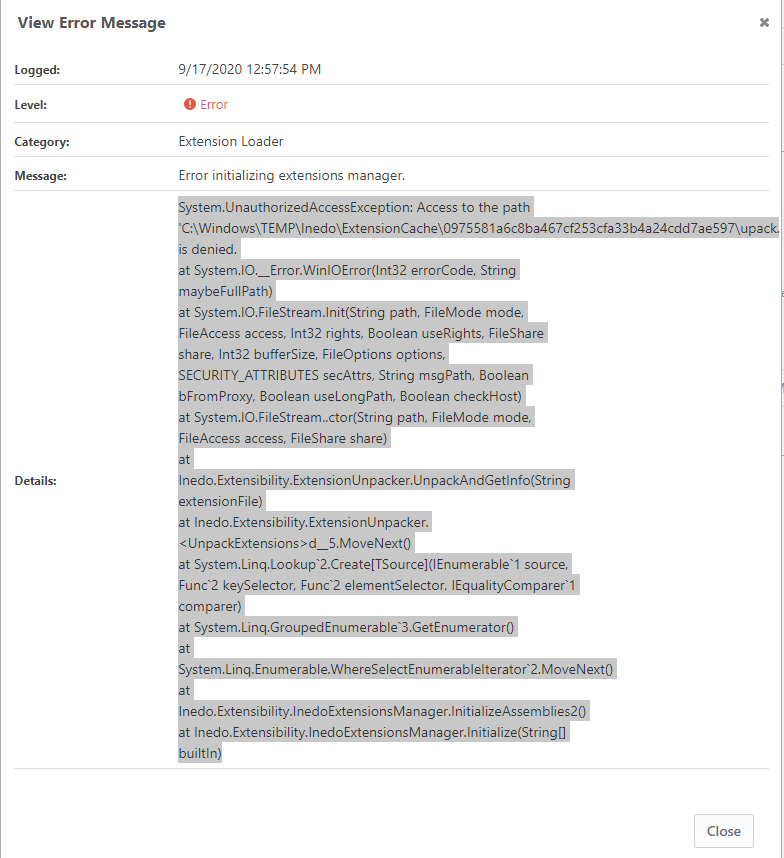
      This has been resolved. The documentation (https://docs.inedo.com/docs/proget/installation/installation-guide/manual) doesn't mention setting permissions on the C:\Windows\TEMP\Inedo\ExtensionCache folder.

      Once the DefaultAppPool user was granted access to that folder, everything worked as expected.

      posted in Support
      M
      msimkin_1572
    • RE: After upgrade to 5.3.11, Extensions not loaded

      As an aside, I'm willing to switch back to the ProGet Integrated Web Server, provided that I can have it bound to two ports at the same time. For example: 80 and 81.

      posted in Support
      M
      msimkin_1572
    • RE: After upgrade to 5.3.11, Extensions not loaded

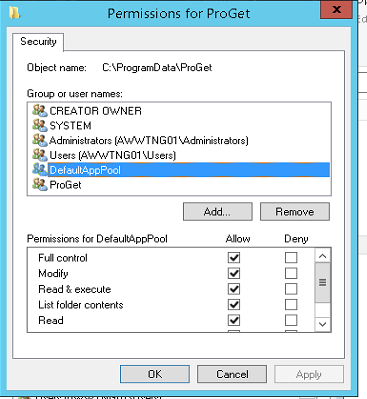
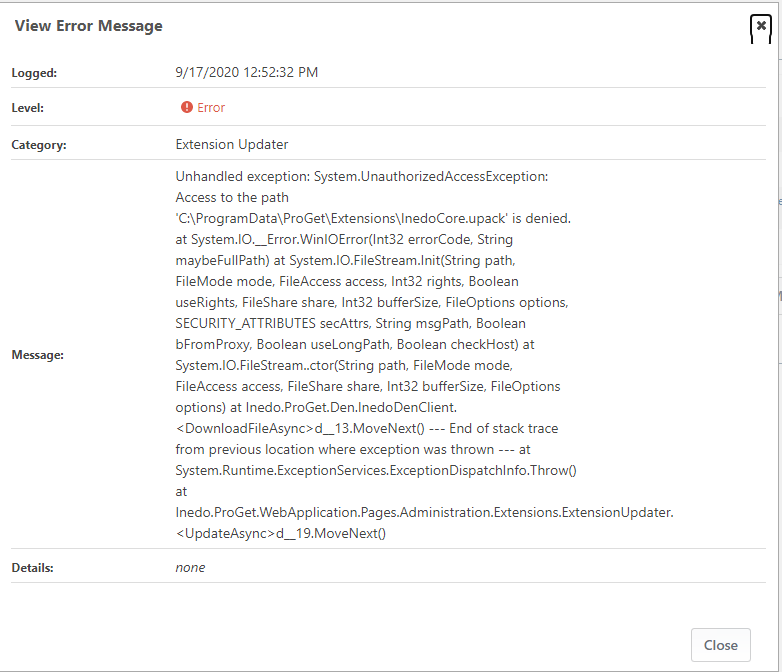
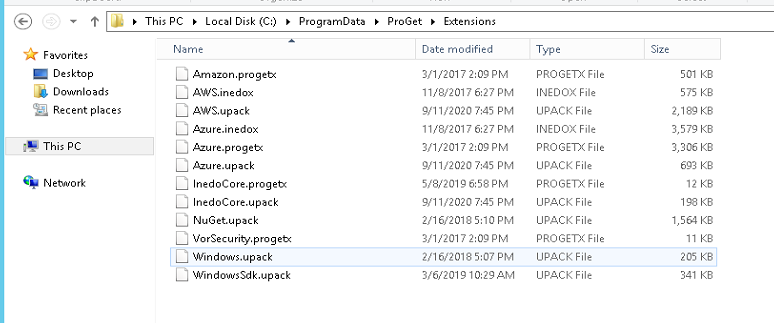
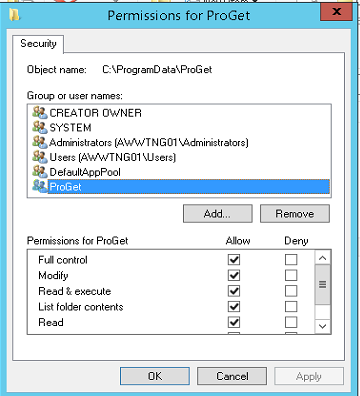
      ProGet-Privs.png Most-Recent-Error.png DefaultAppPool-Privs.png

      The uploaded images show the permissions for both the DefaultAppPool Account and the ProGet account.

      I'm less concerned about the UI not being able to download and install the extensions. I just want to be able to install the extensions manually.

      What are the steps I need to follow?

      Thanks

      -marc

      posted in Support
      M
      msimkin_1572
    • After upgrade to 5.3.11, Extensions not loaded

      I just upgraded from 5.2.30 (Build 4) Free Version to 5.3.11 (Build 37) Free Version. All the extensions, except for Inedo.SDK have not loaded.

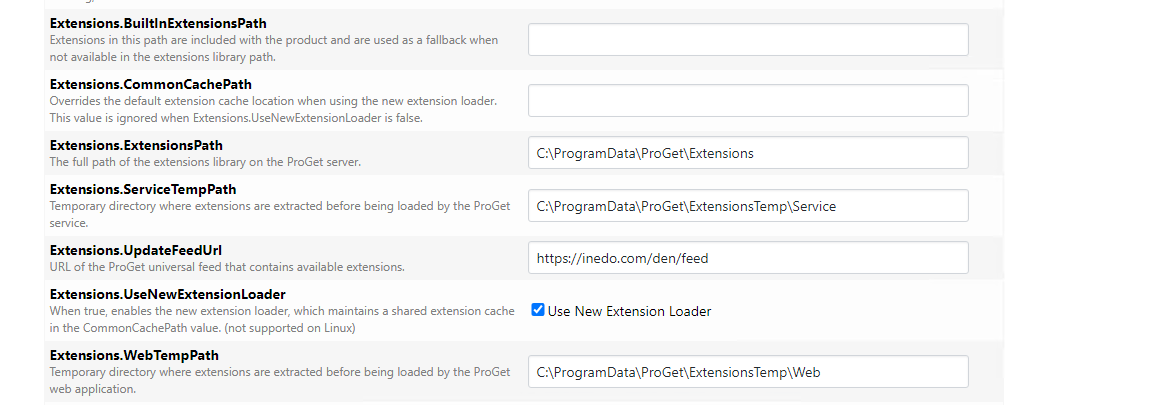
      I have verified the following settings are configured for the correct folders:
      Extensions.ExtensionsPath = C:\ProgramData\ProGet\Extensions
      Extensions.ServiceTempPath = C:\ProgramData\ProGet\ExtensionsTemp\Service
      Extensions.WebTempPath = C:\ProgramData\ProGet\ExtensionsTemp\Web

      Please see the attached images for the error messages found in the logs, the files in the folders, and the extensions settings.

      How can I get all the extensions to load?

      Thanks

      -marcservice-extensions.png extension-cfg-settings.png Error-Msg2.png Error-Msg1.png all-extensions.png

      posted in Support
      M
      msimkin_1572
    • 1
    • 2
    • 1 / 2