@pariv_0352 the code is not fixed in 25.0.9
However, inedo/proget:25.0.10-ci.5 will have the new code that should prevent this error

@pariv_0352 the code is not fixed in 25.0.9
However, inedo/proget:25.0.10-ci.5 will have the new code that should prevent this error
@jfullmer_7346 thanks! As an FYI...
winscp and WinSCP) and Duplicate Versions (e.g. winscp-4.0.0 and WinSCP-4.0.0 checking to feed integrity
Hi @pmsensi ,
Thanks for the heads-up; looks like there was a replication issue with one of our edge nodes. It should be there now
Thanks,
Alana
The "unexpected argument" running without quotes is expected, but it works fine when I run with quotes. I'm afraid I can't reproduce this.
I would check under Admin > Diagnostic Center to see if anythings logged. Alternatively, you may need to query the API by doing something like this:
curl http://server:8624/endpoints/Test/metadata/metadata-test/v1/1%20-%20Normal.txt
Thanks,
Alana
Hi @bohdan-cech_2403 ,
Thanks for sharing that; I can confirm receipt, reproduction, and fixing (PG-3105). If you'd like to try it, you can get the fix in 25.0.10-ci.2 - otherwise it'll be in the next maintenance release (next Friday).
@wechselberg-nisboerge_3629 FYI I entered the url/username/password into ProGet, but I got the message "Failed to find any registries." So, I tried with curl and I got this:
$> curl "https://artifactory.REDACTED.com/artifactory/api/repositories?type=local" --user support
Enter host password for user 'support':
{
  "errors" : [ {
    "status" : 401,
    "message" : "Artifactory configured to accept only encrypted passwords but received a clear text password, getting the encrypted password can be done via the WebUI."
  } ]
}
I have no idea what explains the different behavior. Anyway, I logged into the portal on that URL and generated some kind of key, and it let me connect.
Thanks,
Alana
Hi @felfert,
So far as I can tell, the IP isn't currently logged in these messages... I can see how that would be helpful.
I can certainly do that (which would then show the X-Forwarded when available), but I wanted to make sure I'm looking in the right place. Because I don't see IP info now.
Thanks,
Alana
Hi @felfert ,
As an update, we'd are planning on this pattern instead of row/table locking (PG-3104). It gives us a lot more control and makes it a lot easier to avoid deadlocks.
I still can't reproduce the issue, but I see no reason this won't work.
CREATE OR REPLACE FUNCTION "DockerBlobs_CreateOrUpdateBlob"
(
    "@Feed_Id" INT,
    "@Blob_Digest" VARCHAR(128),
    "@Blob_Size" BIGINT,
    "@MediaType_Name" VARCHAR(255) = NULL,
    "@Cached_Indicator" BOOLEAN = NULL,
    "@Download_Count" INT = NULL,
    "@DockerBlob_Id" INT = NULL
)
RETURNS INT
LANGUAGE plpgsql
AS $$
BEGIN

	-- avoid race condition when two procs call at exact same time
	PERFORM PG_ADVISORY_XACT_LOCK(HASHTEXT(CONCAT_WS('DockerBlobs_CreateOrUpdateBlob', "@Feed_Id", LOWER("@Blob_Digest"))));

    SELECT "DockerBlob_Id"
      INTO "@DockerBlob_Id"
      FROM "DockerBlobs"
     WHERE ("Feed_Id" = "@Feed_Id" OR ("Feed_Id" IS NULL AND "@Feed_Id" IS NULL))
       AND "Blob_Digest" = "@Blob_Digest";

    WITH updated AS
    (
        UPDATE "DockerBlobs"
           SET "Blob_Size" = "@Blob_Size",
               "MediaType_Name" = COALESCE("@MediaType_Name", "MediaType_Name"),
               "Cached_Indicator" = COALESCE("@Cached_Indicator", "Cached_Indicator")
         WHERE ("Feed_Id" = "@Feed_Id" OR ("Feed_Id" IS NULL AND "@Feed_Id" IS NULL))
           AND "Blob_Digest" = "@Blob_Digest"
        RETURNING *
    )
    INSERT INTO "DockerBlobs"
    (
        "Feed_Id",
        "Blob_Digest",
        "Download_Count",
        "Blob_Size",
        "MediaType_Name",
        "Cached_Indicator"
    )
    SELECT
        "@Feed_Id",
        "@Blob_Digest",
        COALESCE("@Download_Count", 0),
        "@Blob_Size",
        "@MediaType_Name",
        COALESCE("@Cached_Indicator", 'N')
    WHERE NOT EXISTS (SELECT * FROM updated)
    RETURNING "DockerBlob_Id" INTO "@DockerBlob_Id";

    RETURN "@DockerBlob_Id";

END $$;
@felfert amazing!! That script will come in handy when we need to help users patch their instance; we can also try to add something that allows you to patch via the UI as well!!
@felfert thanks for confirming!!
FYI tThe fix has not been applied yet to code yet, but you can patch the stored procedure (painfully) as a workaround for now. We will try to find a better solution. The only thing I can imagine happening is that the PUT is happening immediately after the PATCH finishes, but before the client receives a 200 response. I have no idea though.
We'll figure something out, now that we know where it is thanks to your help!!
Hi @parthu-reddy,
ProGet 2025 supports existing Maven classic feeds; you should be able to migrate just as you were in ProGet 2024.
Thanks,
Alana
Hi @parthu-reddy ,
Since these are network-level errors, you would need to use a tool like Wireshark or another packet analyzer to troubleshoot these kind of connectivity failures.
Thanks,
Alana
Did that, verified that the function actually has changed and did another test. Unfortunately this did not help, error was exactly the same like in my above wireshark dump.
Or does one have to "compile" the function somehow after replacing? (I never dealt with SQL functions before and in general have very limited SQL knowledge.)
Ah that's a shame! We're kind of new to "patching" functions like this in postgresql, but I think that should have worked to change the code. And also the code change should have worked.
If you don't mind trying one other patch, where we select out the Blob_Id again in the end.
CREATE OR REPLACE FUNCTION "DockerBlobs_CreateOrUpdateBlob"
(
    "@Feed_Id" INT,
    "@Blob_Digest" VARCHAR(128),
    "@Blob_Size" BIGINT,
    "@MediaType_Name" VARCHAR(255) = NULL,
    "@Cached_Indicator" BOOLEAN = NULL,
    "@Download_Count" INT = NULL,
    "@DockerBlob_Id" INT = NULL
)
RETURNS INT
LANGUAGE plpgsql
AS $$
BEGIN

    SELECT "DockerBlob_Id"
      INTO "@DockerBlob_Id"
      FROM "DockerBlobs"
     WHERE ("Feed_Id" = "@Feed_Id" OR ("Feed_Id" IS NULL AND "@Feed_Id" IS NULL))
       AND "Blob_Digest" = "@Blob_Digest"
   FOR UPDATE;

    WITH updated AS
    (
        UPDATE "DockerBlobs"
           SET "Blob_Size" = "@Blob_Size",
               "MediaType_Name" = COALESCE("@MediaType_Name", "MediaType_Name"),
               "Cached_Indicator" = COALESCE("@Cached_Indicator", "Cached_Indicator")
         WHERE ("Feed_Id" = "@Feed_Id" OR ("Feed_Id" IS NULL AND "@Feed_Id" IS NULL))
           AND "Blob_Digest" = "@Blob_Digest"
        RETURNING *
    )
    INSERT INTO "DockerBlobs"
    (
        "Feed_Id",
        "Blob_Digest",
        "Download_Count",
        "Blob_Size",
        "MediaType_Name",
        "Cached_Indicator"
    )
    SELECT
        "@Feed_Id",
        "@Blob_Digest",
        COALESCE("@Download_Count", 0),
        "@Blob_Size",
        "@MediaType_Name",
        COALESCE("@Cached_Indicator", 'N')
    WHERE NOT EXISTS (SELECT * FROM updated)
    RETURNING "DockerBlob_Id" INTO "@DockerBlob_Id";

    SELECT "DockerBlob_Id"
      INTO "@DockerBlob_Id"
      FROM "DockerBlobs"
     WHERE ("Feed_Id" = "@Feed_Id" OR ("Feed_Id" IS NULL AND "@Feed_Id" IS NULL))
       AND "Blob_Digest" = "@Blob_Digest"

    RETURN "@DockerBlob_Id";

END $$;
If this doesn't do the trick, I think we need to look a lot closer.
Hi @inedo_1308 ,
I forgot how it worked in the preview migration, but the connection string is stored in the database directory (/var/proget/database/.pgsqlconn).
Thanks,
Alana
@inedo_1308 sounds good!
The code would almost certainly be the same, since it hasn't been updated since we did the PostgreSQL version of the script.
So, I think it's a race condition, though I don't know how it would happen. However, if it's a race condition, then it should be solved with an UPDLOCK (or whatever) in PostgreSQL.
DockerBlob_Id is null)insert)insertedIf you're able to patch the procedure, could you add FOR UPDATE as follows? We are still relatively to PostgreSQL so I don't know if this the right way to do it in this case.
I think a second SELECT could also work, but I dunno.
CREATE OR REPLACE FUNCTION "DockerBlobs_CreateOrUpdateBlob"
(
    "@Feed_Id" INT,
    "@Blob_Digest" VARCHAR(128),
    "@Blob_Size" BIGINT,
    "@MediaType_Name" VARCHAR(255) = NULL,
    "@Cached_Indicator" BOOLEAN = NULL,
    "@Download_Count" INT = NULL,
    "@DockerBlob_Id" INT = NULL
)
RETURNS INT
LANGUAGE plpgsql
AS $$
BEGIN

    SELECT "DockerBlob_Id"
      INTO "@DockerBlob_Id"
      FROM "DockerBlobs"
     WHERE ("Feed_Id" = "@Feed_Id" OR ("Feed_Id" IS NULL AND "@Feed_Id" IS NULL))
       AND "Blob_Digest" = "@Blob_Digest"
   FOR UPDATE;

    WITH updated AS
    (
        UPDATE "DockerBlobs"
           SET "Blob_Size" = "@Blob_Size",
               "MediaType_Name" = COALESCE("@MediaType_Name", "MediaType_Name"),
               "Cached_Indicator" = COALESCE("@Cached_Indicator", "Cached_Indicator")
         WHERE ("Feed_Id" = "@Feed_Id" OR ("Feed_Id" IS NULL AND "@Feed_Id" IS NULL))
           AND "Blob_Digest" = "@Blob_Digest"
        RETURNING *
    )
    INSERT INTO "DockerBlobs"
    (
        "Feed_Id",
        "Blob_Digest",
        "Download_Count",
        "Blob_Size",
        "MediaType_Name",
        "Cached_Indicator"
    )
    SELECT
        "@Feed_Id",
        "@Blob_Digest",
        COALESCE("@Download_Count", 0),
        "@Blob_Size",
        "@MediaType_Name",
        COALESCE("@Cached_Indicator", 'N')
    WHERE NOT EXISTS (SELECT * FROM updated)
    RETURNING "DockerBlob_Id" INTO "@DockerBlob_Id";

    RETURN "@DockerBlob_Id";

END $$;
Hmmm the only possibility I can see is that DockerBlobs_CreateOrUpdateBlob is returning NULL , which is failing conversion to int dockerBlobId. That's the only nullable converstion on that line.
There's gotta be some kind of bug with this postresql procedure. Maybe a race condition??
CREATE OR REPLACE FUNCTION "DockerBlobs_CreateOrUpdateBlob"
(
    "@Feed_Id" INT,
    "@Blob_Digest" VARCHAR(128),
    "@Blob_Size" BIGINT,
    "@MediaType_Name" VARCHAR(255) = NULL,
    "@Cached_Indicator" BOOLEAN = NULL,
    "@Download_Count" INT = NULL,
    "@DockerBlob_Id" INT = NULL
)
RETURNS INT
LANGUAGE plpgsql
AS $$
BEGIN

    SELECT "DockerBlob_Id"
      INTO "@DockerBlob_Id"
      FROM "DockerBlobs"
     WHERE ("Feed_Id" = "@Feed_Id" OR ("Feed_Id" IS NULL AND "@Feed_Id" IS NULL))
       AND "Blob_Digest" = "@Blob_Digest";

    WITH updated AS
    (
        UPDATE "DockerBlobs"
           SET "Blob_Size" = "@Blob_Size",
               "MediaType_Name" = COALESCE("@MediaType_Name", "MediaType_Name"),
               "Cached_Indicator" = COALESCE("@Cached_Indicator", "Cached_Indicator")
         WHERE ("Feed_Id" = "@Feed_Id" OR ("Feed_Id" IS NULL AND "@Feed_Id" IS NULL))
           AND "Blob_Digest" = "@Blob_Digest"
        RETURNING *
    )
    INSERT INTO "DockerBlobs"
    (
        "Feed_Id",
        "Blob_Digest",
        "Download_Count",
        "Blob_Size",
        "MediaType_Name",
        "Cached_Indicator"
    )
    SELECT
        "@Feed_Id",
        "@Blob_Digest",
        COALESCE("@Download_Count", 0),
        "@Blob_Size",
        "@MediaType_Name",
        COALESCE("@Cached_Indicator", 'N')
    WHERE NOT EXISTS (SELECT * FROM updated)
    RETURNING "DockerBlob_Id" INTO "@DockerBlob_Id";

    RETURN "@DockerBlob_Id";

END $$;
Anyway we'll study that another day.. at least we think we know specifically where the issue is.
In case you're curious, here is #381
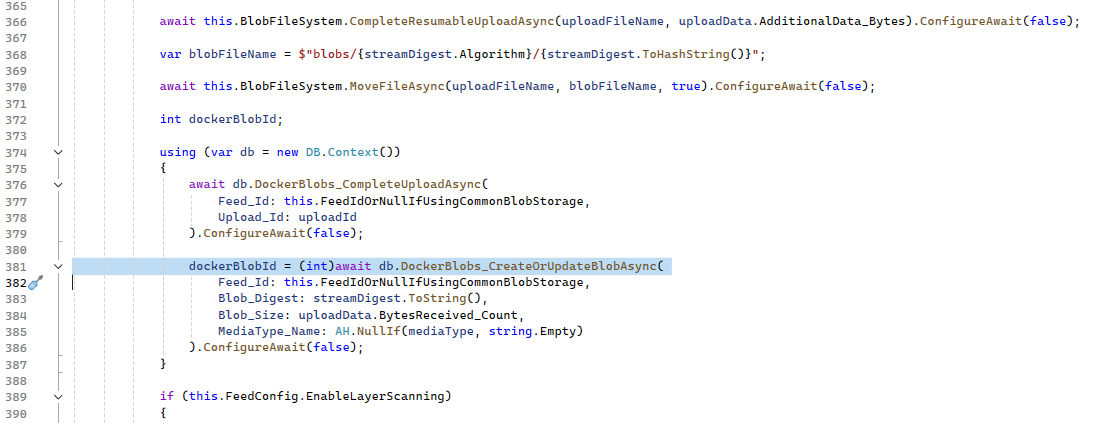
.... and now to figure out what could possibly be null in that specific area 
@inedo_1308 finally!!! nice find :)
@inedo_1308 said in proget 500 Internal server error when pushing to a proget docker feed:
That change looks wrong to me, because (error.StatusCode == 500) is more specific/restrictive than (error.StatusCode >= 500 || context.Response.HeadersWritten)
In other words: It logs less than before.
Good spot / good find -- though we never actually raise anything except 500 anyway, so i thought it would be fine
public static DockerException Unknown(string message) => new DockerException(500, "UNKNOWN", message);
Anyway wriiting the detail to that array will hpefully be caught.
@inedo_1308 thanks for continuing to help us figure this out
Do you mind trying inedo/proget:25.0.9-ci.7?
I'm thinking it's some kind of middleware bug (our code? .NET code? who knows), and I can't see why the logging code I added didn't log that in diagnostic center.
Whatever the case, we can see the error JSON is being written: {"errors":[{"code":"UNKNOWN","message":"Nullable object must have a value.","detail":[]}]} ... so I just added the stack trace to detail element.
FYI, the code:
catch (Exception ex)
{
    WriteError(context, DockerException.Unknown(ex.Message), feed, w => w.WriteValue(ex.StackTrace)); // I added the final argument
}

....

private static void WriteError(AhHttpContext context, DockerException error, DockerFeed? feed, Action<JsonTextWriter>? writeDetail = null)
{
    /// code from before that should have worked
    if (error.StatusCode == 500)
        WUtil.LogFeedException(error.StatusCode, feed, context, error);

    if (!context.Response.HeadersWritten)
    {
        context.Response.Clear();
        context.Response.StatusCode = error.StatusCode;
        context.Response.ContentType = "application/json";

        using var jsonWriter = new JsonTextWriter(context.Response.Output);
        jsonWriter.WriteStartObject();
        jsonWriter.WritePropertyName("errors");
        jsonWriter.WriteStartArray();

        jsonWriter.WriteStartObject();
        jsonWriter.WritePropertyName("code");
        jsonWriter.WriteValue(error.ErrorCode);
        jsonWriter.WritePropertyName("message");
        jsonWriter.WriteValue(error.Message);
        jsonWriter.WritePropertyName("detail");
        jsonWriter.WriteStartArray();
        writeDetail?.Invoke(jsonWriter);
        jsonWriter.WriteEndArray();
        jsonWriter.WriteEndObject();

        jsonWriter.WriteEndArray();
        jsonWriter.WriteEndObject();
    }
}
Hi @james-woods_8996 ,
I looked into this a little more, and it turns out that our cloud storage providers do in fact support chunking -- but the outgoing replication code is not taking advantage of that. We would like to fix that in ProGet 2026.
However, in the meantime, we can fix the incoming replication code (i.e. what's throwing the error) pretty easily via PG-3102 - hopefully we'll get that in the upcoming maintenance release.
Thanks,
Alana
Hi @jfullmer_7346,
unfortunately it looks like the fix didn't work and made things slightly worse 
We are reverting that change in ProGet 2025.9 and will try a new approach via PG-3100 - hopefully in ProGet 2025.10
Hi @inedo_1308
Just tested this 25.0.9-ci.6. Unfortunately, there is neither a stacktrace shown in GUI nor in stdout/stderr on the docker container that runs proget itself :-(
Sorry but just to confirm, you looked in the Admin > Diagnostic Center?
Basically, I just changed the code from this...
if (error.StatusCode >= 500 || context.Response.HeadersWritten)
   WUtil.LogFeedException(error.StatusCode, feed, context, error);
...to this...
if (error.StatusCode == 500)
   WUtil.LogFeedException(error.StatusCode, feed, context, error);
I really don't see how that wouldn't work to log it. I guess, next thing I could try is to write the stack trace in the detail.
Thanks,
Alana
I just changed some of the logging code via PG-3101, which will probably cause the exception to be logged.
It just finished building the image inedo/proget:25.0.9-ci.6 -- would someone mind giving that a try? Once we we get the stack trace it'll probably be one of those  type of errors
@thomas_3037 @inedo_1308 @wechselberg-nisboerge_3629
Thanks!!!!
Thanks for the find @thomas_3037 !
What a strange scenario... I have no idea what that parameter does (aside from what's written in the docs). Do you know if that has to do with how the layers are compressed?
I think this definitely points to some kind of middleware bug. But still aren't sure how to better error report. We'll update a bit later!
Thanks,
Alana
That's unexpected. Large files are supposed to be chunked into 50mb segments.
However, hooking over the code, chunking requires a seekable storage (i.e. random access) on the incoming server (i.e. proget-au.wtg.zone). Are you using cloud storage by chance?
If so, cloud providers do not currently support random access, so this is somewhat expected. I'm not sure if we could add that support, but we could likely work-around it on the Incoming code (i.e. what produces the logs) as well.
Open to ideas - not sure how important this is to get working or if it's just something you happened to notice -- let us know.
If you are NOT using cloud storage, can you temporarily enable verbose replication under Admin > Advanced Settings, and share the results up until that error?
Thanks,
Alana
@rickard-hagelin_7259 not a good surprise
Definitely open to ideas, but the general use case for these commands is like:
$> pgutil upack install --package=prod-tool --version=2.0.6 --feed=tools --target=/var/prod-tool

$> pgutil upack remove --package=prod-tool
Do you think that clarifying that remove deletes all the files would have helped?
Hi @ashleycanham ,
I see the issue... we'll get this fixed via PG-3099 in the upcoming maintenance release (Friday). This is a regerssion in ProGet 2025, so you could rollback and it should work fine.
Thanks,
Alana
Hi @wechselberg-nisboerge_3629 ,
Sure we can fix the username/password at the same time...
That said, if we don't hear back from @bohdan-cech_2403 then perhaps you can help by setting up a trial Artifactory cloud instance that ProGet fails to import from?
We are neither Maven nor Artifactory experts (or users for that matter), so it's very likely we uploaded things "wrong" or are using such "basic" test files.
Thanks,
Alana
Hi @inedo_1308,
Another user has reported this via ticket EDO-12089 (tagging for my reference), and we're currently analyzing their PCAP file.
We cannot reproduce it at all and have absolutely no idea where the error could be coming from -- the current theory is that it's a middleware issue by the way podman did requests (which was different than Docker client),.... but since you mentioned you can repro it on Docker client, then that's probably not it.
Anyway, if you're able to identify a version where this regressed that would be really helpful.
The reason nothing is logged is because it's explicitly suppressed in the code, but I don't know why. We may have to change that so we can see this message logged.
Please stay tuned.
Thanks,
Alana
Hi @bohdan-cech_2403 ,
In that case, the issue is in the importer -- maybe something with the API, it's really hard to say. This is a relatively new importer tool and we could only do so much testing.
Can you provide us with credentials to try this and attach a debugger?
You can share those to the earlier ticket or email to support at inedo dot com -- but we don't monitor the email, so just let us know when you do that.
Thanks,
Alana
Hi @tyler_5201 ,
We'll address this via PG-3098 in an upcoming maintenance release; basically we will add a permission check before chown on Docker/Linux for PostgreSQL. If the permissions are there, then chown won't be run.
Thanks,
Alana
It sounds like there's a problem decrypting authentication tickets. This is almost certainly due to not having the same encryption key on both servers.
Check out https://docs.inedo.com/docs/installation/linux/docker-guide#supported-environment-variables to learn more, but it's an environment variable like this:
-e PROGET_ENCRYPTION_KEY='37D27A670394F7D82CE57F1F07D69747'
It's a 32-char hex string. You can just generate a GUID and delete the "-" to have one.
Thanks,
Alana
I wonder if there's some kind of issues with the artifacts. Can you try uploading some of those using the UI to ProGet?
You can start with the POM file, then upload the JAR.
That will hlep us identify what the issue might be.
Thanks,
Alana
hi @power_pille @pmsensi ,
Just as an update, we will revert the change via PG-3097 in the next maintenance release.
We will solve duplicate package names another day -- but we'll do it the "hard way", which is to update all the related tables when it occurs.
Thanks,
Alana
Hi @tyler_5201
Thanks for the additional info; so it's not that this is an actual "network drive" just (i.e. far from the server), it just happens to be how the configuration works.
I don't think we can/should try to detect the owner; do you if chown will fail if the user is already postgres? If so, then we can wrap this with a try/catch and throw a more helpful error.
Otherwise, we can try/catch and give a warning. But we want to make sure the user can see it when the database fails to load.
Thanks,
Alana
Hi @james-woods_8996 ,
Docker feeds utilize the multi-part upload part of the S3 API, which you can see being used in the BeginResumableUploadAsync method of our file system abstraction.
If they do not implement multi-part uploads, then you will not be able to use it with ProGet. Other feeds rely on that method as well.
I would check w/ the vendor to see what the issue could be - it's possible they simply don't support it.
Thanks,
Alana
Hi @parthu-reddy ,
This behavior is expected; these have a status of "unlisted", which you can see on NuGet.org if you look in the API or type in the URL directly:
ProGet does not hide unlisted packages by design, but shows them with an unlisted icon instead.
Thanks,
Alana
@power_pille @pmsensi thanks for helping to investigate this
What I can say is this is most definitely a regression in ProGet 2025.8 caused by PG-3047 -- I'm not sure if we want to revert that change or fix it. But rolling back to ProGet 2024.7 will definitely address the issue.
As for casing, it's all really strange to honest - some package ecosystems (rpm) are case sensitive, and different packages that differ by casing. Most are not insane like that.
However, due to a bug from a while back, "bad data" snuck into the PackageNameIds table from a vulnerability database update -- and that's why NuGet has those duplicates. Clearing them "blindly" from databases in the field isn't easy, but the feed reindex was a step in that direction.
Anyway we're going to continue researching how to address this
Hi @yaakov-smith_7984 ,
It looks like we forgot to ship the updated extension in 2025.8, so it's not "included" when you install ProGet. You should be able to update under Admin > Extensions, but unless you make the extensions directory (under Admin > Advacned Configuration) mapped to the docker host it will not "survive" a container reboot.
We could get you a prerelease container version if you'd like to try it as included, just let us know
Thanks,
Alana
@misael-esperanzate_5668 thanks for the reproduction details!
I was ablet to reproduce this very easily and fixed it via PG-3091 - it was an ordering problem
This will be in the upcoming maintenance release this Friday
Hi @tyler_5201
I'm not really familiar with all this topic, but why would you want to put the database file on an NFS? The PostgreSQL docs on clustering seem to warn against this.
That said, we added the chown command during early testing because PostgreSQL was failing with something like this:
The files belonging to this database system will be owned by user "postgres".
This user must also own the server process.
The only way to get to work was:
$kubectl exec -n -i -t -- bash -il$cd /var/opt$id -u postgreschown -R 101:101 database/Hence, why we added the chown.
I'm not sure the best approach here -- we could try/catch, but I think the postgres user still needs to own the files?
Cheers,
Alana
Hi @kc_2466 ,
Understood, that was the same reason given before.
Our products' AD/LDAP integration works different than JIRA/TeamCity (live lookup vs sync) so it's just not that simple.
We're not willing to add complexity to work-around "dumb" organizational policies -- what you described is the whole point of AD/LDAP (centrally administered access).
It's possible to delegate group administration in AD, but if they don't want to do that... I guess they are okay with you just creating less-secure built-in users until they get around to completing their tickets ;)
Thanks,
Alana
Hi @thomas_3037 ,
ProGet does not support these, as they are not "real" Debian repositories:
These are used only by the Debian installer and are not installed on a Debian system under normal circumstances.
Unlikely we would add support for them, given the highly-limited use case.
Thanks,
Alana
@tames_0545 I just thought of something, perhaps try a different versions of ProGet, instead of latest -- like maybe 25.0.3, 25.0.4, etc, perhaps into ProGet 2024 as well
Hi @tames_0545 ,
Sorry, no idea -- there is definitely something wrong with your environment but aside from the advice I gave earlier, I don't have any other troubleshooting steps. You may want to try a different environment / Docker host.
As I mentioned, it could something wrong with your database mount (/opt/proget/database) -- maybe that is getting deleted? Or it could be your security configuration that is interfering with the running container. We have seen some hyper-aggressive security tools that make things so secure nothing runs.
Thanks,
Alana
Hi @tames_0545 ,
A connection string should not be specified.
I haven't seen this behavior before; the container runs postgres on start to listen to port 5728 and I can't imagine how that would fail without an error message.
Perhaps there's some kind of issue with /opt/proget/database and that's causing the postgres process to crash; I would start here.
The only other thing I can imagine is some kind of security configuration that is interfering with the running container.
I would keep it as simple as possible. Once you get it working, you can try adding in the encryption key. Unless you absolutely need to use a Docker secret (those are complex and don't really do anything), just specify the encryption key with an environment variable
-e PROGET_ENCRYPTION_KEY='37D27A670394F7D82CE57F1F07D69747'
Cheers,
Alana
Hi @kc_2466,
Thanks for the suggestion; we've had this request in the past but don't believe it's a good fit.
It ought to be trivial to add a group to the AD/LDAP server, so it doesn't make sense to add a "quasi-group" feature on the ProGet end. That would increase complexity and could introduce unbehavior that is challenging to support and troubleshoot.
We haven't seen other products doing something like this, likely for these reasons.
Cheers,
Alana