Inedo Community Forums Forums
    • Recent
    • Tags
    • Popular
    • Login
    1. Home
    2. antony.booth_1029
    3. Topics

    Welcome to the Inedo Forums! Check out the Forums Guide for help getting started.

    If you are experiencing any issues with the forum software, please visit the Contact Form on our website and let us know!

    A Offline
    • Profile
    • Following 0
    • Followers 0
    • Topics 12
    • Posts 19
    • Groups 0

    Topics

    • A

      Buildmaster Version 7.0.9 (Build 2): Probable defect

      Watching Ignoring Scheduled Pinned Locked Moved Support
      4
      0 Votes
      4 Posts
      13 Views
      atrippA
      Thanks @antony-booth_1029 ! This should get fixed via BM-3740 in the next maintenance release of BuildMaster
    • A

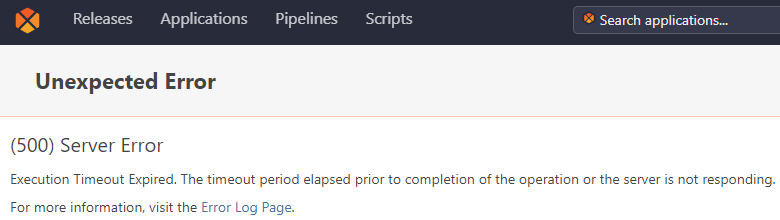
      Buildmaster Version 7.0.9 (Build 2) keeps suffering database timeouts

      Watching Ignoring Scheduled Pinned Locked Moved Support
      4
      2
      0 Votes
      4 Posts
      13 Views
      atrippA
      @antony-booth_1029 thanks for the update! Anecdotally, I've heard of similar issues with AWS RDS. I understand that, behind the scenes, it's some large/shared SQL Server database installation, so I wonder if other traffic impacts it? We've certainly confirmed that was the case in some organizations with their own large SQL Server cluster. You may find using SQL Server Express + Self Backup is okay enough, too.
    • A

      Buildmaster Version 6.2.27 (Build 6): Error 500 saving Config files

      Watching Ignoring Scheduled Pinned Locked Moved Support
      3
      0 Votes
      3 Posts
      8 Views
      A
      I didn't have the problem the next day, so I can no longer replicate it. If it happens again, I'll re-post with logging details. Consider it closed. Thanks.
    • A

      Buildmaster: Get Build Id from within a script

      Watching Ignoring Scheduled Pinned Locked Moved Support
      2
      0 Votes
      2 Posts
      4 Views
      rhessingerR
      Hi @antony-booth_1029, Starting in version 6.2.21, we actually made a new variable function to create the URL for you. You can use the $BuildMasterUrl(build) function and that will generate the URL. If you are running that from within the context of a build, you will not need to specify any other parmaters. You can see more about its usage in the functions reference in BuildMaster by navigating to Administration -> Reference Documentation section -> Functions. We have also added a $BuildMasterId function if you need to get the BuildId directly. Hope this helps! Thanks, Rich
    • A

      Bug: Buildmaster Version 6.2.14 (Build 17). Manual configuration deployment modal not showing Preview

      Watching Ignoring Scheduled Pinned Locked Moved Support
      5
      2
      0 Votes
      5 Posts
      9 Views
      rhessingerR
      Hi @antony-booth_1029 , Yes, this also corrects the size of the modal when it pops up as well as a few pieces of the form that is not working correctly also. The bug was basically the javascript resource for that modal moved and the page was still referencing the old location. Thanks, Rich
    • A

      Bug: Buildmaster 6.2.14 (Build 17) Configuration Template Values containing equals character

      Watching Ignoring Scheduled Pinned Locked Moved Support
      3
      0 Votes
      3 Posts
      7 Views
      rhessingerR
      Hi @antony-booth_1029 , I have fixed this issue and it will be released in BuildMaster 6.2.15 which is due out on July 17. I'll post back here if anything changes. Thanks, Rich
    • A

      Bug: Buildmaster 6.2.13 (Build 2): Selecting a build link from /releases returns HTTP status 404

      Watching Ignoring Scheduled Pinned Locked Moved Support
      2
      0 Votes
      2 Posts
      9 Views
      atrippA
      Thanks for the report , very simple code typo and now it'll be fixed in BM-3611 in the next maintence release
    • A

      Bug: Buildmaster 6.2.13 (Build 2). Parsing templated configuration files.

      Watching Ignoring Scheduled Pinned Locked Moved Support
      4
      0 Votes
      4 Posts
      13 Views
      rhessingerR
      Hi @antony-booth_1029 , Looks like we had an issue in how the javascript resource is loading for this modal. I have fixed this and it will be released in the next version of BuildMaster 6.2.14 which is due out at the end of this week. Thanks, Rich
    • A

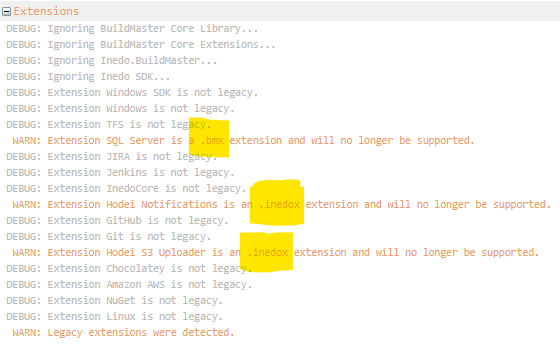
      Buildmaster Legacy Features .bmx, .inedox extension will no longer be supported

      Watching Ignoring Scheduled Pinned Locked Moved Support
      2
      2
      0 Votes
      2 Posts
      10 Views
      atrippA
      Hello, great question. .indeox deployment is no longer supported, so I updated the documentation as follows Direct Deployment {#zip-file} An extension can be directly deployed to an Inedo product's extension root as a simple universal package. To do for an extension named MyExample, first create a manifest file called upack.json with the following contents: { "name": "MyExample", "version": "1.0.1" } Then, create a zip file called MyExample.zip with the compiled output in a package folder, and the upack.json at the root, like this: /package/ /MyExample.dll /SomeLibrary.dll /upack.json Rename the the zip file to MyExample.upack, and copy the .upack file into the Product extensions directory. By default, this will usually be in C:\ProgramData\«product-name»\Extensions, but you can verify the exact location by going to the Admin->All Settings page and looking for the ExtensionsPath value. Finally, restart the product services (and application pool if hosting in IIS).

    • A

      Execute SQL scripts on Agent Server

      Watching Ignoring Scheduled Pinned Locked Moved Support buildmaster net sql-server agents
      3
      0 Votes
      3 Posts
      18 Views
      A
      The SQL server and the application are both on server 'Production' and the application is successfully retrieving data from the SQL server. The connection string used in the application configuration is the same connection string being used in the SQL connection in Buildmaster. It is using a SQL account, so not integrated. Here is a redacted connection string: - Data Source=*************;Initial Catalog=*************;User Id=*************;Password=*************;MultipleActiveResultSets=true;
    • A

      Extension errors

      Watching Ignoring Scheduled Pinned Locked Moved Support error buildmaster
      2
      0 Votes
      2 Posts
      6 Views
      jraschJ
      This has also been reported in our Jenkins extensions issues section, can you take a moment to respond to the questions I posed here? https://github.com/Inedo/inedox-jenkins/issues/26#issuecomment-454188149
    • 1 / 1