Welcome to the Inedo Forums! Check out the Forums Guide for help getting started.
If you are experiencing any issues with the forum software, please visit the Contact Form on our website and let us know!
Bug: Buildmaster Version 6.2.14 (Build 17). Manual configuration deployment modal not showing Preview
-
Reported in a previous post it was stated the fix would be in BuildMaster 6.2.14 later in the week, however the issue persists.
Additionally, the issue occurs in Chrome Version 83.0.4103.116 and the following error is thrown when the modal dialog launches: -

I'm not sure whether this is related, but the initial size of the dialog is tiny.
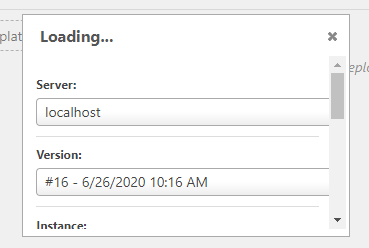
-
More information on dialog sizes: -
Screen resolution is: 1920 x 1009. Sizes are set as inline CSS of: -
div.ui-dialog.ui-widget.ui-widget-content[role='dialog']

    position: fixed;
    height: auto;
    width: 320px;
    top: 385.5px;
    left: 796px;
    display: block;
    z-index: 101;
It works better as percentages: -
div.ui-dialog.ui-widget.ui-widget-content[role='dialog']
    position: fixed;
    height: 70%;
    width: 70%;
    top: 15%;
    left: 15%;
    display: block;
    z-index: 101;

div.ui-dialog.ui-widget[role='dialog'] iframe.ui-dialog-content
    width: 100%;
    min-height: 0px;
    max-height: none;
    height: 100%;
    padding: 0px;
Result: -
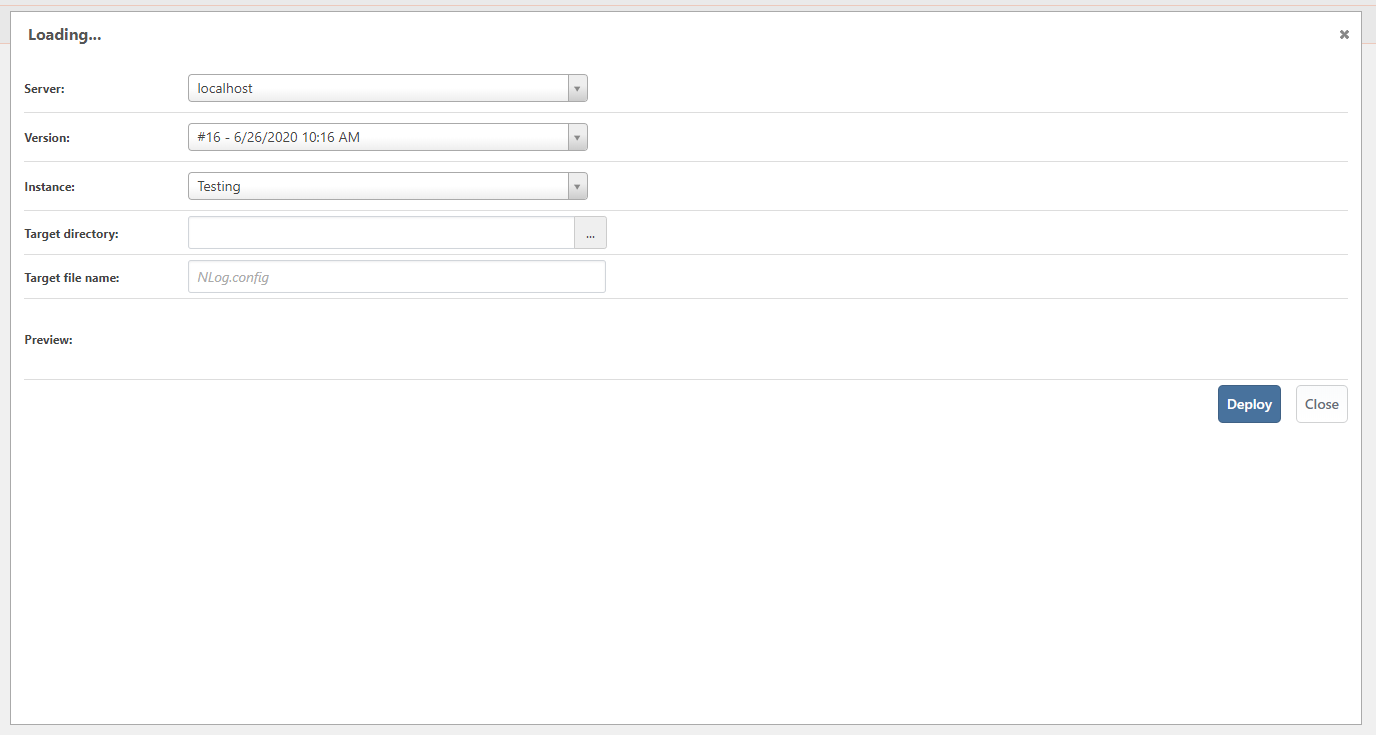
-
Hi @antony-booth_1029,
I'm very sorry about that. It looks like this did not get merged in 6.2.14 for some reason. I have confirmed that this was merged into the master branch and will be released in BuildMaster 6.2.15. That build is due out on July 17th.
In the meantime, we have a CI build 6.2.15-ci.1 available that contains this fix. You can configure Inedo Hub to install pre-release products by following this guide to install this build.
Thanks,
Rich -
Thanks, but I can wait. I reported it again, because I had added it to an existing report, rather than a post of it's own.
Does the fix include css changes so the dialog is proportional to screen size, rather than fixed pixel sizes?
I did not supply the exact css that would apply for any screen size, because it looks like you're using jQuery to inline the style. Typically, I create a reusable css class and if need be, use a javascript framework like jQuery to add or remove the class as necessary.
$dialog.addClass('dialog-size-to-fit fade-in dialog-modal').show(); -
Hi @antony-booth_1029 ,
Yes, this also corrects the size of the modal when it pops up as well as a few pieces of the form that is not working correctly also. The bug was basically the javascript resource for that modal moved and the page was still referencing the old location.
Thanks,
Rich

Hello! It looks like you're interested in this conversation, but you don't have an account yet.
Getting fed up of having to scroll through the same posts each visit? When you register for an account, you'll always come back to exactly where you were before, and choose to be notified of new replies (either via email, or push notification). You'll also be able to save bookmarks and upvote posts to show your appreciation to other community members.
With your input, this post could be even better 💗
Register Login