Welcome to the Inedo Forums! Check out the Forums Guide for help getting started.
If you are experiencing any issues with the forum software, please visit the Contact Form on our website and let us know!
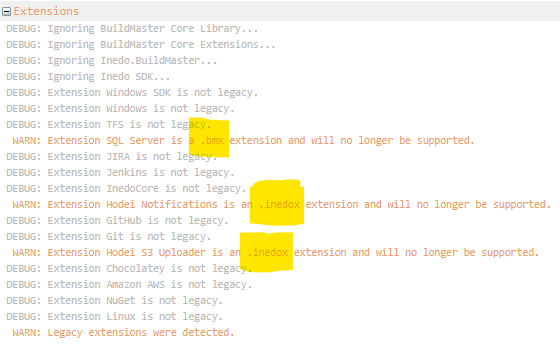
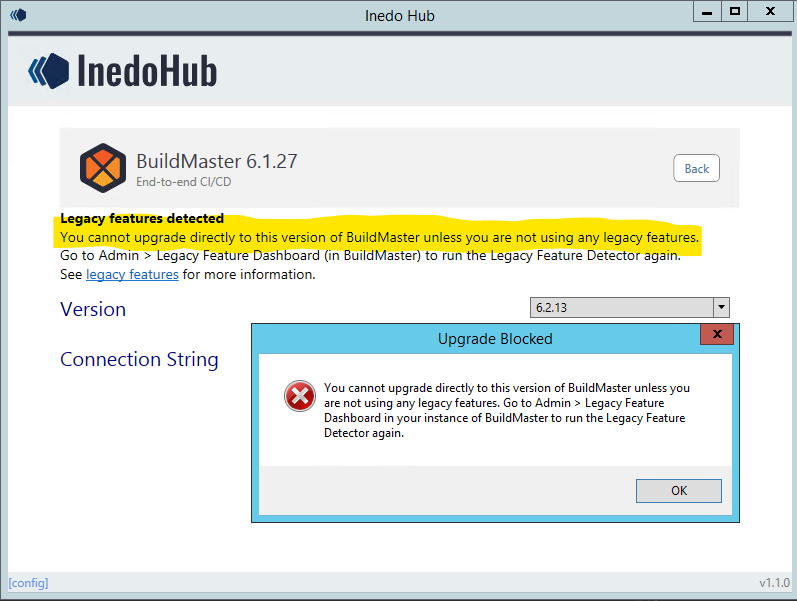
Buildmaster Legacy Features .bmx, .inedox extension will no longer be supported
-
Indeo documentation is still showing that creating a custom extension uses an '.inedox' suffix, yet the Detect Legacy Features section in the administration page states the extension is no longer supported and Buildmaster can not be upgraded to 6.2.13 until all legacy issues have been resolved, so what do I do differently with custom extensions to make them compatible with 6.2.13
-
Hello, great question.
.indeoxdeployment is no longer supported, so I updated the documentation as followsDirect Deployment {#zip-file}
An extension can be directly deployed to an Inedo product's extension root as a simple universal package.
To do for an extension named
MyExample, first create a manifest file calledupack.jsonwith the following contents:{ "name": "MyExample", "version": "1.0.1" }Then, create a zip file called
MyExample.zipwith the compiled output in apackagefolder, and theupack.jsonat the root, like this:/package/ /MyExample.dll /SomeLibrary.dll /upack.jsonRename the the zip file to
MyExample.upack, and copy the.upackfile into the Product extensions directory. By default, this will usually be inC:\ProgramData\«product-name»\Extensions, but you can verify the exact location by going to the Admin->All Settings page and looking for theExtensionsPathvalue.Finally, restart the product services (and application pool if hosting in IIS).

Hello! It looks like you're interested in this conversation, but you don't have an account yet.
Getting fed up of having to scroll through the same posts each visit? When you register for an account, you'll always come back to exactly where you were before, and choose to be notified of new replies (either via email, or push notification). You'll also be able to save bookmarks and upvote posts to show your appreciation to other community members.
With your input, this post could be even better 💗
Register Login