Welcome to the Inedo Forums! Check out the Forums Guide for help getting started.
If you are experiencing any issues with the forum software, please visit the Contact Form on our website and let us know!
Bug: Buildmaster 6.2.13 (Build 2). Parsing templated configuration files.
-
Attempting to deploy a Template based configuration file for NLog, Buildmaster fails with exception: -
Unhandled exception: System.FormatException: "$" is an invalid variable name.This is because NLog is an XML document that contains 'renderers', such as ${shortdate} that use a dollar and braces to denote a replaceable tag. See example below.
According to Buildmaster documentation, to escape a dollar, it is supposed to be preceded with another dollar. The parser can handle something like $$Alpha, but not $${Alpha} as the variable name becomes '$'
I have a hacky workaround of instead of escaping dollars with another dollar, instead create a variable called $Dollar containing '$' and replacing something like ${shortdate} with $Dollar{shortdate} instead of $${shortdate}
<?xml version="1.0" encoding="utf-8" ?> <nlog xmlns="http://www.nlog-project.org/schemas/NLog.xsd" xmlns:xsi="http://www.w3.org/2001/XMLSchema-instance" xsi:schemaLocation="http://www.nlog-project.org/schemas/NLog.xsd NLog.xsd" autoReload="true" throwExceptions="false" internalLogLevel="Off" internalLogFile="C:\logs\relay\nlog-internal.log"> <extensions> <add assembly="NLog.Web.AspNetCore"/> </extensions> <variable name="logRoot" value="C:\logs\relay" /> <variable name="fileNamePrefix" value="$${var:logRoot}/$${shortdate}" /> </nlog> -
Hello; thank you pointing this out, this is a documentation bug, and that page wasn't updated. But I just fixed it now.
Configuration files now use the OtterScript/ExecutionEngine to handle replacements, so please use the grave apostrophe (`) to escape, so in the case, it's
\$myvar `<variable name="fileNamePrefix" value="`${var:logRoot}/`${shortdate}" />Cheers!
-
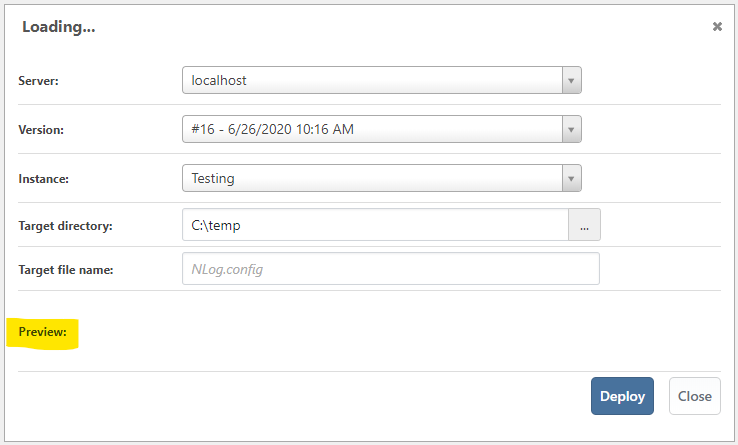
@atripp Thanks. That resolved the issue. On a related, minor note; deploying a config file no longer shows a preview.
-
Hi @antony-booth_1029 ,
Looks like we had an issue in how the javascript resource is loading for this modal. I have fixed this and it will be released in the next version of BuildMaster 6.2.14 which is due out at the end of this week.
Thanks,
Rich


Hello! It looks like you're interested in this conversation, but you don't have an account yet.
Getting fed up of having to scroll through the same posts each visit? When you register for an account, you'll always come back to exactly where you were before, and choose to be notified of new replies (either via email, or push notification). You'll also be able to save bookmarks and upvote posts to show your appreciation to other community members.
With your input, this post could be even better 💗
Register Login