Welcome to the Inedo Forums! Check out the Forums Guide for help getting started.

If you are experiencing any issues with the forum software, please visit the Contact Form on our website and let us know!


  • Email notification about new ProGet versions

    2
    0 Votes
    2 Posts
    14 Views
    Dan_WoolfD
    Hi @lm, We do not currently have any way to be actively notified on new ProGet releases outside of the notification in ProGet. We do, however, perform regular releases of ProGet and we typically release them every 2 weeks. The best place to check for updates would be the https://my.inedo.com/dowloads page or the Offline Installers page. Thanks, Dan
  • Discrepency in Stage name pipeline vs Configuration Files

    4
    0 Votes
    4 Posts
    6 Views
    atrippA
    Hi @Justinvolved , Ah, thanks for clarifying that! Yes... they should be Testing to follow everything else. Pipeline templates are a brand-new feature :) This was a trivial change, and will be updated in next version as BM-3805 Cheers, Alana
  • Deploy artifact without touching a certain subfolder?

    4
    0 Votes
    4 Posts
    8 Views
    rhessingerR
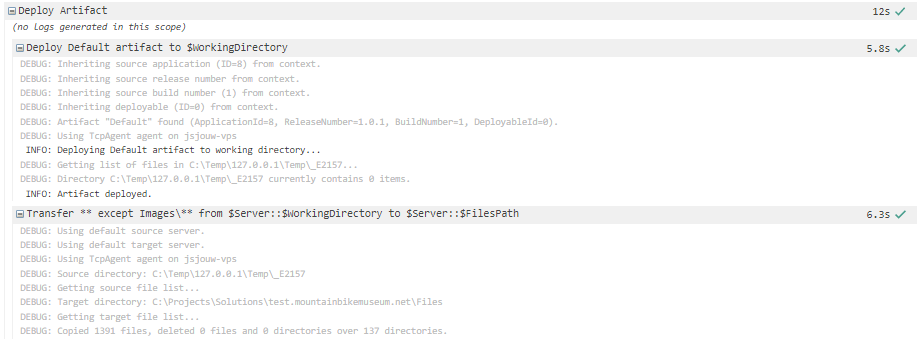
    Hi @Justinvolved, That message that says "currently contains 0 items" is just telling you that the folder that the artifact is deploying to contains 0 files. After that, it will deploy the artifact files. If you enable verbose logging (setting Verbose: true), you will see all the files transferred from the artifact to the working directory. Thanks, Rich
  • Upgrading ProGet from 6.0.14 to 22.0.17 fails with DB Error

    7
    0 Votes
    7 Posts
    23 Views
    R
    Hello @atripp, today we upgraded successfully to 2.0.17. We believe there were problems with Windows Active Directory Users and the permissions granted per group. Our solution was a new sql user and a corresponding change of the connection string in the ProGet.config. Thank you for your help.
  • Invalid Credentials error with Proget Chocolatey Packages

    2
    1
    0 Votes
    2 Posts
    13 Views
    atrippA
    Hello @itpurchasing_0730, It sounds like you set things up correctly, but seems like Chocolatey is behaving strangely; if you added a source, then you shouldn't be prompted for the credentials. In general, you should just need to run choco source add command: https://docs.chocolatey.org/en-us/choco/commands/sources Then you won't be prompted again. I would try removing your sources, and adding them back. You may also want to use a tool like Fiddler classic to monitor the traffic that Chocolatey is making. Unfortunately we can't tell, from just that diagnostic log. That will let you see exactly what URls are being used... and the underlying problem might be related to something like a proxy server. Cheers, Alana
  • 0 Votes
    5 Posts
    16 Views
    atrippA
    Thanks for letting us know @jeff-peirson_4344 ; we'll see if we can better detect and improve this error.
  • npm install

    2
    0 Votes
    2 Posts
    12 Views
    rhessingerR
    Hi @justin_2990, We are actually in the process of developing dedicated npm operations, but we do have anything ready as of yet. The easiest way to call npm commands is to use the Exec operation in OtterScript. Due to how the npm CLI writes it's output, you need to add ErrorOutputLogLevel: Warning to the Exec operation. Here is an example of the npm install and npm publish commands: set $NpmPath = C:\Program Files\nodejs\npm.cmd; set $NodePath = C:\Program Files\nodejs\node.exe; # Install Dependencies Exec ( FileName: $NpmPath, Arguments: install, WorkingDirectory: ~\Source, ErrorOutputLogLevel: Warning ); # Publish Package Exec ( FileName: $NpmPath, Arguments: publish Source, WorkingDirectory: ~\, ErrorOutputLogLevel: Warning ); When it comes to ProGet::Scan, it should work with all npm packages. It just reads the package-lock.json and records the dependencies in ProGet. You can see our implementation on the pgscan GitHub repository. If that doesn't work, you can always use a tool like CycloneDX to generate an SBOM and upload it to ProGet via the SCA API which has an endpoint for importing an SBOM file directly. One last thing, you mentioned that you are using ProGet. You can create an OtterScript module to register ProGet as your package source for npm. I do this with the following: ConfigureNpmRegistry OtterScript Module ##AH:UseTextMode module ConfigureNpmRegistry<$NpmPath, $ResourceName, $CredentialName> { set $ProGetNpmRegistry = $SecureResourceProperty($ResourceName, ServerUrl); Exec ( FileName: $NpmPath, Arguments: config set registry $ProGetNpmRegistry, WorkingDirectory: ~\, ErrorOutputLogLevel: Warning ); set $AuthToken = $SecureCredentialProperty($CredentialName, Token); PSCall Base64Encode ( Text: api:$AuthToken, EncodedText => $AuthKey ); Exec ( FileName: $NpmPath, Arguments: config set always-auth true, WorkingDirectory: ~\, ErrorOutputLogLevel: Warning ); Exec ( FileName: $NpmPath, Arguments: config set _auth $AuthKey, WorkingDirectory: ~\, ErrorOutputLogLevel: Warning, LogArguments: false ); Exec ( FileName: $NpmPath, Arguments: config set email support@inedo.com, WorkingDirectory: ~\, ErrorOutputLogLevel: Warning ); } I also had to add a PowerShell script to handle the base64 encoding of the credentials: <# .SYNOPSIS Base64 Encodes a string .PARAMETER Text Text to be encoded .PARAMETER EncodedText Encoded text string #> param( [Parameter(Mandatory=$true)] [string]$Text, [ref]$EncodedText ) $Bytes = [System.Text.Encoding]::UTF8.GetBytes($Text) $EncodedText =[Convert]::ToBase64String($Bytes) I then call this using: # Setup registry call ConfigureNpmRegistry ( NpmPath: $NpmPath, ResourceName: global::ProGetNpmRepo, CredentialName: global::ProGetNpmCredentials ); These are all operations we plan to build into the npm extension, but these are currently the workaround until we get that extension up and running. I hope this helps! Please let me know if you have any questions. Thanks, Rich
  • Add SymbolPackagePublish service to NuGet v3 Service Index

    3
    0 Votes
    3 Posts
    10 Views
    K
    Thank you very much for answer, keep up the good work.
  • Upgrading ProGet as a different user fails

    3
    0 Votes
    3 Posts
    12 Views
    R
    Thanks Alana, I had tried giving myself sysadmin rights previously, but was still getting permission errors. The trick from that article, to put the database in single user mode first, got things working. Cheers, Rob
  • Problem downloading offline installer

    2
    0 Votes
    2 Posts
    3 Views
    M
    Replying to myself: This is due to chromium protection feature. I successfully downloaded it via Firefox. Solved then
  • mgoulis@inedo.com not valid email?

    2
    0 Votes
    2 Posts
    8 Views
    rhessingerR
    Hi @jimthomas1_7698, Thanks for bringing this to our attention, we will get that updated! Thanks, Rich
  • Introduction to Buildmaster

    2
    0 Votes
    2 Posts
    9 Views
    atrippA
    Hi @jimthomas1_7698 , What should target #0 be? (Deployment Target currently says 'Build to localhost', is that what target #0 refers to?) This message could definitely be clarified; but it basically means that Deployment Target isn't set for the first stage. If you see "Build to localhost" on the pipeline overview page, I'm guessing you didn't "Commit" the changes (save) -- it's at the top of the page. You have to explicitly save the pipeline that you're editing. Where in the Publish command do I specify the Resource Group, Resource Name and Subscription? Or will BuildMaster pull those azurewebsite publish parameters from the project's Properties/PublishProfiles .pubxml file? I'm not familiar enough with azurewebsite publish to be honest... but under the hood, the DotNet::Publish operation calls to dotnet publish. So if your project is configured to use the PublishProfiles... then maybe it will work? You can pass additional arguments into DotNet::Publish (which will get directly passed to dotnet publish, using the AdditionalArguments parameter) FYI: Deploying to Azure Websites is a Deployment Script Template we intend to create later. It's unfortunately a little complicated to do, since it primarily reles on a Which, if any, of the documentation can I rely on for help? We put that "Documentation Renovation in Progress" warning on the pages that are outdated; there's not too many of them with that warning... and we're making our way through them one page at a time In any case, don't hesitate to ask questions - it is often an opportunity for us to improve our software or documentation.
  • How to change Proget's Temporary Upload Path for S3 uploads

    4
    0 Votes
    4 Posts
    11 Views
    atrippA
    Hi @kenneth-garza_2882 , That should be the case, under the hood, ProGet is using this API: https://learn.microsoft.com/en-us/windows/win32/fileio/creating-and-using-a-temporary-file According to the docs for GetTempPath, the first path found will be used: The path specified by the TMP environment variable. The path specified by the TEMP environment variable. The path specified by the USERPROFILE environment variable. The Windows directory. So it seems there's many way to specify this.
  • ProGet linux commands to setup admin user

    10
    0 Votes
    10 Posts
    31 Views
    I
    Brilliant! Thanks again @atripp!
  • upack.exe - add CompressionLevel to arguments

    2
    0 Votes
    2 Posts
    6 Views
    gdivisG
    I've logged this as an issue in the upack repo, and we should have this included in an updated version within a day or two. Thanks!
  • Host package

    4
    0 Votes
    4 Posts
    14 Views
    Dan_WoolfD
    Hi @p-pawlowski_8446, I'm not super familiar with JumpCloud, but it looks like they have a very nice tutorial on how to use Chocolate with JumpCloud: https://university.jumpcloud.com/courses/tutorial-using-chocolatey-for-windows-and-jumpcloud I think the main things that you will need to do with ProGet are: Make sure that your ProGet instance is accessible to the machines that you are installing the chocolate packages on In that tutorial, they showed the choco install command. You should replace that command with the one that shows in ProGet (ex: choco install 7zip --version 21.7 --source https://proget.yourserver.com/nuget/choco-demo-cached/): [image: 1670599111731-889f7fa4-b81e-4260-9c5e-67d799c9eb5d-image.png] Hope this helps! Thanks, Dan
  • Docker Build Error

    3
    0 Votes
    3 Posts
    10 Views
    B
    Thanks a lot for your answer.
  • Secure ProGet with HTTPS.

    2
    0 Votes
    2 Posts
    15 Views
    Dan_WoolfD
    Hi @rehanh_0834, Do you have ProGet installed on Windows or in Docker? If you have it installed on Windows, are you using the integrated web server or IIS to host ProGet? Thanks, Dan
  • Delete docker image

    docker api
    2
    0 Votes
    2 Posts
    5 Views
    atrippA
    Hello, The Docker API is supposed to only support based bearer authentication, but in previous versions (v5) it also worked with Basic auth. There's a sample script on this page that shows how you can authenticate: https://docs.inedo.com/docs/proget-docker-semantic-versioning Cheers, Alana
  • 1 Votes
    2 Posts
    11 Views
    atrippA
    @kaushal141992_6976 what Network error are you receiving? That's a large file to upload, so it's hard to say where the error is. IIS has a hard-coded limt of 4gb, but the integrated web server or Docker does not.
Inedo Website HomeSupport HomeCode of ConductForums GuideDocumentation