
Inedo Community Forums Forums
    • Recent
    • Tags
    • Popular
    • Login
    1. Home
    2. rhessinger
    3. Posts

    Welcome to the Inedo Forums! Check out the Forums Guide for help getting started.

    If you are experiencing any issues with the forum software, please visit the Contact Form on our website and let us know!

    rhessingerR Offline
    • Profile
    • Following 0
    • Followers 0
    • Topics 0
    • Posts 799
    • Groups 2

    Posts

    Recent
    • RE: Migrating from local storage to Azure Storage

      Hi @barnaby-williams_8489,

      Here is a knowledge base article for migrating feeds. Although the majority of this is probably not helpful, the very last section talks about how to migrate a Maven feed. You could probably use that to migrate any Maven feeds to Blob storage. It may be easier for Maven to:

      1. Create a new feed
      2. Migrate your packages over using the KB article
      3. Remove your old feed
      4. Rename your new feed to the old feed's name

      Pulled from our Feed docs

      Renaming a feed will also change its API Endpoint URL. As of ProGet 5.2.19, you can create "Alternate Names" for a feeds by going to Manage Feed > Rename, then clicking the Set Alternate Names link in the warning dialog. Alternate feed names essentially provide multiple endpoint URLs for a feed, and are useful when renaming feeds to keep backwards compatibility with old names.

      That should cover all the feeds except Docker. Do you have any docker feeds configured? Is there any other feeds you are having trouble migrating?

      Thanks,
      Rich
      posted in Support
      rhessingerR
      rhessinger
    • RE: Migrating from local storage to Azure Storage

      Hi @barnaby-williams_8489,

      Please see our documentation for cloud storage. There is a subsection for migrating a feed to cloud storage.

      Thanks,
      Rich

      posted in Support
      rhessingerR
      rhessinger
    • RE: Unable to obtain builds from FTP server using the FTP extension

      Hi @nkerifacclaud_6931,

      Thanks for testing this out! I will get it released as a production version today!

      Thanks,
      Rich

      posted in Support
      rhessingerR
      rhessinger
    • RE: ProGet: incorrect license violations and errors when recording them

      Hi @mike-vanoorschot_1180,

      Yes, that is what I'm referring to. Just to confirm, that is the same URL that your connectors use?

      Thanks,
      Rich

      posted in Support
      rhessingerR
      rhessinger
    • RE: Proget: docker login returns unauthorized

      Hi @mikhael_3947,

      I have updated our Docker documentation to include this information about using a proxy with ProGet. I have also included more information about insecure registries and using self-signed certificates with Docker registries,

      Thanks,
      Rich

      posted in Support
      rhessingerR
      rhessinger
    • RE: ProGet: incorrect license violations and errors when recording them

      Hi Mike,

      For the connector issue, can you try setting the Web.BaseUrl in your Advanced Settings to your DNS name? Please let me know if that works.

      For the errors logging the license violation, I'm going to need to dig in a little more on that. I'll let you know when I have more information.

      Thanks,
      Rich

      posted in Support
      rhessingerR
      rhessinger
    • RE: Unable to obtain builds from FTP server using the FTP extension

      Hi @nkerifacclaud_6931,

      I did some searching around and it seems like there are a bunch of users that have the same problem in Windows 7. It looks like the FTP server is not using the system's TimeZone and I could not find any way to set it. Unfortunately FTP does not give us a way to determine what timezone use dynamically.

      I have created a new CI build, 1.0.1-CI.4, that gives you the ability to use the current date and time as the file modifed date when BuildMaster cannot parse it from the FTP server. You can enable it on the FTP operation by going to the Advanced tab and set the property of Use current date on error to true.

      Could you please update the extension, set the Use current date on error property, and give that a try?

      Thanks,
      Rich

      posted in Support
      rhessingerR
      rhessinger
    • RE: Unable to obtain builds from FTP server using the FTP extension

      Hi @nkerifacclaud_6931,

      The best way is to just adjust the date/time on each and tell me what timezone is selected in each?

      Thanks,
      Rich

      posted in Support
      rhessingerR
      rhessinger
    • RE: npm publish is unauthorized

      Hi @david-osborne_4674,

      Are you able to pull successfully using npm and ProGet? Also, does your API Key have the Feed API right enabled or if you are impersonating a user, does that user have the ability to publish packages?

      Also, when you set your NPM auth using:

      [~]$ npm config set always-auth=true
      [~]$ npm config set _auth={ENCODEDAPIKEY}
      

      Are you base64 encoding your API Key using the format api:{APIKEY}. For example:

      If my API key is FakeApiKey, I would want to base 64 encode api:FakeApiKey would be YXBpOkZha2VBcGlLZXk=. So the commands to run would be:

      [~]$ npm config set always-auth=true
      [~]$ npm config set _auth=YXBpOkZha2VBcGlLZXk=
      

      Alternatively, you could use npm adduser to login. Here are some examples:

      If you ran the command to make ProGet your default repo: npm adduser --always-auth
      If you are using multiple repos: npm adduser --registry=http://progetrepo/feedname --always-auth
      If you are using scoped repos: npm adduser --registry=http://progetrepo/feedname --scope=@inedo --always-auth

      This way uses a username and password. If you want to use an API key, use API as the username as the API Key as the password.

      Hope this helps!

      Thanks,
      Rich

      posted in Support
      rhessingerR
      rhessinger
    • RE: Unable to obtain builds from FTP server using the FTP extension

      Hi @nkerifacclaud_6931,

      Are the server BuildMaster is running on and the FTP server using a different culture? For example, is Buildmaster en-EU and the FTP server en-US? It looks like the FTP server is sending the date as M-d-yy, but BuildMaster is expecting d-M-yy.

      Thanks,
      Rich

      posted in Support
      rhessingerR
      rhessinger
    • RE: After upgrade to 5.3.11, Extensions not loaded

      Hi @msimkin_1572,

      It looks like your application pool user does not have read/write access to C:\ProgramData\ProGet. Could you please verify access to that folder and its child folders?

      Thanks,
      Rich

      posted in Support
      rhessingerR
      rhessinger
    • RE: How to add Bearer Token to Connector

      Hi @msimkin_1572,

      Looking at the Azure DevOps documentation here, you should be able to generate a personal access token (PAT) and connect to it using a username as anything and a password as the PAT. In ProGet 5.2, only NuGet v2 API's are supported, so make sure to follow the instructions for connecting it to a NuGet v2 client. In ProGet 5.3 and later, we have added NuGet v3 support.

      Could you give that a try?

      Thanks,
      Rich

      posted in Support
      rhessingerR
      rhessinger
    • RE: Unable to obtain builds from FTP server using the FTP extension

      Hi @nkerifacclaud_6931,

      Did you download the extension and copy it to the Extensions.ExtensionsPath folder manually or did you update Extensions.UpdateFeedUrl to point to the PreRelease Extensions URL? In either case, try restarting BuildMasters site and service. If you did the manual copy way, then upon restart, you should see the version change. If you updated the feed URL, then you should see an update available for your Ftp extension.

      Thanks,
      Rich

      posted in Support
      rhessingerR
      rhessinger
    • RE: Unable to obtain builds from FTP server using the FTP extension

      Hi @nkerifacclaud_6931,

      I'm not seeing anything that would cause this. I created a CI version of the FTP extension that includes more logging around the Date parsing. Would you be able to install version 1.0.1-CI.2? You can follow our documentation for installing extensions manually to install this.

      Once you have this installed. Could you please repost the error output?

      Thanks,
      Rich

      posted in Support
      rhessingerR
      rhessinger
    • RE: Debian Feet not working: Componet not found?

      Hi @dilshaat_6115,

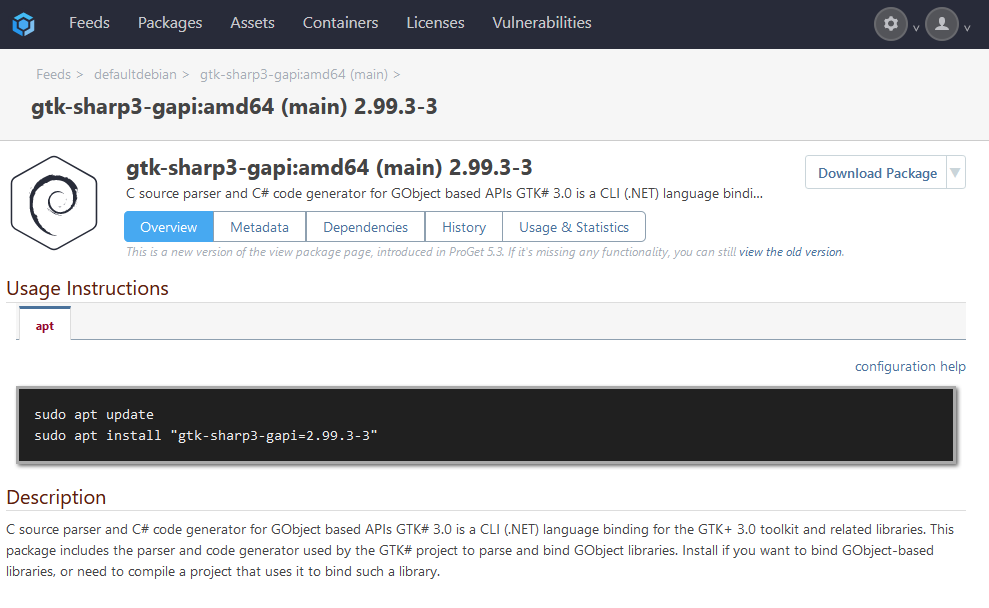
      Glad you got it working! Just some extra information for you. The component name is dependent on the component name of the package you updated. In my case, I uploaded a package to ProGet using the main component. So I had to use deb http://192.168.55.103:8624/ hms-ubuntu main. Here is an example of how my package looked in ProGet.

      3abb0b34-2ef9-41f3-a4cc-c4868272370a-image.png

      Thanks,
      Rich

      posted in Support
      rhessingerR
      rhessinger
    • RE: Unable to obtain builds from FTP server using the FTP extension

      Hi @nkerifacclaud_6931,

      Let me dig into this a bit and see if I can see anything that could be going on.

      Thanks,
      Rich

      posted in Support
      rhessingerR
      rhessinger
    • RE: System.Web.HttpException (0x80004005): Maximum request length exceeded.

      Hi @marcin-kawalerowicz_5163 ,

      Do you have a proxy set up in front of ProGet? If so, please check the request lengths in your proxy.

      Also, what version of ProGet and what version of Docker are you using?

      Thanks,
      Rich

      posted in Support
      rhessingerR
      rhessinger
    • RE: Proget Whitesource Package Access Rule doesn't block vulnerable packages

      Hi @bvandehey_9055,

      The URL you are using looks correct. IF you click on the Download button and the package actually downloads, then that verifies that it successfully connected. If it was failing to connect to WhiteSource, you would see a page that looks like this:
      67e1fc0d-3ddf-40d9-bb7b-a417385cb628-image.png

      If you want to verify that ProGet is communicating with WhiteSource, I would just put in a bad value for WhiteSource and attempt to download the package from the ProGet UI. If you get a similar error to above, that verifies the communication to WhiteSource.

      Are you using the Product Name or the Product Token in the Product field in the configuration? I would try to use the product token first.

      If all of that is setup, then it is most likely an issue with the rules set up within WhiteSource.

      Thanks,
      Rich

      posted in Support
      rhessingerR
      rhessinger
    • RE: Unable to obtain builds from FTP server using the FTP extension

      Hi @nkerifacclaud_6931,

      What version of BuildMaster are you running? Also, what version of the FTP extension do you have installed?

      Thanks,
      Rich

      posted in Support
      rhessingerR
      rhessinger
    • RE: Nuget Feed Connection timeout

      Hi @jyip_5228,

      Are you still running the default max connections property? Or have you increased it? Also, how many concurrent builds are you running at a time?

      Please send us an update on how the .Net Core version is working out for you.

      Thanks,
      Rich

      posted in Support
      rhessingerR
      rhessinger
    • 1 / 1
