Inedo Community Forums Forums
    • Recent
    • Tags
    • Popular
    • Login

    Welcome to the Inedo Forums! Check out the Forums Guide for help getting started.

    If you are experiencing any issues with the forum software, please visit the Contact Form on our website and let us know!

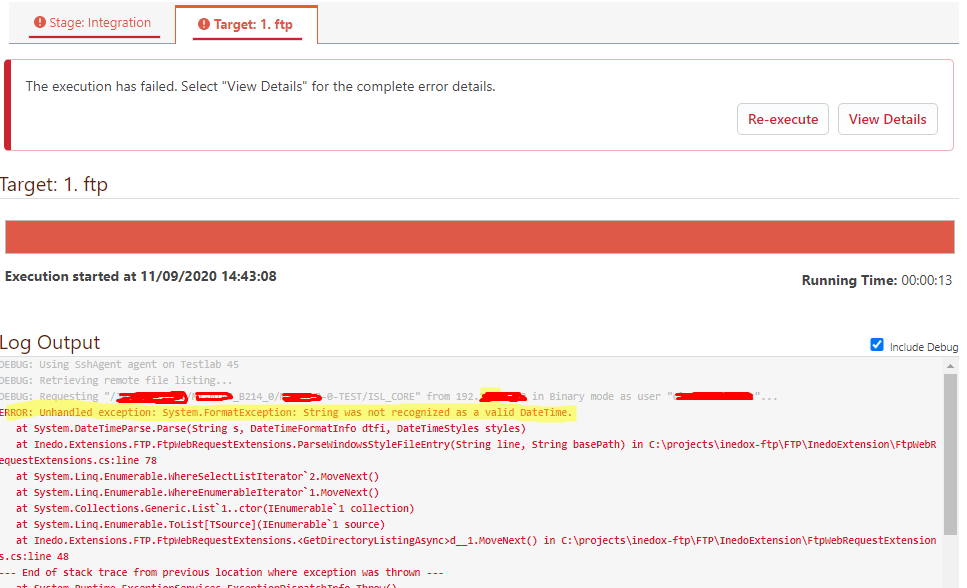
    Unable to obtain builds from FTP server using the FTP extension
    Scheduled Pinned Locked Moved Support
    18 Posts 3 Posters 39 Views 1 Watching
    Loading More Posts
    • Oldest to Newest
    • Newest to Oldest
    • Most Votes
    Reply
    • Reply as topic
    Log in to reply
    This topic has been deleted. Only users with topic management privileges can see it.
    • N Offline
      nkerifacclaud_6931 @atripp
      last edited by

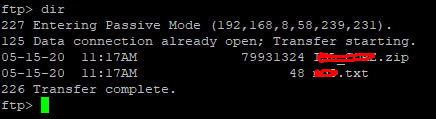
      @atripp Hi, that's the thing. I don't see the data which the FTP extension is getting and rejecting. I tried to do a tcpdump but couldn't find anything useful. When check the listing manually on the FTP server, we have the below:
      e11c67c2-6e3c-4614-9327-759e9091ffb6-image.png
      The date format there will be MM-DD-YY. Could this be the problem?

      1 Reply Last reply Reply Quote 0
      • N Offline
        nkerifacclaud_6931
        last edited by

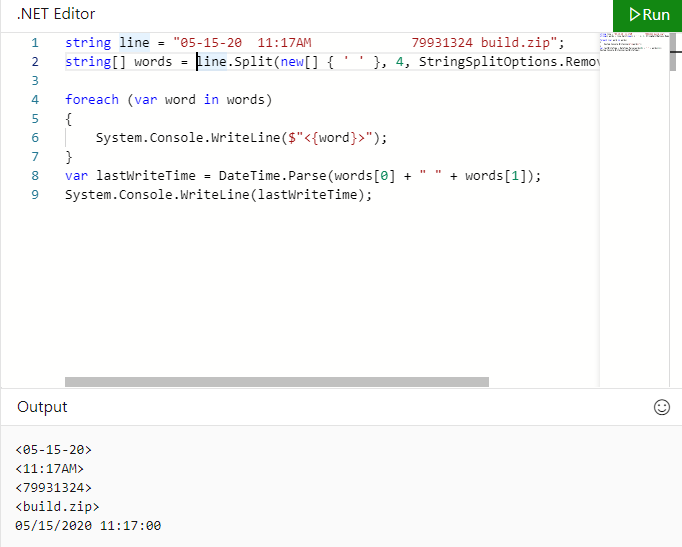
        By the way, I tried simulating using below code which from the source code it should be the same thing buildmaster is trying to do.
        ccfcbe6b-35fc-4a73-9082-da60720929f7-image.png
        The code could run successfully without issues.

        1 Reply Last reply Reply Quote 0
        • rhessingerR Offline
          rhessinger inedo-engineer
          last edited by

          Hi @nkerifacclaud_6931,

          What version of BuildMaster are you running? Also, what version of the FTP extension do you have installed?

          Thanks,
          Rich

          Products Engineer, Inedo

          N 1 Reply Last reply Reply Quote 0
          • N Offline
            nkerifacclaud_6931 @rhessinger
            last edited by

            @rhessinger FTP extension version: 1.0.0
            Buildmaster version: 6.2.17

            1 Reply Last reply Reply Quote 0
            • rhessingerR Offline
              rhessinger inedo-engineer
              last edited by

              Hi @nkerifacclaud_6931,

              Let me dig into this a bit and see if I can see anything that could be going on.

              Thanks,
              Rich

              Products Engineer, Inedo

              1 Reply Last reply Reply Quote 0
              • rhessingerR Offline
                rhessinger inedo-engineer
                last edited by

                Hi @nkerifacclaud_6931,

                I'm not seeing anything that would cause this. I created a CI version of the FTP extension that includes more logging around the Date parsing. Would you be able to install version 1.0.1-CI.2? You can follow our documentation for installing extensions manually to install this.

                Once you have this installed. Could you please repost the error output?

                Thanks,
                Rich

                Products Engineer, Inedo

                N 1 Reply Last reply Reply Quote 0
                • N Offline
                  nkerifacclaud_6931 @rhessinger
                  last edited by

                  Hi @rhessinger,
                  I followed the steps mentioned but still cannot find this new version installed in the list of extensions. So i have not been able to install it.

                  1 Reply Last reply Reply Quote 0
                  • rhessingerR Offline
                    rhessinger inedo-engineer
                    last edited by

                    Hi @nkerifacclaud_6931,

                    Did you download the extension and copy it to the Extensions.ExtensionsPath folder manually or did you update Extensions.UpdateFeedUrl to point to the PreRelease Extensions URL? In either case, try restarting BuildMasters site and service. If you did the manual copy way, then upon restart, you should see the version change. If you updated the feed URL, then you should see an update available for your Ftp extension.

                    Thanks,
                    Rich

                    Products Engineer, Inedo

                    1 Reply Last reply Reply Quote 0
                    • N Offline
                      nkerifacclaud_6931
                      last edited by

                      Hello @rhessinger
                      I managed to install it by update the feedurl.
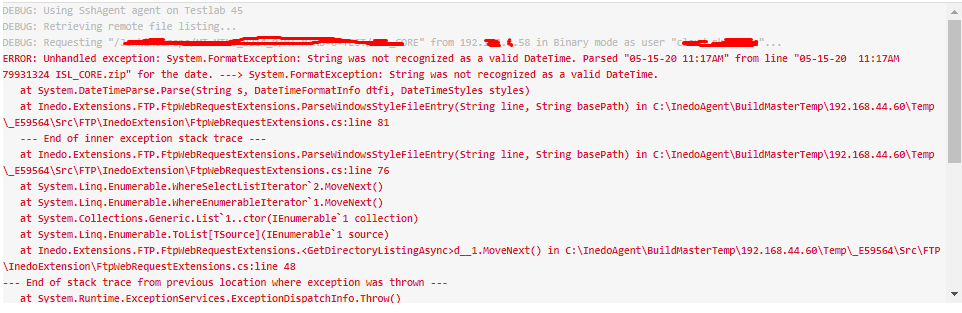
                      I tried again with this version and the error now contains some information, see below screenshot.
                      caa8fdb1-9319-4481-a491-7622233bd84b-image.png

                      1 Reply Last reply Reply Quote 0
                      • rhessingerR Offline
                        rhessinger inedo-engineer
                        last edited by

                        Hi @nkerifacclaud_6931,

                        Are the server BuildMaster is running on and the FTP server using a different culture? For example, is Buildmaster en-EU and the FTP server en-US? It looks like the FTP server is sending the date as M-d-yy, but BuildMaster is expecting d-M-yy.

                        Thanks,
                        Rich

                        Products Engineer, Inedo

                        N 1 Reply Last reply Reply Quote 0
                        • N Offline
                          nkerifacclaud_6931 @rhessinger
                          last edited by

                          Hi @rhessinger ,
                          Buildmaster is running on windows 10 and the FTP is running on windows 7. How can we check the culture you are talking about and how to change if possible.

                          1 Reply Last reply Reply Quote 0
                          • rhessingerR Offline
                            rhessinger inedo-engineer
                            last edited by

                            Hi @nkerifacclaud_6931,

                            The best way is to just adjust the date/time on each and tell me what timezone is selected in each?

                            Thanks,
                            Rich

                            Products Engineer, Inedo

                            1 Reply Last reply Reply Quote 0
                            • N Offline
                              nkerifacclaud_6931
                              last edited by

                              Hello @rhessinger I have adjusted date format on the machine running buildmaster from dd/mm/yyyy to mm/dd/yy, yet issue is still there.
                              Timezone on buildmaster machine is UTC+01:00 West central Africa. I don't have access to the computer running the FTP service.
                              ![0_1600697237180_20582c6f-6a1c-4294-acb3-9075110cc524-image.png](Uploading 100%)

                              1 Reply Last reply Reply Quote 0
                              • rhessingerR Offline
                                rhessinger inedo-engineer
                                last edited by

                                Hi @nkerifacclaud_6931,

                                I did some searching around and it seems like there are a bunch of users that have the same problem in Windows 7. It looks like the FTP server is not using the system's TimeZone and I could not find any way to set it. Unfortunately FTP does not give us a way to determine what timezone use dynamically.

                                I have created a new CI build, 1.0.1-CI.4, that gives you the ability to use the current date and time as the file modifed date when BuildMaster cannot parse it from the FTP server. You can enable it on the FTP operation by going to the Advanced tab and set the property of Use current date on error to true.

                                Could you please update the extension, set the Use current date on error property, and give that a try?

                                Thanks,
                                Rich

                                Products Engineer, Inedo

                                N 1 Reply Last reply Reply Quote 0
                                • N Offline
                                  nkerifacclaud_6931 @rhessinger
                                  last edited by

                                  Hello @rhessinger,
                                  It is working fine now, error no longer appears and it is downloading the needed files.
                                  Thank you for the support.
                                  So what's next, will you make this FTP build an official release?

                                  1 Reply Last reply Reply Quote 0
                                  • rhessingerR Offline
                                    rhessinger inedo-engineer
                                    last edited by

                                    Hi @nkerifacclaud_6931,

                                    Thanks for testing this out! I will get it released as a production version today!

                                    Thanks,
                                    Rich

                                    Products Engineer, Inedo

                                    1 Reply Last reply Reply Quote 0

                                    Hello! It looks like you're interested in this conversation, but you don't have an account yet.

                                    Getting fed up of having to scroll through the same posts each visit? When you register for an account, you'll always come back to exactly where you were before, and choose to be notified of new replies (either via email, or push notification). You'll also be able to save bookmarks and upvote posts to show your appreciation to other community members.

                                    With your input, this post could be even better 💗

                                    Register Login
                                    • 1 / 1
                                    • First post
                                      Last post
                                    Inedo Website Home • Support Home • Code of Conduct • Forums Guide • Documentation