I created on the average 2 servers a week and plenty of roles ...
I am using Otter for configuration management and script deployment so I need a lot of nested roles for the Linux and Windows servers.
I also add/change frequently role variables.
Welcome to the Inedo Forums! Check out the Forums Guide for help getting started.
If you are experiencing any issues with the forum software, please visit the Contact Form on our website and let us know!
P
Offline
Posts
-
RE: Buildmaster - High CPU database since 6.2.22
-
RE: Buildmaster - High CPU database since 6.2.22
SELECT [ExecutionType_Name], COUNT(*) FROM [ManualExecutions] GROUP BY [ExecutionType_Name]
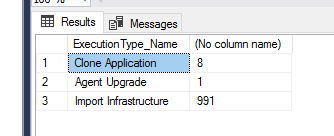
After my last post I purged again the table and it did not increase today. - no rollback I am pretty sure
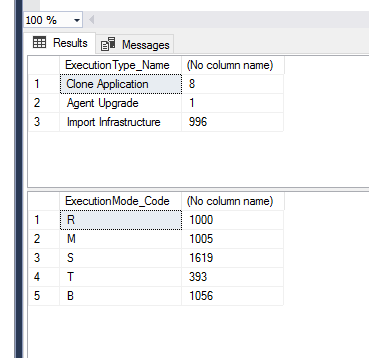
I put again Sync Infra to 1 hour and ran the to following SQL
use BuildMaster
SELECT [ExecutionType_Name], COUNT(*) FROM [ManualExecutions] GROUP BY [ExecutionType_Name]

SELECT [ExecutionMode_Code], COUNT(*) FROM [BuildMaster]..[Executions] GROUP BY [ExecutionMode_Code]
we will see tomorrow
anyway thank you for your time :)
-
RE: Buildmaster - High CPU database since 6.2.22
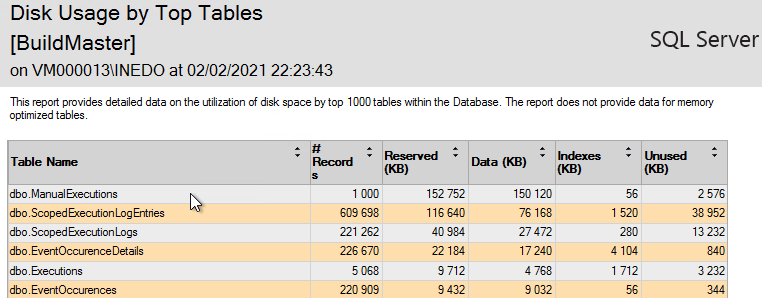
I put some new screenshoots
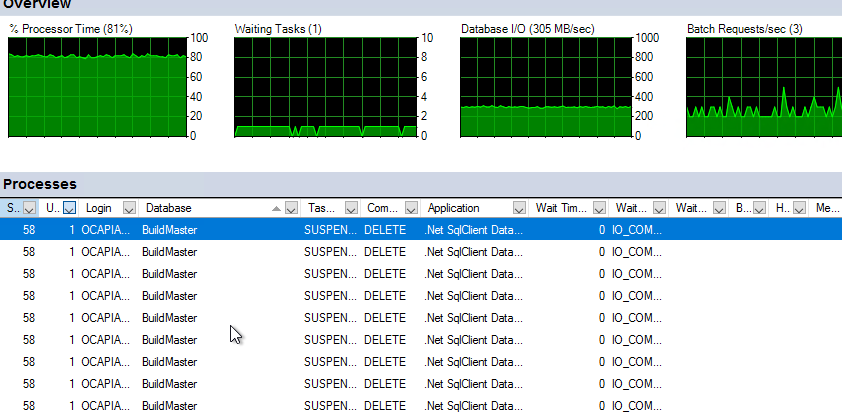
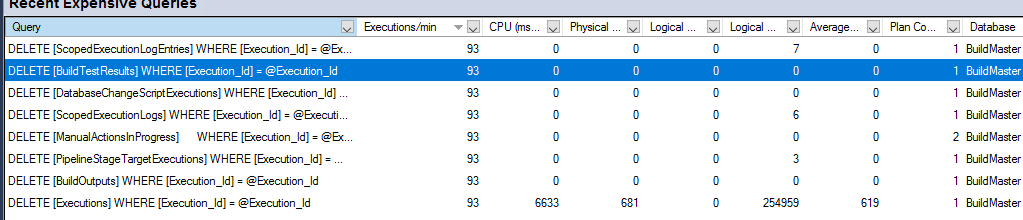
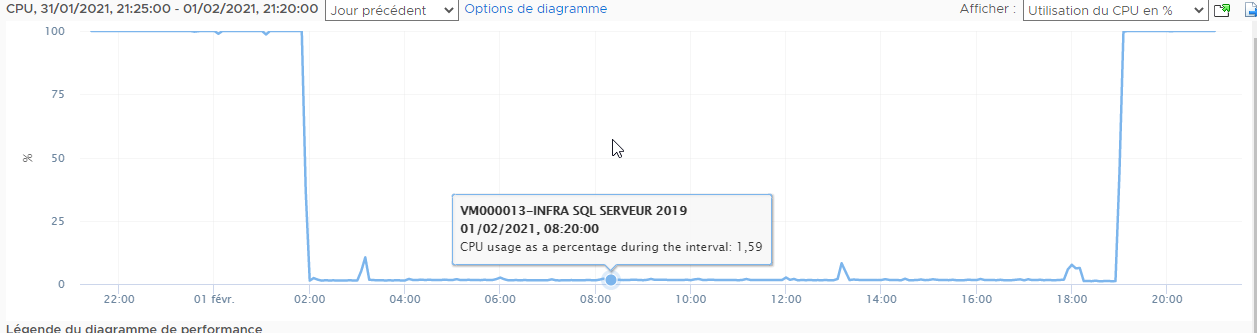
and a lot of this kind of msg
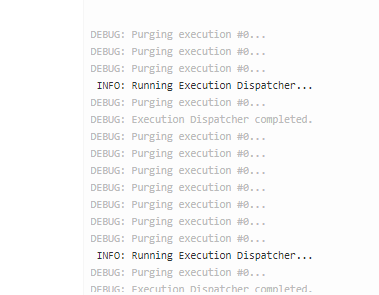
In 10 hours:
- ScopedExecutionLogentries x 20 (600k -> 12M)
- ScopedExecutionLogs : x 34
- ManualExecutions x 164
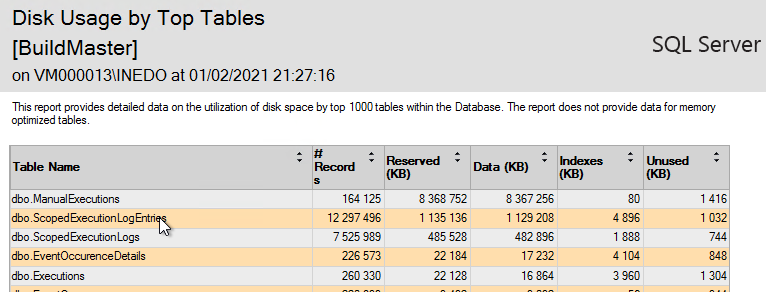
I set Service.AgentUpdaterThrottle to -1
I also increase to 1 hour in order to reduced log.

I will check tomorrow morning
-
RE: Buildmaster - High CPU database since 6.2.22
@atripp
I disabled the Infrastructure sync.
Then I clean up the tableTable size before
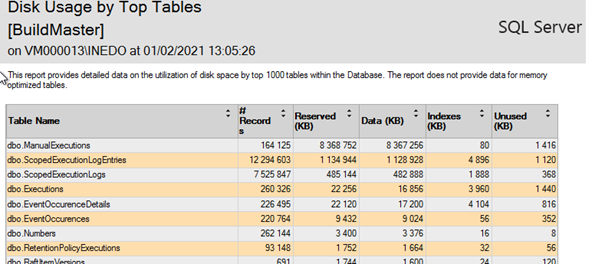
Disable Infrastructure sync
Stop buildmaster
Cleanup
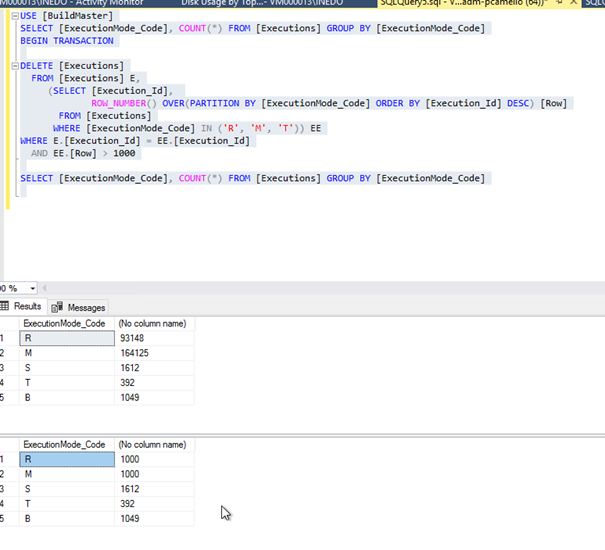
Table size after
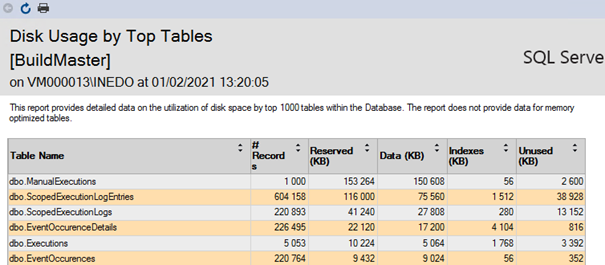
Restart buildmaster
I will check tomorrow about the size and let you know
Thanks
-
RE: Buildmaster - High CPU database since 6.2.22
@atripp said in Buildmaster - High CPU database since 6.2.22:
Importing or Exporting Applications **==> ** never done this **
Cloning and Applying Template to Applications **==> ** one time a month maximum ****
Sync of Issue Sources ==> Not sure what this is about ???
Deploying Configuration file **==> ** No ****
Upgrading Inedo Agents ==> done by Otter in my case
Sync infrastructure ==> Used to sync every 2 hours from Otter. I increased since the last post to one dayI have about 100-110 servers (Linux / windows) sync from Otter, whereas I am using a just a few for deploying application (about 25 actually).
I have plenty of RoleIt could be Sync infrastructure, any way to check ?
-
RE: Buildmaster - High CPU database since 6.2.22
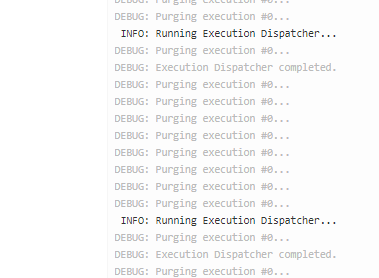
This is what is happening if I force Manual Execution Cleanup to run.
The stop of the BuildMaster Service solved the problem, but BM is down :(
To be more complete, here is the steps I followed
1 Execution of the delete script
2 Restart buildmaster
4 Start Manual Execution Cleanup ==> Problem occurs
4 Start Manual Execution Cleanup ==> Problem occurs -
RE: Buildmaster - High CPU database since 6.2.22
@atripp
Unfortunately, it is disturbing.I join 2 screenshoot about the impact of the delete sql and it is happening during working hours.
I find that deleting several hours of CPU and IO for only 102 purged executions take too long
As I said, the problem exists since release 6.2.22.
I stopped all retention policies,
The problem occurs when the Manual Execution Cleanup is running
==============
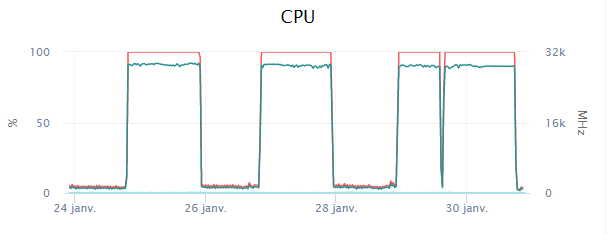
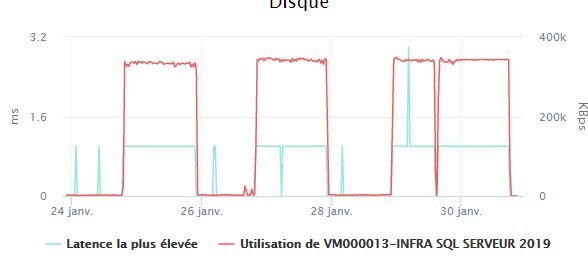
I ran again your code:
Before the execution:
After
(255268 rows affected)

Completion time: 2021-01-30T22:06:02.9603752+01:00
SELECT [ExecutionMode_Code], COUNT(*) FROM [Executions] GROUP BY [ExecutionMode_Code]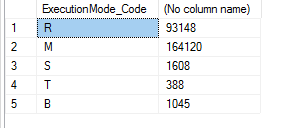
I set Retention.KeepLastManualExecutionCount to 50.
I will see what is going on
Best Regards
PhilippePS - Thanks for the help
-
RE: Buildmaster - High CPU database since 6.2.22
The request still eating all my CPU :(
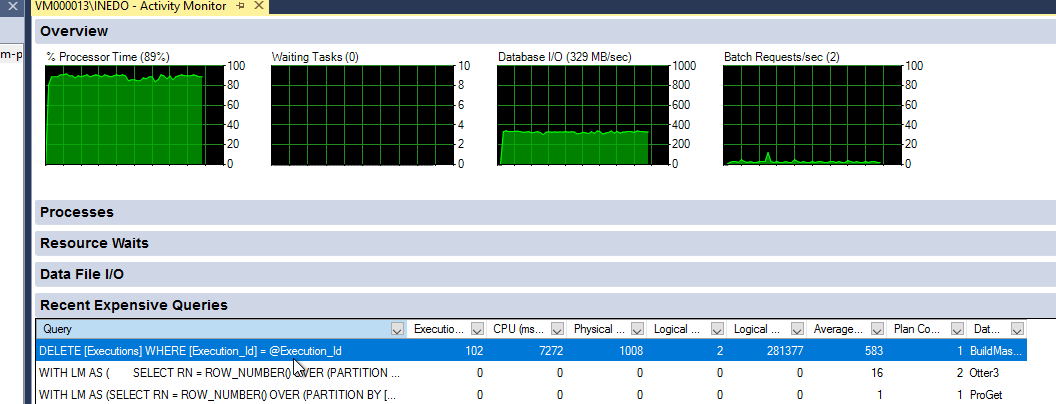
-
RE: Buildmaster - High CPU database since 6.2.22
I had to stop SQL Instance, Restart BM Service
Everything looks fine -
RE: Buildmaster - High CPU database since 6.2.22
Buildmaster is broken

Time out when I try to get an access to BM.I reboot unsuccessfully
but the Database is clean
R 1000 M 1000 S 1586 T 380 B 1025 -
RE: Buildmaster - High CPU database since 6.2.22
I have this error msg from SQL Management Studio or from osql
Msg 4108, Level 15, State 1, Line 7
Les fonctions fenêtrées peuvent uniquement apparaître dans les clauses SELECT ou ORDER BY
I am not good enough in SQL to overcome this. Any tricks ?
-
RE: OTTER 3.0 / Fresh install Install with remote DB from InedoHub failed on non-US system
I had such problem with localized account with a lot of software :)
Managing the [Otter / Buildmaster / Proget] service Account from the InedoHub would be nice.
Philippe
-
RE: Buildmaster - High CPU database since 6.2.22
@atripp
Houps !
About the retention policies, when I start them manually, they remove few lines.
Here is the result of the SQL:
R 91369
M 164051
S 1560
T 377
B 999Thanks
Philippe -
RE: OTTER 3.0 - Git Based-Raft ?
Hello @atripp
That what I thought about git so I installed the extension.
I will reinstall the extension, and I will update the post
Philippe
-
RE: OTTER 3.0 - Agent type SSH
Hey @atripp
I know this is still a beta.
Happy to help you
Philippe -
OTTER 3.0 - Agent type SSH
Hello again.
Linux server created as SSH did not work, the field hostName is missing while it exists in Inedo Agent
Script failed when submitting with the errorUnhandled exception: System.ArgumentNullException: La valeur ne peut pas être null. Nom du paramètre : hostName à Inedo.Agents.Ssh.SshConnectionInfo..ctor(String hostName, String tempPath, SshCredentials credentials, Nullable`1 timeout, Int32 port) à Inedo.Otter.Service.Agents.SshAgentConnection.<CreateAsync>d__9.MoveNext() -
RE: OTTER 3.0 / Fresh install Install with remote DB from InedoHub failed on non-US system
Hi,
I succeed to install it.
The steps I have done:- Create Database on the Remote server with correct collation
- Create file Otter.config in %PROGRAMDATA%\Inedo\SharedConfig
<?xml version="1.0" encoding="utf-8"?> <InedoAppConfig> <ConnectionString>Data Source=MYSQLSERVER\MYINSTANCE;Initial Catalog=MYDATABASE;Integrated Security=True</ConnectionString> <EncryptionKey>***SOME ENCRYPTION KEY ***</EncryptionKey> <WebServer Enabled="false" Urls="http://*:8626/" /> </InedoAppConfig>- Create the Inedo Service with the command:
otter.service.exe installAt this point, nothing is running.
- Run InedoHub,
-- Select Uninstall
this will clean the existing installation
-- Select Install
as the DB is already existing, everything is OK
*In my config, the Otter service have to run with a domain account which owns the Otter DB on the remote server
During the installation, InedoHub is waiting for the service to start.
- Go to the Service Manager, change the Service account and start the Service.
- Change the IIS AppPool with the same account used for the Otter Service
Et voilà !
But, if you create the Database before installing Otter, this should make the installation correctly.
I know it is a little bit messy, I hope this will help if someone meet the same problem
-
RE: Buildmaster - High CPU database since 6.2.22
@atripp said in Buildmaster - High CPU database since 6.2.22:
what are the types of Executions in that table? Manual? Build? Etc?
Sorry, I am not sure to understand what you expect.
I guess every log - manual / build / deployement.I have setup this in the Administration part:
- Diagnostics.MinimumLogLevel : 20
- Retention.KeepLastManualExecutionCount: 1000
I have 3 Retention policies:
- Delete deployed release Retain 180 days
- Delete artifacts for rejected build : Retain 30 days
- Delete execution logs : retain 30 days
Therefore, logs haven't been removed for more than 36 month !!!
I have the same in ScopedExecutionsLogEntriesSELECT TOP (10) [Execution_Id] ,[LogEntry_Sequence] ,[Scope_Sequence] ,[LogEntry_Level] ,[LogEntry_Date] FROM [Otter].[dbo].[ScopedExecutionLogEntries]Execution_Id LogEntry_Sequence Scope_Sequence LogEntry_Level LogEntry_Date 14 1 1 0 2019-04-02 09:09:23.500 14 2 1 0 2019-04-02 09:09:23.500 14 3 1 10 2019-04-02 09:09:23.500 -
OTTER 3.0 / Fresh install Install with remote DB from InedoHub failed on non-US system
Hello
Just to let you know that Installation of Otter 3.0 from scratch with DB on remote Server failed at the DB step due to wrong account.- You should allow to specify the service account
- you should use the SID - S-1-5-2 of "NT Authority\Network service" to grab the "real" name to match for non US system to avoid an error during the setup.
On french system "NT Authority\Network service" is "AUTORITE NT\RESEAU"
=======
** (unnamed scope) **
 ** (unnamed scope) **
  ** Stop $ServiceName service **
    INFO: Stopping service INEDOOTTERSVC...
    INFO: Service INEDOOTTERSVC does not exist.

  ** Stop $WebServiceName service **
    INFO: Stopping service INEDOOTTERWEBSVC...
    INFO: Service INEDOOTTERWEBSVC does not exist.

  ** Sleep for 5 seconds **
    INFO: Sleeping for 5 seconds...
    INFO: Done sleeping.

  ** Deploy Program Files **
   ** Deploy package to $WorkingDirectory **
    DEBUG: Deploying D:\Otter\Extensions\InedoCore.upack...
   ...
    DEBUG: Deploying D:\Otter\Web\bin\System.ValueTuple.dll...


  ** Write SQL Connection String to $DbConnectionString **

  ** Create Database **
   ** Ensure SQL Database $DbName Exists on <unknown> **
    DEBUG: Attempting to connect to *********\INEDO using Initial Catalog=OTTER3...
    DEBUG: Could not connect using Initial Catalog=OTTER3.
    DEBUG: Executing script: CREATE DATABASE [OTTER3] COLLATE SQL_Latin1_General_CP1_CI_AS...
    DEBUG: Executing script: USE [OTTER3];...
    DEBUG: Executing script: CREATE USER [NT AUTHORITY\NETWORK SERVICE] FOR LOGIN [NT AUTHORITY\NETWORK SERVICE]...
    ERROR: Unhandled exception: System.Data.SqlClient.SqlException (0x80131904): Utilisateur ou groupe Windows NT 'NT AUTHORITY\NETWORK SERVICE' introuvable. Vérifiez une nouvelle fois le nom .....
Error Number :15401,State :1,Class :16
Best regards