@rhessinger Thanks
Welcome to the Inedo Forums! Check out the Forums Guide for help getting started.
If you are experiencing any issues with the forum software, please visit the Contact Form on our website and let us know!
P
Offline
Posts
-
Otter 3 - Create an folder in Jobs Template for a Git Asset does not work
Create a Folder in Jobs Template and assign it ot an Asset different than Default.
The folder is not present in the UI but is created in the Git Asset -
RE: OTTER 3 - Variable at environnement level not found
@atripp
As I wrote, I have few environments and INTEGRATION is not a nested env.
I send you the the json file.
Cdt -
Otter 3 - Error This operation is only valid when run against an SSH agent.
Hi
I have some error when I tried to run some Otterv2 working scripts on Otter 3
Define a server (as SSH Agent Type) : VM111021
Create an Otter Module called AnsiblePlaybook##AH:UseTextMode module AnsiblePlayBook<$PLAYBOOK = $Tolower($ApplicationName), %EXTRAVARS = %(env:$ToLower($PipelineStageName)), $YML = main.yml, $RQUIRE = requirements.yml, $Branch = master, $Role = OUI, $GitGroupe = ansible/playbooks> { Log-Debug PLAYBOOK = $PLAYBOOK; Log-Debug Role = $Role; set %EXTRAVARS = %MapAdd(%EXTRAVARS, v, 0); set $DOSSIER = /tmp/ANSIBLE/$PLAYBOOK; set $EXTRAFILE = $DOSSIER/extravars.json; Log-Debug ******** $ToJson(%EXTRAVARS); Ensure-Directory $DOSSIER ( Exists: false ); Log-Debug BEFORE; SHExec git config --global http.sslVerify false; Log-Debug AFTER; if false { # Other stuff I would like to run } }Create an Otter Plan called Create-NewVM
##AH:UseTextMode
##AH:Description Deploiement d'une VM à partird'un template
set $NbVM=1;
set $YML=create-linux.yml
set $octet2 = 100;
set $octet3 = 10;
set $template = GI-DCS-UBUNTU-20.04.1-20210121;
set $annotation = $Date - Creation de la VM  / Template : $template;
# Création d'un VM Linux
for server VM111021
{
    # Loop
    foreach $VM in @Range(1, $NbVM)
    {
        call AnsiblePlayBook
        (
            PLAYBOOK: vmware,
            EXTRAVARS: %(octet2:$octet2,octet3:$octet3,template:$template,annotation:$annotation'),
            YML: $YML,
            Role: NON
        );
    }
}
This script is working fine on Otter 2 but on Otter 3 ...
DEBUG: 2021-05-03 16:19:28Z - Job will be run against servers sequentially (not asynchronously). DEBUG: 2021-05-03 16:19:28Z - Targeting servers: VM111021 DEBUG: 2021-05-03 16:19:28Z - Beginning execution run... DEBUG: 2021-05-03 16:19:28Z - PLAYBOOK = vmware DEBUG: 2021-05-03 16:19:28Z - Role = NON DEBUG: 2021-05-03 16:19:28Z - ******** {"octet2":"100","octet3":"10","template":"GI-DCS-UBUNTU-20.04.1-20210121","annotation":"2021-05-03T18:19:28 - Creation de la VM / Template : GI-DCS-UBUNTU-20.04.1-20210121'","v":"0"} DEBUG: 2021-05-03 16:19:28Z - Looking for /tmp/ANSIBLE/vmware... DEBUG: 2021-05-03 16:19:29Z - Directory does not exist. DEBUG: 2021-05-03 16:19:29Z - BEFORE ERROR: 2021-05-03 16:19:29Z - This operation is only valid when run against an SSH agent. DEBUG: 2021-05-03 16:19:29Z - Script exited with code: 0 ERROR: 2021-05-03 16:19:29Z - Execution run failed. DEBUG: 2021-05-03 16:19:29Z - Cleaning up temporary files on Linux/SSH (10.100.111.21:22)... -
How to use PSEnsure Module and Custom PSRepository ?
Hello
I usually defined a new PSRepository using Otter with this :
Rôle : 000- INIT SERVER
# PSRepository
{
    call PackageManagementSource
    (
        Nom: public-psm,
        SourceLocation: https://proget.ocapiat.fr/nuget/public-psm,
        InstallationPolicy: Trusted
    );

    call PackageManagementSource
    (
        Nom: internal-psm,
        SourceLocation: https://proget.ocapiat.fr/nuget/internal-psm,
        InstallationPolicy: Trusted
    );
}
The called module is:
##AH:UseTextMode
module PackageManagementSource<$Nom, $Ensure = present, $SourceLocation, $ProviderName = PowerShellGet, $InstallationPolicy = Untrusted>

{
        call Log-DSI
        (
            Texte: PSRepository : $Nom
        );
    Ensure-DscResource
    (
        ConfigurationKey: Name,
        Name: PackageManagementSource,
        Module: PackageManagement,
        Properties: %(Name:$Nom,ProviderName:$ProviderName,SourceLocation:$SourceLocation,InstallationPolicy:$InstallationPolicy,Ensure:$Ensure)
    )
}
Then I am using the Ensure PowerModule is a second role (linked to the first role)
And it failed :(Rôle 020 - SERVER - PSMODULE
# General
foreach %Module in @FromJSON($PSModules)
{
    {
        Ensure-PsModule
        (
            Module: %Module.Nom,
            Force: true,
            Repository: public-psm,
            Scope: AllUsers,
            Exists: %Module.Ensure,
            AllowClobber: true,
            AllowPrerelease: false,
            AllVersions: true,
            Parameters: %(MinimumVersion:%Module.Version),
            Verbose: true,
            DebugLogging: true
        );
    }
}
Variable :
$PSModules= [{
		"Nom": "PSDscResources",
		"Version": "2.12.0.0",
		"Ensure": "true",
		"Source": "public-psm"
	},
	{
		"Nom": "Carbon",
		"Version": "2.9.2",
		"Ensure": "true",
		"Source": "public-psm"
	},
	{
		"Nom": "xActiveDirectory",
		"Version": "3.0.0",
		"Ensure": "true",
		"Source": "public-psm"
	},
	{
		"Nom": "NetworkingDSC",
		"Version": "8.2.0",
		"Ensure": "true",
		"Source": "public-psm"
	},
	{
		"Nom": "ComputerManagementDsc",
		"Version": "8.4.0",
		"Ensure": "true",
		"Source": "public-psm"
	}
]
The remediation of the second role failed with the error:
Short versionUnable to find repository 'public-psm'. Use Get-PSRepository to see all available repositoriesLong Version
Install-Module -Name $Name -Force -AllowClobber -Scope $Scope -Repository $Repository -Verbose -MinimumVersion $MinimumVersion
Importing Name...
Importing Version...
Importing Scope...
Importing Repository...
Importing $MinimumVersion...
Renseignement de la propriété RepositorySourceLocation pour le module PackageManagement.
Chargement du module à partir du chemin « C:\Program Files\WindowsPowerShell\Modules\PackageManagement\1.4.7\PackageManagement.psm1 ».
Chargement du module à partir du chemin « C:\Program Files\WindowsPowerShell\Modules\PackageManagement\1.4.7\PackageManagement.psd1 ».
Chargement de « FormatsToProcess » à partir du chemin « C:\Program Files\WindowsPowerShell\Modules\PackageManagement\1.4.7\PackageManagement.format.ps1xml ».
Renseignement de la propriété RepositorySourceLocation pour le module PackageManagement.
Chargement du module à partir du chemin « C:\Program Files\WindowsPowerShell\Modules\PackageManagement\1.4.7\PackageManagement.psm1 ».
Chargement du module à partir du chemin « C:\Program Files\WindowsPowerShell\Modules\PackageManagement\1.4.7\fullclr\Microsoft.PackageManagement.dll ».
Chargement du module à partir du chemin « C:\Program Files\WindowsPowerShell\Modules\PackageManagement\1.4.7\fullclr\Microsoft.PowerShell.PackageManagement.dll ».
Importation de l'applet de commande « Find-Package ».
Importation de l'applet de commande « Find-PackageProvider ».
Importation de l'applet de commande « Get-Package ».
Importation de l'applet de commande « Get-PackageProvider ».
Importation de l'applet de commande « Get-PackageSource ».
Importation de l'applet de commande « Import-PackageProvider ».
Importation de l'applet de commande « Install-Package ».
Importation de l'applet de commande « Install-PackageProvider ».
Importation de l'applet de commande « Register-PackageSource ».
Importation de l'applet de commande « Save-Package ».
Importation de l'applet de commande « Set-PackageSource ».
Importation de l'applet de commande « Uninstall-Package ».
Importation de l'applet de commande « Unregister-PackageSource ».
Exportation de l'applet de commande « Find-Package ».
Exportation de l'applet de commande « Find-PackageProvider ».
Exportation de l'applet de commande « Get-Package ».
Exportation de l'applet de commande « Get-PackageProvider ».
Exportation de l'applet de commande « Get-PackageSource ».
Exportation de l'applet de commande « Import-PackageProvider ».
Exportation de l'applet de commande « Install-Package ».
Exportation de l'applet de commande « Install-PackageProvider ».
Exportation de l'applet de commande « Register-PackageSource ».
Exportation de l'applet de commande « Save-Package ».
Exportation de l'applet de commande « Set-PackageSource ».
Exportation de l'applet de commande « Uninstall-Package ».
Exportation de l'applet de commande « Unregister-PackageSource ».
Importation de l'applet de commande « Find-Package ».
Importation de l'applet de commande « Find-PackageProvider ».
Importation de l'applet de commande « Get-Package ».
Importation de l'applet de commande « Get-PackageProvider ».
Importation de l'applet de commande « Get-PackageSource ».
Importation de l'applet de commande « Import-PackageProvider ».
Importation de l'applet de commande « Install-Package ».
Importation de l'applet de commande « Install-PackageProvider ».
Importation de l'applet de commande « Register-PackageSource ».
Importation de l'applet de commande « Save-Package ».
Importation de l'applet de commande « Set-PackageSource ».
Importation de l'applet de commande « Uninstall-Package ».
Importation de l'applet de commande « Unregister-PackageSource ».

using System;
using System.Net;

namespace Microsoft.PowerShell.Commands.PowerShellGet
{
    /// <summary>
    /// Used by Ping-Endpoint function to supply webproxy to HttpClient
    /// We cannot use System.Net.WebProxy because this is not available on CoreClr
    /// </summary>
    public class InternalWebProxy : IWebProxy
    {
        Uri _proxyUri;
        ICredentials _credentials;

        public InternalWebProxy(Uri uri, ICredentials credentials)
        {
            Credentials = credentials;
            _proxyUri = uri;
        }

        /// <summary>
        /// Credentials used by WebProxy
        /// </summary>
        public ICredentials Credentials
        {
            get
            {
                return _credentials;
            }
            set
            {
                _credentials = value;
            }
        }

        public Uri GetProxy(Uri destination)
        {
            return _proxyUri;
        }

        public bool IsBypassed(Uri host)
        {
            return false;
        }
    }
}

using System;
using System.Management.Automation;

namespace Microsoft.PowerShell.Commands.PowerShellGet
{
    public static class Telemetry
    {
        public static void TraceMessageArtifactsNotFound(string[] artifactsNotFound, string operationName)
        {
            Microsoft.PowerShell.Telemetry.Internal.TelemetryAPI.TraceMessage(operationName, new { ArtifactsNotFound = artifactsNotFound });
        }

        public static void TraceMessageNonPSGalleryRegistration(string sourceLocationType, string sourceLocationHash, string installationPolicy, string packageManagementProvider, string publishLocationHash, string scriptSourceLocationHash, string scriptPublishLocationHash, string operationName)
        {
            Microsoft.PowerShell.Telemetry.Internal.TelemetryAPI.TraceMessage(operationName, new { SourceLocationType = sourceLocationType, SourceLocationHash = sourceLocationHash, InstallationPolicy = installationPolicy, PackageManagementProvider = packageManagementProvider, PublishLocationHash = publishLocationHash, ScriptSourceLocationHash = scriptSourceLocationHash, ScriptPublishLocationHash = scriptPublishLocationHash });
        }
    }
}

using System;
using System.Net;
using Microsoft.Win32.SafeHandles;
using System.Security.Cryptography;
using System.Runtime.InteropServices;
using System.Runtime.ConstrainedExecution;
using System.Runtime.Versioning;
using System.Security;

namespace Microsoft.PowerShell.Commands.PowerShellGet
{
    [StructLayout(LayoutKind.Sequential, CharSet=CharSet.Unicode)]
    public struct CERT_CHAIN_POLICY_PARA {
        public CERT_CHAIN_POLICY_PARA(int size) {
            cbSize = (uint) size;
            dwFlags = 0;
            pvExtraPolicyPara = IntPtr.Zero;
        }
        public uint   cbSize;
        public uint   dwFlags;
        public IntPtr pvExtraPolicyPara;
    }

    [StructLayout(LayoutKind.Sequential, CharSet=CharSet.Unicode)]
    public struct CERT_CHAIN_POLICY_STATUS {
        public CERT_CHAIN_POLICY_STATUS(int size) {
            cbSize = (uint) size;
            dwError = 0;
            lChainIndex = IntPtr.Zero;
            lElementIndex = IntPtr.Zero;
            pvExtraPolicyStatus = IntPtr.Zero;
        }
        public uint   cbSize;
        public uint   dwError;
        public IntPtr lChainIndex;
        public IntPtr lElementIndex;
        public IntPtr pvExtraPolicyStatus;
    }

    // Internal SafeHandleZeroOrMinusOneIsInvalid class to remove the dependency on .Net Framework 4.6.
    public abstract class InternalSafeHandleZeroOrMinusOneIsInvalid : SafeHandle
    {
        protected InternalSafeHandleZeroOrMinusOneIsInvalid(bool ownsHandle)
            : base(IntPtr.Zero, ownsHandle)
        {
        }

        public override bool IsInvalid
        {
            get
            {
                return handle == IntPtr.Zero || handle == new IntPtr(-1);
            }
        }
    }

    // Internal SafeX509ChainHandle class to remove the dependency on .Net Framework 4.6.
    [SecurityCritical]
    public sealed class InternalSafeX509ChainHandle : InternalSafeHandleZeroOrMinusOneIsInvalid {
        private InternalSafeX509ChainHandle () : base(true) {}

        internal InternalSafeX509ChainHandle (IntPtr handle) : base (true) {
            SetHandle(handle);
        }

        internal static InternalSafeX509ChainHandle InvalidHandle {
            get { return new InternalSafeX509ChainHandle(IntPtr.Zero); }
        }

        [SecurityCritical]
        override protected bool ReleaseHandle()
        {
            CertFreeCertificateChain(handle);
            return true;
        }

        [DllImport("Crypt32.dll", SetLastError=true)]

        [SuppressUnmanagedCodeSecurity,
         ResourceExposure(ResourceScope.None),
         ReliabilityContract(Consistency.WillNotCorruptState, Cer.Success)]

        private static extern void CertFreeCertificateChain(IntPtr handle);
    }

    public class Win32Helpers
    {
        [DllImport("Crypt32.dll", CharSet=CharSet.Auto, SetLastError=true)]
        public extern static
        bool CertVerifyCertificateChainPolicy(
            [In]     IntPtr                       pszPolicyOID,
            [In]     SafeX509ChainHandle  pChainContext,
            [In]     ref CERT_CHAIN_POLICY_PARA   pPolicyPara,
            [In,Out] ref CERT_CHAIN_POLICY_STATUS pPolicyStatus);

        [DllImport("Crypt32.dll", CharSet=CharSet.Auto, SetLastError=true)]
        public static extern
        SafeX509ChainHandle CertDuplicateCertificateChain(
            [In]     IntPtr pChainContext);

        [DllImport("Crypt32.dll", CharSet=CharSet.Auto, SetLastError=true)]

        [ResourceExposure(ResourceScope.None)]

        public static extern
        SafeX509ChainHandle CertDuplicateCertificateChain(
            [In]     SafeX509ChainHandle pChainContext);

        public static bool IsMicrosoftCertificate([In] SafeX509ChainHandle pChainContext)
        {
            //-------------------------------------------------------------------------
            //  CERT_CHAIN_POLICY_MICROSOFT_ROOT
            //
            //  Checks if the last element of the first simple chain contains a
            //  Microsoft root public key. If it doesn't contain a Microsoft root
            //  public key, dwError is set to CERT_E_UNTRUSTEDROOT.
            //
            //  pPolicyPara is optional. However,
            //  MICROSOFT_ROOT_CERT_CHAIN_POLICY_ENABLE_TEST_ROOT_FLAG can be set in
            //  the dwFlags in pPolicyPara to also check for the Microsoft Test Roots.
            //
            //  MICROSOFT_ROOT_CERT_CHAIN_POLICY_CHECK_APPLICATION_ROOT_FLAG can be set
            //  in the dwFlags in pPolicyPara to check for the Microsoft root for
            //  application signing instead of the Microsoft product root. This flag
            //  explicitly checks for the application root only and cannot be combined
            //  with the test root flag.
            //
            //  MICROSOFT_ROOT_CERT_CHAIN_POLICY_DISABLE_FLIGHT_ROOT_FLAG can be set
            //  in the dwFlags in pPolicyPara to always disable the Flight root.
            //
            //  pvExtraPolicyPara and pvExtraPolicyStatus aren't used and must be set
            //  to NULL.
            //--------------------------------------------------------------------------
            const uint MICROSOFT_ROOT_CERT_CHAIN_POLICY_ENABLE_TEST_ROOT_FLAG       = 0x00010000;
            const uint MICROSOFT_ROOT_CERT_CHAIN_POLICY_CHECK_APPLICATION_ROOT_FLAG = 0x00020000;
            //const uint MICROSOFT_ROOT_CERT_CHAIN_POLICY_DISABLE_FLIGHT_ROOT_FLAG    = 0x00040000;

            CERT_CHAIN_POLICY_PARA PolicyPara = new CERT_CHAIN_POLICY_PARA(Marshal.SizeOf(typeof(CERT_CHAIN_POLICY_PARA)));
            CERT_CHAIN_POLICY_STATUS PolicyStatus = new CERT_CHAIN_POLICY_STATUS(Marshal.SizeOf(typeof(CERT_CHAIN_POLICY_STATUS)));
            int CERT_CHAIN_POLICY_MICROSOFT_ROOT = 7;

            PolicyPara.dwFlags = (uint) MICROSOFT_ROOT_CERT_CHAIN_POLICY_ENABLE_TEST_ROOT_FLAG;
            bool isMicrosoftRoot = false;

            if(CertVerifyCertificateChainPolicy(new IntPtr(CERT_CHAIN_POLICY_MICROSOFT_ROOT),
                                                pChainContext,
                                                ref PolicyPara,
                                                ref PolicyStatus))
            {
                isMicrosoftRoot = (PolicyStatus.dwError == 0);
            }

            // Also check for the Microsoft root for application signing if the Microsoft product root verification is unsuccessful.
            if(!isMicrosoftRoot)
            {
                // Some Microsoft modules can be signed with Microsoft Application Root instead of Microsoft Product Root,
                // So we need to use the MICROSOFT_ROOT_CERT_CHAIN_POLICY_CHECK_APPLICATION_ROOT_FLAG for the certificate verification.
                // MICROSOFT_ROOT_CERT_CHAIN_POLICY_CHECK_APPLICATION_ROOT_FLAG can not be used
                // with MICROSOFT_ROOT_CERT_CHAIN_POLICY_ENABLE_TEST_ROOT_FLAG,
                // so additional CertVerifyCertificateChainPolicy call is required to verify the given certificate is in Microsoft Application Root.
                //
                CERT_CHAIN_POLICY_PARA PolicyPara2 = new CERT_CHAIN_POLICY_PARA(Marshal.SizeOf(typeof(CERT_CHAIN_POLICY_PARA)));
                CERT_CHAIN_POLICY_STATUS PolicyStatus2 = new CERT_CHAIN_POLICY_STATUS(Marshal.SizeOf(typeof(CERT_CHAIN_POLICY_STATUS)));
                PolicyPara2.dwFlags = (uint) MICROSOFT_ROOT_CERT_CHAIN_POLICY_CHECK_APPLICATION_ROOT_FLAG;

                if(CertVerifyCertificateChainPolicy(new IntPtr(CERT_CHAIN_POLICY_MICROSOFT_ROOT),
                                                    pChainContext,
                                                    ref PolicyPara2,
                                                    ref PolicyStatus2))
                {
                    isMicrosoftRoot = (PolicyStatus2.dwError == 0);
                }
            }

            return isMicrosoftRoot;
        }
    }
}
Exportation de la fonction « Find-Command ».
Exportation de la fonction « Find-DscResource ».
Exportation de la fonction « Find-Module ».
Exportation de la fonction « Find-RoleCapability ».
Exportation de la fonction « Find-Script ».
Exportation de la fonction « Get-CredsFromCredentialProvider ».
Exportation de la fonction « Get-InstalledModule ».
Exportation de la fonction « Get-InstalledScript ».
Exportation de la fonction « Get-PSRepository ».
Exportation de la fonction « Install-Module ».
Exportation de la fonction « Install-Script ».
Exportation de la fonction « New-ScriptFileInfo ».
Exportation de la fonction « Publish-Module ».
Exportation de la fonction « Publish-Script ».
Exportation de la fonction « Register-PSRepository ».
Exportation de la fonction « Save-Module ».
Exportation de la fonction « Save-Script ».
Exportation de la fonction « Set-PSRepository ».
Exportation de la fonction « Test-ScriptFileInfo ».
Exportation de la fonction « Uninstall-Module ».
Exportation de la fonction « Uninstall-Script ».
Exportation de la fonction « Unregister-PSRepository ».
Exportation de la fonction « Update-Module ».
Exportation de la fonction « Update-ModuleManifest ».
Exportation de la fonction « Update-Script ».
Exportation de la fonction « Update-ScriptFileInfo ».
Exportation de la fonction « Add-PackageSource ».
Exportation de la fonction « Download-Package ».
Exportation de la fonction « Find-Package ».
Exportation de la fonction « Get-DynamicOptions ».
Exportation de la fonction « Get-Feature ».
Exportation de la fonction « Get-InstalledPackage ».
Exportation de la fonction « Get-PackageProviderName ».
Exportation de la fonction « Initialize-Provider ».
Exportation de la fonction « Install-Package ».
Exportation de la fonction « Remove-PackageSource ».
Exportation de la fonction « Resolve-PackageSource ».
Exportation de la fonction « Uninstall-Package ».
Exportation de la variable « PSGetPath ».
Exportation de l'alias « fimo ».
Exportation de l'alias « inmo ».
Exportation de l'alias « upmo ».
Exportation de l'alias « pumo ».
Exportation de l'alias « uimo ».
00:00:00.0000002 Current running environment: Windows PowerShell.
00:00:00.0409141 Trying provider assembly: C:\Program Files\WindowsPowerShell\Modules\PackageManagement\1.4.7\fullclr\Microsoft.PackageManagement.MsiProvider.dll
00:00:00.0409171 Trying provider assembly: C:\Program Files\WindowsPowerShell\Modules\PackageManagement\1.4.7\fullclr\Microsoft.PackageManagement.ArchiverProviders.dll
00:00:00.0409136 Trying provider assembly: C:\Program Files\WindowsPowerShell\Modules\PackageManagement\1.4.7\fullclr\Microsoft.PackageManagement.NuGetProvider.dll
00:00:00.0409679 Trying provider assembly: C:\Program Files\WindowsPowerShell\Modules\PackageManagement\1.4.7\fullclr\Microsoft.PackageManagement.MetaProvider.PowerShell.dll
00:00:00.0412470 Trying provider assembly: C:\Program Files\WindowsPowerShell\Modules\PackageManagement\1.4.7\fullclr\Microsoft.PackageManagement.CoreProviders.dll
00:00:00.0412699 Trying provider assembly: C:\Program Files\WindowsPowerShell\Modules\PackageManagement\1.4.7\fullclr\Microsoft.PackageManagement.MsuProvider.dll
00:00:00.0420513 Attempting loading of assembly: C:\Program Files\WindowsPowerShell\Modules\PackageManagement\1.4.7\fullclr\Microsoft.PackageManagement.MetaProvider.PowerShell.dll
00:00:00.0421320 Attempting loading of assembly: C:\Program Files\WindowsPowerShell\Modules\PackageManagement\1.4.7\fullclr\Microsoft.PackageManagement.MsuProvider.dll
00:00:00.0422013 Attempting loading of assembly: C:\Program Files\WindowsPowerShell\Modules\PackageManagement\1.4.7\fullclr\Microsoft.PackageManagement.ArchiverProviders.dll
00:00:00.0422681 Attempting loading of assembly: C:\Program Files\WindowsPowerShell\Modules\PackageManagement\1.4.7\fullclr\Microsoft.PackageManagement.CoreProviders.dll
00:00:00.0424206 Attempting loading of assembly: C:\Program Files\WindowsPowerShell\Modules\PackageManagement\1.4.7\fullclr\Microsoft.PackageManagement.MsiProvider.dll
00:00:00.0425076 Attempting loading of assembly: C:\Program Files\WindowsPowerShell\Modules\PackageManagement\1.4.7\fullclr\Microsoft.PackageManagement.NuGetProvider.dll
Acquiring providers for assembly: C:\Program Files\WindowsPowerShell\Modules\PackageManagement\1.4.7\fullclr\Microsoft.PackageManagement.MetaProvider.PowerShell.dll
Acquiring providers for assembly: C:\Program Files\WindowsPowerShell\Modules\PackageManagement\1.4.7\fullclr\Microsoft.PackageManagement.CoreProviders.dll
Acquiring providers for assembly: C:\Program Files\WindowsPowerShell\Modules\PackageManagement\1.4.7\fullclr\Microsoft.PackageManagement.MsuProvider.dll
Acquiring providers for assembly: C:\Program Files\WindowsPowerShell\Modules\PackageManagement\1.4.7\fullclr\Microsoft.PackageManagement.ArchiverProviders.dll
Acquiring providers for assembly: C:\Program Files\WindowsPowerShell\Modules\PackageManagement\1.4.7\fullclr\Microsoft.PackageManagement.MsiProvider.dll
Acquiring providers for assembly: C:\Program Files\WindowsPowerShell\Modules\PackageManagement\1.4.7\fullclr\Microsoft.PackageManagement.NuGetProvider.dll
00:00:00.0995375 Registering providers via metaproviders for assembly Microsoft.PackageManagement.MetaProvider.PowerShell.Internal.PowerShellMetaProvider
00:00:00.1429840 Initializing provider 'zipfile'
00:00:00.1431664 Initializing provider 'WebDownloader'
00:00:00.1432405 Initializing provider 'Bootstrap'
00:00:00.1432709 Initializing provider 'Programs'
00:00:00.1433983 Initializing provider 'msu'
00:00:00.1434329 Initializing provider 'msi'
00:00:00.1435730 Initializing provider 'NuGet'
00:00:00.1742315 Provider 'WebDownloader' Initialized
00:00:00.1742657 Provider 'zipfile' Initialized
00:00:00.1742804 Using Downloader Provider WebDownloader
00:00:00.1742916 Using Archiver Provider zipfile
00:00:00.1752022 Initialize Bootstrapper
00:00:00.1754217 Provider 'Bootstrap' Initialized
00:00:00.1754477 Using Package Provider Bootstrap
00:00:00.1785106 Calling 'msi::InitializeProvider'
00:00:00.1785183 Calling 'Programs::InitializeProvider'
00:00:00.1785447 Provider 'msi' Initialized
00:00:00.1785457 Provider 'Programs' Initialized
00:00:00.1785590 Using Package Provider msi
00:00:00.1785603 Using Package Provider Programs
00:00:00.1786129 Calling 'msu::InitializeProvider'
00:00:00.1786502 Provider 'msu' Initialized
00:00:00.1786646 Using Package Provider msu
00:00:00.1787321 Calling 'NuGet'::'InitializeProvider'.
00:00:00.1787731 Provider 'NuGet' Initialized
00:00:00.1787864 Using Package Provider NuGet
00:00:00.1790461 Trying to register metaprovider
00:00:00.1936506 Initializing PowerShell MetaProvider
00:00:00.1961897 Calling 'Programs::GetFeatures'
00:00:00.1962144 Calling 'msi::GetFeatures'
00:00:00.1962318 Calling 'Bootstrap::GetFeatures'
00:00:00.1962764 Calling 'NuGet'::'GetFeatures'.
00:00:00.1963291 Calling 'msu::GetFeatures'
00:00:00.1963715 Calling 'WebDownloader::GetFeatures'
00:00:00.1964346 Calling 'zipfile::GetFeatures'
00:00:00.1971251 The provider 'Programs' is imported
00:00:00.1982903 The provider 'msu' is imported
00:00:00.1983136 The provider 'Bootstrap' is imported
00:00:00.1983144 The provider 'msi' is imported
00:00:00.1984682 The provider 'NuGet' is imported
00:00:00.1985542 SUCCESS provider assembly: C:\Program Files\WindowsPowerShell\Modules\PackageManagement\1.4.7\fullclr\Microsoft.PackageManagement.MsuProvider.dll
00:00:00.1988048 SUCCESS provider assembly: C:\Program Files\WindowsPowerShell\Modules\PackageManagement\1.4.7\fullclr\Microsoft.PackageManagement.MsiProvider.dll
00:00:00.1988880 SUCCESS provider assembly: C:\Program Files\WindowsPowerShell\Modules\PackageManagement\1.4.7\fullclr\Microsoft.PackageManagement.ArchiverProviders.dll
00:00:00.1991170 SUCCESS provider assembly: C:\Program Files\WindowsPowerShell\Modules\PackageManagement\1.4.7\fullclr\Microsoft.PackageManagement.CoreProviders.dll
00:00:00.1995544 SUCCESS provider assembly: C:\Program Files\WindowsPowerShell\Modules\PackageManagement\1.4.7\fullclr\Microsoft.PackageManagement.NuGetProvider.dll
00:00:00.2086319 Calling 'WebDownloader::DownloadFile' 'https://go.microsoft.com/fwlink/?LinkID=627338&clcid=0x409','C:\Users\svc-inedo\AppData\Local\Temp\Microsoft.PackageManagement\evi4ojfr.adc','40000','False'
00:00:00.2168660 Attempting to load PowerShell Provider Module [C:\Program Files\WindowsPowerShell\Modules\PowerShellGet\2.2.5\PSModule.psm1]
00:00:00.3548969 Calling 'WebDownloader::DownloadFile' 'https://onegetcdn.azureedge.net/providers/nuget-2.8.5.208.package.swidtag','C:\Users\svc-inedo\AppData\Local\Temp\Microsoft.PackageManagement\3pqkgnso.vfk','40000','False'
00:00:00.3707818 Calling 'WebDownloader::DownloadFile' 'https://onegetcdn.azureedge.net/providers/psl-1.0.0.210.package.swidtag','C:\Users\svc-inedo\AppData\Local\Temp\Microsoft.PackageManagement\bs5wy4jx.3bw','40000','False'
00:00:00.3746673 Loaded PowerShell package provider: '[C:\Program Files\WindowsPowerShell\Modules\PowerShellGet\2.2.5\PSModule.psm1]'.
00:00:00.3811891 Loaded PowerShell Provider: PowerShellGet
00:00:00.3830792 Initializing provider 'PowerShellGet'
00:00:00.3871533 Calling 'WebDownloader::DownloadFile' 'https://onegetcdn.azureedge.net/providers/ChocolateyPrototype-2.8.5.130.package.swidtag','C:\Users\svc-inedo\AppData\Local\Temp\Microsoft.PackageManagement\dqjzpfhm.zdy','40000','False'
00:00:00.3898807 Calling New() : MethodName = 'InitializeProvider'
00:00:00.3899178 ErrorAction: SilentlyContinue
00:00:00.3899290 WarningAction: SilentlyContinue
00:00:00.4008578 INVOKING PowerShell Fn Initialize-Provider with args  that has length 0
00:00:00.4527793 In PowerShellGet Provider - 'Initialize-Provider'.
00:00:00.4530119 PowerShell Script 'PSModule' Function 'Initialize-Provider' returns null.
00:00:00.4539599 Done calling powershell «Initialize-Provider» «PSModule»
00:00:00.4540134 Provider 'PowerShellGet' Initialized
00:00:00.4540261 Using Package Provider PowerShellGet
00:00:00.4592491 Calling New() : MethodName = 'GetFeatures'
00:00:00.4592844 ErrorAction: SilentlyContinue
00:00:00.4593029 WarningAction: SilentlyContinue
00:00:00.4598243 INVOKING PowerShell Fn Get-Feature with args  that has length 0
00:00:00.5012206 In PowerShellGet Provider - 'Get-Feature'.
00:00:00.5113543 Done calling powershell «Get-Feature» «PSModule»
00:00:00.5114479 The provider 'PowerShellGet' is imported
00:00:00.5125800 SUCCESS provider assembly: C:\Program Files\WindowsPowerShell\Modules\PackageManagement\1.4.7\fullclr\Microsoft.PackageManagement.MetaProvider.PowerShell.dll
00:00:00.0000002 Calling New() : MethodName = 'ResolvePackageSources'
00:00:00.0002003 Verbose: False
00:00:00.0002236 Name: public-psm
00:00:00.0002355 ErrorVariable: ev
00:00:00.0008344 INVOKING PowerShell Fn Resolve-PackageSource with args  that has length 0
00:00:00.0440115 In PowerShellGet Provider - 'Resolve-PackageSource'.
00:00:00.3266117 PowerShell Script 'PSModule' Function 'Resolve-PackageSource' returns null.
00:00:00.3271033 Done calling powershell «Resolve-PackageSource» «PSModule»
Unable to find repository 'public-psm'. Use Get-PSRepository to see all available repositories.
Storing configuration template...
What's wrong ?
-
RE: [Otter 3] Upgrade Inedo Agent failed
@atripp said in [Otter 3] Upgrade Inedo Agent failed:
m here, I recommend to just reinstall v49 on the serve
Reinstall the v49 directly is working but as the config file move and its format change I have to modify my autoregistration deployment script

Thanks for the reply
-
RE: OTTER 3 - Help needed on PSEnsure (works on Plan but not on Configuration)
@apxltd
Thank you, problem fixed
-
RE: OTTER 3 - Variable at environnement level not found
@atripp
INTEGRATION is not a nested environment.
I have only few environment withe 2 nested env (under DEVELOPPEMENT)
|-INTEGRATION
|-DEVELOPPEMENT
|------RECETTE
|----- PREPROD
|-PRODUCTION -
OTTER 3 - Help needed on PSEnsure (works on Plan but not on Configuration)
Hello
I made a small PSEnsure script to create an AD Group - test case -
Running directly from an Otter Plan it is working as expected:- if the group exists, it does nothing
- if the group doesn't exist, it creates the group
From a configuration Plan inside a Role
- the Verify step works as expected
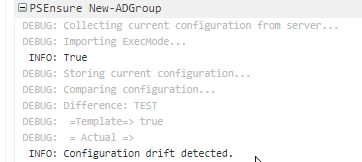
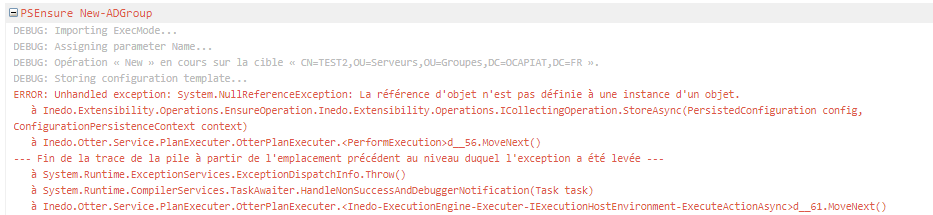
- the Remediation step returns an error

Powershell Script: New-ADGroup
<#
.DESCRIPTION
Create AD Group

.AHCONFIGKEY
$Name

.AHEXECMODE
$ExecMode
#>
Param(
   [Parameter(Mandatory=$false)]
   [string]$Name="TEST",

   [Parameter(Mandatory=$false)]
   [string]$GroupCategory="Security",

   [Parameter(Mandatory=$false)]
   [string]$GroupScope="DomainLocal",

   [Parameter(Mandatory=$false)]
   [string]$DisplayName="TEST",

   [Parameter(Mandatory=$false)]
   [string]$Path="OU=Serveurs,OU=Groupes,DC=OCAPIAT,DC=FR",

   [Parameter(Mandatory=$false)]
   [string]$Description="Test"
)
    if ($ExecMode -eq "Configure") {
        if ([bool](Get-ADGroup -filter "Name -eq '$($Name)'")){ return $true} else {
            New-ADGroup -Name $Name -GroupCategory $GroupCategory -GroupScope $GroupScope  -DisplayName $DisplayName -Path $Path -Description $Description -Verbose
        }

}else{
    if ([bool](Get-ADGroup -filter "Name -eq '$($Name)'")){ return $true} else { return $false }
}
Otter Plan : TESTPLAN
##AH:UseTextMode
PSEnsure New-ADGroup
(
    Name: TEST2
);
Role : TESTROLE
##AH:UseTextMode


PSEnsure New-ADGroup
(
    Name: TEST2
);
Prerequisite on the server : RSAT-AD-Powershell feature
I can't figure out what I am doing wrong, any help would be appreciate
Best Regards
Philippe -
RE: [Otter 3] Upgrade Inedo Agent failed
Hello @atripp
I made a new test from Otter 3.0.5
The target is a server with Agent 46 already linked to another Otter instance (2.7)I defined the server in the Otter 3 instance (AES + key)
Everything was working until I upgraded the Agent.Downloading updated agent from https://s3.amazonaws.com/cdn.inedo.com/downloads/inedo-agent/InedoAgent.49.zip... Connection established; transferring data... Download complete; extracting files... Creating temporary directory: C:\Users\svc-inedo\AppData\Local\Temp\InedoAgent\ff51ec9a70474e269d1b272111428843 Extracting InedoAgentService.exe... Extracting Inedo.Agents.dll... Verifying agent public key... Download and verification complete. Agent endpoint is VM008004.OCAPIAT.FR:46336 Connecting to agent... Connection established; sending updated agent... Agent update sent; waiting for upgrade to complete... Trying to establish connection to agent... Agent still unreachable. Trying again in 5 seconds... Trying to establish connection to agent... Agent still unreachable. Trying again in 5 seconds... Trying to establish connection to agent... Agent still unreachable. Trying again in 5 seconds... Trying to establish connection to agent... Agent still unreachable. Trying again in 5 seconds... Trying to establish connection to agent... Agent is not responding. Cleaning up temporary files in C:\Users\svc-inedo\AppData\Local\Temp\InedoAgent\ff51ec9a70474e269d1b272111428843...Restarting Otter service did not help, Restarting the Agent as well
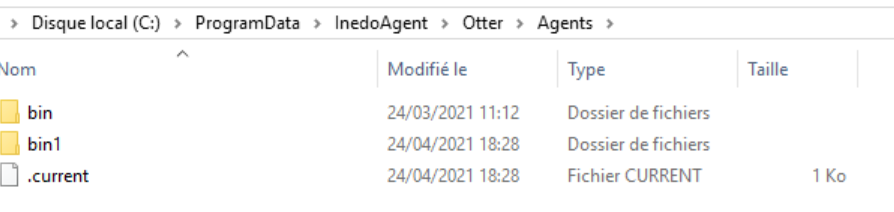
I found there is a /bin1 folder in the %programdata%\Inedo\Otter\Agents
-
OTTER 3 - Variable at environnement level not found
Hello
I have a small problem.
If a variable is assigned at the environment level, it is not available for the Plan
If the variable is moved at the Role level, the plan is working fine.- Otter 3.0.5 -
Test Case:
- Environment : INTEGRATION
- Role: SQL
- Variable:
{ "SQLInstanceParams": "%(BOFINT: %(RAM: 2048, StaticPorts: @(1451, 5022)))" }- Otter Plan: SQL-000-PrepDeploy
##AH:UseTextMode
for role SQL
{
    # Loop
    foreach $SQLInstance in @SQLInstances
    {
        Log-Debug $SQLInstance;
        # SQL - Firewall - Gestion des ports
        set @StaticPorts = %SQLInstanceParams[$SQLInstance].StaticPorts;

        # Loop
        foreach $Port in @StaticPorts
        {
            set $Name = FW-SQL-${SQLInstance}-${Port};
            {
                Firewall::Ensure-NetFirewallRule
                (
                    Name: $Name,
                    Profiles: "Domain,Private",
                    Port: $Port,
                    Protocol: TCP,
                    Inbound: true,
                    Allow: true,
                    Exists: true
                );
            }
        }
    }
}
When the variable %SQLInstanceParams is defined in the Environnement INTEGRATION, I have this error msg:
....
DEBUG: 2021-04-24 16:08:55Z - Beginning execution run...
DEBUG: 2021-04-24 16:08:55Z - Looking for firewall rule "FW-SQL-Browser-1434"...
DEBUG: 2021-04-24 16:08:55Z - Creating new "FW-SQL-Browser-1434" firewall rule...
DEBUG: 2021-04-24 16:08:55Z - BOFINT
ERROR: 2021-04-24 16:08:55Z - Could not resolve variable %SQLInstanceParams.
ERROR: 2021-04-24 16:08:55Z - Execution run failed.
...
whereas if the variable %SQLInstanceParams is defined in the role SQL, it is working fine
DEBUG: 2021-04-24 16:09:58Z - Beginning execution run... DEBUG: 2021-04-24 16:09:58Z - Looking for firewall rule "FW-SQL-Browser-1434"... DEBUG: 2021-04-24 16:09:58Z - Deleting existing "FW-SQL-Browser-1434" firewall rule... DEBUG: 2021-04-24 16:09:58Z - Creating new "FW-SQL-Browser-1434" firewall rule... DEBUG: 2021-04-24 16:09:58Z - BOFINT DEBUG: 2021-04-24 16:09:58Z - Looking for firewall rule "FW-SQL-BOFINT-1451"... DEBUG: 2021-04-24 16:09:58Z - Creating new "FW-SQL-BOFINT-1451" firewall rule... DEBUG: 2021-04-24 16:09:58Z - Looking for firewall rule "FW-SQL-BOFINT-5022"... DEBUG: 2021-04-24 16:09:58Z - Deleting existing "FW-SQL-BOFINT-5022" firewall rule... DEBUG: 2021-04-24 16:09:58Z - Creating new "FW-SQL-BOFINT-5022" firewall rule... INFO : 2021-04-24 16:09:58Z - Execution run succeeded. -
RE: Setting runtime variable from powershell script
@ashah_4271
Hello
What about the PSEval function ? -
RE: OTTER 3 - $CredentialProperty not working after migration from Otter 2.X
thank you @rhessinger
It is working fine.I have now to mix this version with the Scripting v1.10.2-CI.1 (bug for PSEnsure)

Thank you guys for the fast correction
-
RE: [Otter 3] Upgrade Inedo Agent failed
The link is working but not the upgrade

Downloading updated agent from https://s3.amazonaws.com/cdn.inedo.com/downloads/inedo-agent/InedoAgent.49.zip... Connection established; transferring data... Download complete; extracting files... Creating temporary directory: C:\Users\svc-inedo\AppData\Local\Temp\InedoAgent\bf85fefbd0af4e13a28c58c9a3ba0902 Extracting InedoAgentService.exe... Extracting Inedo.Agents.dll... Verifying agent public key... Download and verification complete. Agent endpoint is VM008001:46336 Connecting to agent... Unable to connect to agent: Impossible de lire les données de la connexion de transport : Une connexion existante a dû être fermée par l’hôte distant. -
RE: [Otter 3] Upgrade Inedo Agent failed
Hello
I have this error message from Otter 3.0.4 if I want to upgrade on line.
INFO : 2021-04-09 16:00:58Z - Downloading updated agent from https://s3.amazonaws.com/cdn.inedo.com/downloads/inedo-agent/InedoAgent.49.zip... ERROR: 2021-04-09 16:01:02Z - System.Net.WebException: Le serveur distant a retourné une erreur : (403) Interdit. à System.Net.HttpWebRequest.EndGetResponse(IAsyncResult asyncResult) à System.Threading.Tasks.TaskFactory`1.FromAsyncCoreLogic(IAsyncResult iar, Func`2 endFunction, Action`1 endAction, Task`1 promise, Boolean requiresSynchronization) --- Fin de la trace de la pile à partir de l'emplacement précédent au niveau duquel l'exception a été levée --- à System.Runtime.ExceptionServices.ExceptionDispatchInfo.Throw() à System.Runtime.CompilerServices.TaskAwaiter.HandleNonSuccessAndDebuggerNotification(Task task) à Inedo.Otter.Extensions.GeneralExecutions.UpgradeAgentExecution.<DownloadAgentAsync>d__11.MoveNext() -
RE: OTTER 3 - $CredentialProperty not working after migration from Otter 2.X
Thank
I am sorry, I am using Inedo Hub, and this version is not available.
Do you have any link for this prerelease version ? -
RE: OTTER 3 - $CredentialProperty not working after migration from Otter 2.X
@atripp said in OTTER 3 - $CredentialProperty not working after migration from Otter 2.X:
it's already scheduled for Otter 3.0.5 (next Friday), but w
I would like to test it as soon as possible if possible .
Thank you -
OTTER 3 - Can't make new PSEnsure working
Hello
I am looking to use the new PSEnsure. but it is not working. - I mean I can't find the right syntax :(
Any help would be appreciatedPS SCript
<#
.DESCRIPTION
Create AD Group

.AHCONFIGKEY
$Name

.AHDESIREDVALUE
True

.AHEXECMODE
$ExecMode
#>
Param(
   [Parameter(Mandatory=$false)]
   [string]$Name,

   [Parameter(Mandatory=$false)]
   [string]$GroupCategory="Security",

   [Parameter(Mandatory=$false)]
   [string]$GroupScope="DomainLocal",

   [Parameter(Mandatory=$false)]
   [string]$DisplayName,

   [Parameter(Mandatory=$false)]
   [string]$Path,

   [Parameter(Mandatory=$false)]
   [string]$Description
)
if ($ExecMode -eq "Configure") {
    New-ADGroup -Name $Name -GroupCategory $GroupCategory -GroupScope $GroupScope  -DisplayName $DisplayName -Path $Path -Description $Description
}else{
if ([bool](Get-ADGroup -filter "Name -eq '$($Name)'")){ return $true} else { return $false }
}
Configuraiton Plan for a Role
# Groupes AD
{
    # Groupe Administrateurs locaux du serveur
    set $Path = OU=Serveurs,OU=Groupes,$DomainNameDC;
    set $Description = Administrateurs locaux du serveur;
    set $Name = SRV-ADM-$ServerName;

    PSEnsure Set-ADGroup
    (
        Name: $Name,
        GroupCategory: Security,
        GroupScope: Domainlocal,
        DisplayName: $Name,
        Path: $Path,
        Description: $Description
    );
    set $Name = SRV-USR-$ServerName;
    set $Description = Utilisateurs locaux du serveur;
    PSEnsure Set-ADGroup
    (
        Name: $Name,
        GroupCategory: Security,
        GroupScope: Domainlocal,
        DisplayName: $Name,
        Path: $Path,
        Description: $Description
    );
}
The partial result of the Collect step is:
Collecting current configuration from server...
Importing ExecMode...
Assigning parameter Name...
Assigning parameter GroupCategory...
Assigning parameter GroupScope...
Assigning parameter DisplayName...
Assigning parameter Path...
Assigning parameter Description...
True
Storing current configuration...
Comparing configuration...
Difference: SRV-ADM-VM008003
 =Template=> True
 = Actual =>
Configuration drift detected.
A Configuration drift is detected but it should not, what is wrong ?
-
RE: Agent 49 - Otter 2 / Otter 3 ?
@rhessinger said in Agent 49 - Otter 2 / Otter 3 ?:
t you should be able to use the same agent install on more than one intance (Otter 3 and Otter 2.2) at the same time without issue. Basically, you can add that same agent to both Otter instances you have.
Good news
Thank you