Welcome to the Inedo Forums! Check out the Forums Guide for help getting started.
If you are experiencing any issues with the forum software, please visit the Contact Form on our website and let us know!
[Otter 3] Upgrade Inedo Agent failed
-
Hello
The "Upgrade Agent" has a bug.
Steps to reproduce:Defined a server with old version agent (46)
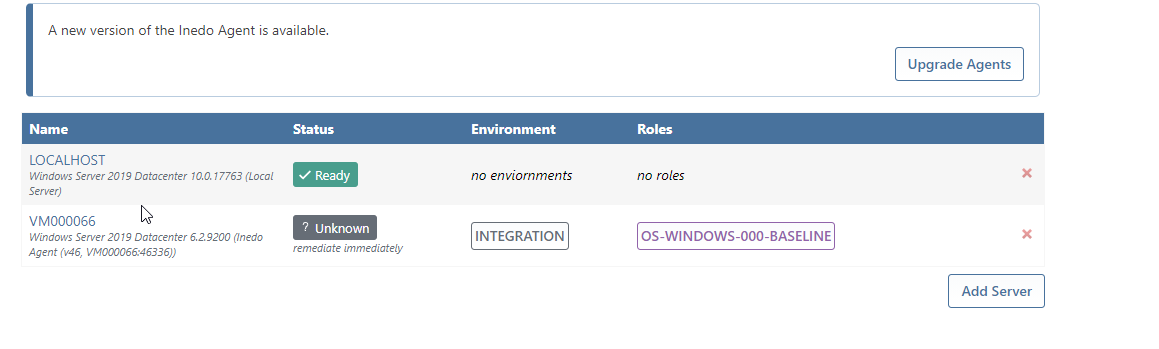
click on Upgrade Agents
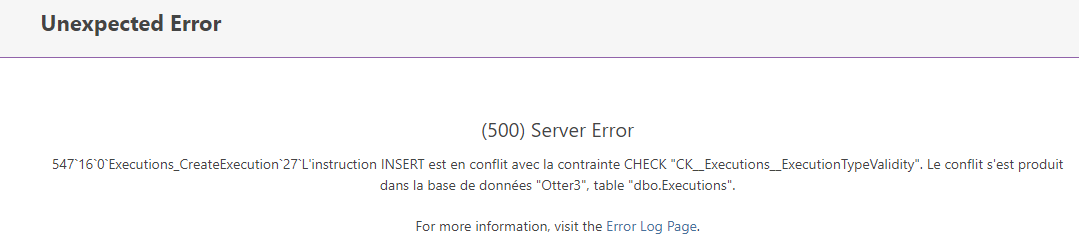
Get the following msg error
-
Thanks for reporting this regression! It appears to be related to some kind of refactoring.
I've logged it as OT-411 and we are targeting fixing it in the next release.
-
Hi @NanciCalo
There is also some regressions with the role and the depencies
I made a thread in the forum about this. -
Hello
I have this error message from Otter 3.0.4 if I want to upgrade on line.
INFO : 2021-04-09 16:00:58Z - Downloading updated agent from https://s3.amazonaws.com/cdn.inedo.com/downloads/inedo-agent/InedoAgent.49.zip... ERROR: 2021-04-09 16:01:02Z - System.Net.WebException: Le serveur distant a retourné une erreur : (403) Interdit. à System.Net.HttpWebRequest.EndGetResponse(IAsyncResult asyncResult) à System.Threading.Tasks.TaskFactory`1.FromAsyncCoreLogic(IAsyncResult iar, Func`2 endFunction, Action`1 endAction, Task`1 promise, Boolean requiresSynchronization) --- Fin de la trace de la pile à partir de l'emplacement précédent au niveau duquel l'exception a été levée --- à System.Runtime.ExceptionServices.ExceptionDispatchInfo.Throw() à System.Runtime.CompilerServices.TaskAwaiter.HandleNonSuccessAndDebuggerNotification(Task task) à Inedo.Otter.Extensions.GeneralExecutions.UpgradeAgentExecution.<DownloadAgentAsync>d__11.MoveNext() -
Hi @philippe-camelio_3885,
It looks like the InedoAgent files were uploaded with the wrong version tag. I have reached out to our release team to try to get this resolved, but in the meantime, if you change the download URL to
http://cdn.inedo.com/downloads/inedo-agent/InedoAgent.49.0.0.zip, it should resolve this error.Thanks,
Rich -
Hi @philippe-camelio_3885,
Looks like I spoke too soon. The release team already corrected the link, so it should work with the default link now.
Thanks,
Rich -
The link is working but not the upgrade

Downloading updated agent from https://s3.amazonaws.com/cdn.inedo.com/downloads/inedo-agent/InedoAgent.49.zip... Connection established; transferring data... Download complete; extracting files... Creating temporary directory: C:\Users\svc-inedo\AppData\Local\Temp\InedoAgent\bf85fefbd0af4e13a28c58c9a3ba0902 Extracting InedoAgentService.exe... Extracting Inedo.Agents.dll... Verifying agent public key... Download and verification complete. Agent endpoint is VM008001:46336 Connecting to agent... Unable to connect to agent: Impossible de lire les données de la connexion de transport : Une connexion existante a dû être fermée par l’hôte distant. -
@philippe-camelio_3885 a failure there is rather peculiar, and the error message just looks like a generic "can't connect" error. The agent upgrade hasn't really even started yet, it's just some initial prep of downloading the file.
That message is occurring when making a very basic "direct connection" to the Inedo Agent (as opposed to the more complicated, "pass through" connection to the Otter Agent that the Inedo Agent manages).
The other time a "direct connection" is made is during the "Server Checker" task runner. That runs on service startup, and then every hour, or when you trigger it manually (Admin > Service).
Anyway you could check it there. So, it could just be bad timing? Maybe the server is actually inactive, or agent got off?
-
Hello @atripp
I made a new test from Otter 3.0.5
The target is a server with Agent 46 already linked to another Otter instance (2.7)I defined the server in the Otter 3 instance (AES + key)
Everything was working until I upgraded the Agent.Downloading updated agent from https://s3.amazonaws.com/cdn.inedo.com/downloads/inedo-agent/InedoAgent.49.zip... Connection established; transferring data... Download complete; extracting files... Creating temporary directory: C:\Users\svc-inedo\AppData\Local\Temp\InedoAgent\ff51ec9a70474e269d1b272111428843 Extracting InedoAgentService.exe... Extracting Inedo.Agents.dll... Verifying agent public key... Download and verification complete. Agent endpoint is VM008004.OCAPIAT.FR:46336 Connecting to agent... Connection established; sending updated agent... Agent update sent; waiting for upgrade to complete... Trying to establish connection to agent... Agent still unreachable. Trying again in 5 seconds... Trying to establish connection to agent... Agent still unreachable. Trying again in 5 seconds... Trying to establish connection to agent... Agent still unreachable. Trying again in 5 seconds... Trying to establish connection to agent... Agent still unreachable. Trying again in 5 seconds... Trying to establish connection to agent... Agent is not responding. Cleaning up temporary files in C:\Users\svc-inedo\AppData\Local\Temp\InedoAgent\ff51ec9a70474e269d1b272111428843...Restarting Otter service did not help, Restarting the Agent as well
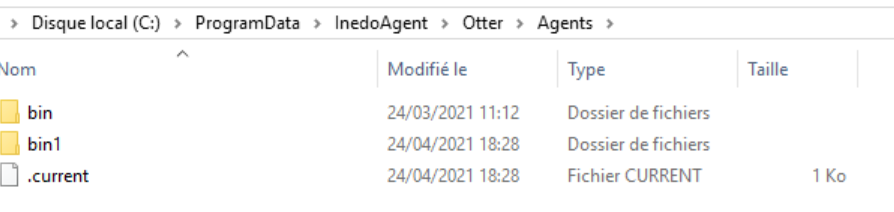
I found there is a /bin1 folder in the %programdata%\Inedo\Otter\Agents
-
Just a guess, but v46 required you to explicitly set an Instance Name in the product, and I'm guessing you didn't do that. This can cause some strange behaviors, and maybe that's what happened here.
From here, I recommend to just reinstall v49 on the server, manually. Alternatively, you could upgrade to v49 first (you can manually enter a URL in Otter, for the installation package).
FYI: in v49, instancing is automatic, based on IP address.
-
@atripp said in [Otter 3] Upgrade Inedo Agent failed:
m here, I recommend to just reinstall v49 on the serve
Reinstall the v49 directly is working but as the config file move and its format change I have to modify my autoregistration deployment script

Thanks for the reply



Hello! It looks like you're interested in this conversation, but you don't have an account yet.
Getting fed up of having to scroll through the same posts each visit? When you register for an account, you'll always come back to exactly where you were before, and choose to be notified of new replies (either via email, or push notification). You'll also be able to save bookmarks and upvote posts to show your appreciation to other community members.
With your input, this post could be even better 💗
Register Login