Inedo Community Forums Forums
    • Recent
    • Tags
    • Popular
    • Login
    1. Home
    2. lucas.almeida_8120

    Welcome to the Inedo Forums! Check out the Forums Guide for help getting started.

    If you are experiencing any issues with the forum software, please visit the Contact Form on our website and let us know!

    L Offline
    • Profile
    • Following 0
    • Followers 0
    • Topics 4
    • Posts 6
    • Groups 0

    lucas.almeida_8120

    @lucas.almeida_8120

    0
    Reputation
    1
    Profile views
    6
    Posts
    0
    Followers
    0
    Following
    Joined
    Last Online

    lucas.almeida_8120 Unfollow Follow

    Latest posts made by lucas.almeida_8120

    • Error Downloading Nuget Packages on Visual Studio

      Hi,
      I upgraded to 2024 and now I get errors in Visual Studio

      Visual Studio the error says "Object reference not set to an instance of an object" and I can't browse for packages.

      f034a313-7ab8-49dd-80aa-f1f324b001c4-image.png

      but to upload new versions for packages is normal, my problem is only to download then.

      posted in Support
      L
      lucas.almeida_8120
    • RE: SQL Error after upgrade version

      I chose to migrate it to a server with a more updated operating system, and I will let it recreate the database. How do I ensure that my feeds and NuGet packages are maintained while allowing Proget to create a new database? If I simply copy the folder where my packages and extensions are saved and place it on the new server, will it be able to identify them?

      posted in Support
      L
      lucas.almeida_8120
    • SQL Error after upgrade version

      I am having an issue that every time I update the Proget version, it always gives some error in some database procedure. This time, when I updated to version 2023.30, I received the following error:

      Could not find stored procedure 'PgvdVulnerabilities_GetVulnerabilities'.

      Microsoft.Data.SqlClient.SqlException (0x80131904): Could not find stored procedure 'PgvdVulnerabilities_GetVulnerabilities'.
      at Microsoft.Data.SqlClient.SqlCommand.<>c.<ExecuteDbDataReaderAsync>b__209_0(Task1 result) at System.Threading.Tasks.ContinuationResultTaskFromResultTask2.InnerInvoke()
      at System.Threading.ExecutionContext.RunInternal(ExecutionContext executionContext, ContextCallback callback, Object state)
      --- End of stack trace from previous location ---
      at System.Threading.Tasks.Task.ExecuteWithThreadLocal(Task& currentTaskSlot, Thread threadPoolThread)
      --- End of stack trace from previous location ---
      at Inedo.Data.DatabaseContext.DbResult.CreateAsync(DbCommand command, DatabaseContext context, DateTimeOffset startTime, Stopwatch stopwatch)
      at Inedo.Data.DatabaseContext.ExecuteInternalAsync(String storedProcName, GenericDbParameter[] parameters)
      at Inedo.Data.SqlServerDatabaseContext.ExecuteInternalAsync(String storedProcName, GenericDbParameter[] parameters)
      at Inedo.ProGet.Data.DB.Context.PgvdVulnerabilities_GetVulnerabilitiesAsync(String Ecosystem_Name, String AssessmentType_Name, Nullable1 OnlyUnassessed_Indicator, String OrderBy_Name, Nullable1 OrderByDesc_Indicator, Nullable1 Skip_Count, Nullable1 Take_Count)
      at Inedo.ProGet.WebApplication.Pages.Packages.ListPackagesPage.PackageList.InitializeAsyncInternal()
      at Inedo.ProGet.WebApplication.Pages.Packages.ListPackagesPage.PackageList.InitializeAsync()
      ClientConnectionId:97f4c8e6-6163-43c5-8f83-3654804ba889
      Error Number:2812,State:62,Class:16

      This time it was this, but every time I update it presents some issue of not being able to find some procedure. Could you give me some assistance on this matter?

      posted in Support
      L
      lucas.almeida_8120
    • Error when updating Proget version and error in the NuGet_GetPackages procedure.

      Hello, I'm having an issue when updating the Proget version. It's throwing the following error related to the NuGet_GetPackages procedure: "System.Data.SqlClient.SqlException: Cannot resolve the collation conflict between 'Latin1_General_CS_AS' and 'SQL_Latin1_General_CP1_CI_AS' in the equal to operation" (the complete error log is attached in the post). However, even though this error is reported, the Proget version is updated. But when I open the feed that contains the NuGet Packages, I encounter the error shown in the screenshot below.
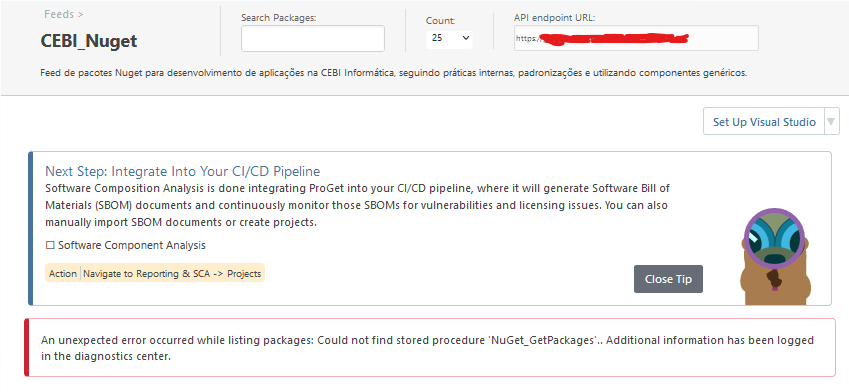
      3b876603-8028-496a-b1a7-634d423ce526-image.png

      We've already checked the collation of the database, and it's set as "SQL_Latin1_General_CP1_CI_AS." Additionally, the database version is SQL Server 2017 (the database settings screenshot is attached in the post), and the server is Windows Server 2012 R2. What can I do to resolve the version update issue, and could this problem be related to the NuGet Packages not displaying in the feed? If it's not related, what can I do to resolve the issue in the screenshot as well?
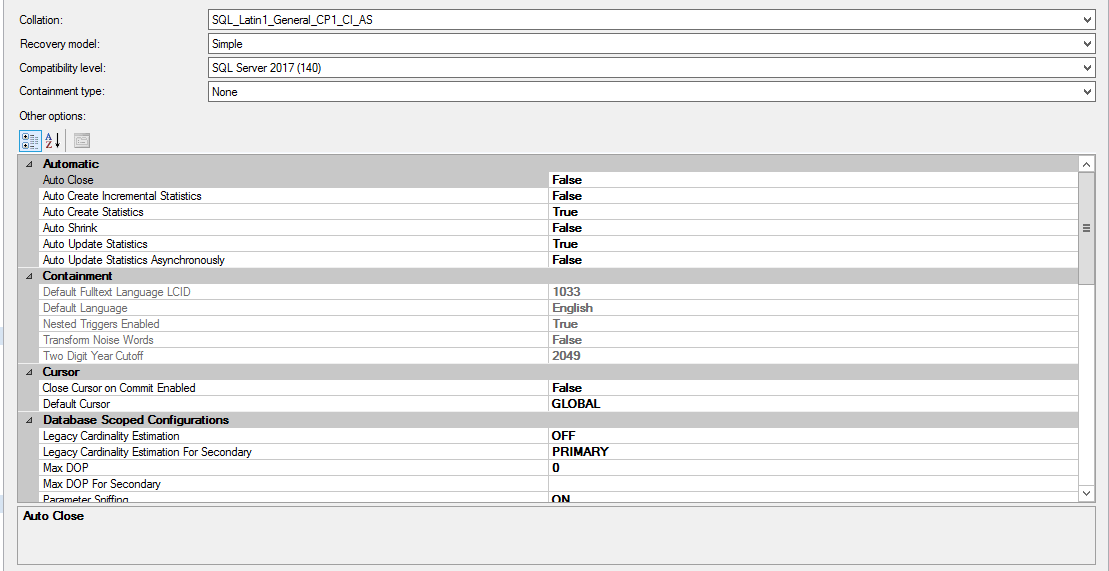
      Database Settings.png

      Log Error:

      INFO: Executing untracked script OBJECTS/4.PROCEDURES/1.NuGet_GetLatestStablePackages.sql...
      INFO: Executing untracked script OBJECTS/4.PROCEDURES/1.NuGet_GetMatchingSymbols.sql...
      INFO: Executing untracked script OBJECTS/4.PROCEDURES/1.NuGet_GetPackage.sql...
      INFO: Executing untracked script OBJECTS/4.PROCEDURES/1.NuGet_GetPackageIds.sql...
      INFO: Executing untracked script OBJECTS/4.PROCEDURES/1.NuGet_GetPackages.sql...
      ERROR: at System.Data.SqlClient.SqlConnection.OnError(SqlException exception, Boolean breakConnection, Action1 wrapCloseInAction) ERROR: at System.Data.SqlClient.TdsParser.ThrowExceptionAndWarning(TdsParserStateObject stateObj, Boolean callerHasConnectionLock, Boolean asyncClose) ERROR: at System.Data.SqlClient.TdsParser.TryRun(RunBehavior runBehavior, SqlCommand cmdHandler, SqlDataReader dataStream, BulkCopySimpleResultSet bulkCopyHandler, TdsParserStateObject stateObj, Boolean& dataReady) ERROR: at System.Data.SqlClient.SqlCommand.RunExecuteNonQueryTds(String methodName, Boolean async, Int32 timeout, Boolean asyncWrite) ERROR: at System.Data.SqlClient.SqlCommand.InternalExecuteNonQuery(TaskCompletionSource1 completion, String methodName, Boolean sendToPipe, Int32 timeout, Boolean& usedCache, Boolean asyncWrite, Boolean inRetry)
      ERROR: at System.Data.SqlClient.SqlCommand.ExecuteNonQuery()
      ERROR: at Inedo.DbUpdater.SqlServer.SqlServerDatabaseConnection.ExecuteQueryWithSplitter(String query, SqlTransaction transaction)
      ERROR: at Inedo.DbUpdater.SqlServer.SqlServerDatabaseConnection.ExecuteScripts(IEnumerable`1 scripts, ChangeScriptState state)
      ERROR: at Inedo.DbUpdater.Program.Update(String scriptPath, String connectionString, Boolean force)
      ERROR: at Inedo.DbUpdater.Program.Run(ArgList args)
      ERROR: at Inedo.DbUpdater.Program.Main(String[] args)
      ERROR: Unhandled Exception: System.Data.SqlClient.SqlException: Cannot resolve the collation conflict between "Latin1_General_CS_AS" and "SQL_Latin1_General_CP1_CI_AS" in the equal to operation.
      ERROR: Process exited with code: -532462766 (failure)

      posted in Support
      L
      lucas.almeida_8120
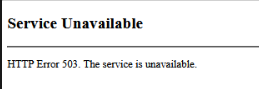
    • Error 503 when trying to restart the Proget Web Service

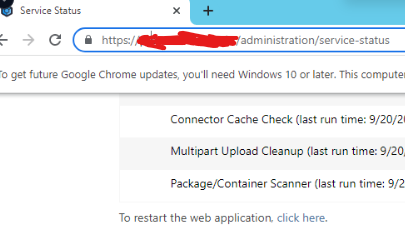
      I'm encountering an error when I attempt to restart the Proget service using the button on the web page (see attached screenshot of the button in question). In my case, Proget is installed on a Windows Server 2012R2, and to restart the service, I need to open the Windows Server Services tab and restart it from there.

      0dc12d77-4e50-4d60-b0ea-8d1b8d0d9225-image.png

      05c1033c-e8a7-4dcb-938f-0ca826eed96b-image.png

      My question is, how can I resolve this issue?

      posted in Support
      L
      lucas.almeida_8120