Inedo Community Forums Forums
    • Recent
    • Tags
    • Popular
    • Login
    1. Home
    2. kichikawa_2913
    3. Posts

    Welcome to the Inedo Forums! Check out the Forums Guide for help getting started.

    If you are experiencing any issues with the forum software, please visit the Contact Form on our website and let us know!

    K Offline
    • Profile
    • Following 0
    • Followers 0
    • Topics 11
    • Posts 82
    • Groups 0

    Posts

    Recent Best Controversial
    • RE: Permissions only work when set for specific user, not a group (LDAP)

      @Dan_Woolf everything seems working as expected except for the following error from Visual Studio:

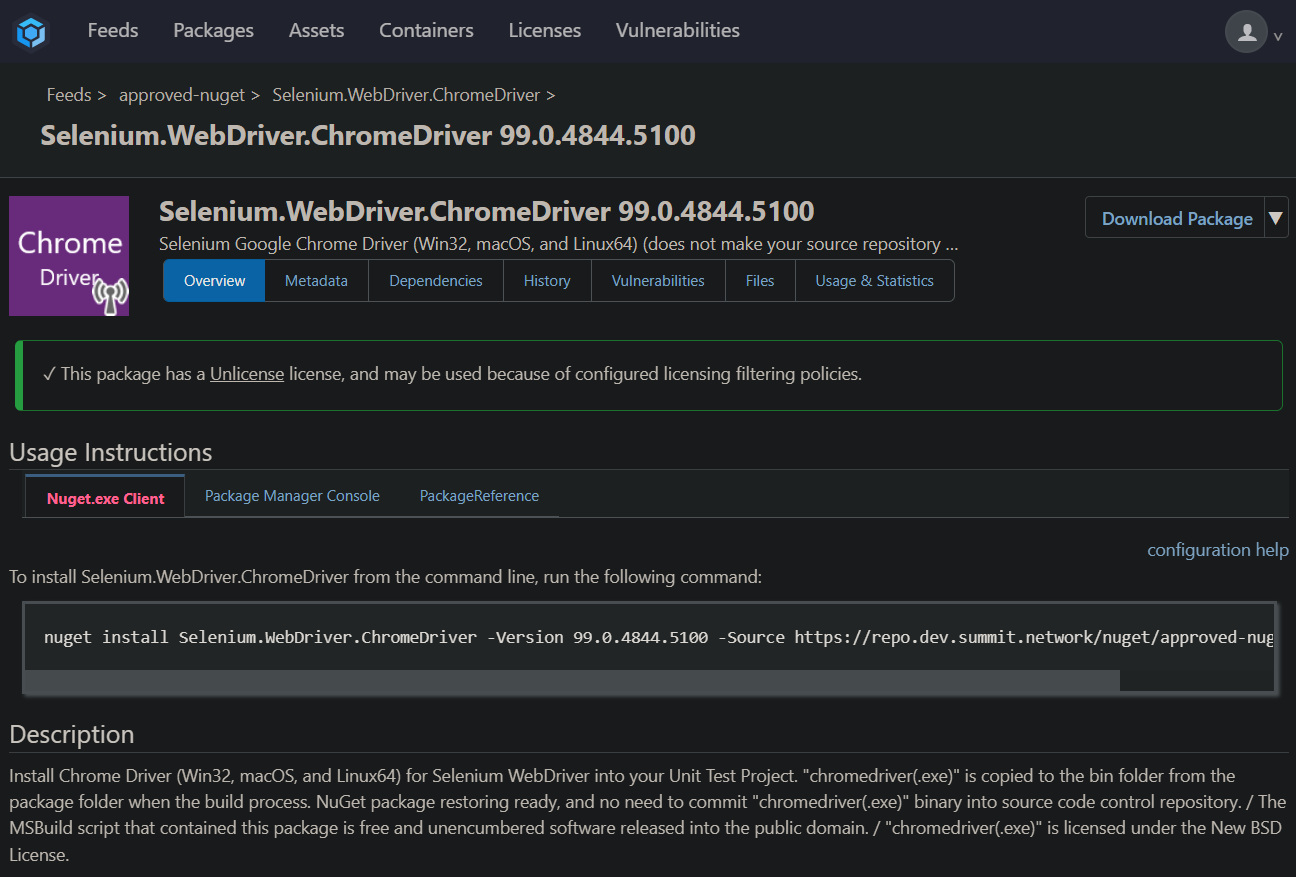
      Severity Code Description Project File Line Suppression State Error Package 'Selenium.WebDriver.ChromeDriver 99.0.4844.5100' is not found in the following primary source(s): 'https://repo.dev.internal/nuget/approved-nuget/v3/index.json'. Please verify all your online package sources are available (OR) package id, version are specified correctly.

      This error has apparently been reported since before we started working in this ticket. Should I open a new ticket to look into this one? This seems to be the only package we have this issue with, if we go directly to nuget.org we do not have this issue.
      posted in Support
      K
      kichikawa_2913
    • RE: Permissions only work when set for specific user, not a group (LDAP)

      @Dan_Woolf All your bullets are correct and I did clear out my Visual Studio credentials; re-entering my credentials appears to have resolved the issue even with the 6.1 preview features enabled. I did not use an API key, I just entered my Windows credentials.

      We are going to get our LDAP integration user corrected and continue to test to be sure. Thank you all for your help! It is greatly appreciated.

      posted in Support
      K
      kichikawa_2913
    • RE: Permissions only work when set for specific user, not a group (LDAP)

      @Dan_Woolf something else I noticed in the preview security features is that I can't find where to manage the AD credentials for the LDAP integration user. I had to revert back to pre-6.0 behavior to do it.

      posted in Support
      K
      kichikawa_2913
    • RE: Permissions only work when set for specific user, not a group (LDAP)

      @Dan_Woolf working with some other team members, we found that the user we are using for the AD configuration does not have permissions to enumerate the user groups. I tried with a different user that does have permissions and view/downloading packages from the UI works fine, but from Visual Studio still does not. I tested using pre 6.0 security features and post-6.0 features with the same results.

      So part of the issue is the permissions of the user we are using in the AD configuration.

      posted in Support
      K
      kichikawa_2913
    • RE: Permissions only work when set for specific user, not a group (LDAP)

      @Dan_Woolf the issues we were running into (value too large for defined data type) were related to our AV being installed and enabled on the server.

      @sebastian we updated to 6.0.10 and made sure InedoCore was up-to-date and we are still seeing issues where scoping view/download permissions to an AD group does not work but adding "Anonymous" or specific users does work.

      posted in Support
      K
      kichikawa_2913
    • RE: Permissions only work when set for specific user, not a group (LDAP)

      We are now having issues just creating the container getting the following error:

      Error: error creating temporary passwd file for container 441b7e059858087ded586bf7b20a02284af788603bd6fb67e532a0021107db1c: open /home/{username}/.local/share/containers/storage/overlay/6b312eb340dc2cafa8c6aaccdec719d8c249b226b4825ada3250bafd209a607d/merged/etc/passwd: value too large for defined data type

      I don't think this is related to ProGet, so I'll report back after we get this resolved.

      posted in Support
      K
      kichikawa_2913
    • RE: Permissions only work when set for specific user, not a group (LDAP)

      @sebastian thanks for the info! We'll try to update to most recent version and restarting the instance.

      @Dan_Woolf we don't have that group in different OUs from what I can see, that looks like the "path"/hierarchy to the group ("Security Groups" -> "Roles" -> "IT"). I'm not as familiar with AD as I would like to be, so I'll ping our admins on that.

      posted in Support
      K
      kichikawa_2913
    • RE: Permissions only work when set for specific user, not a group (LDAP)

      @Dan_Woolf sent a second email showing all the settings used in the tool.

      posted in Support
      K
      kichikawa_2913
    • RE: Permissions only work when set for specific user, not a group (LDAP)

      @Dan_Woolf I'm not getting any users back, I emailed you the debug log.

      posted in Support
      K
      kichikawa_2913
    • RE: Permissions only work when set for specific user, not a group (LDAP)

      @Dan_Woolf from a Visual Studio perspective it seems to be working better, meaning we can see all versions for a package but unable to download certain versions of packages. The only example I have so far is Selenium ChromeDriver NuGet.

      Error Package 'Selenium.WebDriver.ChromeDriver 99.0.4844.5100' is not found in the following primary source(s): 'https://repo.dev.summit.network/nuget/approved-nuget/v3/index.json'. Please verify all your online package sources are available (OR) package id, version are specified correctly.

      Despite the package version there and downloadable:

      a25df9c7-5287-4248-8d11-b925c9e241e1-image.png

      If I log into the UI with a user from that group I still get 403.

      posted in Support
      K
      kichikawa_2913
    • RE: Permissions only work when set for specific user, not a group (LDAP)

      @stevedennis

      1. User logs in, clicks on "Feeds", and only sees the 403 message on the page with nothing else available.
      2. I sent an email with screenshots of the test privileges for the group and specific user in that group.

      What do you mean by "revert to the 6.0 behavior"? We are on 6.0.8, should we revert back to the initial release of 6.0.0?

      posted in Support
      K
      kichikawa_2913
    • RE: Permissions only work when set for specific user, not a group (LDAP)

      @Dan_Woolf 1 did not work and 2 lets me log in but results in 403 unauthorized still.

      posted in Support
      K
      kichikawa_2913
    • RE: Permissions only work when set for specific user, not a group (LDAP)

      @Dan_Woolf we only have one "emergency admin" account created with the built-in method. The only reason that is enabled is because the UI recommended it be enabled in case of an emergency or when switching between methods. We have absolutely no users from AD setup on the built-in method.

      posted in Support
      K
      kichikawa_2913
    • RE: Permissions only work when set for specific user, not a group (LDAP)

      @Dan_Woolf Sent

      posted in Support
      K
      kichikawa_2913
    • RE: Permissions only work when set for specific user, not a group (LDAP)

      @Dan_Woolf said in Permissions only work when set for specific user, not a group (LDAP):

      [QA-785] Permissions Configuration

      Sending an email with screenshots.

      We are running 6.0.8 Build 5 and InedoCore 1.13.0 with and update available to 1.13.1.

      posted in Support
      K
      kichikawa_2913
    • RE: Permissions only work when set for specific user, not a group (LDAP)

      @Dan_Woolf thank you for the clarification!

      1. Users are downloading packages using Visual Studio and I did see it prompt for credentials that are stored in the Windows Credential Manager.
      2. The users can log into the ProGet UI but are not able to view or download any packages from any feeds despite having the permissions setup with an LDAP group. They are only able to accomplish this when I scope permissions/tasks directly to a user.

      We do have "Search recursively" enabled in our LDAP setup.

      posted in Support
      K
      kichikawa_2913
    • RE: Permissions only work when set for specific user, not a group (LDAP)

      Thank you for the response.

      1. Using the username of api and the api key as the password, is that setup in the Task/Permissions section or in a NuGet.config file?
      2. I used the "test privileges" function and it shows that the group has View/Download permissions.
      3. My user is directly in the group, not indirectly by some other group.
      posted in Support
      K
      kichikawa_2913
    • Permissions only work when set for specific user, not a group (LDAP)

      Hello,

      I logged an issue here: https://forums.inedo.com/topic/3271/cannot-push-nuget-package-to-ldap-secured-feed?_=1646689732560 about not being able to upload packages to an LDAP secured feed. It was indicated there that the NuGet client queries the feed first which does not use any API key, so we had to enable Anonymous permissions to View/Download on all feeds. Why is that the case?

      Also, I think this is related to that, we tried to set permissions to View/Download feeds at an LDAP security group level, but users are getting a 403 unauthorized. If I scope the permissions directly to the user it all seems to work as intended. Am I configuring the LDAP group permissions incorrectly?

      posted in Support
      K
      kichikawa_2913
    • RE: "Backup" instances in HA environment unable to connect to Service Messenger.

      @Dan_Woolf thank you for the details! Is all that reflected in documentation somewhere? If not, can documentation be updated to explain that a container network is required to have the service messenger traffic balanced across nodes? I don't remember seeing anything describing that.

      posted in Support
      K
      kichikawa_2913
    • RE: "Backup" instances in HA environment unable to connect to Service Messenger.

      If I click the [change] button at the bottom of each node's Service section and set it to all the same thing tcp://containerhost01.internal.network:6001 they all show as connected now and green.

      posted in Support
      K
      kichikawa_2913
    • 1
    • 2
    • 3
    • 4
    • 5
    • 2 / 5