It almost seems like the instances are not using the shared configuration setting.
Welcome to the Inedo Forums! Check out the Forums Guide for help getting started.
If you are experiencing any issues with the forum software, please visit the Contact Form on our website and let us know!
K
Offline
Posts
-
RE: "Backup" instances in HA environment unable to connect to Service Messenger.
-
RE: "Backup" instances in HA environment unable to connect to Service Messenger.
@Dan_Woolf I updated the
Service.MessengerEndpointvalue, restarted the containers, no difference. -
RE: "Backup" instances in HA environment unable to connect to Service Messenger.
@Dan_Woolf I'll have to dig back through the documentation but I thought all the instances just needed to communicate back to the primary node.
- We did not setup any network for these. They are rootless containers running on two different hosts and they are all listening on different ports using the host's IP.
- We do have HA enabled.
I did try changing the
Service.MessengerEndpointto the value you recommended but I did not restart the containers, I will try that. -
"Backup" instances in HA environment unable to connect to Service Messenger.
I'm not seeing any issues already logged on this; we just upgraded our production cluster of 4 podman containers running on OEL 8 from 5.3.37 to 6.0.8 and we are seeing our "backup" instances not able to connect to the primary node's service messenger.
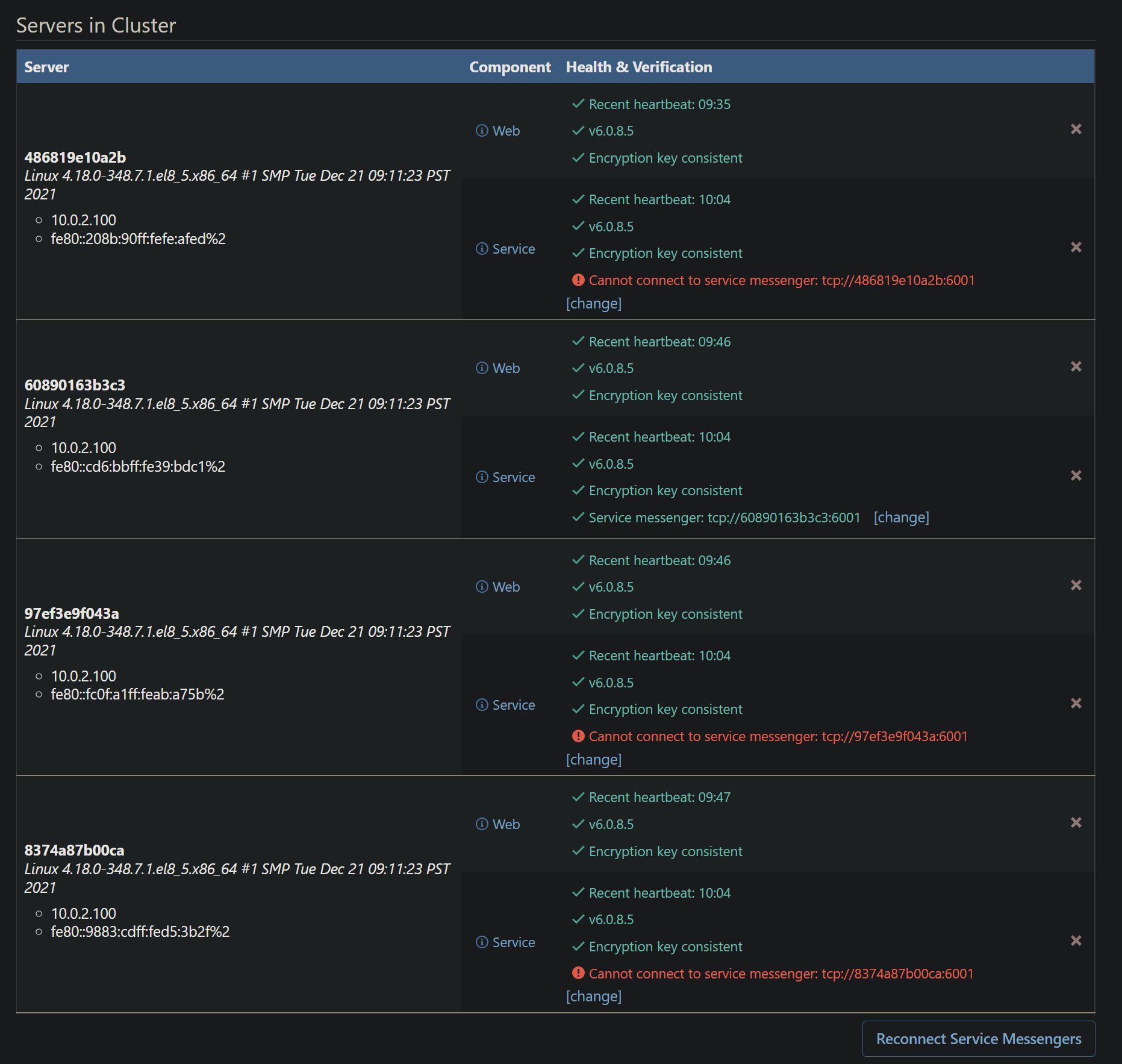
I have tried to click the "Reconnect Service Messengers" and it does not appear to do anything. The only things in the container logs are this:
Messenger not connected; attempting to connect...
Messenger not connected; attempting to connect...
Messenger not connected; attempting to connect...
Messenger connect failure: Resource temporarily unavailable
Messenger connect failure: Resource temporarily unavailable
Messenger connect failure: Resource temporarily unavailable
Besides those errors, these may be unrelated, we are seeing these in all containers:
info: Microsoft.AspNetCore.Hosting.Diagnostics[2]
      Request finished HTTP/1.1 GET http://proget.internal.network/health - 0 - 200 489 application/json 1.5043ms
info: Microsoft.AspNetCore.Hosting.Diagnostics[1]
      Request starting HTTP/1.1 GET http://proget.internal.network/health - 0
info: Microsoft.AspNetCore.Hosting.Diagnostics[2]
      Request finished HTTP/1.1 GET http://proget.internal.network/health - 0 - 200 489 application/json 1.6918ms
info: Microsoft.AspNetCore.Hosting.Diagnostics[1]
      Request starting HTTP/1.1 GET http://proget.internal.network/health - 0
info: Microsoft.AspNetCore.Hosting.Diagnostics[2]
      Request finished HTTP/1.1 GET http://proget.internal.network/health - 0 - 200 489 application/json 1.5451ms
info: Microsoft.AspNetCore.Hosting.Diagnostics[1]
      Request starting HTTP/1.1 POST http://proget.internal.network/0x44/ProGet.WebApplication/Inedo.ProGet.WebApplication.Controls.Layout.NotificationBar/GetNotifications - 0
info: Microsoft.AspNetCore.Hosting.Diagnostics[2]
      Request finished HTTP/1.1 POST http://proget.internal.network/0x44/ProGet.WebApplication/Inedo.ProGet.WebApplication.Controls.Layout.NotificationBar/GetNotifications - 0 - 200 30 - 0.5531ms
Failed to record node status: IFeatureCollection has been disposed.
Object name: 'Collection'.
info: Microsoft.AspNetCore.Hosting.Diagnostics[1]
      Request starting HTTP/1.1 GET http://proget.internal.network/health - 0
info: Microsoft.AspNetCore.Hosting.Diagnostics[2]
      Request finished HTTP/1.1 GET http://proget.internal.network/health - 0 - 200 489 application/json 5.3372ms
info: Microsoft.AspNetCore.Hosting.Diagnostics[1]
      Request starting HTTP/1.1 GET http://proget.internal.network/health - 0
info: Microsoft.AspNetCore.Hosting.Diagnostics[2]
      Request finished HTTP/1.1 GET http://proget.internal.network/health - 0 - 200 489 application/json 1.8011ms
info: Microsoft.AspNetCore.Hosting.Diagnostics[1]
Here is what we have the "Service.MessengerEndpoint" set to: tcp://containerhost.internal.network:6001 - we only have the primary node listening on tcp://*:6001, no other containers are listening, this is how we had it setup on the previous version. There is also a value in the "Service.MessengerEncryptionKey" field.
I also noticed in the first screenshot that the address the other instances are attempting to connect to are different per instance.
-
RE: ProGet upgrade 5.3.37 to 6.0.5 Permission Denied starting Kestrel
Looks like using the environment variable worked. Sorry for the pollution!
-
RE: ProGet upgrade 5.3.37 to 6.0.5 Permission Denied starting Kestrel
Looks like I'm late to the party and ashamed I did not see the other issues related to this....https://forums.inedo.com/topic/3402/proget-on-rootless-docker-cannot-switch-port
I'll try these out and see if this solves it.
-
ProGet upgrade 5.3.37 to 6.0.5 Permission Denied starting Kestrel
We are testing upgrading ProGet from 5.3.37 to 6.0.5 in our test environment. We run ProGet in rootless Podman containers on OEL8 with the following command:
podman run -d --runtime=crun --userns=keep-id -v /home/local-user/sharedconfig/config1:/usr/share/Inedo/SharedConfig -v /var/proget/packages:/var/proget/packages -p 8080:8080 --name=cproget -e SQL_CONNECTION_STRING='<connection string>' -e TZ='America/New_York' proget.inedo.com/productimages/inedo/proget:6.0.5In the
.../sharedconfig/config1directory we have the following:<?xml version="1.0" encoding="utf-8"?><InedoAppConfig><ConnectionString Type="SqlServer">'"$SQL_CONNECTION_STRING"'</ConnectionString><WebServer Enabled="true" Urls="http://*:8080/"/></InedoAppConfig>The config above is a result of working in this issue: https://forums.inedo.com/topic/3098/run-proget-container-as-non-root/3?_=1641935170390
We are getting the following error when the container starts:
Starting the Package/Container Scanner task runner...
Package/Container Scanner task runner started.
Initializing Scheduled Job Dispatcher...
Scheduled Job Dispatcher initialized.
Running Scheduled Job Dispatcher...
Checking for scheduled jobs...
Ensuring that all required scheduled jobs are configured...
Scheduled job configuration is correct.
info: Inedo.Web.BackgroundTaskQueueService[0]
      Background Task Queue is starting.
Scheduled Job Dispatcher completed.
crit: Microsoft.AspNetCore.Server.Kestrel[0]
      Unable to start Kestrel.
      System.Net.Sockets.SocketException (13): Permission denied
         at System.Net.Sockets.Socket.UpdateStatusAfterSocketErrorAndThrowException(SocketError error, String callerName)
         at System.Net.Sockets.Socket.DoBind(EndPoint endPointSnapshot, SocketAddress socketAddress)
         at System.Net.Sockets.Socket.Bind(EndPoint localEP)
         at Microsoft.AspNetCore.Server.Kestrel.Transport.Sockets.SocketConnectionListener.<Bind>g__BindSocket|13_0(<>c__DisplayClass13_0& )
         at Microsoft.AspNetCore.Server.Kestrel.Transport.Sockets.SocketConnectionListener.Bind()
         at Microsoft.AspNetCore.Server.Kestrel.Transport.Sockets.SocketTransportFactory.BindAsync(EndPoint endpoint, CancellationToken cancellationToken)
         at Microsoft.AspNetCore.Server.Kestrel.Core.Internal.Infrastructure.TransportManager.BindAsync(EndPoint endPoint, ConnectionDelegate connectionDelegate, EndpointConf                                                                                                                                                                                        ig endpointConfig)
         at Microsoft.AspNetCore.Server.Kestrel.Core.KestrelServerImpl.<>c__DisplayClass29_0`1.<<StartAsync>g__OnBind|0>d.MoveNext()
      --- End of stack trace from previous location ---
         at Microsoft.AspNetCore.Server.Kestrel.Core.Internal.AddressBinder.BindEndpointAsync(ListenOptions endpoint, AddressBindContext context)
         at Microsoft.AspNetCore.Server.Kestrel.Core.ListenOptions.BindAsync(AddressBindContext context)
         at Microsoft.AspNetCore.Server.Kestrel.Core.AnyIPListenOptions.BindAsync(AddressBindContext context)
         at Microsoft.AspNetCore.Server.Kestrel.Core.Internal.AddressBinder.AddressesStrategy.BindAsync(AddressBindContext context)
         at Microsoft.AspNetCore.Server.Kestrel.Core.Internal.AddressBinder.BindAsync(IEnumerable`1 listenOptions, AddressBindContext context)
         at Microsoft.AspNetCore.Server.Kestrel.Core.KestrelServerImpl.BindAsync(CancellationToken cancellationToken)
         at Microsoft.AspNetCore.Server.Kestrel.Core.KestrelServerImpl.StartAsync[TContext](IHttpApplication`1 application, CancellationToken cancellationToken)
Initializing Proxy Configuration Monitor...
Proxy Configuration Monitor initialized.
Running Proxy Configuration Monitor...
Proxy Configuration Monitor completed.
Initializing Drop Path Monitor...
Drop Path Monitor initialized.
Running Drop Path Monitor...
Getting list of feeds with a drop path...
No feeds with a drop path.
Drop Path Monitor completed.
Initializing Execution Dispatcher...
It seems to me that the new version is possibly ignoring the config file we have to force it to use higher ports since we are running rootless. We have confirmed the location is mounted and we can see the shared configuration file in the container when interactively working in it.
-
RE: No option for NuGet package path under Advanced Settings
@stevedennis sorry for such a delayed reply. Our use case is simply because when we setup our shares on our SAN we setup a share per package type (python, NuGet, etc) just in case of the need to more granularly control backups/maintenance of the shares. We may run into different issues/needs depending on the package type or we may not, just wanted to have the ability.
-
RE: No option for NuGet package path under Advanced Settings
@Dan_Woolf thank you for the swift reply! We do have
Storage.PackageRootPathset and we setup NFS shares for each type of package under that path that we host internally (Python, NuGet, Powershell, etc.) but just noticed an explicit NuGet path is not available unless you go to each feed.Unless there's some under-the-hood functionality between nugetV2 and nugetv3 that would prevent it, I think it would be nice to have a setting like the others at a global scope for NuGet for consistency.
-
No option for NuGet package path under Advanced Settings
We are running ProGet v5.3.37 in Linux Containers and we are not seeing a way to set the "Storage.*" path for NuGet feeds under "Administration" >> "Advanced Settings". We are able to set Python, NPM, etc. The only way we have found to do this is editing each NuGet/Powershell feed individually under the "Manage Feed" >> "Storage and Retention".
Is there a specific reason there's not a more general path setting for those or just an oversight?
-
RE: Cannot push NuGet package to LDAP secured feed.
I thought I did have anonymous View/Download on that feed, I did not. It's working now with the Api Key I set under administration, thank you!
-
Cannot push NuGet package to LDAP secured feed.
Hello,
We are running ProGet in a container using Podman instead of Docker and it looks to be operating well! We are currently running into an issue where we have LDAP enabled and are trying to have TeamCity publish built NuGet packages to a private feed.
I created an API Key under Administration, set that API Key to impersonate an AD user that has permissions set under "Users & Tasks", and I'm getting the following:
18:01:47 Step 11/11: Publish Packages (NuGet Publish)
18:01:47   Attempt to publish symbol package. Symbol packages are not fully supported by TeamCity internal feed. For more details see https://confluence.jetbrains.com/display/TCDL/NuGet#NuGet-symbols
18:01:47   push: Publish package Project\Project.2.1.0.symbols.nupkg
18:01:47     Starting: F:\TeamCity\Agents\01\tools\NuGet.CommandLine.5.8.1\tools\NuGet.exe push F:\TeamCity\Agents\01\work\b5fafe99a9e2e5c9\Project\Project.2.1.0.symbols.nupkg -ApiKey ******* -Source https://proget.dev.private.network/nuget/internal-nuget/v3/index.json
18:01:47     in directory: F:\TeamCity\Agents\01\work\b5fafe99a9e2e5c9\Project
18:01:49     MSBuild auto-detection: using msbuild version '16.9.0.16703' from 'F:\Microsoft Visual Studio\2019\BuildTools\MSBuild\Current\bin'.
18:01:50     Please provide credentials for: https://proget.dev.private.network/nuget/internal-nuget/v3/index.json
18:01:50     Unable to load the service index for source https://proget.dev.private.network/nuget/internal-nuget/v3/index.json
18:01:50       Response status code does not indicate success: 401 (Unauthorized).
18:01:50     UserName:
18:01:50     Process exited with code 1
18:01:50     Process exited with code 1 (Step: Publish Packages (NuGet Publish))
18:01:50   Step Publish Packages (NuGet Publish) failed
I tried using
username:passwordas the-ApiKeyvalue as well with the same result. Only thing I notice is that there is a line that looks to be prompting for a username.I tried searching through older forum posts, but I'm not sure how valid they are since they are from version before v4.x for the most recent posts that I could find.....
-
RE: Run proget container as non root
@rhessinger I was able to get the container running, validated a license, but then noticed that on the Administration page I was getting errors connecting to the messenger service:
Messenger not connected; attempting to connect...
Messenger connect failure: Connection refused
Messenger not connected; attempting to connect...
Messenger connect failure: Connection refused
Messenger connect failure: Connection refused
Messenger not connected; attempting to connect...
Messenger connect failure: Connection refused
I then ran the stored procedure you mentioned previously:
EXEC [Configuration_SetValue] 'Service.MessengerEndpoint', 'tcp://127.0.0.1:6001'The messenger service is now connecting and seems to be operating as intended.
-
RE: Run proget container as non root
@rhessinger I did not have the
--expose=8080.I remember you adding that feature when we were working on the LDAP issues, thanks for reminding me!
-
RE: Run proget container as non root
SIDE NOTE: The Podman run command I have in this thread mounts a root CA certificate location from the host into the container, this will not work with root-less containers. After we mount that volume we run
podman exec -ti proget shand thenupdate-ca-certificateswhich won't work in root-less mode. Another method will need done to get your organization's root CA cert into the container for LDAPS. -
RE: Run proget container as non root
@rhessinger said in Run proget container as non root:
echo '<?xml version="1.0" encoding="utf-8"?><InedoAppConfig><ConnectionString Type="SqlServer">'"`$SQL_CONNECTION_STRING"'</ConnectionString><WebServer Enabled="true" Urls="http://*:8080/"/></InedoAppConfig>' > SharedConfig/ProGet.config
Creating that configuration file and mounting it worked! I did not need the environment variable
ASPNETCORE_URLSanymore and just changed the port binding to-p 8080:8080. Thank you for your help!This worked implemented under Podman, I do not have Docker setup to test this with. I would assume it would work there as well just using Docker specific syntax with the commands.
-
RE: Run proget container as non root
@rhessinger adding the
/tcpresulted in the same error. Thank you for the information though! -
RE: Run proget container as non root
@rhessinger said in Run proget container as non root:
'tcp://127.0.0.1:6001'
I modified the database using that stored procedure you mentioned and am still getting the permissions denied.
Is there a way to override the port the service is using? I saw in the documentation that the Windows version has a configuration file that can enable overriding the URLs, but I did not see that config in the container. Would that config file allow changing the port the service is binding to?
-
RE: Run proget container as non root
@rhessinger I have tried to run the container by mapping internal 80 to 8080 on the host with the same permission denied result. I have checked to make sure 8080 is not being used on the host, that error is coming from inside the container, I would expect an error from Podman when calling
podman runif the host port was already in use. I have gotten an error from podman when not mapping the ports because it was trying to use privileged port on the host (80).I'll do some testing with the Service.MessengerEndpoint port, thank you!
-
RE: Run proget container as non root
We are actually running into this issue as well using Podman root-less containers because everything inside the container is running as the user.
[user@serverName]$ podman run -d --userns=keep-id -v proget-packages:/var/proget/packages -v /etc/pki/ca-trust/source/anchors:/usr/local/share/ca-certificates:ro -p 8080:8080 --name=proget -e ASPNETCORE_URLS='http://+:8080' -e SQL_CONNECTION_STRING='Server=SERVERNAME;Database=ProGet;User ID=USERNAME;Password=PASSWORD' -e TZ='America/New_York' -i -t proget.inedo.com/productimages/inedo/proget:5.3.32 /bin/bash
-- {GUID for Container} --
[user@serverName]$ podman exec -it proget /bin/bash
bash: /root/.bashrc: Permission denied
[user@4c2bc39a6a24:/usr/local/proget$ id
uid=1001(user) gid=1001(user) groups=1001(user)
I think it may have to do with the Messenger Endpoint that runs on port 1000. I am able to override the front-end web app (binding to port 80) using
-e ASPNETCORE_URLS='http://+:8080'but I think we are still seeing that error because of that Messenger Endpoint here:ProGet version is 5.3.32.11. Current DB schema version is 5.3.32.11. Starting the messenger... Messenger endpoint is tcp://localhost:1000 Reading standard license list... Importing license list into database...Any thoughts on how to override that URL as well?
Here are the logs:
ProGet version is 5.3.32.11. Current DB schema version is 5.3.32.11. Starting the messenger... Messenger endpoint is tcp://localhost:1000 Reading standard license list... Importing license list into database... License import complete. Looking for web app at: /usr/local/proget/web Initializing Scheduled Job Dispatcher... Scheduled Job Dispatcher initialized. Running Scheduled Job Dispatcher... Checking for scheduled jobs... Ensuring that all required scheduled jobs are configured... Scheduled job configuration is correct. Scheduled Job Dispatcher completed. crit: Microsoft.AspNetCore.Server.Kestrel[0] Unable to start Kestrel. System.Net.Sockets.SocketException (13): Permission denied at System.Net.Sockets.Socket.UpdateStatusAfterSocketErrorAndThrowException(SocketError error, String callerName) at System.Net.Sockets.Socket.DoBind(EndPoint endPointSnapshot, SocketAddress socketAddress) at System.Net.Sockets.Socket.Bind(EndPoint localEP) at Microsoft.AspNetCore.Server.Kestrel.Transport.Sockets.SocketConnectionListener.<Bind>g__BindSocket|13_0(<>c__DisplayClass13_0& ) at Microsoft.AspNetCore.Server.Kestrel.Transport.Sockets.SocketConnectionListener.Bind() at Microsoft.AspNetCore.Server.Kestrel.Transport.Sockets.SocketTransportFactory.BindAsync(EndPoint endpoint, CancellationToken cancellationToken) at Microsoft.AspNetCore.Server.Kestrel.Core.Internal.Infrastructure.TransportManager.BindAsync(EndPoint endPoint, ConnectionDelegate connectionDelegate, EndpointConfig endpointConfig) at Microsoft.AspNetCore.Server.Kestrel.Core.KestrelServerImpl.<>c__DisplayClass29_0`1.<<StartAsync>g__OnBind|0>d.MoveNext() --- End of stack trace from previous location --- at Microsoft.AspNetCore.Server.Kestrel.Core.Internal.AddressBinder.BindEndpointAsync(ListenOptions endpoint, AddressBindContext context) at Microsoft.AspNetCore.Server.Kestrel.Core.ListenOptions.BindAsync(AddressBindContext context) at Microsoft.AspNetCore.Server.Kestrel.Core.AnyIPListenOptions.BindAsync(AddressBindContext context) at Microsoft.AspNetCore.Server.Kestrel.Core.Internal.AddressBinder.AddressesStrategy.BindAsync(AddressBindContext context) at Microsoft.AspNetCore.Server.Kestrel.Core.Internal.AddressBinder.BindAsync(IEnumerable`1 listenOptions, AddressBindContext context) at Microsoft.AspNetCore.Server.Kestrel.Core.KestrelServerImpl.BindAsync(CancellationToken cancellationToken) at Microsoft.AspNetCore.Server.Kestrel.Core.KestrelServerImpl.StartAsync[TContext](IHttpApplication`1 application, CancellationToken cancellationToken) Initializing Proxy Configuration Monitor... Proxy Configuration Monitor initialized. Running Proxy Configuration Monitor... Proxy Configuration Monitor completed. Initializing Feed Replication... Feed Replication initialized. Running Feed Replication... Feed Replication completed. Initializing Docker Upload Cleanup... Docker Upload Cleanup initialized. Running Docker Upload Cleanup... Docker Upload Cleanup completed. Initializing Connector Cache Check... Connector Cache Check initialized. Running Connector Cache Check... Getting list of connector responses... No connector responses to check. Connector Cache Check completed.