Welcome to the Inedo Forums! Check out the Forums Guide for help getting started.
If you are experiencing any issues with the forum software, please visit the Contact Form on our website and let us know!
"Backup" instances in HA environment unable to connect to Service Messenger.
-
I'm not seeing any issues already logged on this; we just upgraded our production cluster of 4 podman containers running on OEL 8 from 5.3.37 to 6.0.8 and we are seeing our "backup" instances not able to connect to the primary node's service messenger.
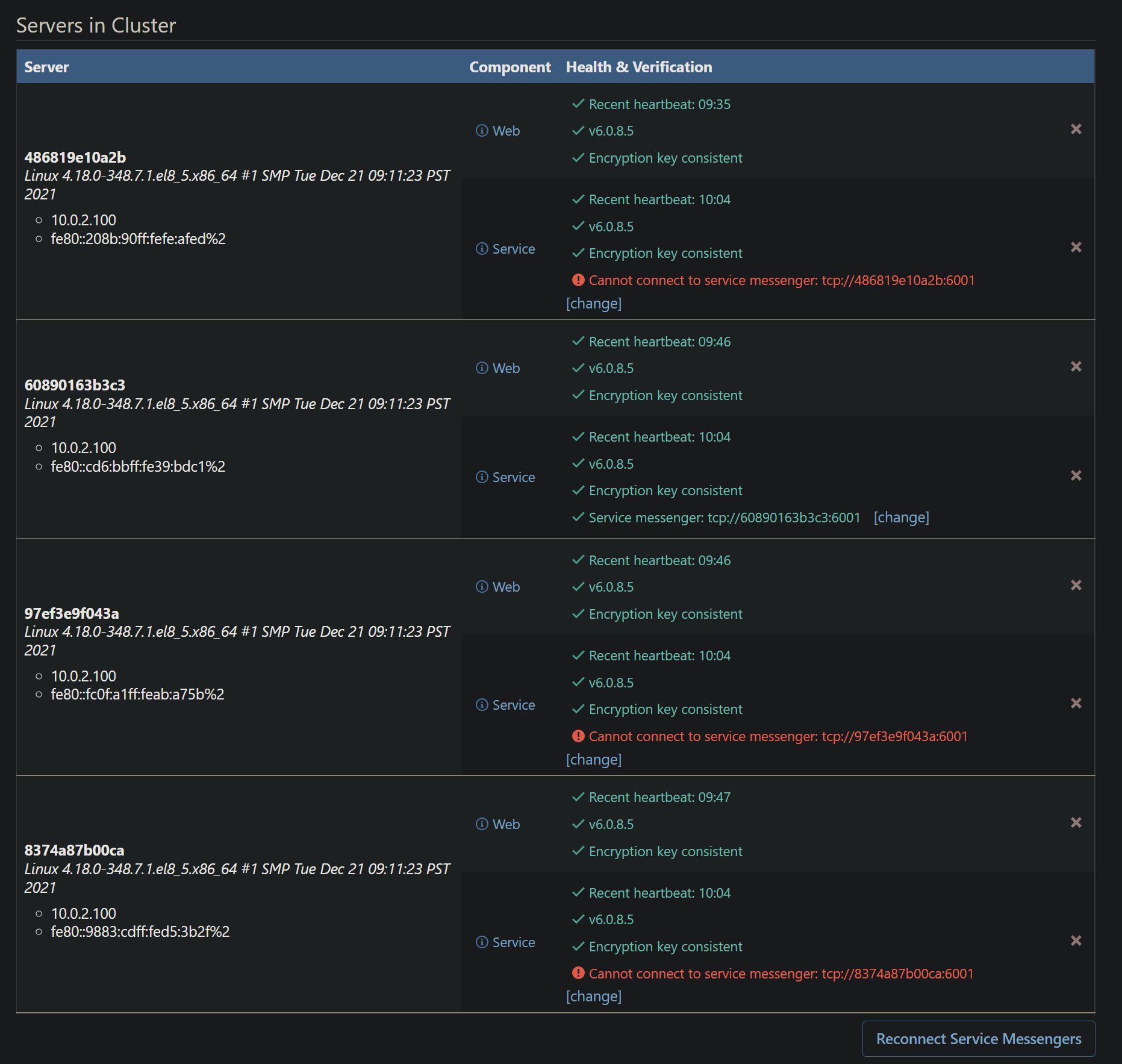
I have tried to click the "Reconnect Service Messengers" and it does not appear to do anything. The only things in the container logs are this:
Messenger not connected; attempting to connect...
Messenger not connected; attempting to connect...
Messenger not connected; attempting to connect...
Messenger connect failure: Resource temporarily unavailable
Messenger connect failure: Resource temporarily unavailable
Messenger connect failure: Resource temporarily unavailable
Besides those errors, these may be unrelated, we are seeing these in all containers:
info: Microsoft.AspNetCore.Hosting.Diagnostics[2]
      Request finished HTTP/1.1 GET http://proget.internal.network/health - 0 - 200 489 application/json 1.5043ms
info: Microsoft.AspNetCore.Hosting.Diagnostics[1]
      Request starting HTTP/1.1 GET http://proget.internal.network/health - 0
info: Microsoft.AspNetCore.Hosting.Diagnostics[2]
      Request finished HTTP/1.1 GET http://proget.internal.network/health - 0 - 200 489 application/json 1.6918ms
info: Microsoft.AspNetCore.Hosting.Diagnostics[1]
      Request starting HTTP/1.1 GET http://proget.internal.network/health - 0
info: Microsoft.AspNetCore.Hosting.Diagnostics[2]
      Request finished HTTP/1.1 GET http://proget.internal.network/health - 0 - 200 489 application/json 1.5451ms
info: Microsoft.AspNetCore.Hosting.Diagnostics[1]
      Request starting HTTP/1.1 POST http://proget.internal.network/0x44/ProGet.WebApplication/Inedo.ProGet.WebApplication.Controls.Layout.NotificationBar/GetNotifications - 0
info: Microsoft.AspNetCore.Hosting.Diagnostics[2]
      Request finished HTTP/1.1 POST http://proget.internal.network/0x44/ProGet.WebApplication/Inedo.ProGet.WebApplication.Controls.Layout.NotificationBar/GetNotifications - 0 - 200 30 - 0.5531ms
Failed to record node status: IFeatureCollection has been disposed.
Object name: 'Collection'.
info: Microsoft.AspNetCore.Hosting.Diagnostics[1]
      Request starting HTTP/1.1 GET http://proget.internal.network/health - 0
info: Microsoft.AspNetCore.Hosting.Diagnostics[2]
      Request finished HTTP/1.1 GET http://proget.internal.network/health - 0 - 200 489 application/json 5.3372ms
info: Microsoft.AspNetCore.Hosting.Diagnostics[1]
      Request starting HTTP/1.1 GET http://proget.internal.network/health - 0
info: Microsoft.AspNetCore.Hosting.Diagnostics[2]
      Request finished HTTP/1.1 GET http://proget.internal.network/health - 0 - 200 489 application/json 1.8011ms
info: Microsoft.AspNetCore.Hosting.Diagnostics[1]
Here is what we have the "Service.MessengerEndpoint" set to: tcp://containerhost.internal.network:6001 - we only have the primary node listening on tcp://*:6001, no other containers are listening, this is how we had it setup on the previous version. There is also a value in the "Service.MessengerEncryptionKey" field.
I also noticed in the first screenshot that the address the other instances are attempting to connect to are different per instance.
-
Hi @kichikawa_2913,
I think the main issue here is that the
Service.MessengerEndpointconfiguration value is a shared configuration across all nodes in your cluster. Can you try setting that value totcp://*:6001and then restart all of your containers?Also, just a couple of questions:
- Are your Docker containers running on the same docker network?
- Do you have High Availability enabled?
Thanks,
Dan -
@Dan_Woolf I'll have to dig back through the documentation but I thought all the instances just needed to communicate back to the primary node.
- We did not setup any network for these. They are rootless containers running on two different hosts and they are all listening on different ports using the host's IP.
- We do have HA enabled.
I did try changing the
Service.MessengerEndpointto the value you recommended but I did not restart the containers, I will try that. -
@Dan_Woolf I updated the
Service.MessengerEndpointvalue, restarted the containers, no difference. -
It almost seems like the instances are not using the shared configuration setting.
-
If I click the [change] button at the bottom of each node's Service section and set it to all the same thing
tcp://containerhost01.internal.network:6001they all show as connected now and green. -
Hi @kichikawa_2913,
Thank you for following up with us and letting us know it is working now. Also, thanks for clarifying the Docker network setup for me. This is related to how we changed the service messenger in ProGet v6.
I took a deeper look into the code and when setting the endpoint via the "change" link, it will override the configuration's shared value. Once that has been set, it will use the configuration associated with that node instead.
Based on your screenshot, it looks like it was using
tcp://*:6001as the shared configuration (even though you said not to), but failed to connect because it was trying to balance amongst the other nodes. If you were using a Docker network, this most likely would have worked because the individual nodes could have listened on 6001 as well.After reviewing these changes, you would have to change the service messenger address on each service node in order to apply the configuration you are looking to use (which is what you did above).
Hopefully this gave a bit more context to this change.
Thanks,
Dan -
@Dan_Woolf thank you for the details! Is all that reflected in documentation somewhere? If not, can documentation be updated to explain that a container network is required to have the service messenger traffic balanced across nodes? I don't remember seeing anything describing that.
-
Hi @kichikawa_2913,
Good catch! It looks like this is missing from our documentation. I'll work to get it updated this week!
Thanks,
Dan

Hello! It looks like you're interested in this conversation, but you don't have an account yet.
Getting fed up of having to scroll through the same posts each visit? When you register for an account, you'll always come back to exactly where you were before, and choose to be notified of new replies (either via email, or push notification). You'll also be able to save bookmarks and upvote posts to show your appreciation to other community members.
With your input, this post could be even better 💗
Register Login