Hi @guyk,
Can you try using https://registry.hub.docker.com for your connector URL and see if you have the same issue?
Thanks,
Dan
Welcome to the Inedo Forums! Check out the Forums Guide for help getting started.
If you are experiencing any issues with the forum software, please visit the Contact Form on our website and let us know!
 D
Offline
D
Offline
Hi @guyk,
Can you try using https://registry.hub.docker.com for your connector URL and see if you have the same issue?
Thanks,
Dan
Hi @guyk,
I have a few questions for you. Can you please share the connector URL you use for your Docker connector? Also, on one of the images that failed with this message, when you look at them in ProGet, do you see if the image is cached? If so, can you try to delete the cached image and pull it again?
Thanks,
Dan
Hi @v-makkenze_6348,
When you enable the preview feature for ProGet Vulnerability Central, ProGet will add a vulnerability source name PGVC automatically, but it will not show under the vulnerability sources. It looks like after you enabled that, you added a new ProGet Vulnerability Center (which will default the name to "ProGet Vulnerability Central"). So the ProGet Vulnerability Center source should be left off and can probably be removed. That is definitely what was causing a duplicate vulnerability.
Thanks,
Dan
Hi @hashim-abu-gellban_3562,
I think the issue here is that the link for the sample config in our docs is now pointing to the wrong sample configuration file. You will want to download the config sample from: https://raw.githubusercontent.com/quay/clair/v2.1.8/config.example.yaml
As Alana mentioned they are on Clair v4 now and it is a different product than version 2 and v4 has a completely different configuration file structure. If you use this older config example, you'll see in the first section has the database connection information. Use this configuration file base should fix your issue.
Thanks,
Dan
Hi @arozanski_1087,
We talked it over in our team meeting yesterday and decided to change ProGet to always create a new release when one doesn't exist and add new dependencies when the release does exist. This way that parameter will not be needed. So you will just need to upgrade ProGet to v2022.23 when it is released later today.
As for the Yarn support and scanning multiple package types in the initial scan, we plan to work on that early next week, so we should have something for you soon.
Thanks,
Dan
Hi @arozanski_1087,
We were able to get the fix in for the appending dependencies, PG-2294. This will be released tomorrow in ProGet 2022.23 and we will also be releasing a new pgscan, v1.4.2, that includes a new parameter, --append-dependencies, that will allow you to append dependencies from multiple scans.
Thanks,
Dan
Hi @arozanski_1087,
I'm sorry I missed this earlier, but it looks like there was a typo on the GitHub page for the identify documentation, it previously used --consumer-product-version. That parameter should have been --version. If you run the pgscan help identify command, you will see it is appropriately listed there. My colleague updated the documentation to include the proper parameter. That should get you passed the error above.
I also noticed another issue. If you run the command twice, the dependencies that were found on the second run will not be added to the project. I'm working on getting this fixed, but as a workaround, you can do the following:
That will then add the missing packages to your release. To fix this, we will need to make a change to both pgscan and ProGet. I will do my bet to get this fix into tomorrow's release.
Thanks,
Dan
Hi @arozanski_1087,
Thanks for the additional information. I'll need to research this a little further because nothing is jumping out at me looking through the code. Please stay tuned!
Thanks,
Dan
Hi @arozanski_1087,
pgscan inspect command will handle creating the project and/or release if it doesn't exist. If the project and release already exist, it will also update them with any changes it has.Thanks,
Dan
Hi @arozanski_1087,
I'll do my best to answer your questions:
input parameter should be the path and name of the package.json (ex: \wwwroot\package.json). This will then parse the package-lock.json for dependencies in that same folder. If this is what you are already doing, then can you please send over the command you are using and the full error you are receiving?inspect command will work in an additive fashion and just append the new packages that were found into the ProGet project. This is something we are also looking to improve to add support to auto-scan both NuGet and NPM in one scan. As for the difference between inspect and publish
inspect is the new command for ProGet 2022 and higher. This will add the dependencies to a Project in ProGet's SCA feature and is an overall better way to see your dependencies and it will link them to packages, vulnerabilities, and licenses in all your feeds.publish is the ProGet v6 and v7 command and it will only add the dependencies to a single feed at a time directly on the package itself. This command also requires the feed to be passed to record the results.I hope this answers all of your questions, but please let us know if you have more or need clarification on anything. Also, if you are interested in working to help us add improved support for the new features I mentioned, let us know and we can work together to get these features implemented.
Thanks,
Dan
Hi @florian-haid_9440,
Can you tell me what version of Windows you are running your ProGet instance on? An SSL error like this will typically happen if your SSL/TLS requirements are not configured to allow the newer schemes by default. Newer OS versions handle these for you, but older Windows versions need specific registry values.
Thanks,
Dan
Hi @nselezneva_7646,
I'm not sure I completely understand what you are asking, but I think you are referring to our connector filters feature. If that is not what you are looking for, could you please explain your use case in a little more detail?
Thanks,
Dan
Hi @lm,
Thanks for this request. We currently support some ways of hosting a symbol server in ProGet, but in ProGet v2023 we are looking to expand this support, including source links. I will bring the request for adding a symbol server proxy to ProGet to the products team to evaluate further and let you know what we decide.
Thanks,
Dan
Hi @lm,
Thanks for the notes on our documentation for HTTPS. We are actually working on providing better guidance on our preferred method for configuring SSL with ProGet. Also, we are in the process of implementing a way to configure this in the UI from within ProGet as well. So our documentation for this will be changing in multiple ways, but I'll at least get the typos fixed that you found. Thanks!
Thanks,
Dan
Hi @lm,
We currently do not have a variable for the base URL. Unfortunately, this is not a trivial thing to implement either. The best solution is to hard code your base URL as you are currently doing in your webhook.
Thanks,
Dan
Hi @lm,
We do not currently have any way to be actively notified on new ProGet releases outside of the notification in ProGet. We do, however, perform regular releases of ProGet and we typically release them every 2 weeks. The best place to check for updates would be the https://my.inedo.com/dowloads page or the Offline Installers page.
Thanks,
Dan
Hi @lm,
Thanks for the feature request! I'll bring this up with the products team and let you know what they say.
Thanks,
Dan
Hi @p-pawlowski_8446,
I'm not super familiar with JumpCloud, but it looks like they have a very nice tutorial on how to use Chocolate with JumpCloud: https://university.jumpcloud.com/courses/tutorial-using-chocolatey-for-windows-and-jumpcloud
I think the main things that you will need to do with ProGet are:
choco install 7zip --version 21.7 --source https://proget.yourserver.com/nuget/choco-demo-cached/):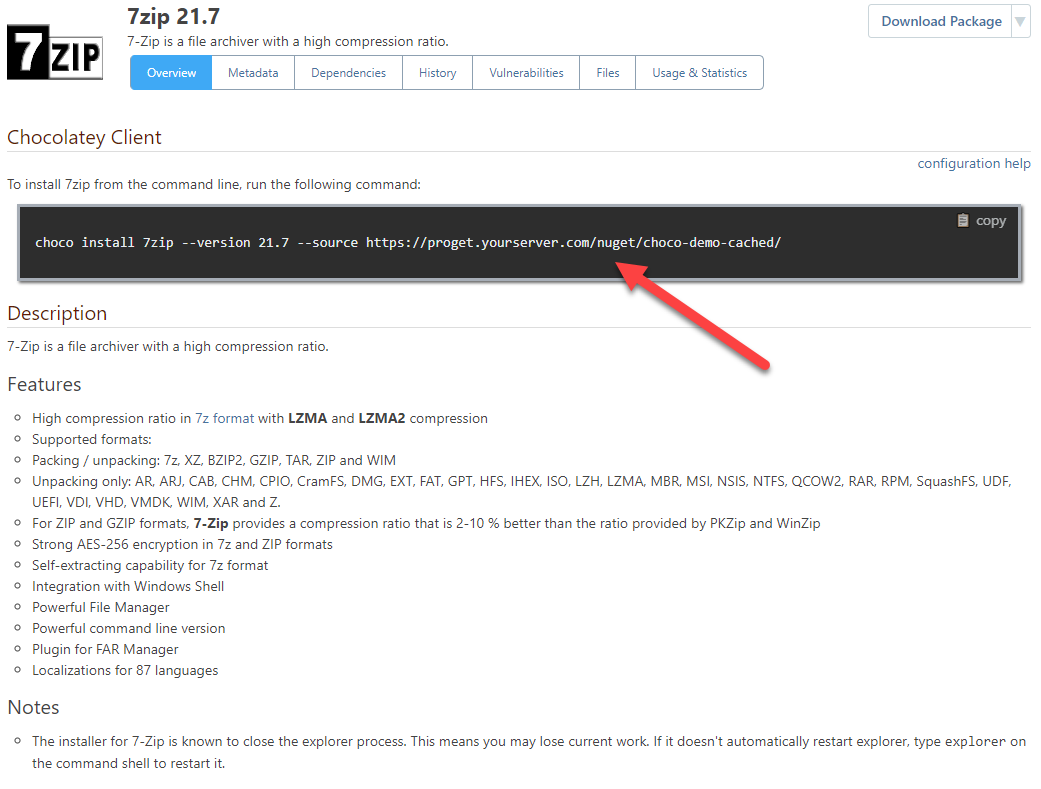
Hope this helps!
Thanks,
Dan
Hi @boazyo_8097,
You are receiving this error because the URL you are using for NuGet to build your docker image is using a localhost URL. That means that the Docker client will try to connect to ProGet using the loopback address. You will most likely need to change out the URL to specify the server name instead of localhost (ex: http://proget-server.mydomain.local:8624/nuget/LocalNugetServer/v3/index.json).
Thanks,
Dan
Hi @rehanh_0834,
Do you have ProGet installed on Windows or in Docker? If you have it installed on Windows, are you using the integrated web server or IIS to host ProGet?
Thanks,
Dan