Inedo Community Forums Forums
    • Recent
    • Tags
    • Popular
    • Login
    1. Home
    2. caterina
    3. Posts

    Welcome to the Inedo Forums! Check out the Forums Guide for help getting started.

    If you are experiencing any issues with the forum software, please visit the Contact Form on our website and let us know!

    C Offline
    • Profile
    • Following 0
    • Followers 0
    • Topics 25
    • Posts 68
    • Groups 0

    Posts

    Recent Best Controversial
    • RE: pgutil: consider project references

      Hi @gdivis,

      thank you very much for your response!
      We are really looking forward to the finalized version :)

      Thanks,
      Caterina

      posted in Support
      C
      caterina
    • RE: ProGet 2023.35: Wrong vulnerability-mapping?

      Hi @atripp,

      thank you very much for clarifying this.
      We are not able to update to ProGet 2024 yet, so I will just resolve this issue manually for our projects.

      Thanks,
      Caterina

      posted in Support
      C
      caterina
    • ProGet 2023.35: Wrong vulnerability-mapping?

      Hi,

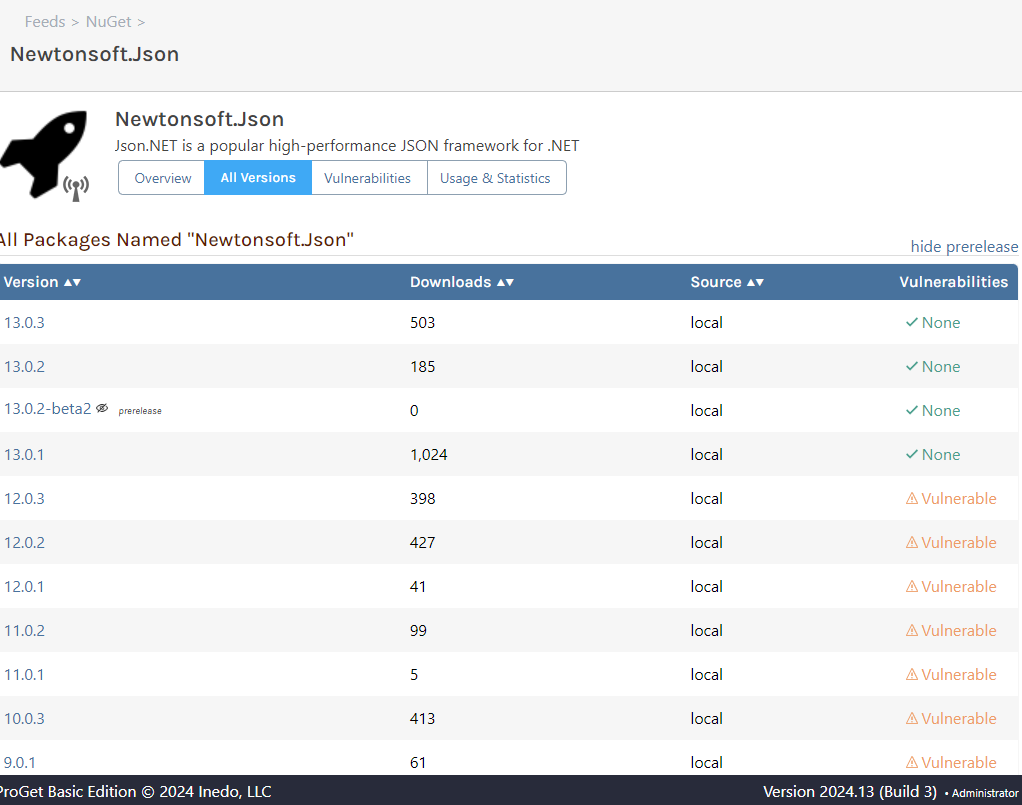
      we came accross an issue in some of our projects which does not really make sense to us:
      1fe72c96-1096-4894-a0dd-c55c4f28e34a-image.png
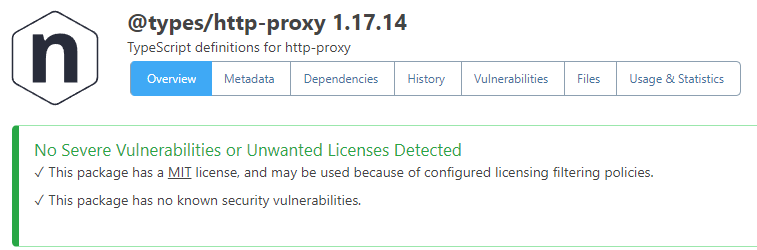
      If I have a look at "@types/http-proxy 1.17.14" it does not show any vulnerability:
      e0f03f85-4af1-4d7b-8f26-1cb8bba9d8c4-image.png
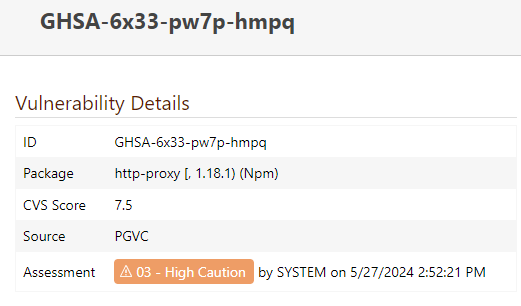
      If I have a look at the vulnerability itself, it says that this vulnerability affects package "http-proxy <1.18.1":
      381a25ca-a39b-4377-8b0d-cddf4e4c5184-image.png

      Could it be possible that the scope of the package is not considered in vulnerability scanning, and that "@types/http-proxy 1.17.14" leads to "http-proxy 1.17.14"?

      Or is there any other reason for this vulnerability to show up in our projects?

      I hope you can clarify this issue for me.

      Best,
      Caterina

      posted in Support
      C
      caterina
    • pgutil: consider project references

      Hi,

      I was having a look at pgutil for the first time, and I appreciate that you brought the functionality to consider project references as package references into it (we introduced this feature in pgscan).
      Maybe I am overlooking something, but I can not find an option to set the flag. I guess it should be settable for sbom and scan?
      Please let me know if I am missing something here.

      Thanks,
      Caterina

      posted in Support
      C
      caterina
    • RE: [ProGet] Download NuGet packages with symbols

      Hi @gdivis,

      thank you for your response.
      I think it is a little bit confusing in general.

      Just for clarification:
      We are not using any symbol packages at all (neither .symbols.nupgk nor .snupkg). We are only embedding PDBs right into our .nupgk files. But it would be nice to strip the PDBs on package download. We can achieve this on ProGet by activating the symbol server for the legacy format.

      I was just confused on why I have to use "legacy" for this approach since it is also standard to embedd the PDBs instead of using symbol packages.

      I guess normally it won't be necessary to enable a symbol server if you are using embedded PDBs. But we want to see the symbol information for our packages and we want to be able to strip the PDBs on download.

      It seems to be more of a hack to use the legacy symbol server for this but we achieve our goals doing so. No need to file a bug for this.

      Thank you,
      Caterina

      posted in Support
      C
      caterina
    • RE: [ProGet] Download NuGet packages with symbols

      Hi,

      I have to ask again:
      https://learn.microsoft.com/en-us/dotnet/standard/library-guidance/nuget#symbol-packages

      This documentation states that it is possible to use .snupkg files or to embed the symbol files in the NuGet package (like we do it).
      I can't find a documentation that says embedding symbol files is deprecated/legacy.

      The documentation says: "The downside of embedding symbol files is that they increase the package size by about 30% for .NET libraries compiled using SDK-style projects. If package size is a concern, you should publish symbols in a symbol package instead."
      But with the setting "Strip symbol files and source code from packages downloaded from this feed" ProGet provides for the legacy format we can avoid the problem of an increased package size.

      Maybe you can evaluate further why only .snupgk files are supported as a standard?

      Thanks,
      Caterina

      posted in Support
      C
      caterina
    • RE: Scoped npm packages not listed in releases

      Hi @atripp,

      our pull request contains a fix for the assignment of the scope to the group property of the dependency scanner.
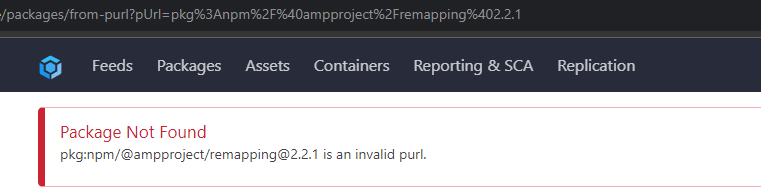
      But as already mentioned in my previous post this only fixes the appearance of the packages in the overview. The URL behind the package name is still broken.
      Maybe this needs to be fixed on the ProGet-side?

      Cheers,
      Caterina

      posted in Support
      C
      caterina
    • RE: [ProGet] Download NuGet packages with symbols

      Hi @atripp,

      thank you very much for the clarification :)

      Cheers,
      Caterina

      posted in Support
      C
      caterina
    • RE: [ProGet] Download NuGet packages with symbols

      Hi @atripp,

      ah I see the settings were messed up. "Standard" was selected. Switching to "Mixed" made the download-button appear again.

      The info window of the settings states:
      "We recommend following the "Standard" approach of storing NuGet Packages and Symbol Packages (.snupkg format) in the same feed".
      Would it be better to work with .snupkg files instead of embedded portable PDBs?

      Cheers,
      Caterina

      posted in Support
      C
      caterina
    • [ProGet] Download NuGet packages with symbols

      Hi,

      we are using portable PDB files in combination with Source Link for debugging purposes.
      Last time I checked, I was able to download either the package itself, or the package with symbols. But I can not find the option "Download with Symbols" anymore.
      Has it moved? Or is it no longer possible?

      I am asking because we have a problem with debugging a specific package and I would like to download it (including its symbols) to check if the package is ok.

      Cheers,
      Caterina

      posted in Support
      C
      caterina
    • RE: Scoped npm packages not listed in releases

      Hi @atripp,

      I investigated a little bit further:
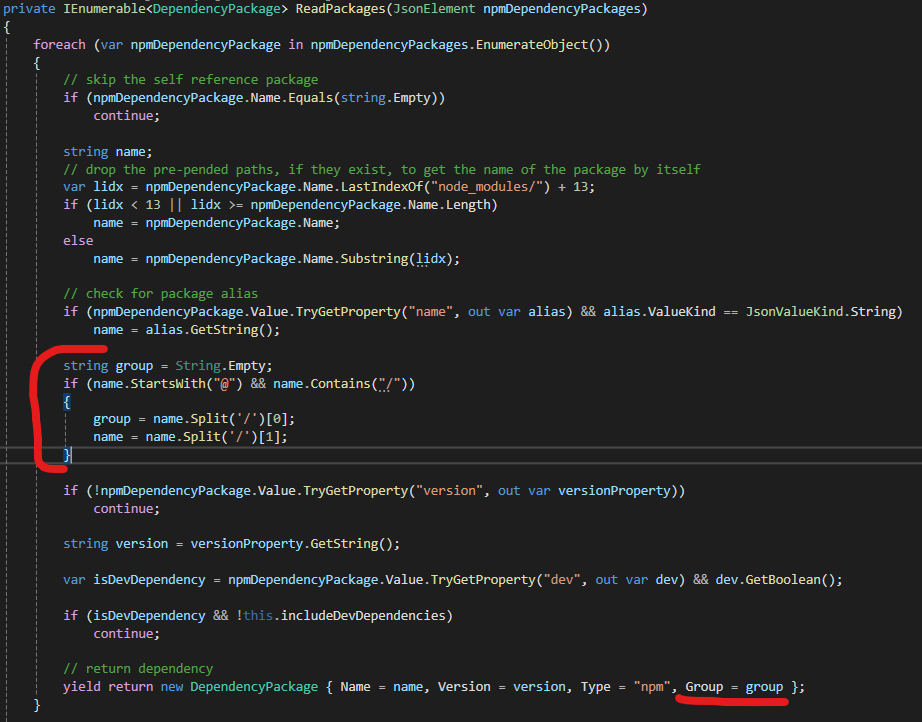
      The NpmDependencyScanner does not treat the scope of a package as a 'Group'.
      I added a little code for testing:
      bd6989c7-c6e5-49ff-a37f-42e52ca3e701-image.png
      Afterwards the packages-list of my release looks like this:
      74ef1433-d7ab-4602-80b3-89d376868469-image.png
      But the url behind a scoped package is still not working:
      c432edc0-23ae-45e6-88ed-58915fbbd7f2-image.png

      Cheers,
      Caterina

      posted in Support
      C
      caterina
    • RE: Scoped npm packages not listed in releases

      Hi @atripp,

      thank you for the quick fix. We would have suggested just the same solution.

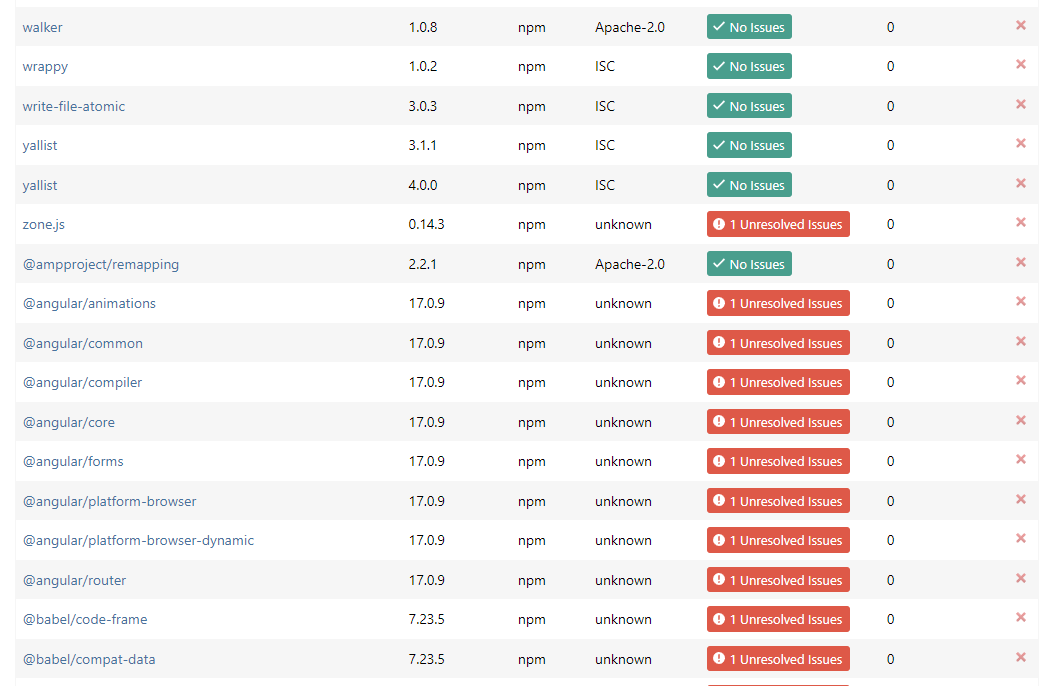
      I have tried the version and scoped packages are now visible but I ended up with the following:
      f53becd8-9701-41b1-8136-6ee58b92bd4b-image.png
      f92601d9-b983-45ed-b35b-8ccabd37ca3c-image.png

      Cheers,
      Caterina

      posted in Support
      C
      caterina
    • RE: Scoped npm packages not listed in releases

      Hi @atripp,

      thanks for having a look at it.
      Yes, we are using pgscan to create and upload our SBOMs.

      Cheers,
      Caterina

      posted in Support
      C
      caterina
    • RE: Scoped npm packages not listed in releases

      Hi @atripp,

      I just created an angular test project with default dependencies and created the sbom.
      I sent the sbom file via email to support@inedo.com.

      If I upload this file to our ProGet server (using our npm-proxy-feed) I can see all packages without a scope, and the project is listed under usages. Packages with a scope are missing.

      Cheers,
      Caterina

      posted in Support
      C
      caterina
    • Scoped npm packages not listed in releases

      Hello,

      I am using pgscan to create and upload sbom files for our releases.
      I noticed that our sbom files contain scoped npm packages (e.g. @angular/common, @babel/core) which is correct because we are using them.
      But if I have a look at the packages of a specific release using scoped npm packages, those are not listed (Reporting & SCA -> Releases -> Specific Release -> Packages).
      Vice versa, my release is not listed under "Usage & Statistic" of a used scoped npm package.

      Has this behavior already been noticed?

      Cheers,
      Caterina

      posted in Support
      C
      caterina
    • RE: pgscan: Different results for npm dependencies

      Hi Rich,

      please take your time.

      We used to have two different pgscan calls for nuget and npm and we ended up with two files on ProGet:
      a01ba139-8194-4ecf-86cb-64a05a4f1fd5-image.png

      But did I get it right that if I export the sbom those two files are being merged into one? In this case we would have to think about separating those pgscan calls again.

      Thank you
      Caterina

      posted in Support
      C
      caterina
    • RE: pgscan: Different results for npm dependencies

      Hi Rich,

      to get back to my "initial problem".

      If I would use pgscan with auto type I would run into the same problem. Because the dev dependencies within the package-lock.json would be ommited but the node_modules directory contains also dev dependencies and their package-lock.json files would be read as well leading to my initial problem (having dev dependencies in the sbom file). I think we are not able to distinguish between dev dependency and "real" dependency within the node_modules folder.

      Of course I could explicitly specify only to scan the package-lock.json file with the npm type but I would have to make a second pgscan call for nuget packages and would end up with two sbom files. It is a lot more comfortable to have all dependencies in one sbom file.

      Further, pgscan with auto type and pgscan with npm type would by default list different npm dependencies.

      Or did I understand something wrong?

      Thanks
      Caterina

      posted in Support
      C
      caterina
    • RE: pgscan: Different results for npm dependencies

      Hi Rich,

      we talked about this options as well and we think that maybe a switch to exclude dev dependencies could be helpful.
      If pgscan takes the argument --exclude-dev (e.g.) node_modules folders are ignored and only dependencies with "dev: false" in the package-lock.json file are written into the sbom file.
      Otherwise all dependencies in package-lock.json are listed and node_modules folders are included.

      I can't imagine a scenario where I want "package-lock-only" without "omit:dev". Because dev dependencies would be listed in the sbom but the node_modules would not be scanned which would lead to an incomplete output I guess.

      Let me know how you think about it and what the thoughts of your team are.

      Thanks
      Caterina

      posted in Support
      C
      caterina
    • RE: pgscan: Different results for npm dependencies

      Hi Rich,

      I had to dive deeper into this topic to have a better understandig of it.
      So basically what we are doing is calling "npm ci" followed by "ng build --configuration production".
      The package-lock.json file contains all dependencies, production and dev dependencies. "npm ci" installs them all which means that the node_modules folder contains dev dependencies as well. But "ng build --configuration production" creates our production output which has no dev references.
      I tried to call "npm ci --omit=dev". In this case only production dependencies are installed and part of node_modules. But unfortunately, "@angular/cli" is a dev dependency which is needed to call "ng build".

      Therefore, I would say that the node_modules scan should still be removed since this folder could contain dev dependencies which are not part of the final product.
      Further, I guess we should add a filter for the dev dependencies while parsing the package-lock.json in pgscan. Right now dev dependencies are part of the generated sbom file. But packages like "@angular/cli" for example are never being shipped with our product.

      Hope it gets clear what I am trying to say.

      Thanks
      Caterina

      posted in Support
      C
      caterina
    • RE: pgscan: Different results for npm dependencies

      Hi Rich,

      thank you, I was looking for this conversation!

      So our current problem is that ProGet determines a critical vulnerability in one of our projects:
      0b0ca653-c097-48ca-9697-ad9c95139384-image.png

      Our affected project team contacted me and told me that the project is not referencing json-schema in any version. And this dependency is also not listed in the package-lock.json of the project.
      But I noticed that our project references "minipass-sized" and "npm-normalize-package-bin" as developer dependencies. Both of them have "json-schema" as dependency in their package-lock.json files.

      And I guess I just fixed my own problem here... DevDependencies should not be part of my production output and thus not part of my node_modules folder. I guess I will have to take a look at the buildprocess of the product again.
      I will keep you updated.

      Thanks
      Caterina

      posted in Support
      C
      caterina
    • 1
    • 2
    • 3
    • 4
    • 3 / 4