Inedo Community Forums Forums
    • Recent
    • Tags
    • Popular
    • Login
    1. Home
    2. caterina
    3. Posts

    Welcome to the Inedo Forums! Check out the Forums Guide for help getting started.

    If you are experiencing any issues with the forum software, please visit the Contact Form on our website and let us know!

    C Offline
    • Profile
    • Following 0
    • Followers 0
    • Topics 25
    • Posts 68
    • Groups 0

    Posts

    Recent Best Controversial
    • RE: ProGet: Different behavior for build creation

      Hi @atripp,

      I think uploading a SBOM should not modify other metadata of a build (e.g. Build Stage, BuildStatus). I also can't see a usecase where it would be necessary to updoad a SBOM for an inactive build. Even if you do not prevent it, it should not change the BuildStatus I guess 🤔 .

      For the duplicates: those are indeed two different builds. I can also see it in the database:
      99441cfd-b36c-4940-9649-71a31dc51bb6-image.png
      The difference here is Release_Number. If a build gets created via SBOM the Release_Number is NULL. If I use "Create Build" the Release_Number is empty. Both Build_Number are the same. None of it containes a whitespace.

      Best,
      Caterina

      posted in Support
      C
      caterina
    • RE: ProGet: Different behavior for build creation

      Hi @atripp,

      to be honest, I am still confused. Let me explain my approach in more detail:

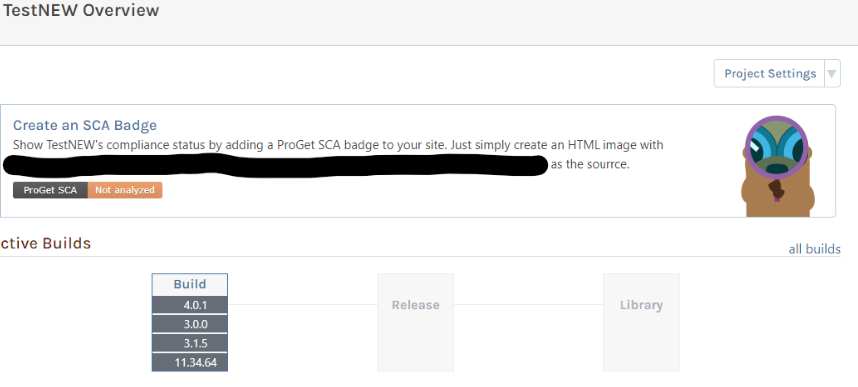
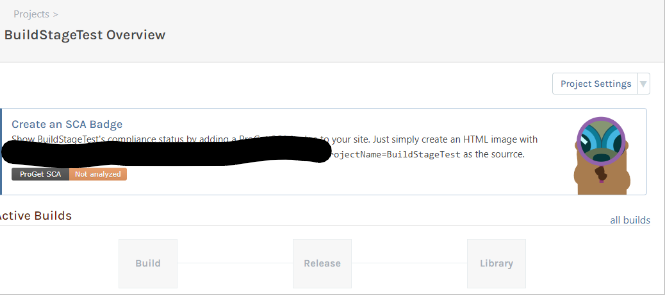
      So I created a test project which does not contain any builds yet:
      630820af-5644-4c14-80d5-138e252fc7b7-image.png
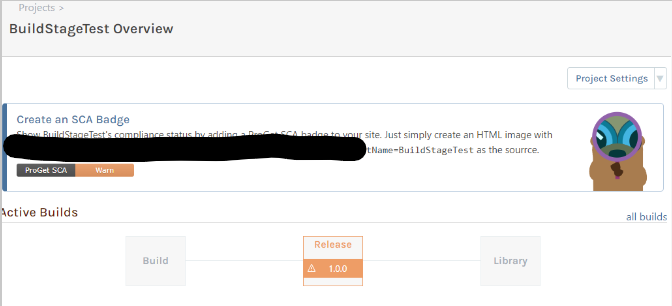
      I want to add build 1.0.0 to this project. To do so, I upload an SBOM file containing the information about version 1.0.0. I also promote this version to the stage "Release":
      2d973bc6-90b4-4606-985e-edf695f2e74c-image.png
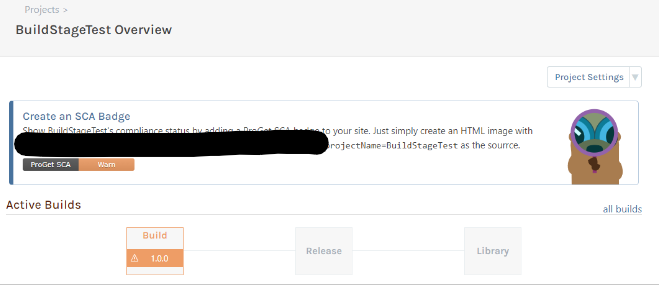
      Now the worst case scenario happens. After months someone uploads a different sbom with version 1.0.0 to this project. I can confirm that the information from the "new" sbom gets added. But the build is also moved back to the stage "Build":
      e7a25898-06c3-4cba-b5d5-d7edbeef579a-image.png
      I would expect that the build remains in its stage. But maybe you have a valid reason to do it like this?

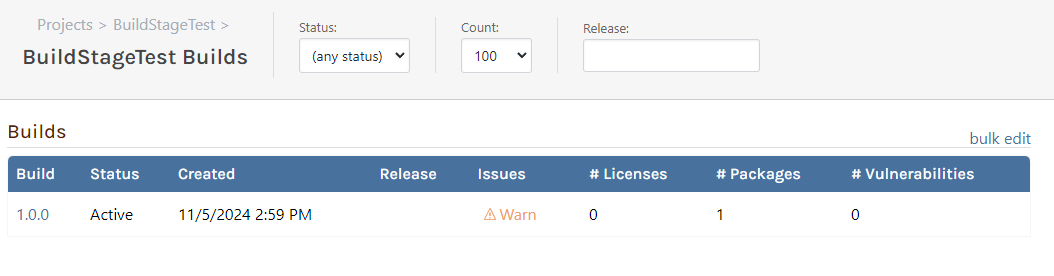
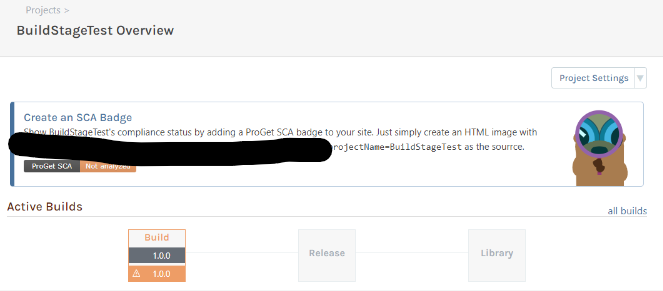
      So now I used "Create Build" from the dropdown to manually create version 1.0.0 again, which leads to two versions 1.0.0:
      581939e7-a20c-4f9d-a5e3-b7d35ee9d6fc-image.png
      If I now upload a SBOM for version 1.0.0 only the first version 1.0.0 gets modified. The second, manually created version 1.0.0 remains unchanged.

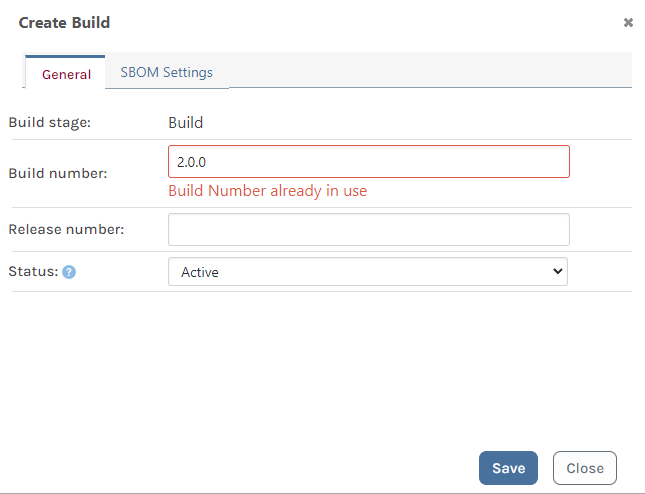
      Further, I created a version 2.0.0 manually using "Create Build". Then I uploaded a SBOM for version 2.0.0, which again results in two builds with version 2.0.0:
      20ee196b-5ae5-4673-abff-e3096b2c084a-image.png
      As far as I understood your explanation, uploading a SBOM should have added the information to the already existing build 2.0.0 instead of creating a new build?

      You also said that the constraint for duplicates is <Project_Id, Release_Number, Build_Number>.
      So for versions 1.0.0 the Project_Id as well as the Build_Number are the same. The Release_Number is empty for both builds (or not set):
      ff2c5814-96e8-4dde-b64f-37050822600b-image.png
      Maybe that's a problem leading to having a build twice? But this seems to be the default when using pgutil to create and upload a SBOM. I am not really sure how this Release_Number property should be used and how it is set using pgutil.

      But if this behavior is on purpose maybe you can again explain to me why?

      Thanks
      Caterina

      posted in Support
      C
      caterina
    • RE: ProGet: Confusion about behavior of Compliance

      Hi @atripp,

      thank you for the clarification. I can confirm this behavior.

      Thank you very much,
      Caterina

      posted in Support
      C
      caterina
    • RE: ProGet: Different behavior for build creation

      Edit:

      If I first use "Create Build" to create build 3.0.0 and afterwards "Import SBOM" to create build 3.0.0 I have two builds with version 3.0.0 in my project.
      The same happens if I do it vice versa.

      posted in Support
      C
      caterina
    • ProGet: Different behavior for build creation

      Hi,

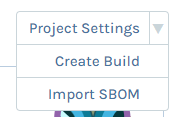
      there are two possibilities to create a build in a project in ProGet 2024.
      I can select between "Create Build" and "Import SBOM".
      c304e72b-5fc3-49db-9daf-74c7b3ef24e3-image.png

      I was interested in what would happen if I create a build with the same version twice.
      Both of those options create a new build but with a different behavior.

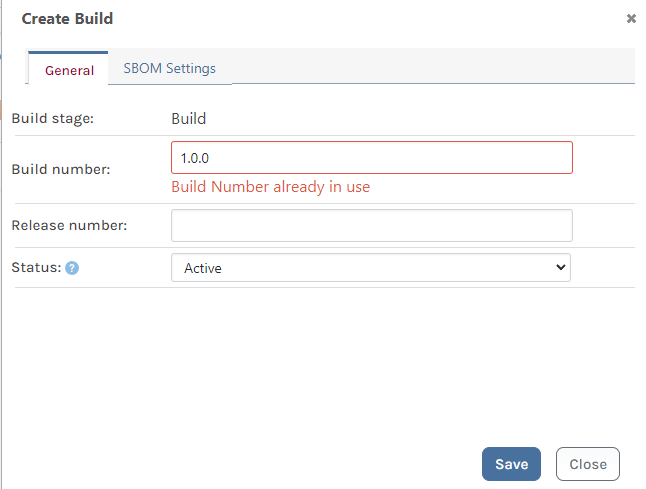
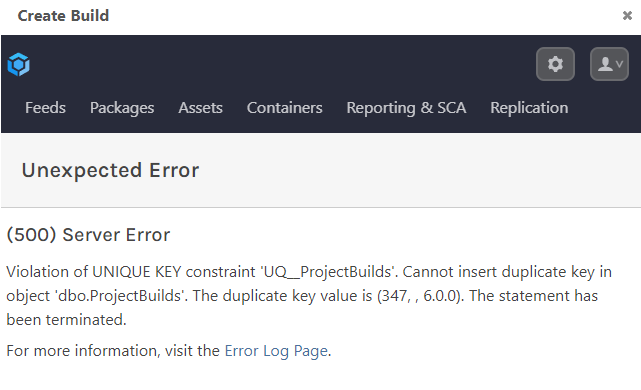
      If I select "Create Build" to create e.g. build 1.0.0 and I do this a second time I get an error:
      4d077e6d-15db-4b7d-9073-078019430d3c-image.png

      If I select "Import SBOM" to create build 2.0.0 and I do this a second time, the first build gets deleted and overwritten I think. Because if build 2.0.0 is in another stage and I try to import the SBOM to my default stage, the build is available in the default stage and no longer in the other stage.

      Shouldn't these two options behave the same?

      If we use pgutil to import a SBOM we would prefer that previous builds would not be overwritten. It should no happen that a build with the same version gets created twice, but sometimes mistakes happen. In this case the previous build should not be deleted without a warning.

      Can you please have a look into this szenario? Maybe we can also discuss what would be the best behavior for pgutil in this case.

      Thanks
      Caterina

      posted in Support
      C
      caterina
    • ProGet: Confusion about behavior of Compliance

      Hi,

      while comparing ProGet 2023 with ProGet 2024 I noticed that a project has an issue in ProGet 2024 but not in 2023.

      In ProGet 2024 the project shows a warning for the package "DevExpress.Win.Gauges 21.2.7" (this package comes from a proxy-feed). The warning is "because of package status (unlisted, deprecated) is unknown, no license detected".
      But if I have a look at the package the license is being detected and it has no vulnerabilities or other issues.

      In ProGet 2023 the same project referencing the same package does not have an issue.

      I hope I could make the problem clear, unfortunately the server won't let me upload screenshots for some reason.

      Thanks,
      Caterina

      posted in Support
      C
      caterina
    • RE: pgutil: PackageLockOnly for npm projects

      Hi @atripp,

      the default behavior of the NpmDependencyScanner is to read the input file as well as all package-lock.json files found in the node_modules directory.

      Rich and I had a longer discussion about this behavior last year (https://forums.inedo.com/topic/3934/pgscan-different-results-for-npm-dependencies/13).
      Result of this discussion was to add "--package-lock-only" to be able to ignore the package-lock.json files in node_modules.

      The code for this is already part of pgutil ('packageLockOnly'-property in NpmDependencyScanner). The only thing missing here is the possibility to set this property from the outside.

      Thanks,
      Caterina

      posted in Support
      C
      caterina
    • RE: pgutil: Read product name and version from file

      Hi @atripp,

      this feature is necessary for us because we have products where we are not able to access the version otherwise. But we want to have the according information about this project, so we implemented the possibility to read the version from a .dll or .exe.
      It just extends the current functionality and I think it would also be a great addition for pgutil.

      It is not limited to .NET since we were using System.Diagnostics.FileVersionInfo.GetVersionInfo() to retrieve the information in pgscan.

      I think instead of 'identify' it is now 'builds scan'. It is a property which is necessary for sbom generation. So I would suggest that 'builds scan' and 'builds sbom' in pgutil should support this option.

      Thanks,
      Caterina

      posted in Support
      C
      caterina
    • pgutil: PackageLockOnly for npm projects

      Hi,

      I see that the Dependency Scanner for npm projects is able to handle "packageLockOnly" (like it was the case in pgscan). But I can't seem to find an option to set this flag from the outside.

      Maybe this option has been overlooked? Or I am missing it?
      I appreciate the help.

      Thanks,
      Caterina

      posted in Support
      C
      caterina
    • pgutil: Read product name and version from file

      Hi,

      in pgscan it was possible to read the product name and version from a given file using --fileInfo (for 'identify) or --consumer-package-file (for 'publish').

      I think this is missing in pgutil? Or am I missing something here?
      It looks like the SbomCommand and the ScanCommand can only handle the properties --project-name and --version. But I can't see an option for a file.

      Hopefully you can help me with this issue.

      Thanks,
      Caterina

      posted in Support
      C
      caterina
    • RE: pgutil: Write SBOM to local file

      Hi @gdivis

      thank you for your response. This is what I was looking for!

      Thanks,
      Caterina

      posted in Support
      C
      caterina
    • pgutil: Write SBOM to local file

      Hi,

      in pgscan we introduced the possibility to write an SBOM to a local output file instead of uploading it to the server using the flag '--output-file'.
      Is this still possible in pgutil? I don't seem to find an option to do this.
      It was always really helpful for testing purposes.

      Thanks,
      Caterina

      posted in Support
      C
      caterina
    • RE: pgutil usage

      Hi @rhessinger,

      thank you very much! We will just wait for the next release and I will come back to you if we encounter further problems.

      Thanks,
      Caterina

      posted in Support
      C
      caterina
    • RE: pgutil usage

      Hi @Dan_Woolf,

      thank you for the quick fix.
      But the promotion call does not seem to promote the build. The build remains in its initial stage.
      From pgutil I do get the feedback "Promoting BuildStageTest 1.1.0 to Test/Production/Integration". I tested it with all of our stages. But if I have a look at ProGet the build is still in the initial stage "Build".
      Can you reproduce this behavior as well?

      Thanks,
      Caterina

      posted in Support
      C
      caterina
    • RE: pgutil usage

      Hi @stevedennis,

      thank you for your response.
      Maybe you can also help me with a follow-up-problem.

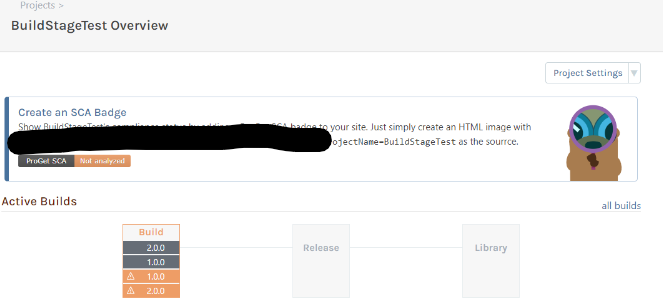
      I created a project using

      pgutil builds projects create --project=BuildStageTest
      

      and i created a build using

      pgutil builds scan --input=<path-to-sln> --project-name=BuildStageTest --version=1.1.0 --api-key=***
      

      Those steps worked perfectly fine:
      69294664-04ba-4f7c-8ee1-9021de7a0d5b-image.png

      Afterwards I wanted to promote this build to another stage:

      pgutil builds promote --build=1.1.0 --project=BuildStageTest --stage=Test --api-key=***
      

      but I got an error:
      Server responded with BadRequest (400): Missing required query argument: build

      I really hope you can help me here as well.

      Thanks,
      Caterina

      posted in Support
      C
      caterina
    • pgutil usage

      Hi,

      I have questions regarding the usage of pgutil.

      Our previous approach using pgscan was to upload an sbom which contained all necessary information. The project was automatically created.
      As far as I understand, uploading an sbom with pgutil (pgutil.exe builds scan) also creates the project without explicitly creating one (pgutil.exe builds create).
      Using the promote command (pgutil.exe builds promote) a build can be promoted to a different stage.
      Is it possible to combine this functionality? We would love to upload an sbom directly to a specific stage. If it is not possible - have you thought about adding this functionality? Or will we have to call both commands consecutively?

      Further, I have tried to create a build using pgutil but I keep getting an error.
      My pgutil call looks like this:
      pgutil.exe builds create --build=1.0.0 --project=BuildStageTest --api-key=*** --source=Test
      And the error I get is:
      Server responded with BadRequest (400): Invalid project name.
      If I try to create this project directly in ProGet there are no errors. Can you reproduce this problem? Or is something wrong with my call? I am working with the latest sources from github.

      Thank you
      Caterina

      posted in Support
      C
      caterina
    • RE: NuGet connector feed no longer showing connector packages

      Hi @atripp,

      there are no connector errors listed in the diagnostic center and the connector itself also says there were no recent errors.

      But we noticed another thing:
      We have a package filter for this connector because we do not want to get DevExpress packages from this feed.
      40c7339c-c3a4-41c1-bc6c-de96de0e911f-image.png
      If we delete this filter, the connector packages are displayed in the feed.
      21d125ea-fe15-4fc4-9ba0-e5407d351497-image.png
      As you can see it is our only filter. If we add the filter again, the connector packages are gone.
      Further, we noticed this behavior already in version 2024.13. In 2024.12 everything was working fine.

      Thanks,
      Caterina

      posted in Support
      C
      caterina
    • NuGet connector feed no longer showing connector packages

      Hi,

      we have a NuGet feed which is using a connector to NuGet ( https://api.nuget.org/v3/index.json).
      Having a look at all versions of a package we are able to see local packages as well as connector packages:
      2f2f8376-6f88-4f5c-b776-a37aeeea5be5-image.png
      We noticed that starting with version 2024.13 the packages with NuGet Connector as source were no longer showing up:
      0f024882-5a20-4355-b0a3-11f0505f279a-image.png
      The connector itself still seems to be working. Using Visual Studio I installed a version with a local source. Afterwards I manually changed the version in my .csproj file to a version with NuGet Connector source which is not visible in my feed. Visual studio was able to successfully restore this nuget package from my feed, but the package never showed up with a local source. This creates the impression that the connector is still working but may not be displayed correctly.

      Further, this is only an issue with our feed using the NuGet connector. We have several feeds using a connector (e.g. https://registry.npmjs.org) but they are showing local and connector packages.

      Maybe someone can help me with this.

      Tanks,
      Caterina

      posted in Support
      C
      caterina
    • RE: Rollback from ProGet 2024 to 2023

      Hi @atripp

      thank you very much, downloading the latest version solved my issue.

      Best,
      Caterina

      posted in Support
      C
      caterina
    • Rollback from ProGet 2024 to 2023

      Hi all,

      I wanted to downgrade my ProGet installation from 2024 to 2023. The documentation for ProGet 2024 says: "However, if you need to rollback to ProGet 2023, you can do so without restoring the database by simply using the Inedo Hub."
      But I can not see such an option in the Inedo Hub. All i can see is an upgrade to the different versions of 2024. Maybe someone can help me with this.

      Tanks,
      Caterina

      posted in Support
      C
      caterina
    • 1
    • 2
    • 3
    • 4
    • 2 / 4