Me too! I couldn't not hear it every time I talked about it, so it had to change. I stumbled across that pronunciation documentation and the lightbulb went off 
Welcome to the Inedo Forums! Check out the Forums Guide for help getting started.
If you are experiencing any issues with the forum software, please visit the Contact Form on our website and let us know!
 S
Offline
S
Offline
Posts
-
RE: Pagootle: pgutil, but PowerShell
-
Pagootle: pgutil, but PowerShell
I've published the initial release of my module for managing Inedo ProGet to the PowerShell gallery! Pagootle (formerly InedoOps) allows you to manage your ProGet server via PowerShell.
You can via the source code for Pagootle at https://github.com/steviecoaster/Pagootle, read the documentation at https://steviecoaster.github.io/Pagootle/, or via the release on the PowerShell gallery at https://www.powershellgallery.com/packages?q=pagootle
If you're wondering Why the name Pagootle? Well it's a play on the pronunciation of their command-line executable: pgutil.exe! See: https://docs.inedo.com/docs/proget/api/pgutil#how-is-pgutil-pronounced
-
Discrepancy when creating Chocolatey feeds
In the latest version of ProGet, when creating a Chocolatey Feed via the web interface, both v2 and v3 apis are enabled by default.
However, when creating a feed via
pgutil, only the v2 endpoint is enabled. For consistency, can we have v3 endpoints be enabled for Chocolatey feeds the same way they are in the web interface? -
RE: Drop Path not deleting
Late reply (was out at a conference), but this was in fact permissions related. I've added a check to ensure the Inedo service account has been granted modify permissions on the drop path upon creation, and it is working appropriately!
-
Drop Path not deleting
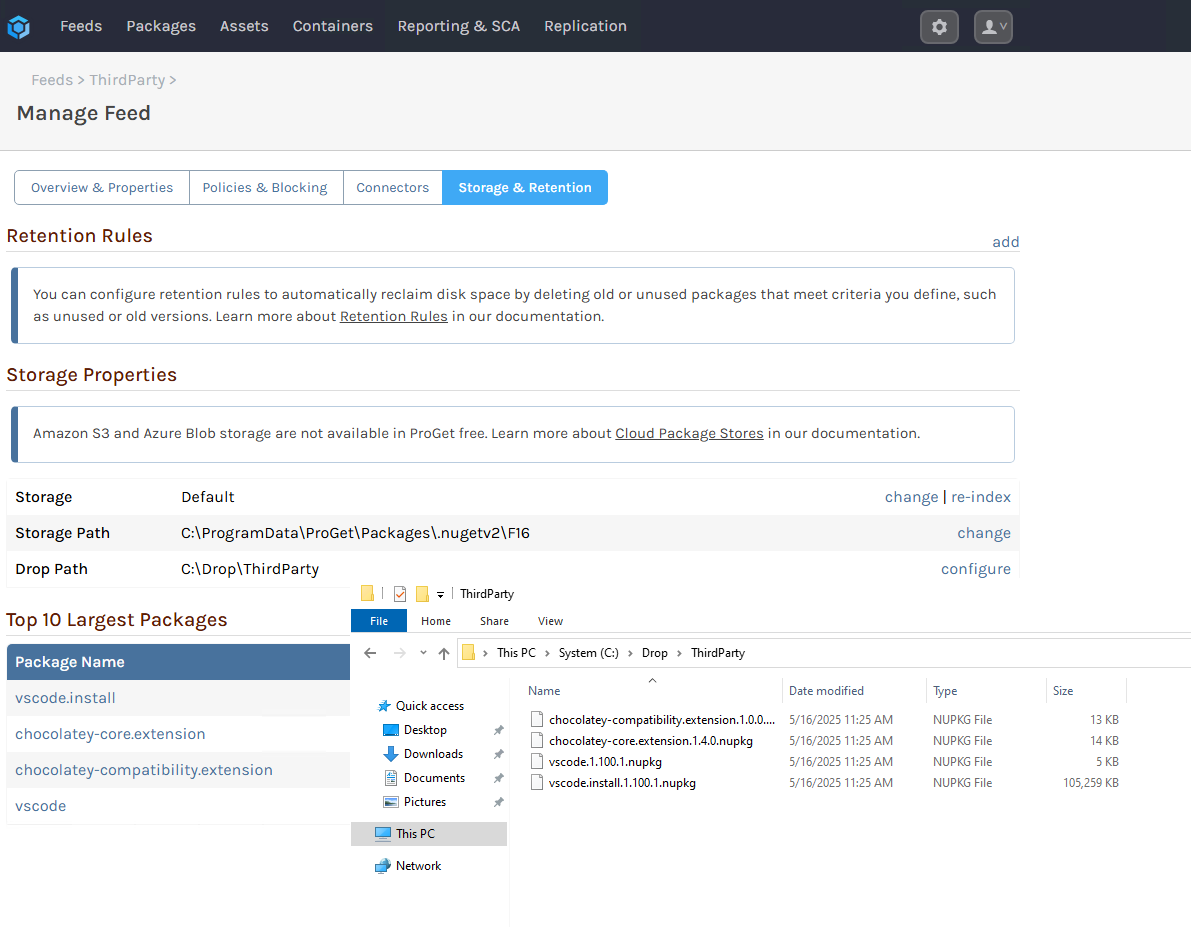
According to https://forums.inedo.com/topic/1038/drop-path-contents/4?_=1747409857938 the Drop Path folder should remove a package once it has been successfully imported into a feed.
I've configured a drop path for a chocolatey feed and the folder does not seem to be clearing of nupkg files once they are ProGet.
See:
ProGet version 2024.35 (Build 2)
-
Programmatically License ProGet
Hello. Me....again.
As the title suggests, can one programmatically assign a license to ProGet itself, or must it be done through the WebUI as shown here:?:
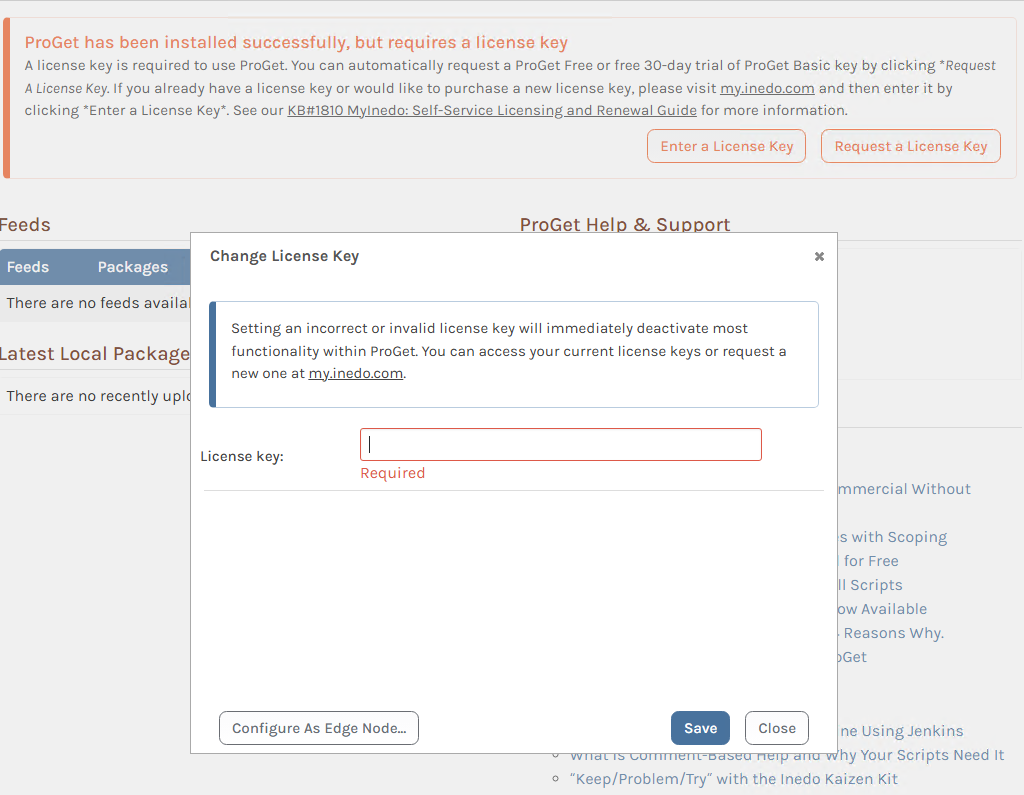
I had a quick look through the stored procedures to see if anything jumped out, but it all seemed related to licenses tied to assets being stored in ProGet feeds, not the actual server license itself.
I'm away to play with DevTools to see if the browser points in the right direction, but figured I'd ask here as well as you'll provide a much better answer :)
-
RE: ssl certificate does not work
Ah, that makes more sense! Yeah, Github is weird like that. I think if I provided the raw link then that right-click would have worked. Sorry for the confusion!
-
RE: Pull Maven artifacts - invalid version
v20250407 doesn't follow any sort of semver convention that I am aware of, that looks more like a git tag (but even those usually follow at least semver 2? I'd expect this to be 2025.04.07. Perhaps they published this malformed upstream, and ProGet can't handle it?
Just a hunch :)
-
RE: Extending the migrator utility
Thanks @dean-houston! That's good enough for me. Looking forward to trying the new migrator once it lands, sounds really really good!
-
Extending the migrator utility
Hi friends!
Firstly, I gotta say that that package migration utility you've built into Chocolatey feeds in ProGet is awesome.
That said, I'm looking to extend it. We're doing a webinar together in a few weeks and I'm looking to build some automation that not only migrates the packages, but builds the feeds as well.
I can trivially do this with PowerShell and choco.exe, but the overhead of using choco slows the process down considerably. It would just absolutely wonderful if you could provide the secret sauce that you use to get the list of packages from the source repo before you start pulling them down into the destination.
I imagine you are skipping using choco or nuget but rather using the nuget api directly, but I can't quite grep which endpoints are in play here. I can get a single package easily.
But....I need to get every package. I can craft urls once I have a list of packages that need migrated. I just can't.....get that. Help?
We can take this offline if you don't want/can't reveal the secret sauce here :)
-
RE: ssl certificate does not work
It just occured to me that you probably only need the Set-CertPermission function. If you're just renewing a cert, everything else should be fine in your config.
You can call this on its own as well: https://github.com/steviecoaster/InedoOps/blob/main/source/private/Set-CertPermissions.ps1
-
RE: ssl certificate does not work
The issue on windows is that the Service user running the Inedo web service doesn't have permissions to the private key on WIndows. The script can run 100% offline standalone. There are 0 references to the internet inside of it. The only way you would need the internet to use it is if you use Install-Module to install the entire InedoOps module, which you do not need to do. You could simply copy the function, and run it.
It is obviously good practice to read any code you find online before you blindly run it, but there are 0 references to the internet. Unless you are referring to the -Urls parameter. That is so you can control what port your ProGet web interface is bound too with your SSL certificate, not the internet in general.
-
RE: ssl certificate does not work
It seems like you are dancing around the fact that this is permissions issue on the private key. This is a windows host, correct? and you are attempting to use a certificate that is inside an Windows Certificate store?
If so I urge you to try the code I linked, instead of fighting it :)
-
RE: Default Chocolatey feeds to v2 and v3 enabled
Awesome! Thanks for the quick response on this one!
-
Default Chocolatey feeds to v2 and v3 enabled
Since Chocolatey CLI 2.0.0 we have added NuGet v3 support. As all the other repository vendors have deprecated NuGet v2 apis, the majority of our customers on other platforms have migrated their configuration to v3 endpoints.
It is also worth mentioning that other repository vendors don't provide an option, both v2 and v3 are just available without needing to manage configuration.
-
RE: ssl certificate does not work
Hey @udi-moshe_0021,
My InedoOps PowerShell module has a Set-ProGetSSLConfig function that helps setups ProGet to server up content via HTTPS.
The nice thing about this particular function is that, since it doesn't interact with ProGet's web interface, but rather configuration, it can be ran standalone.
You can find the function here: https://github.com/steviecoaster/InedoOps/blob/main/source/public/Utility/Set-ProGetSSLConfig.ps1
The first example is likely the one you'll want to follow, but pay attention to the URL parameter and adjust it as needed as you'll likely want to use
https://*:443/for the value (or whatever port you typically serve SSL traffic over to ProGet).As mentioned by @rhessinger this is likely a permissions issue on the private key, which the above handles for you.
Hope that helps!
-
RE: Creating Users with Native API
@jipianu_mihnea_1277 said in Creating Users with Native API:
ant to use the Native API to create users and groups, but I do not know how to generate the password because I am unaware of th
Thanks for the shout-out @atripp! Yes, you can do
Set-ProGetUserPassword -Credential (Get-Credential)and supply the username of the account you with to set the password, as well as the new password.The
New-ProGetUserfunction will do this internally for you when you pass in the credential object that function expects.If you run into trouble, please do file an issue so I can try to fix it!