OK. That aligns with what I was seeing.
Thanks for explaining it to me! 
OK. That aligns with what I was seeing.
Thanks for explaining it to me! 
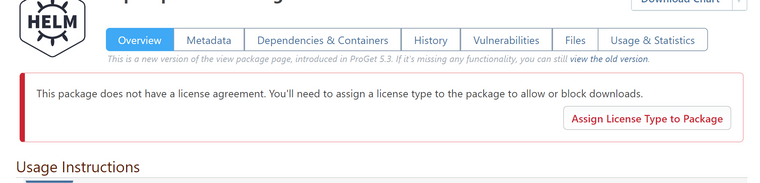
You may also want to remove this message:

The big red banner is what got me looking into the license types in the first place. (I did not want my users to see the big red banner and I could see no way to suppress it except for getting a license assigned.)
I am having problem with getting the catalog of docker repositories. Here is an example of the call I am trying:
curl -X GET -u api:mytokenhere -v https://myproget.company.net/v2/_catalog
This returns only the repositories that are setup to allow anonymous access. The token I am using is setup specifically for one repository. But that one is not in the list.
To say it another way, I get the exact same results if I run it without a user.
curl -X GET -v https://myproget.company.net/v2/_catalog
I thought it might be my token user, so I made a new token with full control (over all of Proget) and got the exact same results.
I then thought to try listing tags, like this:
curl -u api:mytokenhere https://myproget.company.net/v2/myfeed/prefix/container-here/tags/list
I got this error:
{"errors":[{"code":"UNAUTHORIZED",
"message":"Anonymous is not permitted to perform the Feeds_ViewFeed task for the current scope.",
"detail":[{"Type":"repository","Name":"myfeed/prefix/container-here","Action":"pull"}]}]}
My token is setup with "Feed (use certain feeds)", and then I have selected my feed in the next level down. It has the checkboxes "View/Downlaod" and "Add/Repackage" checked. "Promote" and "Overwrite/Delete" are unchecked.
How can I get the _catalog and tags call to show me more than just anonymous results?
When I look at a container image in ProGet, I can see each layer's size (which is great!). It would be nice to also show the total size. It can be a bit of a pain to add all the numbers up when I have a container with a lot of layers.
Just a suggestion.
We use the ProGet API to promote docker images from a PreRelease feed to a Release feed. This API takes a version property in the request body that is the Tag of the container image.
Today we ran into an issue where we needed to promote a container image, but it did not promote. Further investigation found that the container image was already in the Release feed, but it did not have the tag that we were trying to promote. We assume that ProGet saw that the container was already in the target feed and so ignored the request.
We tested this using the UI and found that it also ignored our promotion request.
We were able to work around this issue by using the UI to manually add an additional tag to the container image.
However, we use tags in our process to refer to container images. Even though we know that the image is actually uniquely defined by its digest, the tag is very important to us.
I would like to requests that when a Docker Image promotion request arrives to ProGet, if it sees that the container image is already in the target feed, that it looks at the tag that was used in the request, and if the tag is not on the container image in the target feed, it adds the tag to the image.
So it would follow this logic structure:
If this is not acceptable, then I would suggest that the request to do the promotion API respond with a 403 - Already Exists response. That way we can know that the promotion was of something that was already there and know to go add the tag.
I got this working. Here is my PowerShell script to get a Docker Token from ProGet:
function GetDockerToken() {
param (
[string] $packageName = $(throw "-packageName is required. This is the namespace and image name. For example: library/my-container-image"),
[string] $feed = $(throw "-feed is required"),
[string] $actionToAuthorize = $(throw "-action is required. This is the docker action to be authorized (pull, push, delete, etc)"),
[string] $apiKey = $(throw "-apiKey is required"),
[string] $progetBaseUrl = $(throw "-progetBaseUrl is required. "),
[string] $service
)
if ($service -eq "") {
# This expects that $progetBaseUrl is prepended with "https://" If you are using "http://" then change 8 to 7 below.
$service = $progetBaseUrl.SubString(8,$progetBaseUrl.Length-8)
}
$base64AuthInfo = [Convert]::ToBase64String([Text.Encoding]::ASCII.GetBytes(("{0}:{1}" -f "api","$apiKey")))
$response = Invoke-WebRequest -Uri "$progetBaseUrl/v2/_auth?service=$service&scope=repository`:$feed/$packageName`:$actionToAuthorize" -Headers @{Authorization=("Basic {0}" -f $base64AuthInfo)}
if ($response.StatusDescription -eq "OK") {
$token = ($response.Content | ConvertFrom-Json).token
$token
}
}
This can then be used like this:
$pullToken = GetDockerToken -feed $toFeed -packageName $packageName -actionToAuthorize "pull" -apiKey $apiKey -progetBaseUrl $progetBaseUrl
$manifest = Invoke-WebRequest -Uri "$progetBaseUrl/v2/$fromFeed/$packageName/manifests/$fromVersion" -Method GET -Headers @{Authorization=("Bearer {0}" -f $pullToken)}
Since this using the API Key for calls like this is no longer supported in ProGet 6, you may want update your documentation here: https://docs.inedo.com/docs/proget-docker-semantic-versioning
This page has a script I wrote a while back to repackage a container image that uses API Keys on the ProGet Docker API. I posted an update to the script using Docker Tokens on the original thread that caused its creation: https://forums.inedo.com/topic/3255/api-to-apply-an-alternate-tag-to-docker-container-image/4
If you like, you can update the documentation with the updated script that is compatible with the removal of API Keys functionality on the ProGet 6 Docker API.
Version 6 of ProGet removes the ability to make calls to the docker API via a ProGet API Key.
As such the code posted above no longer works. I updated it to work using the Docker Token based Authentication system. I am posting it here in case someone comes along this post and wanted to use this code:
function RepackageContainerImage() {
param (
[string] $packageName = $(throw "-packageName is required. This is the namespace/image-name"),
[string] $fromFeed = $(throw "-fromFeed is required"),
[string] $toFeed = $(throw "-toFeed is required"),
[string] $fromVersion = $(throw "-fromVersion is required. This is the current tag on the image in the fromFeed."),
[string] $toVersion = $(throw "-toVersion is required. This is the tag to be applied after the image is promoted."),
[string] $comments = "Promoted by automation",
[string] $apiKey = $(throw "-apiKey is required"),
[string] $progetBaseUrl = $(throw "-progetBaseUrl is required")
)
# Promote the Container Image
$postBody = @{
packageName="$packageName";
groupName="";
version="$fromVersion";
fromFeed="$fromFeed";
toFeed="$toFeed";
comments="$comments"
}
$promoteResponse = Invoke-WebRequest -Uri "$progetBaseUrl/api/promotions/promote" -Method POST -Body $postBody -Headers @{"X-ApiKey"="$apiKey"}
# Retag the container image by downloading the manifest and then re-uploading it as the new version
$pullToken = GetDockerToken -feed $toFeed -packageName $packageName -actionToAuthorize "pull" -apiKey $apiKey -progetBaseUrl $progetBaseUrl
$manifest = Invoke-WebRequest -Uri "$progetBaseUrl/v2/$fromFeed/$packageName/manifests/$fromVersion" -Method GET -Headers @{Authorization=("Bearer {0}" -f $pullToken)}
$pushToken = GetDockerToken -feed $toFeed -packageName $packageName -actionToAuthorize "push" -apiKey $apiKey -progetBaseUrl $progetBaseUrl
Invoke-WebRequest -Uri "$progetBaseUrl/v2/$toFeed/$packageName/manifests/$toVersion" -Method PUT -Body $manifest.ToString() -Headers @{Authorization=("Bearer {0}" -f $pushToken)}
}
function GetDockerToken() {
param (
[string] $packageName = $(throw "-packageName is required. This is the namespace and image name. For example: library/my-container-image"),
[string] $feed = $(throw "-feed is required"),
[string] $actionToAuthorize = $(throw "-action is required. This is the docker action to be authorized (pull, push, delete, etc)"),
[string] $apiKey = $(throw "-apiKey is required"),
[string] $progetBaseUrl = $(throw "-progetBaseUrl is required"),
[string] $service
)
if ($service -eq "") {
$service = $progetBaseUrl.SubString(8,$progetBaseUrl.Length-8)
}
$base64AuthInfo = [Convert]::ToBase64String([Text.Encoding]::ASCII.GetBytes(("{0}:{1}" -f "api","$apiKey")))
$response = Invoke-WebRequest -Uri "$progetBaseUrl/v2/_auth?service=$service&scope=repository`:$feed/$packageName`:$actionToAuthorize" -Headers @{Authorization=("Basic {0}" -f $base64AuthInfo)}
if ($response.StatusDescription -eq "OK") {
$token = ($response.Content | ConvertFrom-Json).token
$token
}
}
@atripp do you have any docs on how to do this token authentication with proget? I just need a way to curl or otherwise do a GET to see if the container is there already.
We recently upgraded from ProGet 5.3.38 to 6.0.6. It worked fine for a few days, but then part of our automation tried to use an API Key to check if a container exists in an repository exists. This check was working fine before we upgraded, but now is failing.
Here is the command that was run (in PowerShell):
$manifestResponse = Invoke-WebRequest -Uri "https://myProGetServer.net/v2/MyFeed/PackageLibraryHere/PackageNameHere/manifests/1.0.0" -Method GET -Headers @{"X-ApiKey"="___API_KEY_HERE__";"accept"="application/vnd.docker.distribution.manifest.v2+json"}
Now when this runs it returns:
{"errors":[{"code":"UNAUTHORIZED","message":"Anonymous is not permitted to perform the Feeds_ViewFeed task for the current scope.","detail":[{"Type":"repository","Name":"MyFeed/PackageLibraryHere/PackageNameHere","Action":"pull"}]}]}
Prior to upgrading this API Key had a user that it ran as. After upgrading to version 6, it seems to have been auto-converted to a "Personal" API Key. It still has the correct user on it post upgrade and the API Key seems to be unchanged (though I can't really verify that).
To see if it was specific to this user, I created a Feed API Key (assigned to my feed). When I tried the call with that API Key (which looks longer than the old ones), it still failed with the same "Anonymous is not permitted" error.
I want to reiterate that this was tested and was all working fine before we upgraded to version 6.
How can I get this call to check if a Container is already uploaded working correctly again?
Say I have a Helm feed with 20 different charts in it.
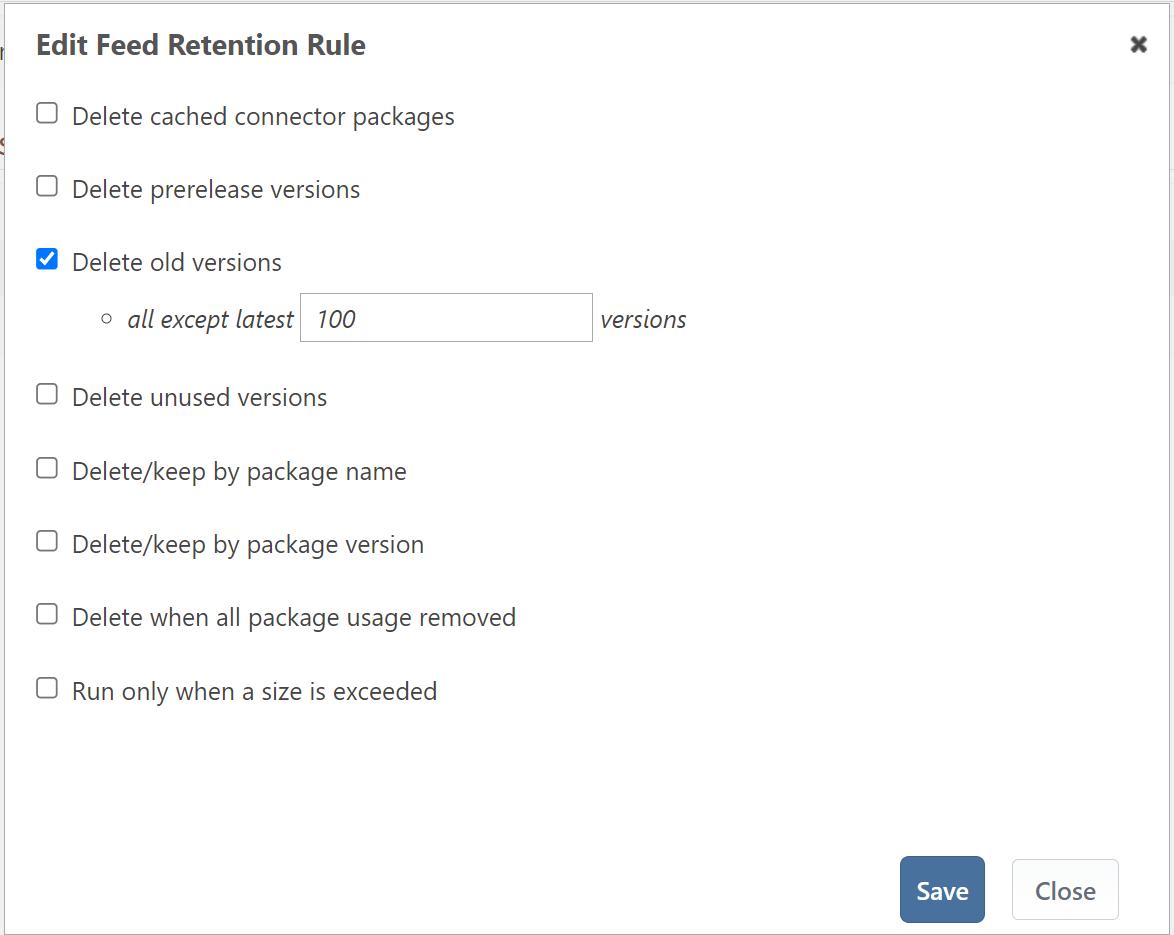
If I setup that feed like below (delete all but the latest 100 versions):

Will that keep the newest 100 helm chart version in the feed (up to 100 in total)? Or will it keep the newest 100 versions in each chart (up to 2,000 charts in total)?
I had to get into my permissions for ProGet again today. As I am doing so, I end up wondering why I have some permissions set the way they are. I then have to try to figure it out again (and hope I don't miss anything).
I would like to suggest that you allow adding a comment/note next to permission entries. This will allow explanations of permissions for future maintainers.
Basically it would hold comments like:
This is not a high priority need, but would be useful (at least to me).
I created a new feed and then I added the publish permission for that feed to an existing user. Then I had to wait 30 minutes for it to take effect.
I am running 5.3.39 (Build 2). I only run a single ProGet server instance (no HA cluster).
Again, this is not a really big issue. Waiting does cause it to start working, but I would suggest firing an update to your cache when a user's permissions are changed.