Inedo Community Forums Forums
    • Recent
    • Tags
    • Popular
    • Login
    1. Home
    2. jyip_5228
    3. Posts

    Welcome to the Inedo Forums! Check out the Forums Guide for help getting started.

    If you are experiencing any issues with the forum software, please visit the Contact Form on our website and let us know!

    J Offline
    • Profile
    • Following 0
    • Followers 0
    • Topics 6
    • Posts 40
    • Groups 0

    Posts

    Recent Best Controversial
    • RE: Nuget packages not found during reindex

      we are actually using both versions, some of our legacy applications appear to be pointing to the 12.x version. I copied the package into Wpf folder and had to modify the names of the actual package for it to work. The casing of the package had to match as well for it to work.

      7f8f6f35-335a-4ba2-82fd-9c2ac799c1c7-image.png

      Please work on a fix for this. I think this type of mucking around in the packages directory may pollute the contents.

      posted in Support
      J
      jyip_5228
    • RE: Nuget package not found in proget, but searchable in UI

      It is multiple packages, not just MethodTimer.Fody. Our code/dependencies does use multiple versions of MethodTimer.Fody, and we have multiple versions cached locally on Proget.

      posted in Support
      J
      jyip_5228
    • RE: Nuget package not found in proget, but searchable in UI

      both of those commands run fine, however issue is unless the package is cached on the Proget server, it cant be used by MSBuild. And i actually have connector caching turned off, but it still caches..

      posted in Support
      J
      jyip_5228
    • RE: Nuget packages not found during reindex

      this is definitely breaking builds:

      C:\Program Files (x86)\Microsoft Visual Studio\2017\BuildTools\Common7\IDE\CommonExtensions\Microsoft\NuGet\NuGet.targets(114, 5): The feed 'https://xxx/nuget/ks-nuget/v3/index.json [https://xxx/nuget/ks-nuget/v3/index.json]' lists package 'Syncfusion.Grid.WPF.17.4.0.47' but multiple attempts to download the nupkg have failed. The feed is either invalid or required packages were removed while the current operation was in progress. Verify the package exists on the feed and try again.
        Unable to find package 'Syncfusion.Grid.WPF.17.4.0.47'.
      

      Package is clearly there at least on the server, probably searching in the wrong directory
      16042f2a-fb4e-4ca6-9c52-88549c6c429b-image.png

      posted in Support
      J
      jyip_5228
    • RE: Nuget Feed Connection timeout

      Actually seems like 1000 is not enough, i just hit the error again upon compiling a bigger project. These are the two errors that are grouped together usually.

       An error occurred processing a GET request to http://xxxxx.nupkg: Timeout expired. The timeout period elapsed prior to obtaining a connection from the pool. This may have occurred because all pooled connections were in use and max pool size was reached.
      
      An error occurred in the web application: Timeout expired. The timeout period elapsed prior to obtaining a connection from the pool. This may have occurred because all pooled connections were in use and max pool size was reached.
      
      posted in Support
      J
      jyip_5228
    • RE: Nuget Feed Connection timeout

      had to up it to 1000 before i stopped seeing the issue

      posted in Support
      J
      jyip_5228
    • Nuget package not found in proget, but searchable in UI

      During build i occasionally get this issue where the nuget package is not found, i can search it in the UI and it can see it on nuget.org via connector but unable to install.. however if i manually do a nuget install, it caches locally and then Msbuild is able to get the package from proget and compile.

      NU1101: Unable to find package MethodTimer.Fody. No packages exist with this id in source(s): https://xxx/nuget/ks-nuget/v3/index.json
      
      C:\>nuget install MethodTimer.Fody -Version 3.1.2 -Source https://xxx/nuget/ks-nuget/v3/index.json
      

      Doing the 'pull to proget' in the UI does not seem to make it work.

      Anyone having a similar issue?

      posted in Support
      J
      jyip_5228
    • RE: Nuget Feed Connection timeout

      i set it to 300 in the connection string still seeing max pool, gonna increase it to 500 and see how that goes.

      posted in Support
      J
      jyip_5228
    • RE: Nuget Feed Connection timeout

      i am running MSSQL 2017 in docker, will that require increasing the max allowed connections on the SQL server as well? I will increase the max pool size to 300 and see how that goes.

      posted in Support
      J
      jyip_5228
    • RE: Nuget Feed Connection timeout

      actually I would like to add that Proget is also reaching out to nuget.org to search for internal packages as well and gets a timeout. Is it suppose to reach out for something that it should have found locally?
      I wonder if these additional calls to nuget.org contributes to to this exception that I have also been getting.

      Details: System.InvalidOperationException: Timeout expired. The timeout period elapsed prior to obtaining a connection from the pool. This may have occurred because all pooled connections were in use and max pool size was reached.
      
      posted in Support
      J
      jyip_5228
    • RE: Nuget packages not found during reindex

      I am hitting an issue when trying to install nuget from proget, it reports the package cannot be found despite reporting having it. If i recall correctly the message may be similar to this

      multiple attempts to download the nupkg have failed. The feed is either invalid or required packages were removed while the current operation was in progress
      
      posted in Support
      J
      jyip_5228
    • RE: Nuget Feed Connection timeout

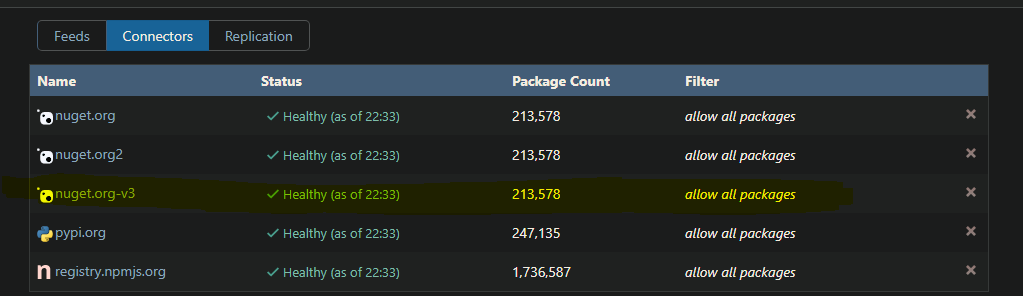
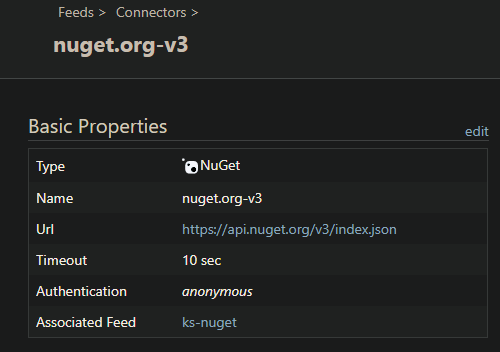
      I had 2 nuget connectors originally, v2 and v3, but I deleted the v2 just to see if this error would stop. But it still happened. Works for me if its nothing to be concerned about.

      thank you.

      posted in Support
      J
      jyip_5228
    • Nuget Feed Connection timeout

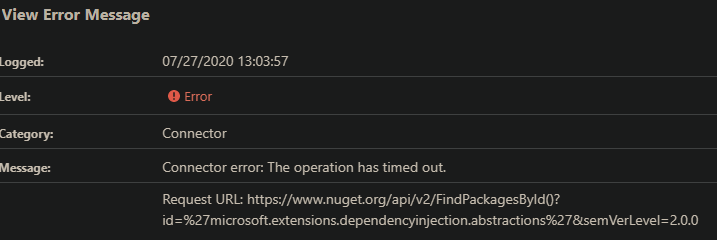
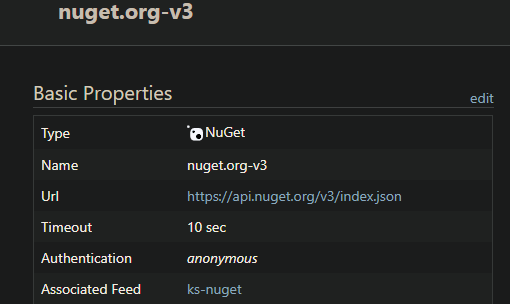
      I am using nuget v3 api but for some reason getting connection timeout on v2.
      cfa6ed02-5ffd-41fd-a76f-76f46fc00b81-image.png
      b4b2c556-5a95-49c7-9ef5-3c2f16e5aa07-image.png

      Request URL: https://www.nuget.org/api/v2/FindPackagesById()?id=%27microsoft.extensions.dependencyinjection.abstractions%27&semVerLevel=2.0.0
      
      System.Net.WebException: The operation has timed out.
      at System.Net.HttpWebRequest.RunWithTimeoutWorker[T] (System.Threading.Tasks.Task`1[TResult] workerTask, System.Int32 timeout, System.Action abort, System.Func`1[TResult] aborted, System.Threading.CancellationTokenSource cts) [0x000f8] in <4d8f95b7df544b3fa1a27dda924b4424>:0
      at System.Net.HttpWebRequest.EndGetResponse (System.IAsyncResult asyncResult) [0x00020] in <4d8f95b7df544b3fa1a27dda924b4424>:0
      at System.Threading.Tasks.TaskFactory`1[TResult].FromAsyncCoreLogic (System.IAsyncResult iar, System.Func`2[T,TResult] endFunction, System.Action`1[T] endAction, System.Threading.Tasks.Task`1[TResult] promise, System.Boolean requiresSynchronization) [0x0000f] in <c453bf849bb84e719dbec0475e99db95>:0
      --- End of stack trace from previous location where exception was thrown ---
      
      at Inedo.ProGet.Feeds.Connector.GetDirectResponseAsync (System.String url) [0x000eb] in <5675ed1ff2ff49938725a260ae4389ad>:0
      at Inedo.ProGet.Feeds.Connector.GetCachedResponseAsync (System.String url) [0x000a8] in <5675ed1ff2ff49938725a260ae4389ad>:0
      at Inedo.ProGet.Feeds.Connector.GetCachedTextReaderAsync (System.String url) [0x00075] in <5675ed1ff2ff49938725a260ae4389ad>:0
      at Inedo.ProGet.Feeds.NuGet.V2.NuGetFeedClient.PerformRequestWithAbsoluteUrlAsync (System.String fullUrl) [0x000d9] in <5675ed1ff2ff49938725a260ae4389ad>:0
      
      posted in Support
      J
      jyip_5228
    • Nuget packages not found during reindex

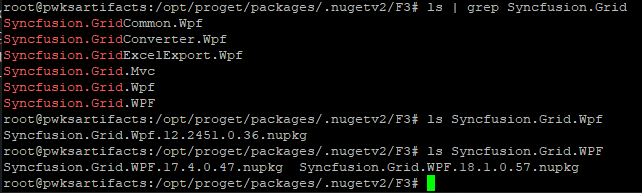
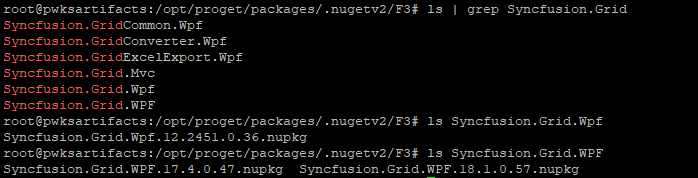
      Is there a chance that Proget is caching files and then searching for files in the wrong directory due to case sensitivity?
      Check out the screenshots below where the package name does not reflect properly in storage path.
      ALSO i have set the connector to NOT cache. But it still caches..
      Using proget 5.3.7 - docker
      For example, i reindex the nuget feed, its looking a package in Syncfusion.Grid.Wpf (however it appears to have stored in Syncfusion.Grid.WPF directory
      pic3.png pic2.png pic1.png

      Let me know if I can provide more logs or something.

      posted in Support
      J
      jyip_5228
    • RE: Nuget connector not working properly

      I tested the following: changing the nuget connector to utilize v2. The effect is the same where I cannot pull from nuget.org. This definitely worked prior to v5.3

      Right now i have proget running a v3 api for the feed with a v2 connector and it is working fine so far.

      I believe its a bug when the feed is running v2.

      posted in Support
      J
      jyip_5228
    • RE: Nuget connector not working properly

      I might have found a temporary fix by utilizing enabling and utilizing v3 api, running this allows it to install perfectly fine it seems.

      nuget install CommonServiceLocator -Version 1.3.0 -Source https://localnugetserver/nuget/ks-nuget/v3/index.json
      

      can someone look into this issue/ verify that it is not just me having the issue?

      posted in Support
      J
      jyip_5228
    • Nuget connector not working properly

      I have noticed that since upgrading to v5.3.5 Proget, the connector/nuget feed is not working properly. For example I am trying to download CommonServiceLocator.1.3.0.0.nupkg, it is an external package in the public nuget server. This is what i get when running in CLI

      C:\Dev\Nuget>nuget install CommonServiceLocator -Version 1.3.0 -Source https://localprogetserver/nuget/ks-nuget/
      Feeds used:
        C:\Dev\NuGet\packages
        https://localprogetserver/nuget/ks-nuget/
      
      Attempting to gather dependency information for package 'CommonServiceLocator.1.3.0' with respect to project 'C:\Dev\Nuget', targeting 'Any,Version=v0.0'
      Gathering dependency information took 342 ms
      Attempting to resolve dependencies for package 'CommonServiceLocator.1.3.0' with DependencyBehavior 'Lowest'
      Resolving dependency information took 0 ms
      Resolving actions to install package 'CommonServiceLocator.1.3.0'
      Resolved actions to install package 'CommonServiceLocator.1.3.0'
      Retrieving package 'CommonServiceLocator 1.3.0' from 'https://localprogetserver/nuget/ks-nuget/'.
        GET https://localprogetserver/nuget/ks-nuget/package/CommonServiceLocator/1.3
        NotFound https://localprogetserver/nuget/ks-nuget/package/CommonServiceLocator/1.3 152ms
      WARNING: Install failed. Rolling back...
      Executing nuget actions took 199 ms
      Package 'CommonServiceLocator.1.3.0' is not found on source 'https://localprogetserver/nuget/ks-nuget/'.
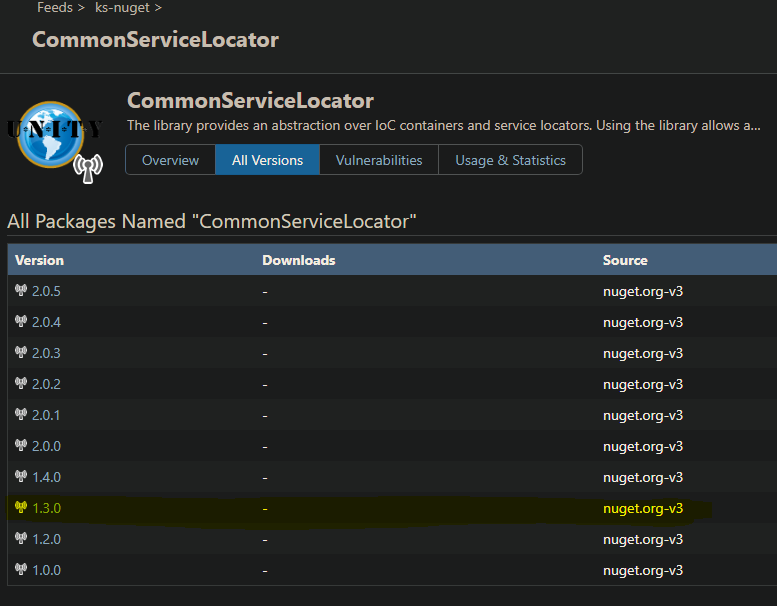
      

      98234f4a-cf7f-4bef-8cf3-e62a5fcfabe1-image.png
      8fde7963-6e16-4ac5-b456-68e5acda33fe-image.png
      2b43cb0c-bb56-4702-991a-47e843cf6a19-image.png
      In the pictures above, it shows that its clearly available online through the external connector.
      Prior/ expected result when I try to install a nuget package not on our local proget server is that I get proxied out to the external nuget.org and get the installation.

      Please assist.

      posted in Support
      J
      jyip_5228
    • RE: Proget 5.3 Docker Image

      you should update the link to download the docker image because it is pointing to dockerhub...

      https://inedo.com/proget/download

      posted in Support
      J
      jyip_5228
    • RE: docker pull from proget not working

      hi,

      i just checked the diagnostics center, I see other errors regarding feeds etc, but i do anything regarding docker pull.

      Its weird i only get this issue when i'm not logged in as a user; unless this was by design.

      posted in Support
      J
      jyip_5228
    • docker pull from proget not working

      I have setup a nginx proxy with SSL certs setup. I am able to do docker pull and docker push, IF i do a docker login first with Admin for example. The anonymous permissions allows for the tasks of 'view and download packages' however I am unable to do a docker pull without any login.

      I get the following error:
      Error response from daemon: received unexpected HTTP status: 500 Internal Server Error

      I am running the proget docker image with mssql and nginx.

      Can we confirm if its possible to download docker images without login?

      Thank you

      posted in Support
      J
      jyip_5228
    • 1 / 1