Inedo Community Forums Forums
    • Recent
    • Tags
    • Popular
    • Login
    1. Home
    2. jyip_5228
    3. Posts

    Welcome to the Inedo Forums! Check out the Forums Guide for help getting started.

    If you are experiencing any issues with the forum software, please visit the Contact Form on our website and let us know!

    J Offline
    • Profile
    • Following 0
    • Followers 0
    • Topics 6
    • Posts 40
    • Groups 0

    Posts

    Recent Best Controversial
    • RE: docker progetcore:5.3.10 - unable to push packages

      Found this.

      An error occurred processing a PUT request to http://xxxx/nuget/ks-nuget/: Synchronous operations are disallowed. Call ReadAsync or set AllowSynchronousIO to true instead.
       Details: System.InvalidOperationException: Synchronous operations are disallowed. Call ReadAsync or set AllowSynchronousIO to true instead.
      at Microsoft.AspNetCore.Server.Kestrel.Core.Internal.Http.HttpRequestStream.Read(Byte[] buffer, Int32 offset, Int32 count)
      at Microsoft.AspNetCore.WebUtilities.FileBufferingReadStream.Read(Byte[] buffer, Int32 offset, Int32 count)
      at System.IO.Stream.ReadByte()
      at Inedo.IO.StreamSearcher.FindNext(Stream stream)
      at Inedo.IO.StreamSearcher.FindAll(Stream stream)+MoveNext()
      at System.Collections.Generic.List`1..ctor(IEnumerable`1 collection)
      at System.Linq.Enumerable.ToList[TSource](IEnumerable`1 source)
      at Inedo.Web.HttpRequestExtensions.GetPostedFilesInternal(HttpContext context)
      at Inedo.Web.HttpRequestExtensions.GetPostedFiles(HttpContext context)
      at Inedo.ProGet.WebApplication.FeedEndpoints.NuGet.NuGetApi.PutHandler.ProcessPutRequestAsync(HttpContext context, RequestData urlData, NuGetFeed feed) in C:\InedoAgent\BuildMasterTemp\192.168.44.60\Temp\_E55466\Src\ProGet.WebApplication\FeedEndpoints\NuGet\NuGetApi.PutHandler.cs:line 42
      at Inedo.ProGet.WebApplication.FeedEndpoints.NuGet.NuGetApi.ProcessRequestAsync(HttpContext context, NuGetFeed feed, String relativeUrl) in C:\InedoAgent\BuildMasterTemp\192.168.44.60\Temp\_E55466\Src\ProGet.WebApplication\FeedEndpoints\NuGet\NuGetApi.cs:line 37
      at Inedo.ProGet.WebApplication.FeedEndpoints.FeedEndpointHandler.FeedRequestHandler.ProcessRequestAsync(HttpContext context) in C:\InedoAgent\BuildMasterTemp\192.168.44.60\Temp\_E55466\Src\ProGet.WebApplication\FeedEndpoints\FeedEndpointHandler.cs:line 192
      
      posted in Support
      J
      jyip_5228
    • docker progetcore:5.3.10 - unable to push packages

      Hi,
      Switched to progetcore due to a possible fix of DB timeouts. however found the following problem when trying to push packages via nuget.

      [Exec] "C:\Txx\tools\NuGet.CommandLine.4.7.1\tools\Nuget.exe" push "C:\xxx.nupkg" -Source "https://xxxxxx/nuget/ks-nuget/" -ApiKey "xxxxxxxx"
      [14:58:16][Exec] Pushing xxx.nupkg to 'https://xxxxxx/nuget/ks-nuget/'...
      [14:58:16][Exec]   PUT https://xxxxxx/nuget/ks-nuget/
      [14:58:16][Exec]   InternalServerError https://xxxxxx/nuget/ks-nuget/ 282ms
      [14:58:16][Exec]   PUT https://xxxxxx/nuget/ks-nuget/
      [14:58:17][Exec]   InternalServerError https://axxxxxx/nuget/ks-nuget/ 171ms
      [14:58:17][Exec]   PUT https://xxxxxx/nuget/ks-nuget/
      [14:58:17][Exec]   InternalServerError https://xxxxxx/nuget/ks-nuget/ 168ms
      [14:58:17][Exec] Response status code does not indicate success: 500 (Internal Server Error).
      

      Reverting back to the regular proget:5.3.10 works perfectly.

      posted in Support
      J
      jyip_5228
    • RE: Nuget Feed Connection timeout

      I havent tracked it, but i restarted container on Monday, by Tuesday morning when people returned to office/ started running builds, I started seeing Timeout errors. I will switch to the core version and see how that goes.

      posted in Support
      J
      jyip_5228
    • RE: Nuget Feed Connection timeout

      Hi I'm running 5.3.10 and getting timeouts again / max pool reached, is the database issue occurring again?

      An error occurred in the web application: Timeout expired. The timeout period elapsed prior to obtaining a connection from the pool. This may have occurred because all pooled connections were in use and max pool size was reached.
       Details: URL: http://xxx/nuget/ks-nuget/v3/flatcontainer/xxx/xxx/xxxxx.nupkg
      Referrer: (not set)
      User: (unknown)
      User Agent: NuGet Desktop MSBuild Task/5.5.0 (Microsoft Windows NT 10.0.18363.0)
      Stack trace: at System.Data.ProviderBase.DbConnectionFactory.TryGetConnection (System.Data.Common.DbConnection owningConnection, System.Threading.Tasks.TaskCompletionSource`1[TResult] retry, System.Data.Common.DbConnectionOptions userOptions, System.Data.ProviderBase.DbConnectionInternal oldConnection, System.Data.ProviderBase.DbConnectionInternal& connection) [0x0024d] in <0864334e7e474248b37afca9b637daa9>:0
      at System.Data.ProviderBase.DbConnectionInternal.TryOpenConnectionInternal (System.Data.Common.DbConnection outerConnection, System.Data.ProviderBase.DbConnectionFactory connectionFactory, System.Threading.Tasks.TaskCompletionSource`1[TResult] retry, System.Data.Common.DbConnectionOptions userOptions) [0x00036] in <0864334e7e474248b37afca9b637daa9>:0
      at System.Data.ProviderBase.DbConnectionClosed.TryOpenConnection (System.Data.Common.DbConnection outerConnection, System.Data.ProviderBase.DbConnectionFactory connectionFactory, System.Threading.Tasks.TaskCompletionSource`1[TResult] retry, System.Data.Common.DbConnectionOptions userOptions) [0x00000] in <0864334e7e474248b37afca9b637daa9>:0
      at System.Data.SqlClient.SqlConnection.TryOpen (System.Threading.Tasks.TaskCompletionSource`1[TResult] retry) [0x0005d] in <0864334e7e474248b37afca9b637daa9>:0
      at System.Data.SqlClient.SqlConnection.Open () [0x0003b] in <0864334e7e474248b37afca9b637daa9>:0
      at Inedo.Data.SqlServerDatabaseContext.CreateConnection () [0x0006c] in <8a0468ee94a94ef1b2bba97871f29990>:0
      at Inedo.Data.DatabaseContext.ExecuteInternal (System.String storedProcName, Inedo.Data.GenericDbParameter[] parameters) [0x00064] in <8a0468ee94a94ef1b2bba97871f29990>:0
      at Inedo.Data.SqlServerDatabaseContext.ExecuteInternal (System.String storedProcName, Inedo.Data.GenericDbParameter[] parameters) [0x00005] in <8a0468ee94a94ef1b2bba97871f29990>:0
      at Inedo.Data.DatabaseContext+<>c__DisplayClass29_0`1[TRow].<EnumerateTable>b__0 () [0x00000] in <8a0468ee94a94ef1b2bba97871f29990>:0
      at Inedo.Data.StrongDataReader+<Read>d__11`1[TRow].MoveNext () [0x0003e] in <8a0468ee94a94ef1b2bba97871f29990>:0
      at System.Linq.Enumerable.TryGetFirst[TSource] (System.Collections.Generic.IEnumerable`1[T] source, System.Boolean& found) [0x00045] in <22384ee444974b39bb55b725de39c721>:0
      at System.Linq.Enumerable.FirstOrDefault[TSource] (System.Collections.Generic.IEnumerable`1[T] source) [0x00000] in <22384ee444974b39bb55b725de39c721>:0
      at Inedo.ProGet.Data.DB+Context.Feeds_GetFeed (System.Nullable`1[T] Feed_Id, System.String Feed_Name) [0x0003d] in <888866fba54f44d68ecb60a2adf95719>:0
      at Inedo.ProGet.Feeds.Feed.GetFeed (System.String feedName, Inedo.ProGet.Data.DB+Context externalDbContext) [0x0000b] in <888866fba54f44d68ecb60a2adf95719>:0
      at Inedo.ProGet.WebApplication.FeedEndpoints.FeedEndpointHandler.GetHttpHandler (Inedo.Web.Handlers.GetHandlerParams args) [0x0017e] in <d560b10d729641519d596b0266d076a4>:0
      at Inedo.Web.Handlers.DynamicHttpHandling.GetHandler (System.Web.HttpContext context, System.String requestType, System.String url, System.String pathTranslated) [0x0003b] in <8a0468ee94a94ef1b2bba97871f29990>:0
      at Inedo.Web.InedoHttpModule.MapHandlerAndBeginRequestAsync (System.Web.HttpApplication app) [0x00029] in <8a0468ee94a94ef1b2bba97871f29990>:0
      at Inedo.Web.InedoHttpModule.HandleBeginRequestInternalAsync (System.Web.HttpApplication app) [0x0000f] in <8a0468ee94a94ef1b2bba97871f29990>:0
      at Inedo.Web.InedoHttpModule.ProcessBegin (System.Object sender, System.EventArgs e, System.AsyncCallback cb, System.Object extraData) [0x0000d] in <8a0468ee94a94ef1b2bba97871f29990>:0
      at System.Web.HttpApplication+<RunHooks>d__217.MoveNext () [0x000a4] in <b4f0b153c02f4f0588d3f7549d75281b>:0
      at System.Web.HttpApplication+<Pipeline>d__225.MoveNext () [0x0012c] in <b4f0b153c02f4f0588d3f7549d75281b>:0
      at System.Web.HttpApplication.Tick () [0x00000] in <b4f0b153c02f4f0588d3f7549d75281b>:0

      
      posted in Support
      J
      jyip_5228
    • RE: Nuget packages not found during reindex

      still looking forward to this in 5.3.11, but wanted to let you know release 5.3.10 had a fixed a bug that was caching unintentionally. Since these packages I do not intend to cache, the case sensitivity issue is not affecting me for now.

      posted in Support
      J
      jyip_5228
    • RE: Nuget packages not found during reindex

      this is excellent news, i am looking forward to this fix.

      thank you.

      posted in Support
      J
      jyip_5228
    • RE: Nuget package not found in proget, but searchable in UI

      nuget version 4.7.1.5393

      posted in Support
      J
      jyip_5228
    • RE: Nuget packages not found during reindex

      are there any other ideas to fix this?
      new packages are going into the wrong folder and i have to copy it to the .Wpf one from .WPF
      new package:

      C:\Program Files (x86)\Microsoft Visual Studio\2017\BuildTools\Common7\IDE\CommonExtensions\Microsoft\NuGet\NuGet.targets(114, 5): The feed 'https://xxx/nuget/ks-nuget/v3/index.json [https://xxx/nuget/ks-nuget/v3/index.json]' lists package 'Syncfusion.Grid.WPF.18.2.0.54' but multiple attempts to download the nupkg have failed. The feed is either invalid or required packages were removed while the current operation was in progress. Verify the package exists on the feed and try again.
        Unable to find package 'Syncfusion.Grid.WPF.18.2.0.54'.
      

      e9a90edf-11d9-4467-8103-dfd249d5c642-image.png
      Running this command every time it breaks something cause a new package is not feasible.
      Technically the package shouldnt be caching, so will PG-1804 fix this?

      posted in Support
      J
      jyip_5228
    • RE: Nuget package not found in proget, but searchable in UI

      @atripp
      So there is no trace from Proget side where it receives the request and see how it responds?

      Also for the stacktrace @rhessinger mentioned should it be v2, when I'm using v3 ?

      posted in Support
      J
      jyip_5228
    • RE: Nuget package not found in proget, but searchable in UI

      i completely agree that it shouldnt be using v2 api.. and i dont know why cause it is pointed to the v3 url.

      cc0b8cf5-a6c5-4aa7-83c7-04aaa7fc42c8-image.png

      posted in Support
      J
      jyip_5228
    • RE: Nuget package not found in proget, but searchable in UI

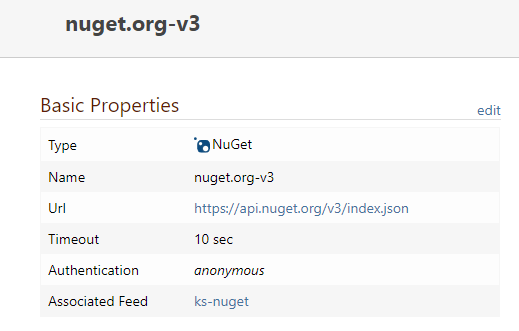
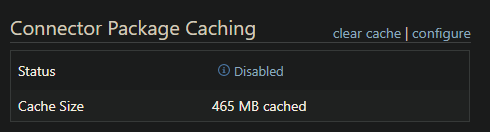
      I have only seen issues with remote packages. The clear command didn't do anything. Is there a way to find logs on why it failed and today it worked? Need this to work reliably.

      Also seems like the setting for no cache does not work.
      3bd9f50f-f293-48a2-b068-9dc100223bd8-image.png
      22d527ed-ac92-4da1-9773-69d3548c26d4-image.png

      posted in Support
      J
      jyip_5228
    • RE: Nuget package not found in proget, but searchable in UI

      @rhessinger

      This issue appears to still exist occasionally, is there a way to increase logging to try and troubleshoot this?

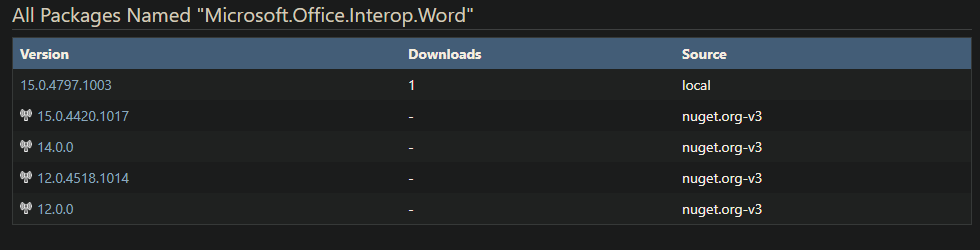
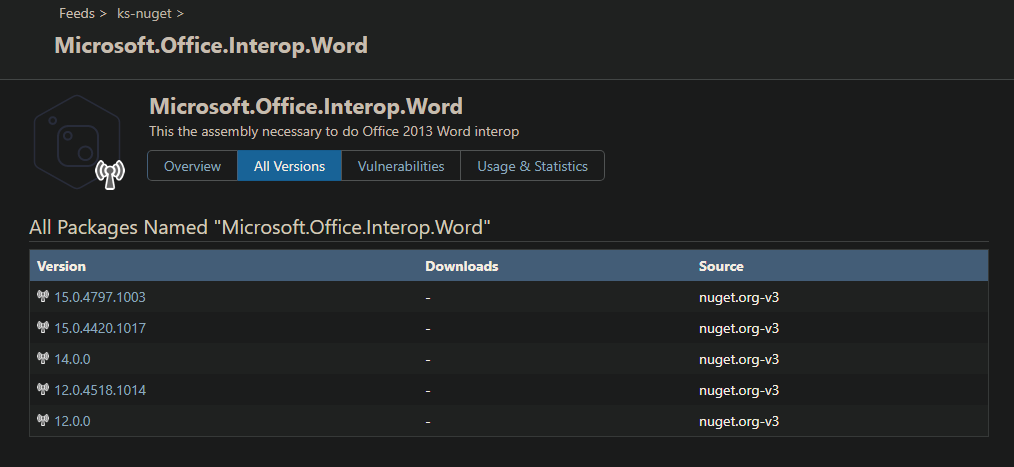
      error NU1101: Unable to find package Microsoft.Office.Interop.Word. No packages exist with this id in source(s): https://xxx/nuget/ks-nuget/v3/index.json
      

      Clearly searching via UI
      19ddc015-1f26-447c-8ff3-618f8b7e421b-image.png

      I sometimes when it feels like it would work after running the build job a few times, this happened to the package 'automapper' eventually it worked.

      Please assist.

      posted in Support
      J
      jyip_5228
    • RE: Nuget Feed Connection timeout

      hi, it looks good so far, will see if it helps other issues as well.

      posted in Support
      J
      jyip_5228
    • RE: Nuget packages not found during reindex

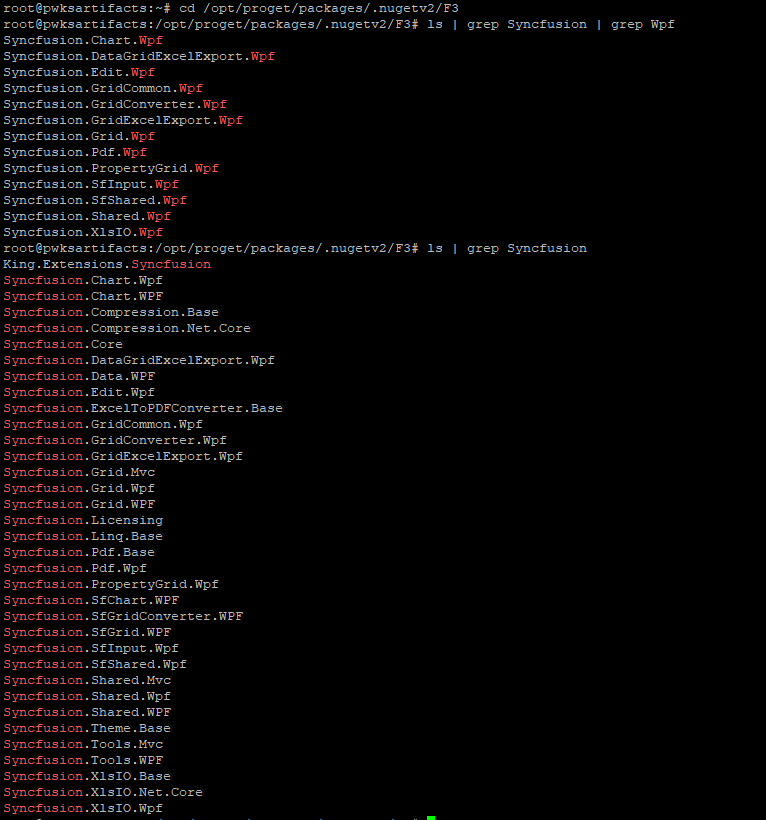
      Did a quick look in our packages directory, looks like Syncfusion Inc has done this to other packages as well with the case rename, got 10+ packages that have different cases :(
      217aca5c-095d-4bdb-ab44-3fe131d6016f-image.png

      posted in Support
      J
      jyip_5228
    • RE: Nuget packages not found during reindex

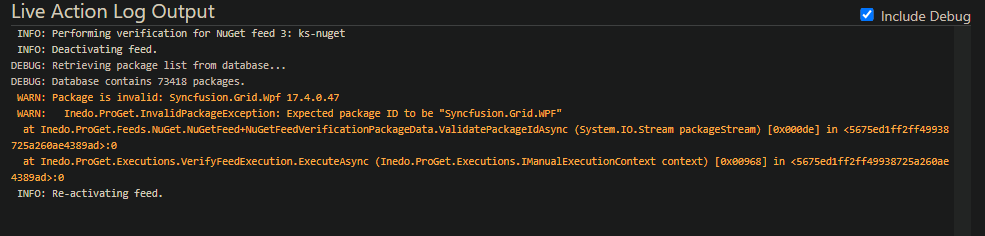
      I want to add that after the manual change, when I did a reindex it seems like Proget detected it as an invalid package and removed it (i checked the delete option)
      c2de0428-c205-4693-84e1-940bb01e55f4-image.png

      posted in Support
      J
      jyip_5228
    • RE: Nuget packages not found during reindex

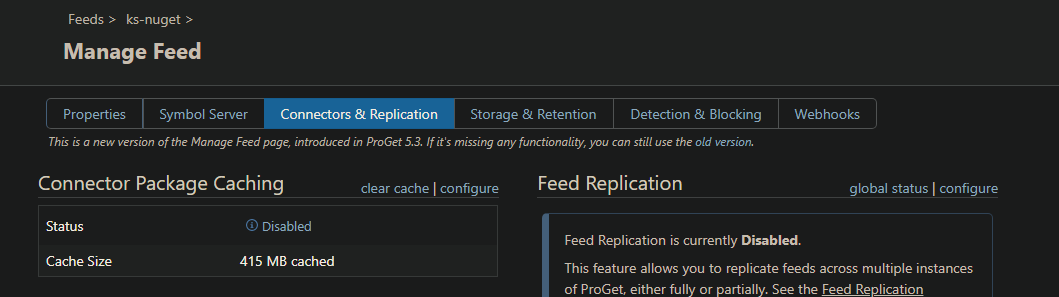
      What are the chances of storing everything in lowercase getting added? Can the same fix be applied to the cloud storage bit apply to the Linux setup?

      Has anyone reported that disabling cache connector still caches the packages locally for nuget? If this was working I guess I wouldnt be affecting me cause I have cache off.
      Despite cache off, the cache size has been increasing, such as the Syncfusion.Grid.WPF being downloaded locally..
      21610dbf-c53f-40b5-bd6e-b8751dda5112-image.png

      posted in Support
      J
      jyip_5228
    • RE: Nuget packages not found during reindex

      So it looks like Proget is not even searching Syncfusion.Grid.WPF directory despite most of the new packages going into that.

      I deleted Syncfusion.Grid.Wpf directory and it couldn't find the package despite being a copy inside Syncfusion.Grid.WPF directory.

      C:\Program Files (x86)\Microsoft Visual Studio\2017\BuildTools\Common7\IDE\CommonExtensions\Microsoft\NuGet\NuGet.targets(114, 5): The feed 'https://xxx/nuget/ks-nuget/v3/index.json [https://xxx/nuget/ks-nuget/v3/index.json]' lists package 'Syncfusion.Grid.WPF.17.4.0.47' but multiple attempts to download the nupkg have failed. The feed is either invalid or required packages were removed while the current operation was in progress. Verify the package exists on the feed and try again.
        Unable to find package 'Syncfusion.Grid.WPF.17.4.0.47'.
      

      What made this work was copy/move and rename 'Syncfusion.Grid.WPF\Syncfusion.Grid.WPF.17.4.0.47.nupkg' to 'Syncfusion.Grid.Wpf\Syncfusion.Grid.Wpf.17.4.0.47.nupkg'

      If no cache is set for the connector, none of this should technically matter, correct?

      posted in Support
      J
      jyip_5228
    • RE: Nuget Feed Connection timeout

      Great! hoping this will fix the issue.

      posted in Support
      J
      jyip_5228
    • RE: Nuget package not found in proget, but searchable in UI

      Took awhile clicking through each diagnostics message to find the timeout error below. Is there an easier way to search through these messages?

      Prior to the timeout message there were error messages regarding database out of max pool size reached. So they may be correlated.

      error NU1101: Unable to find package System.IO.FileSystem.Watcher. No packages exist with this id in source(s): https://xxx/nuget/ks-nuget/v3/index.json
      

      Message: Connector error: The operation has timed out.

      Request URL: https://www.nuget.org/api/v2/FindPackagesById()?id=%27system.io.filesystem.watcher%27&semVerLevel=2.0.0
      
      System.Net.WebException: The operation has timed out.
      at System.Net.HttpWebRequest.RunWithTimeoutWorker[T] (System.Threading.Tasks.Task`1[TResult] workerTask, System.Int32 timeout, System.Action abort, System.Func`1[TResult] aborted, System.Threading.CancellationTokenSource cts) [0x000f8] in <4d8f95b7df544b3fa1a27dda924b4424>:0
      at System.Net.HttpWebRequest.EndGetResponse (System.IAsyncResult asyncResult) [0x00020] in <4d8f95b7df544b3fa1a27dda924b4424>:0
      at System.Threading.Tasks.TaskFactory`1[TResult].FromAsyncCoreLogic (System.IAsyncResult iar, System.Func`2[T,TResult] endFunction, System.Action`1[T] endAction, System.Threading.Tasks.Task`1[TResult] promise, System.Boolean requiresSynchronization) [0x0000f] in <c453bf849bb84e719dbec0475e99db95>:0
      --- End of stack trace from previous location where exception was thrown ---
      
      at Inedo.ProGet.Feeds.Connector.GetDirectResponseAsync (System.String url) [0x000eb] in <5675ed1ff2ff49938725a260ae4389ad>:0
      at Inedo.ProGet.Feeds.Connector.GetCachedResponseAsync (System.String url) [0x000a8] in <5675ed1ff2ff49938725a260ae4389ad>:0
      at Inedo.ProGet.Feeds.Connector.GetCachedTextReaderAsync (System.String url) [0x00075] in <5675ed1ff2ff49938725a260ae4389ad>:0
      at Inedo.ProGet.Feeds.NuGet.V2.NuGetFeedClient.PerformRequestWithAbsoluteUrlAsync (System.String fullUrl) [0x000d9] in <5675ed1ff2ff49938725a260ae4389ad>:0
      
      posted in Support
      J
      jyip_5228
    • RE: Nuget package not found in proget, but searchable in UI

      Correct, this is on docker.
      This may be related to the database error; I can further test this when the database error is resolved. This particular issue was not something I can produce consistently.

      posted in Support
      J
      jyip_5228
    • 1 / 1