Inedo Community Forums Forums
    • Recent
    • Tags
    • Popular
    • Login
    1. Home
    2. jw
    3. Posts

    Welcome to the Inedo Forums! Check out the Forums Guide for help getting started.

    If you are experiencing any issues with the forum software, please visit the Contact Form on our website and let us know!

    J Offline
    • Profile
    • Following 0
    • Followers 0
    • Topics 37
    • Posts 138
    • Groups 0

    Posts

    Recent Best Controversial
    • ProGet SCA UI Bugs

      Ran into some potential bugs when evaluating SCA vulnerability scanning.

      Tested on Version 2023.20 (Build 14)

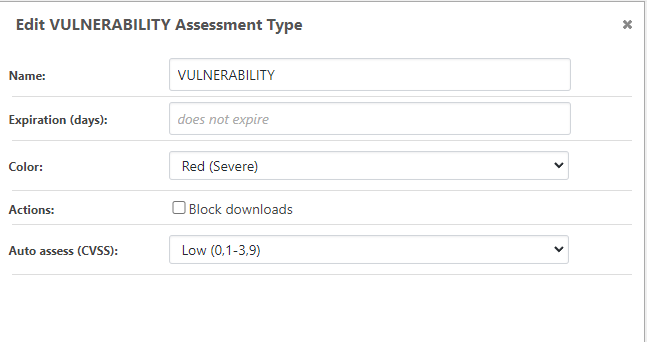
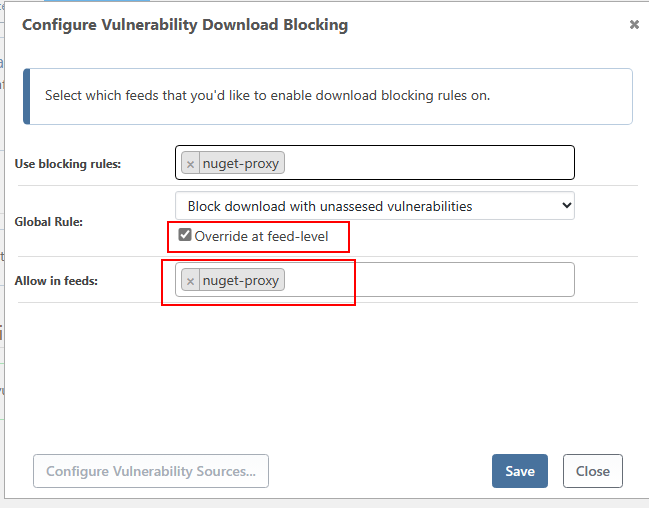
      1. The two marked settings behaving strangely. Either I cannot save them and they revert to the unconfigured state, or they are actually configured and I cannot remove them no matter how often I configure and save them. Not exactly sure how to create either state, also happens to me on a clean trial installation.

      8657f750-ab64-4830-b474-a5a38782e418-image.png

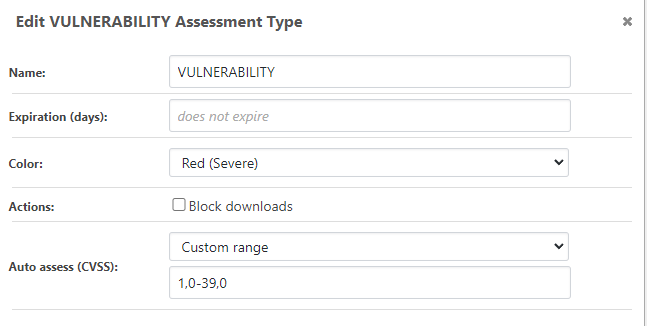
      1. There seems to be some localization issue on the "Auto assess (VCSS)" option. I'm using an en-US OS but with German regional settings for numbers and dates.

      8085576c-361f-4c13-8eef-a5c8f72a26de-image.png

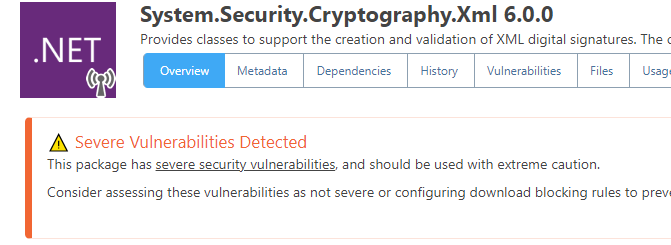
      Saving and reopening this shows:
      8e17d31f-96a9-411a-a06d-9e4c2b797b8f-image.png

      posted in Support
      J
      jw
    • ProGet SCA Cannot get NuGet vulnerability scanning to work

      I've been trying to get vulnerability detection with SBOM scans to work for nuget.org packages, but so far no luck.

      Here is an example SBOM that should pop up on any scan:
      https://privatebin.net/?ca7ad862057815c8#7WzmrR54i6opxoD37dxaE1X7GS67GfcJ79zEps2BTtaS

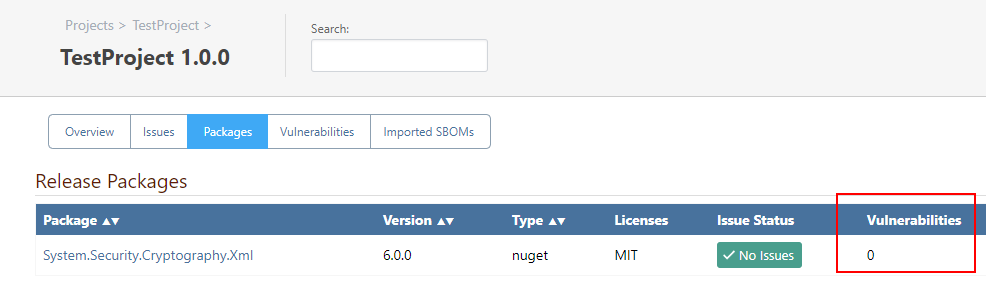
      Clicking on the package shows that the vulnerability is recognized:
      d4a39602-e956-427a-8447-c4f2d8a16f59-image.png

      The package is also in the package cache, I've manually downloaded it to avoid this issue.

      Yet there is not a single mention of this vulnerability anywhere on the SCA release pages:

      302eb55b-0953-4dcf-b422-86a4a039236d-image.png

      • I have configured the vulnerability sources (both OSS Index and PGVC)
      • I have enabled the vulnerability feature on the feed
      • I have added auto assessment, though I'm not really sure if that is even needed. I am not looking to make download blocking work at the moment.

      Is there something I have missed?

      posted in Support
      J
      jw
    • RE: ProGet - SCA Missing Package because of NuGet proxy cache miss

      This paradigm "SCA in ProGet only works correctly when a package was previously put in the cache" should be revisited.

      There already seems to be functionality in ProGet that can determine which feed provides a package, otherwise this link here /packages/from-purl?pUrl=pkg%3Anuget%2FMicrosoft.AspNetCore.Mvc%402.2.0 would not work. So the feed identification where to get the information from does not seem to be the issue.

      Then on the subject of cache. Caches should be something that are fully transparent. If a package is not in the cache or caching is not available, then the required information should just be pulled from the source.

      I do not see a difference between someone restoring a package from a feed and an SBOM requiring a package for running a complete SBOM analysis.

      It would be really nice if this could be considered as an improvement to the NuGet SCA experience in ProGet. All the parts already seem to be there, they just need some wiring. Doing this externally with scripts or other hackery seems counterproductive to a well-rounded product.

      posted in Support
      J
      jw
    • RE: ProGet - SCA Missing Package because of NuGet proxy cache miss

      Hello @atripp,

      this is a tricky subject indeed.

      As for this particular case, we've seen this too - and just found that downloading the package caused the issue to go away, and that was simple enough since there weren't too many packages (just lots of annoying clicking).

      While it can easily be resolved by downloading the packages manually, this is just not sustainable in the long run. Packages change, frameworks change and with every change there is the risk of yet another package missing in the cache and someone having to click again.

      I don't think we want to have ProGet automatically download/populate the feed with packages, but perhaps a better way to handle this is some kind of rule or ignore setting for missing packages??

      And it'd be nice if ProGet automatically shipped with a list of these too. I really can't think of any reason why anyone would ever want a notice of "Microsoft.Extensions.Localization" being missing. Can you?

      Ignoring these packages does not seem like a good solution. Just because they are shipped with the .NET Runtime/SDK does not mean they are not susceptible for vulnerabilities, so I would rather have them being treated as regular packages with full vulnerability scanning etc.

      This is probaly something unqiue to NuGet as opposed to other package managers.

      Without knowing enough about the ProGet internals, this seems more like a proxy/caching issue for me. The question I would ask first is why ProGet does need the full package in its cache for the SCA tracking to work correctly.
      Maybe some degree of metadata would be enough for that?

      Maybe a parameter to SBOM uploading/analyzing could be introduced that enables downloading the required metadata or packages (depending on what is really needed) before analysis is started.

      posted in Support
      J
      jw
    • ProGet - SCA Missing Package because of NuGet proxy cache miss

      I configured a NuGet caching proxy for nuget.org.

      When uploading a sbom.json I noticed that a number of open source NuGet packages are reported as "Missing Package". One such example is Microsoft.Extensions.Localization.

      These packages do exists on nuget.org and ProGet is also showing them correctly. The issue is that these packages are never actually downloaded during the dotnet/nuget restore process (in fact, they are never part of the build machine's local NuGet package cache) because the dlls of these packages are shipped together with the DotNet SDK.

      ProGet SCA is reporting these packages are missing, because since they were never restored, they are not part of ProGet's proxy package cache.

      It is possible to click on each missing package, get redirected on the package page and then hit the download button to populate the proxy cache and this also resolves the missing package issue, but this is very inconvenient.

      I think there should be a way to automatically populate the proxy caches when uploading SBOMs.

      Am I missing something here?

      posted in Support
      J
      jw
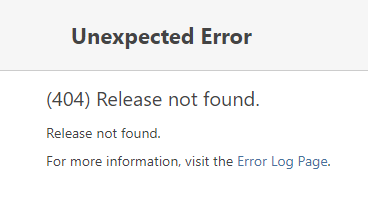
    • ProGet - Deleting a SCA release leads to error message

      Version 2023.18 (Build 15)

      784791d6-456c-4eb0-8291-6814c667d37b-image.png

      It also leads to an error in the Logs:
      dddad753-a860-46c8-a04c-1032ed533295-image.png

      The release itself seems to be deleted though, guess just a proper redirection after deletion is missing.

      posted in Support
      J
      jw
    • RE: ProGet NuGet upload user tracking

      In 2023.10 the field is populated and the history page shows it correctly. 👍

      The $UserName variable for web hooks (tested with Teams integration) still shows Anonymous for the same package though.

      posted in Support
      J
      jw
    • RE: ProGet NuGet upload user tracking

      I pushed the package via nuget.exe with API key.

      Assuming I'm actually looking at the correct column (ProGet.dbo.FeedPackageVersions.PublishedBy_User_Name), in does indeed say "Anonymous".

      posted in Support
      J
      jw
    • RE: ProGet NuGet upload user tracking

      I've just installed 2023.9 but the upload user is still shown as Anonymous on the history page.

      Was this issue addressed yet?

      posted in Support
      J
      jw
    • RE: ProGet 2023.1: Exception when trying to push a .snupkg

      Just installed 2023.2 and .snupkg pushing works again for me, so the original issue is solved.

      As for the lost packages:

      Tried reimporting all the packages and triggering re-indexing once again. This time it completed cleanly.

      Looking in the InedoHub Logs, the last version of ProGet I installed was on 05.03.2023, so whichever version was current at this date is the one I updated from to 2023.1.

      I cannot find any ProGet version number in the InedoHub installation logs, which is a bit weird...?

      posted in Support
      J
      jw
    • RE: ProGet 2023.1: Exception when trying to push a .snupkg

      @gdivis

      Good to hear.

      As for the re-indexing, yes I had the option checked and I also recall that the log was full of warnings that hashes of the packages wouldn't match. After the process was finished the feed was completely void of any package.

      Unfortunately I did not save the logs, which in retrospect was no so smart..

      posted in Support
      J
      jw
    • RE: ProGet 2023.1: Exception when trying to push a .snupkg

      @rhessinger

      Just tested this with another package I had already pushed before - Same exception.

      Also, yes, the feed is still configured correctly.

      **Edit

      • Rebooted the machine
      • Tried re-indexing the feed. This deleted all the packages, very unsettling....
      • Recreated the feed completely

      Still no luck.

      posted in Support
      J
      jw
    • ProGet 2023.1: Exception when trying to push a .snupkg

      The NuGet package is created on disk, so this shouldn't be a permission problem. The matching .snupkg produces errors and is subsequently missing on disk and also not indexed.
      API key is configured for both the package as well as the symbol source URLs.
      .snupkg support is enabled on feed.

      nuget.exe output:

      D:\test>nuget push -Source https://192.168.x.x/nuget/nuget-hosted/v3/index.json SourceLinkTestLib.2.0.6.nupkg
      Pushing SourceLinkTestLib.2.0.6.nupkg to 'https://192.168.x.x/nuget/nuget-hosted/package'...
        PUT https://192.168.x.x/nuget/nuget-hosted/package/
        Created https://192.168.x.x/nuget/nuget-hosted/package/ 231ms
      Your package was pushed.
      Pushing SourceLinkTestLib.2.0.6.snupkg to 'https://192.168.x.x/nuget/nuget-hosted/symbolpackage'...
        PUT https://192.168.x.x/nuget/nuget-hosted/symbolpackage/
        InternalServerError https://192.168.x.x/nuget/nuget-hosted/symbolpackage/ 67ms
        PUT https://192.168.x.x/nuget/nuget-hosted/symbolpackage/
        InternalServerError https://192.168.x.x/nuget/nuget-hosted/symbolpackage/ 7ms
        PUT https://192.168.x.x/nuget/nuget-hosted/symbolpackage/
        InternalServerError https://192.168.x.x/nuget/nuget-hosted/symbolpackage/ 56ms
      Response status code does not indicate success: 500 (Internal Server Error).
      

      Server log:

      System.IO.FileNotFoundException: Could not find file 'C:\ProgramData\ProGet\Packages\.nugetv2\F1\SourceLinkTestLib\SourceLinkTestLib.2.0.6.snupkg'.
      File name: 'C:\ProgramData\ProGet\Packages\.nugetv2\F1\SourceLinkTestLib\SourceLinkTestLib.2.0.6.snupkg'
      at Microsoft.Win32.SafeHandles.SafeFileHandle.CreateFile(String fullPath, FileMode mode, FileAccess access, FileShare share, FileOptions options)
      at Microsoft.Win32.SafeHandles.SafeFileHandle.Open(String fullPath, FileMode mode, FileAccess access, FileShare share, FileOptions options, Int64 preallocationSize)
      at System.IO.Strategies.OSFileStreamStrategy..ctor(String path, FileMode mode, FileAccess access, FileShare share, FileOptions options, Int64 preallocationSize)
      at System.IO.Strategies.FileStreamHelpers.ChooseStrategyCore(String path, FileMode mode, FileAccess access, FileShare share, FileOptions options, Int64 preallocationSize)
      at System.IO.Strategies.FileStreamHelpers.ChooseStrategy(FileStream fileStream, String path, FileMode mode, FileAccess access, FileShare share, Int32 bufferSize, FileOptions options, Int64 preallocationSize)
      at System.IO.FileStream..ctor(String path, FileMode mode, FileAccess access, FileShare share, Int32 bufferSize, FileOptions options)
      at Inedo.IO.FileEx.Open(String fileName, FileMode fileMode, FileAccess fileAccess, FileShare fileShare, FileOptions fileOptions)
      at Inedo.ProGet.Extensions.FileSystems.DirectoryFileSystem.OpenReadAsync(String fileName, FileAccessHints hints, CancellationToken cancellationToken)
      at Inedo.ProGet.Feeds.NuGet.NuGetFeed.InstallOrUpdateSnupkgAsync(Stream stream, Nullable`1 publishDate)
      at Inedo.ProGet.WebApplication.FeedEndpoints.NuGet.NuGetApi.PutHandler.ProcessPutRequestAsync(AhHttpContext context, WebApiContext apiContext, RequestData urlData, NuGetFeed feed)
      at Inedo.ProGet.WebApplication.FeedEndpoints.NuGet.NuGetApi.ProcessRequestAsync(AhHttpContext context, WebApiContext apiContext, NuGetFeed feed, String relativeUrl)
      at Inedo.ProGet.WebApplication.FeedEndpoints.NuGet.NuGetFeedHandler.ProcessRequestAsync(AhHttpContext context, WebApiContext apiContext, NuGetFeed feed, String relativeUrl)
      at Inedo.ProGet.WebApplication.FeedEndpoints.FeedEndpointHandler.FeedRequestHandler.ProcessRequestAsync(AhHttpContext context)
      
      posted in Support
      J
      jw
    • RE: ProGet NuGet upload user tracking

      @atripp

      Thanks for the update, looking forward to the release.

      posted in Support
      J
      jw
    • RE: ProGet NuGet upload user tracking

      @stevedennis

      Is there any news on this subject by any chance?

      posted in Support
      J
      jw
    • RE: HTTPS with self hosted ProGet and internal web server

      There is updated documentation with step-by-step instructions here:

      https://docs.inedo.com/docs/installation-windows-https-support#configuring-https-on-the-integrated-web-server

      posted in Support
      J
      jw
    • RE: Feedback about PG-2268 Integrated .snupkg NuGet Symbol Support

      @atripp

      Thanks for the query, this has indeed fixed the 2nd issue and pushing packages now works without error.

      About the 1st issue. Since the source code for nuget.exe is public, one could try to debug this directly in the client, to see what the expectations from a server are.

      posted in Support
      J
      jw
    • Feedback about PG-2268 Integrated .snupkg NuGet Symbol Support

      Hi,

      since we're highly interested in this feature, I spend some time trying it out, but ran into two issues.

      1. According to this post on GitHub from a Microsoft employee, when pushing packages with nuget.exe using an API key, it should pickup and reuse this key also for the symbol package.

      When only having an API key set for the package feed itself, I get a password prompt for the symbol package.

      Pushing SourceLinkTestLib.2.0.0.nupkg to 'https://192.168.x.x/nuget/nuget-hosted/package'...
        PUT https://192.168.x.x/nuget/nuget-hosted/package/
        Created https://192.168.x.x/nuget/nuget-hosted/package/ 54ms
      Your package was pushed.
      Pushing SourceLinkTestLib.2.0.0.snupkg to 'https://192.168.x.x/nuget/nuget-hosted/symbolpackage'...
        PUT https://192.168.x.x/nuget/nuget-hosted/symbolpackage/
      MSBuild auto-detection: using msbuild version '17.4.1.60106' from 'C:\Program Files\Microsoft Visual Studio\2022\Professional\MSBuild\Current\Bin'.
      Please provide credentials for: https://192.168.x.x/nuget/nuget-hosted/v3/index.json
      UserName:
      

      When also setting an API key for the */symbolpackage URL, this prompt goes away. But according to the Microsoft guy, this should not really be required.

      1. When fixing the issue decribed in 1., pushing the .snupkg returns an error, the package itself seems to be actually copied to the ProGet package directory on disk.

      Log message:

      An error occurred processing a PUT request to https://192.168.x.x/nuget/nuget-hosted/symbolpackage/: The EXECUTE permission was denied on the object 'IndexedSymbolEntry', database 'ProGet', schema 'dbo'.
      

      Details:

      Microsoft.Data.SqlClient.SqlException (0x80131904): The EXECUTE permission was denied on the object 'IndexedSymbolEntry', database 'ProGet', schema 'dbo'.
      at Microsoft.Data.SqlClient.SqlCommand.<>c.<ExecuteDbDataReaderAsync>b__207_0(Task`1 result)
      at System.Threading.Tasks.ContinuationResultTaskFromResultTask`2.InnerInvoke()
      at System.Threading.ExecutionContext.RunInternal(ExecutionContext executionContext, ContextCallback callback, Object state)
      --- End of stack trace from previous location ---
      at System.Threading.Tasks.Task.ExecuteWithThreadLocal(Task& currentTaskSlot, Thread threadPoolThread)
      --- End of stack trace from previous location ---
      at Inedo.Data.DatabaseContext.DbResult.CreateAsync(DbCommand command, DatabaseContext context, DateTimeOffset startTime, Stopwatch stopwatch)
      at Inedo.Data.DatabaseContext.ExecuteInternalAsync(String storedProcName, GenericDbParameter[] parameters)
      at Inedo.Data.SqlServerDatabaseContext.ExecuteInternalAsync(String storedProcName, GenericDbParameter[] parameters)
      at Inedo.Data.DatabaseContext.ExecuteNonQueryAsync(String storedProcName, GenericDbParameter[] parameters)
      at Inedo.ProGet.Feeds.NuGet.NuGetFeed.InstallOrUpdateSnupkgAsync(Stream stream, Nullable`1 publishDate)
      at Inedo.ProGet.WebApplication.FeedEndpoints.NuGet.NuGetApi.PutHandler.ProcessPutRequestAsync(HttpContext context, WebApiContext apiContext, RequestData urlData, NuGetFeed feed)
      at Inedo.ProGet.WebApplication.FeedEndpoints.NuGet.NuGetApi.ProcessRequestAsync(HttpContext context, WebApiContext apiContext, NuGetFeed feed, String relativeUrl)
      at Inedo.ProGet.WebApplication.FeedEndpoints.NuGet.NuGetFeedHandler.ProcessRequestAsync(HttpContext context, WebApiContext apiContext, NuGetFeed feed, String relativeUrl)
      at Inedo.ProGet.WebApplication.FeedEndpoints.FeedEndpointHandler.FeedRequestHandler.ProcessRequestAsync(HttpContext context)
      ClientConnectionId:ab40b37a-98dc-4cf4-be5d-7ff3ed663d8f
      Error Number:229,State:5,Class:14
      
      posted in Support
      J
      jw
    • RE: ProGet symbol proxy

      You're right, caching SourceLink enabled PDBs would be somewhat useless for outages.

      Though there are still plenty of "old-school" PDBs around, especially for native code (C/C++).

      posted in Support
      J
      jw
    • RE: ProGet NuGet upload user tracking

      I've looked at the Event log, but it is pretty inconvenient, since one has to click through all the events to find out which package the log entry is actually about.

      It would be nice if my two points from above could make it into v2023.

      This together with the support for .snupkg would probably allow us to migrate from Nexus.

      posted in Support
      J
      jw
    • 1
    • 2
    • 3
    • 4
    • 5
    • 6
    • 7
    • 6 / 7