Inedo Community Forums Forums
    • Recent
    • Tags
    • Popular
    • Login
    1. Home
    2. jimbobmcgee
    3. Posts

    Welcome to the Inedo Forums! Check out the Forums Guide for help getting started.

    If you are experiencing any issues with the forum software, please visit the Contact Form on our website and let us know!

    J Offline
    • Profile
    • Following 0
    • Followers 0
    • Topics 16
    • Posts 37
    • Groups 0

    Posts

    Recent Best Controversial
    • RE: HTTP/500 error when re-running a job from History which has a blank/empty template variables

      @dean-houston This might be a really silly question, but what is the URL for the Pre-Release package source feed?

      The linked documentation suggests that Package source should be a drop-down list in InedoHub (from which I should select Inedo's Prerelease Feed); mine is a free text field containing https://proget.inedo.com/upack/Products.

      posted in Support
      J
      jimbobmcgee
    • HTTP/500 error when re-running a job from History which has a blank/empty template variables

      I have an Otter job template for which I have defined a number of custom variables, some of which are marked as Required and some are not.

      If I view previous executions of that job in /jobs/history, there is a small ▶ (play) button icon against each execution, for which I believe the intention is to re-run any one particular execution with the variable prompts pre-populated with the previously-entered values for that execution.

      If there were no custom variables defined on the template or, for that execution, if all the custom variables were populated with a value, clicking that button works as intended.

      If, however, I did not set a value for one of the properties (i.e. it was left as an empty text box), clicking that button results in an HTTP/500 server error. The Diagnostic Centre page yields the following:

      An error occurred in the web application: The given key 'MyCustomVariableName' was not present in the dictionary.
      
      URL: http://xxxx:8626/jobs/from-template?jobTemplateId=Default%3A%3AJobTemplate%3A%3AMyTemplateFolder%2FMyTemplateName&jobId=140
      Referrer: http://xxxx:8626/jobs/history
      User: Admin
      User Agent: Mozilla/5.0 (Windows NT 10.0; Win64; x64; rv:132.0) Gecko/20100101 Firefox/132.0
      Stack trace:    at System.Collections.Generic.Dictionary`2.get_Item(TKey key)
         at Inedo.Otter.WebApplication.Pages.Jobs.CreateJobFromTemplatePage.VariablePrompts..ctor(IEnumerable`1 variables, Dictionary`2 selectedValues, VariableTemplateContext context)
         at Inedo.Otter.WebApplication.Pages.Jobs.CreateJobFromTemplatePage.CreateChildControls()
         at Inedo.Otter.WebApplication.Pages.OtterSimplePageBase.InitializeAsync()
         at Inedo.Web.PageFree.SimplePageBase.ExecutePageLifeCycleAsync()
         at Inedo.Web.PageFree.SimplePageBase.ProcessRequestAsync(AhHttpContext context)
         at Inedo.Web.AhWebMiddleware.InvokeAsync(HttpContext context)
      
      ::HTTP Error on 19/12/2024 18:55:42::
      

      I'm fairly certain it boils down to a simple null-ref check in the CreateJobFromTemplatePage class (decompiled from Otter.WebApplication.dll):

      public VariablePrompts(IEnumerable<TemplateVariable> variables, Dictionary<string, string> selectedValues, VariableTemplateContext context)
      {
          object item;
          CreateJobFromTemplatePage.VariablePrompts variablePrompt = this;
          foreach (TemplateVariable variable in variables)
          {
              if (this.variableValues.ContainsKey(variable.Name))
              {
                  continue;
              }
              TemplateVariable templateVariable = variable;
              if (selectedValues != null)
              {
                  item = selectedValues[variable.Name];    // <-- here
              }
              else
              {
                  item = null;
              }
              if (item == null)
              {
                  item = variable.InitialValue;
              }
              templateVariable.InitialValue = (string)item;
              VariableTemplateInput variableTemplateInput = variable.Type.CreateInput(variable, context);
              variablePrompt.get_Controls().Add(variableTemplateInput);
              this.variableValues.Add(variable.Name, variableTemplateInput);
          }
      }
      

      My guess is that you are not serializing unset/empty values or that they are not being deserialized correctly to the selectedValues dictionary by the caller. Whether or not that is a larger problem is unknown, but you can probably bandage it here by simply changing to...

      if (selectedValues != null || !selectedValues.ContainsKey(variable.Name))
      {
          item = selectedValues[variable.Name];
      }
      

      ...without affecting the surrounding logic.

      posted in Support otter
      J
      jimbobmcgee
    • "Bad handshake" when listening for agent

      I have enabled the listening connection on my Otter install, and am trying to get a second server that has the agent installed to dial home to the Otter server.

      The firewall is open, a self-sign certificate has been created on the Otter server, and its thumbprint has been configured in the Otter server's listener config. A public export of the self-signed cert has been installed in the Trusted Roots store on the server with the agent, and the windows dialog claims the certificate chain is therefore OK.

      I have created a server object, with the server type of "pull", and pasted the secret key from the object into a Connections/Server node the InedoAgent.config file on the server. Also, Connections/@Enabled="true" in that file.

      However, the server object in Otter is stuck in the Error state.

      The Agent Listener Dashboard shows connections from the server with the agent, every 30s or so. The Diagnostics Centre shows errors in a matching timeframe, with:

      Bad handshake from SERVERWITHAGENTIP:52768: System.Security.Authentication.AuthenticationException: Authentication failed, see inner exception. ---> System.ComponentModel.Win32Exception (0x8009030D): The credentials supplied to the package were not recognized at System.Net.SSPIWrapper.AcquireCredentialsHandle(ISSPIInterface secModule, String package, CredentialUse intent, SCHANNEL_CRED* scc) at System.Net.Security.SslStreamPal.AcquireCredentialsHandle(CredentialUse credUsage, SCHANNEL_CRED* secureCredential) at System.Net.Security.SslStreamPal.AcquireCredentialsHandleSchannelCred(SslStreamCertificateContext certificateContext, SslProtocols protocols, EncryptionPolicy policy, Boolean isServer) at System.Net.Security.SslStreamPal.AcquireCredentialsHandle(SslStreamCertificateContext certificateContext, SslProtocols protocols, EncryptionPolicy policy, Boolean isServer) --- End of inner exception stack trace --- at System.Net.Security.SslStreamPal.AcquireCredentialsHandle(SslStreamCertificateContext certificateContext, SslProtocols protocols, EncryptionPolicy policy, Boolean isServer) at System.Net.Security.SecureChannel.AcquireServerCredentials(Byte[]& thumbPrint) at System.Net.Security.SecureChannel.GenerateToken(ReadOnlySpan`1 inputBuffer, Byte[]& output) at System.Net.Security.SecureChannel.NextMessage(ReadOnlySpan`1 incomingBuffer) at System.Net.Security.SslStream.ProcessBlob(Int32 frameSize) at System.Net.Security.SslStream.ReceiveBlobAsync[TIOAdapter](TIOAdapter adapter) at System.Net.Security.SslStream.ForceAuthenticationAsync[TIOAdapter](TIOAdapter adapter, Boolean receiveFirst, Byte[] reAuthenticationData, Boolean isApm) at Inedo.Agents.Connections.PullServerConnection.ReceiveHandshakeAsync(CancellationToken cancellationToken) at Inedo.Agents.AgentListener`1.ProcessIncomingConnection(TConnection channel)
      

      If I set LogFile in the InedoAgent.config file, I see repeated entries for:

      07/06/2023 06:13:44 DEBUG: Attempting to establish connection with OTTERSERVER:46336...
      07/06/2023 06:14:14 DEBUG: Attempting to establish connection with OTTERSERVER:46336...
      

      DNS and firewall look fine:

      > Test-NetConnection OTTERSERVER -Port 46336
      
      ComputerName     : OTTERSERVER
      RemoteAddress    : OTTERSERVERIP
      RemotePort       : 46336
      InterfaceAlias   : Ethernet0
      SourceAddress    : SERVERWITHAGENTIP
      TcpTestSucceeded : True
      

      I can add the standard .NET trace listeners to the InedoAgentService.exe.config, but I'm not sure what I'm looking for in the massive infodump the resulting trace file then contains.

      What am I missing?

      posted in Support inedo-agent otter
      J
      jimbobmcgee
    • API method to get a specific object by name

      I am trying to determine if an Otter server object has been created, and am using the recommended (non-native) API to do this.

      At the moment, in order to perform this test (at least as per the documentation), I have to issue an /api/infrastructure/servers/list call and loop through all the results, matching on the Name property.

      As this project grows, this is going to amount to a whole heap of JSON parsing, and the list is only going to get longer and longer. That's going to have a growing impact on the memory and processing time of my scripts, not to mention the log storage (as each API call response appears to be logged).

      Instead, I would like to call an API method which returns the given object by name (I believe name is unique within Otter).

      I've already tried to see if an undocumented RESTful or RPC-like method already exists, but both...

      • /api/infrastructure/servers/SERVERNAME
      • /api/infrastructure/servers/get/SERVERNAME

      ...return HTTP/400 Invalid action type (I have also tried RPC-like methods search and find, with the same result). I had hoped that one of them might return HTTP/200 and the JSON of the single found object; or HTTP/404 if it did not exist.

      Can I please raise the request that something along these lines be considered for the recommended API?

      Or if it already exists, could the documentation be updated to include it?

      posted in Support api feature-request otter
      J
      jimbobmcgee
    • RE: Apply-Template adding unexpected CR newline chars

      @atripp said in Apply-Template adding unexpected CR newline chars:

      In any case, we should probably switch to an enumeration like template operat has (TemplateNewLineMode) -- but a fourth option to the both (None).

      Creating a None value may be risky. It's just that None is such a "default-sounding" word, that someone might one day try and make it the default, instead of Auto, and everyone would have to update scripts that worked before.

      For Create-File, I picked a bool to indicate that you can either attempt to transform the newlines file or not, and named it so that the default (i.e. false) would keep the current behaviour. That way, it becomes an opt-in parameter so, if anyone is relying on the way Create-File currently handles newlines, they shouldn't have to change their scripts to retain the old behaviour.

      If you standardise the logic for both Apply-Template and Create-File to both support a NewLines property in the same way, having the default value remain Auto would still mean that the current behaviour is retained without changing the scripts.

      Perhaps Binary would indicate both a non-default status, and that the source isn't transformed...

      (Of course, the term Auto might itself lead someone to expect that binary/non-text source files would not be subject to line-ending alteration -- I don't know how you get around that. Naming things is hard 😄)

      posted in Support
      J
      jimbobmcgee
    • RE: Apply-Template adding unexpected CR newline chars

      @atripp
      Thanks for looking.

      Without wanting to hold you to a particular date, what is the typical release timeframe?

      I just need to work out whether to work around this issue for now, or wait it out until the next release...

      posted in Support
      J
      jimbobmcgee
    • RE: Basic arithmetic in OtterScript

      @atripp
      otter-job-servers.png

      It didn't seem right to me either, so I assumed I was missing something obvious.

      Am I right in saying that for server is only expected to work for Custom server targeting, though?

      And for server can take a scalar variable argument, such as...

      for server localhost {
      	Log-Debug "some arbitrary stuff on the Otter server"
      
      	set $serverIWantToConfigure = "TheServerIChoseInMyProperty";
      
      	for server $serverIWantToConfigure {
      		Log-Debug "some arbitrary stuff on the server I want to configure"
      	}
      }
      
      ...?
      posted in Support
      J
      jimbobmcgee
    • RE: Apply-Template adding unexpected CR newline chars

      @atripp

      Here's the Create-File code, where there seems to be another replacement:
      https://github.com/Inedo/inedox-inedocore/blob/master/InedoCore/InedoExtension/Operations/Files/CreateFileOperation.cs#L77

      That appears to use the same Regex (or close-enough) as I have proposed for Apply-Template above, but it always replaces with fileOps.NewLine, which I assume is server-specific.

      If someone genuinely needed to create a file which used a different line-ending than the platform's default, that logic falls short.

      Perhaps, instead, you could ratify an additional property which controls this:

      +++
      [ScriptAlias("RawMode")]
      [Description("If true, does not attempt to rewrite newlines")]
      public bool RawMode { get; set; }
      

      ...then alter the line to gate that newline rewrite behind that property:

      ---
      var text = Regex.Replace(this.Text ?? string.Empty, @"\r?\n", fileOps.NewLine);
      
      +++
      var text = this.Text ?? string.Empty;
      // OPT: reuse the interned regex from Apply-Template above?
      if (!this.RawMode) text = Regex.Replace(text, @"\r?\n", fileOps.NewLine);
      

      You are then doing a further translation, further down at #L92, where you use StreamWriter to explicitly set the newline for Linux operations.

      If fileOps.NewLine is already abstracting this, it may not actually be necessary but, in any case, I don't think it does what you think it will, because you only call writer.WriteAsync(text) and not writer.WriteLineAsync(text).

      I think the StreamWriter.NewLine property only applies when WriteLine/WriteLineAsync are called, and only to indicate the char added to the end of the string in each call -- it doesn't replace existing newlines in the supplied string.

      I suspect, therefore, the line at L92 can therefore become:

          using var stream = await linuxFileOps.OpenFileAsync(path, FileMode.Create, FileAccess.Write, Extensions.PosixFileMode.FromDecimal(mode.Value).OctalValue);
      --- using var writer = new StreamWriter(stream, InedoLib.UTF8Encoding) { NewLine = linuxFileOps.NewLine };
      +++ using var writer = new StreamWriter(stream, InedoLib.UTF8Encoding);
          await writer.WriteAsync(text);
      
      posted in Support
      J
      jimbobmcgee
    • RE: Apply-Template adding unexpected CR newline chars

      @atripp

      I wonder if this is the issue in Apply-Template?
      https://github.com/Inedo/inedox-inedocore/blob/master/InedoCore/InedoExtension/Operations/General/ApplyTemplateOperation.cs#L90

      At first glance, it would certainly appear to be that line which creates the \r characters I am seeing.

      I'm guessing the original string must have \r\n in it or something.

      I assume that >>swim strings>> which contain newlines persist them as \r\n, but that might be platform-specific. If I can therefore also assume that the only supported platforms are Windows and Linux (so \r\n or \n), then it might be enough to replace that line with:

      ---
      if (this.NewLineMode == TemplateNewLineMode.Windows)
          result = result.Replace("\n", "\r\n");
      
      +++
      string targetNewline;
      switch (this.NewLineMode)
      {
      	case TemplateNewLineMode.Windows:
      		targetNewline = "\r\n";
      		break;
      	case TemplateNewLineMode.Linux:
      		targetNewline = "\n";
      		break;
      	case TemplateNewLineMode.Auto:
      		auto:       // jump here after warning, if not handled
      		targetNewline = Environment.NewLine;  // should this be fileOps.NewLine...?
      		break;
      	default:
      		this.LogWarning($"unsupported NewLine value '{this.NewLineMode}'; Auto assumed");
      		goto auto;  // jump to Auto case
          }
      
      // TODO: intern this in a singleton utility class?
      var newlineSearcher = new Regex(@"
      	(?>             # atomic capture and discard matched
      	    \r?         # optional \r char
      	    \n)         # definitive \n char
      	", RegexOptions.Multiline
      	 | RegexOptions.Compiled 
      	 | RegexOptions.IgnorePatternWhitespace);
      
      result = newlineSearcher.Replace(result, targetNewline);
      

      There is another replacement happening at https://github.com/Inedo/inedox-inedocore/blob/master/InedoCore/InedoExtension/Operations/General/ApplyTemplateOperation.cs#L97 which I don't think would be needed, if the above is applied...

      ---
      var fileOps = await context.Agent.GetServiceAsync<IFileOperationsExecuter>().ConfigureAwait(false);
      if (this.NewLineMode == TemplateNewLineMode.Auto)
          result = result.Replace("\n", fileOps.NewLine);
      

      ...but it may be appropriate to hoist the instantiation of fileOps and use fileOps.NewLine in place of Envrionment.NewLine in the switch above (I assume that fileOps.NewLine uses the platform of the current for server, rather than the platform on which Otter is running).

      posted in Support
      J
      jimbobmcgee
    • RE: Basic arithmetic in OtterScript

      @atripp said in Basic arithmetic in OtterScript:

      You're right, you would have to switch to localhost; however, you wouldn't have to "switch back"

      But anytime I try to switch anywhere with for server, I am met with: Server context switching is not allowed on this plan execution.

      I can only get for server to work if I run an ad-hoc job with Custom server targeting, but if I use ad-hoc jobs, I can't prompt for variables.

      I can only prompt for variables with a job template, but the option for Custom server targeting is not available in job templates.

      So switching is indeed a pain, regardless of direction.

      posted in Support
      J
      jimbobmcgee
    • Apply-Template adding unexpected CR newline chars

      I am experiencing an unexpected bug in the following minimum-repro OtterScript:

      set $literal = >-@>
          this is line 1
          this is line 2
          this is line 3
      >-@>;
      
      Apply-Template(
          Literal: $literal,
          OutputFile: $PathCombine($SpecialWindowsPath(CommonApplicationData), none.txt)
      );
      
      Apply-Template(
          Literal: $literal,
          NewLines: Auto,
          OutputFile: $PathCombine($SpecialWindowsPath(CommonApplicationData), auto.txt)
      );
      
      Apply-Template(
          Literal: $literal,
          NewLines: Windows,
          OutputFile: $PathCombine($SpecialWindowsPath(CommonApplicationData), windows.txt)
      );
      
      Apply-Template(
          Literal: $literal,
          NewLines: Linux,
          OutputFile: $PathCombine($SpecialWindowsPath(CommonApplicationData), linux.txt)
      );
      

      When run against localhost (a Windows server), the resulting files appear to be created with additonal \r chars in between each line:
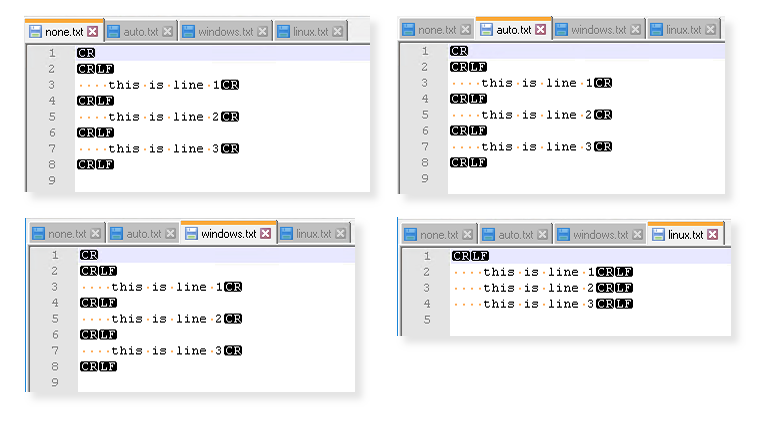
      otter-apply-template.png

      I was expecting that, for NewLines: Windows, the byte-sequence for line-endings would be \r\n and for NewLines: Linux, the byte-sequence would be \n. Instead, I appear to have \r\r\n and \r\n.

      (I assume not specifying is the same as Auto, and matches the Windows behaviour because of the target server's platform. I have not tried against a Linux target server.)

      Note that I am not referring to the ones at the top and bottom of the resulting files -- those are clearly because I have written newlines before and after my fish-quotes. Nor the spaces at the start of each line, those also exist in the fish-string.

      The script was entered via the /scripts/edit2 text editor rather than /osve.

      Have I misunderstood some nuance of the Apply-Template function, or fish-strings in general, or is this a bug?

      PS: I thought I might work around this with...

      Apply-Template
      (
          OutputVariable => $out,
          Literal: $literal,
          NewLines: Windows
      );
      
      set $linux_out = $RegexReplace($out, "[\r]+\n", "`n");
      Log-Debug $linux_out;
      
      set $win_out = $RegexReplace($out, "[\r]+\n", "`r`n");
      Log-Debug $win_out;
      
      Create-File
      (
          Name: $PathCombine($SpecialWindowsPath(CommonApplicationData), linux_pp.txt),
          Text: $linux_out,
          Overwrite: true
      );
      
      Create-File
      (
          Name: $PathCombine($SpecialWindowsPath(CommonApplicationData), windows_pp.txt),
          Text: $win_out,
          Overwrite: true
      );
      

      ...but it appears that Create-File has its own nuance, and all were turned into \r\n newlines. I assume, therefore, it is not possible to use Create-File to create a raw file containing the exact content of a variable, with no pre-processing?

      Version 2022.10 (Build 1)
      
      posted in Support templates otter
      J
      jimbobmcgee
    • RE: Basic arithmetic in OtterScript

      @atripp said in Basic arithmetic in OtterScript:

      There isn't any noticeable overhead.

      This assumes I am orchestrating a system which can run PowerShell.

      As it stands, to perform the $PSEval, I'd first have to for server to a utility server (e.g. localhost) to run the PowerShell, then for server back to the server I was actually orchestrating.

      Or I'd have to $SHEval a call to something which can do maths, which is guaranteed to be on the target device (possibly bc, if POSIX) and capture stdout to get the result of the calculation.

      Rudimentary support for basic expressions would avoid that rather complex call, hence the feature request.

      posted in Support
      J
      jimbobmcgee
    • RE: SSH password authentication vs keyboard-interactive

      @apxltd; apologies for the delay; I did not get a notification.

      Essentially, it is a chicken-and-egg problem.

      Enabling key-based, non-interactive login was one of the things I was hoping to automate/remediate with Otter; instead it is currently a prerequisite to using Otter.

      The device is not a 'server' per se, but a third-party 'appliance' built on top of Linux. The device image itself comes prebuilt with keyboard-interactive auth (not password) enabled.

      Having Otter support keyboard-interactive seemed more beneficial to a wider audience, than trying to alter the appliance software.

      posted in Support
      J
      jimbobmcgee
    • Basic arithmetic in OtterScript

      Does OtterScript have any rudimentary arithmetic, beyond $Increment and $Decrement, or is it reserved only for specific statements?

      I was trying what I thought was a basic array lookup:

      set @parts = $Split($FullPath, "/");
      set @basename = $ListItem(@parts, $ListCount(@parts) - 1);
      

      ...and was told Cannot convert property "Index" value "3 - 1" to Int32 type..

      I assume that means $ListCount(@parts) was resolved to 3 and 3 - 1 could not be used as the second parameter to $ListItem.

      Subsequently...

      set @basename = $ListItem(@parts, $Decrement($ListCount(@parts)));
      

      ...did seem to work, but what if my arithmetic operation was more complex?

      Do I really need to invoke PowerShell to do basic maths? It seems like overkill, especially in the context of a remote server connection.

      If that really is the case, could an $Expr(...) function be considered for the next version of the language, akin to TCL's expr{} function? e.g. allowing for $Expr((5 + 3) * 4 / 3^0.5) or $Expr($ListCount(@path) - 1)

      If it's not the case, and I've just missed something, could you advise the correct form?

      posted in Support otterscript
      J
      jimbobmcgee
    • RE: SSH password authentication vs keyboard-interactive

      Thanks for replying, and for indicating what you guys use internally. It is a feature I have had to implement myself in a tool we use internally, so I have some familiarity with doing it (at least, in Go).

      I believe the equivalent in libssh2 is to call libssh2_userauth_keyboard_interactive_ex, so I presume the code path would branch based on whether a Use keyboard-interactive method option was set.

      That function takes a callback argument which, when invoked, receives pointers to an array of server prompts and a target array of responses. The callback is expected to populate the target array with the responses.

      At its simplest, you can probably assume the password prompt is the first in the array, and set the first element in the target array with the configured password -- that should cover most use-cases.

      So, not a simple flag, but should be trivial enough, depending on the libssh2 wrapper you are using (your signature is C#?)

      If you did want to support more than one prompt, you could allow storing a list of responses against either the server or the credential object, and writing them to the target response array in the order they were stored.

      posted in Support
      J
      jimbobmcgee
    • SSH password authentication vs keyboard-interactive

      I've been setting up some SSH-based servers in Otter, and have experienced authentication failures, even though I know the username and password to be correct:

      Unhandled exception: Inedo.Agents.Ssh.SshException: Authentication failed (username/password)
      

      It took me a while to work out what was going wrong.

      In the SSH standard, there are two types of "password" authentication:

      • password
      • keyboard-interactive

      It appears the SSH agent in Otter only supports true "password" authentication, but many users' expectation of using a login that is username/password-based might also fall under the bracket of "keyboard-interactive". Indeed many distributions actually disable true "password" authentication and enable "keyboard-interactive" by default.

      Obviously, the correct way to work around this is to use public/private key based authentication but, as a feature request, could keyboard-interactive authentication also be supported?

      Note that I am not suggesting that the end-user should be required to manually enter the password on each job run, just that the Otter SSH client correctly handle if the server's permitted authentication method happens to be keyboard-interactive.

      Both "password" and "keyboard-interactive" ultimately resolve when the SSH client sends a password string so, if your SSH client library supports sending a keyboard-interactive authentication, can you expose that option?

      At its simplest, I imagine this could be a tickbox option (e.g. Use keyboard-interactive method for passwords), when editing an SSH-based server. but I suppose you could attempt to auto-detect from the server response when authentication has failed due using to the wrong method.

      Keyboard-interactive also technically allows for receiving multiple prompts from the server, and answering each in turn (with the same or other strings), so the ability to define multiple strings in turn might be useful but, at a minimum, supporting just the password going over the keyboard-interactive layer should be enough for most.

      posted in Support
      J
      jimbobmcgee
    • Onboarding duplicated template VMs to Otter

      I am trying to determine a way whereby new VMs are automatically made available as deployment targets in Otter. They do not have to be assigned to envrionments yet -- this can be done later -- it's just the onboarding that I want to start with.

      For the purposes of this question, assume that there are a significant number of VMs to create. There is a template VM, which has the Inedo agent installed. VMs will be created by copying the template in (for example) the ESXi shell and registered using vim-cmd. I won't know the IPs of the created VMs until after they have first booted and DHCP has assigned them.

      The InedoAgent.config is only going to have a single encryption key (the one in the template), and outbound Connection defined to a central Otter server.

      If I am reading the documentation correctly, in order for an outbound connection to be made by Inedo Agent, the outbound connection must know both the hostname (of the Otter server) and a key. The key however, must be generated on the Otter server and manually pasted into the InedoAgent.config file, and it must be unique for each individual agent instance.

      It cannot be correct that I need to generate objects in Otter, just so Otter can generate a key for each of them, just so I can then manually provision the agent on each VM, so each VM can connect to Otter.

      At any significant scale, I'd need an orchestration system to provision Otter, so I can use Otter as an orchestration system.

      Although I can run rudimentary python scripts from the ESXi shell, even if I conconcted a script to call out to the Otter API and have it create the server object, provision the agent and retrieve the key (I've not tried this yet), I can't then get that key into the InedoAgent.config file.

      Is there a better way?

      posted in Support otter
      J
      jimbobmcgee
    • 1
    • 2
    • 2 / 2