Inedo Community Forums Forums
    • Recent
    • Tags
    • Popular
    • Login
    1. Home
    2. ivan.magdolen_6846

    Welcome to the Inedo Forums! Check out the Forums Guide for help getting started.

    If you are experiencing any issues with the forum software, please visit the Contact Form on our website and let us know!

    I Offline
    • Profile
    • Following 0
    • Followers 0
    • Topics 2
    • Posts 4
    • Groups 0

    ivan.magdolen_6846

    @ivan.magdolen_6846

    0
    Reputation
    1
    Profile views
    4
    Posts
    0
    Followers
    0
    Following
    Joined
    Last Online

    ivan.magdolen_6846 Unfollow Follow

    Latest posts made by ivan.magdolen_6846

    • RE: [ProGet] Feature Request: Enable creating 'Feed & Project Groups' using API and/or PGUtil

      Hi @Nils-Nilsson,

      we were facing similar issue maybe 2 years ago (I am not even sure if pgutil was available at that time). There may be other approaches besides pgutil. ProGet exposes native APIs, but not all features are enabled by default; some aspects can be modified directly in the database.
      The native API is visible at:
      https://<ProgetServer>:<port>/reference/api

      FeedGroups APIs
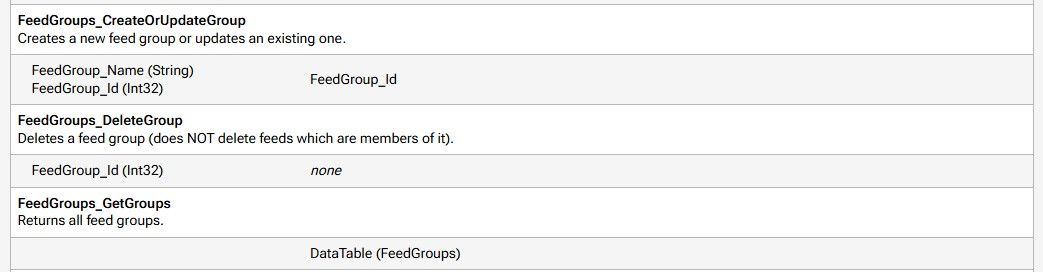
      48fdf5f8-ccce-44da-b858-e625d4494986-image.jpeg

      The Enabled features can be checked in the following table (we are using an MS SQL database):
      __StoredProcInfo

      Internal_Indicator shows what is exposed and can be used. We set Internal_Indicator = 'N' for the APIs (stored procedures) that we want to use for our automation purposes.

      Kind regards
      Ivan
      posted in Support
      I
      ivan.magdolen_6846
    • RE: Access Proget Feed under system (computer) account

      Hello @atripp,
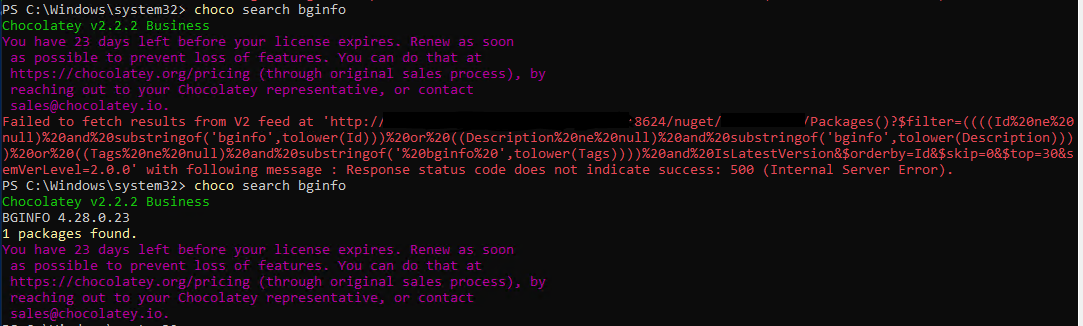
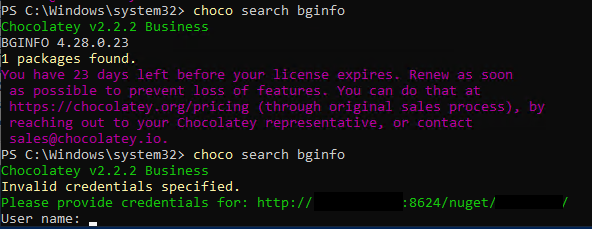
      I am able to add "Domain Computers" so group is returned by LDAP query, but it doesn't work. Same when I've created security group and add computer account to members. Still I am not able to reach Proget Feed under system account. I got following message: Invalid credentials specified.
      f689fac5-837b-491d-beae-429872fac35e-Error1.PNG
      But when I add to Feed "Anonymous" - View & Download Packages I am able to reach the feed.

      When I've tried to reach Feed under computer account on Proget server I got following message. Then I've added anonymous
      See picture below
      fa840e5d-b2ab-499d-a015-5ad4ba1ca2db-Error.PNG

      Kind regards
      Ivan

      posted in Support
      I
      ivan.magdolen_6846
    • Access Proget Feed under system (computer) account

      Hi,

      is it possible to access Proget Feed under system account when Windows Integrated Authentication is enabled on Proget ? I've tried to add Domain Computers with View & Download packages permissions but this didn't work. We need to be able to access Proget Feed (which is configured as a source in choco config) under system account because DSC is running under system. When I've added Anonymous to View & Download packages it works but this is not really the preferred and manageable way.
      Thank you for your answer.

      Kind regards
      Ivan

      posted in Support
      I
      ivan.magdolen_6846
    • Create System API key via API

      Hello,

      is there a way how to create API key (key type = System with all permissions) via API or somehow automatically ?
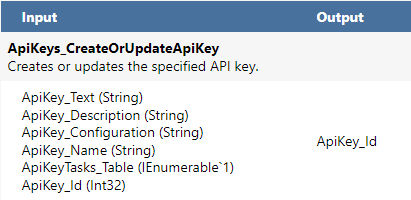
      I found following native API:
      ApiKeys_CreateOrUpdateApiKey

      f952f901-1684-47d8-9e2c-fc9115f4e934-image.png

      but when I tried to use this code (powershell):
      $conf = '<Inedo.ProGet.ApiKeys.ApiKey Assembly="ProGetCoreEx"><Properties AllowPackagePromotionApi="False" AllowRepackagingApi="False" AllowFeedManagementApi="False" AllowWebhooksApi="True"
      AllowConnectorHealthApi="True" AllowFeedsApi="True" AllowDockerBlobReaderApi="False" AllowSbomApi="True" AllowSbomUpload="True" UseApiKeyTasks="False" AllowNativeApi="True"
      DoNotLogRequest="True" DoNotLogResponse="True" /></Inedo.ProGet.ApiKeys.ApiKey>'
      $URL = "http://<myservername>/api/json/ApiKeys_CreateOrUpdateApiKey"
      $body = @{
      ApiKey_Text = "<my new API key>";
      ApiKey_Configuration = $conf;
      ApiKey_Name = "TestKeyName";
      #ApiKey_Id = "2";
      ApiKey_Description = "Description API Key"
      }
      Invoke-RestMethod -Method Post -Uri $URL -Body ($body | ConvertTo-Json) -ContentType "application/json"

      I got following error
      30ac21b1-967e-4391-afc9-280c7da0e019-image.png

      so it seems I need some API key to create another API key.
      The purpose of this is to fully automate installation and configuration of Proget and avoid manual configuration of API key in Proget GUI.
      Once API key is created I would like to use that API for configuration of Feeds and Connectors.
      Thank you for your response.

      Kind regards
      Ivan Magdolen

      posted in Support
      I
      ivan.magdolen_6846