Hi @gdivis,
This actually clears up a lot for me. I haven't made the adjustment yet but will do so very soon. Thank you so much for bringing it all together.
Thank you,
Brandon
Hi @gdivis,
This actually clears up a lot for me. I haven't made the adjustment yet but will do so very soon. Thank you so much for bringing it all together.
Thank you,
Brandon
Buildmaster has some nice features when it comes to git and even monitoring git. Unfortunately it falls a hair short for what I need and I'm trying to bridge the gap with an otter script. This is having me fetch request info to make other calls. I'll give more details but the overall goal is to see if I'm not going about this in the way you'd recommend as well to see if there is any changes planned in the next major release that might help with this.
First some specifics on where my troubles are. When writing a script I prefer OtterScript because of all the built-in commands and the help you can get from the GUI as you go. I also figured that when interacting specifically with BuildMaster it would provide the most easy to use functionality. Unfortunately that didn't prove to be true in all cases, especially when running outside the context of a specific app, like in a scheduled job. I did find, however, that you can call the Buildmaster rest API to get extra functionality in some cases. Where I can't seem to bridge the gap is I'm getting a list of applications in the otterscript and I can get a set of release numbers but the API I want (which is Releases_GetRelease) in this case requires application id which I don't have, I just have name.
What I'm after here is to get the branch the release is linked to. Otterscript seems to have a way to do it for a build not a release. I tried treating the build as an optional parameter but it just threw an error for an invalid application name. I thought the error was odd but didn't know how to get around it so I pivoted. If there is a way I can use that function that would be great.
The ultimate thing I'm after (which I'm incredibly close on) is go through the active applications that have a git monitor on them and check the releases on that app to see if there are any created off a pr branch where the pr is no longer open so I can purge those releases. If there is something in an upcoming major release that might help with I'd appreciate learning about that too.
Thank you,
Brandon
Hi @gdivis
I appreciate that extra info and that is a really nice bit to know. I haven't had a chance to play this yet and if I can I may add another comment on this post with some updated information. The part that I'm not quite understanding from your post and the corresponding documentation is how it connects to the issue I had and fixed with the code in my original post. My issue was never (that I knew of) with what showed up in the Buildmaster UI as I was using text view most of the time. Granted I did switch to the visual editor at one point to see if it provided help on the output part, but it didn't. It did however help me fix the input part (corrected the params declaration).
What I'd like to know is if adding that help is going to somehow wire something up behind the scenes to prevent me from having to do that crazy Write-Output line in the ps1. I can see how it would help me with the syntax of the Otterscript but that isn't where I was having my issue. For clarity my issue was that if I set the variable like you did the $resulttext in your example, it wasn't being set in otterscript. I couldn't get it to work until the changed the ps1 to add one more line to do the Write-Output I posted above. Hopefully that will help you understand my issue more and help with improvements for the 2026 version.
Thank you,
Brandon
After many hours (over multiple days) I was finally able to get data back from a powershell script with with PSCall (which is really PSCall2 under the hood). Unfortunately the documentation on your site doesn't have any information about what is needed in the powershell side of things. I ended up using cursor to analyze the scripting extension dll and help me figure out what you code was expecting. I was surprised at how specific the answer was, especially since it appears to missing in the documentation and in my eyes is not anything anyone could guess on their own.
I had to create an object in ps and turn it into JSON (which I had already done anyways) but having the variable was not enough. I had to do a Write-Output with other specific parsing text. Here is the resulting code:
Write-Output "!INEDO_VAR!RepositoryInfo!$RepositoryInfoJson"
I'm hoping that posting this here will help someone in the future and maybe even get the documentation updated. Or maybe you'll tell me a better way to accomplish this same thing.
Thank you,
Brandon
I have code that is trying to get Token using $CredentialProperty and it says it fails with "not configured to allow access to encrypted values" but this doesn't appear to be the case. First here is the line of code in question:
This is executed where $BuildMasterApiKeyName = "global::BuildMaster"
$CredentialProperty($BuildMasterApiKeyName, Token);
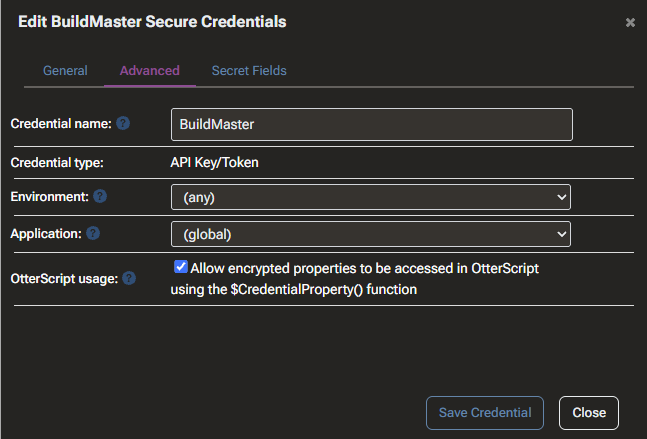
The execution log shows the error: The specified credential property "Token" is marked as encrypted and the "global::BuildMaster" credential is not configured to allow access to encrypted values.
Here is a screenshot showing that property as checked:
Thank you,
Brandon
Hi @atripp,
I finally have time to work on this again and wanted to respond to your last message regarding releaseless builds. Honestly, I'm not entirely sure how that helps me but more importantly look at that link you gave me doesn't even tell me how to set that up. Can you point me to some documentation regarding that feature? Maybe if I play with it I can determine if I want to use it as part of my pitch or not.
Thank you,
Brandon
Hi Alana,
Just wanted to let you know that restarting the service did fix the issue. Thank you for the suggestion.
Brandon
Alana,
I totally understand everything you are saying and in the nearly 15 years I've being using BuildMaster this is the first time I've ever even considered anything like this. To be honest I don't like how our builds/releases are currently handled but being as new as I am with the company I don't have a lot of power there. I'm on this project to hopefully gain a little influence in this area though.
One thing I've learned in my time with this company, is there is at least some benefit to triggering a build for the PRs so you can require a successful build prior to allowing the PR to merge. I love the way Buildmaster handles things with releases, I just was hoping you had something to help separate the different types of release as you obviously support create a release off of a PR. Maybe that feature is something you added but not something Inedo fully believes in so you haven't spent a lot of time on the features around it (which would be totally understandable).
To be clear I'm not looking to 100% replicate the UI we currently use (I don't like most of it anyways). The only thing I'm interested in is keeping someone from losing the primary release in a bunch of PR releases. I had hoped that being able to add PR in front of the release name would help but it appears you guys support the number and not the name in that feature. If you have another idea up your sleeve I'd appreciate it, if not I understand.
Thank you,
Brandon
Thank you,
Brandon
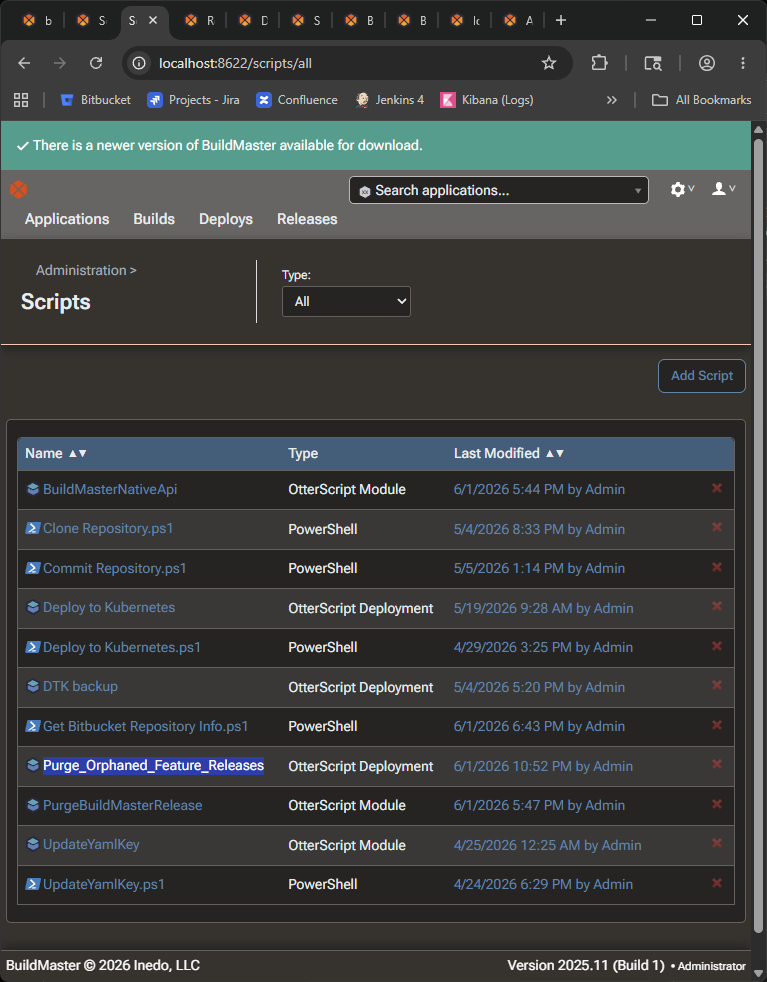
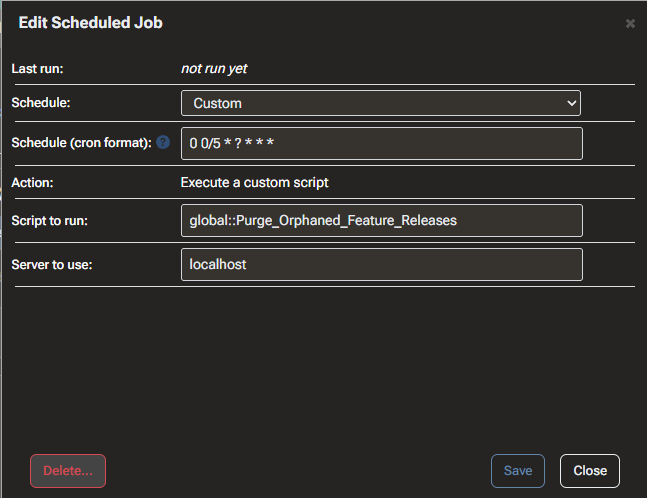
I created a scheduled task that points to an OtterScript. I created the script it is pointing to as a global script via the Administration screen. Even though I can clearly see the script and the name I keep getting the error
System.FormatException: "Purge_Orphaned_Feature_Releases" is not a valid DeploymentScript identifier for the "global" scope.
when it attempts to fire the scheduled task.
The original name was Purge Orphaned Feature Releases but I changed it to use underscores thinking the spaces had something to do with it. I even tried prefixing it with global::. I'm hoping someone can tell me what is going on so I can get this working.
Here is a screenshot showing the script is defined globally
Here is a screenshot showing the current configuration for the scheduled task
Thank you,
Brandon