@stevedennis and @inedo-engineer I appreciate that. I really didn't care about reputation except that it was preventing me from replying back to my tickets and saying thank you. It said my reputation wasn't high enough to have that many posts and I had to wait a while before I could say "Thank you" on another post. Maybe when you turned that feature off you fixed that issue too. I just thought I'd let you know more details so if you upgrade again you can keep track of that.
Thank you,
Brandon
Welcome to the Inedo Forums! Check out the Forums Guide for help getting started.
If you are experiencing any issues with the forum software, please visit the Contact Form on our website and let us know!
B
Offline
Posts
-
RE: Bug Report: Deploy IIS Site generates invalid otter script if you choose Create/Update Application (VM 2026.1)
-
RE: Bug Report: Deploy IIS Site generates invalid otter script if you choose Create/Update Application (VM 2026.1)
Hi @inedo-engineer , I was just curious about voting/reputation. I did some digging and I have no reputation because no one ever votes on my tickets. When I did research apparently one thing that can help is doing a good job reporting bugs. Can you tell me why bugs are not good enough? Or do you guys have a policy against voting on users stuff so the only way I can get a vote or uptick in my reputation is by non employees?
-
RE: Image-based Services (Containerized Builds) failing on "Build .NET Project"
@stevedennis Thank you, I look forward to hearing back.
-
Bug Report: Deploy IIS Site generates invalid otter script if you choose Create/Update Application (VM 2026.1)
I am trying to set up a simple IIS deploy where it deploys to an application and ensures that application exists. I filled out the wizard and then I tested it and it failed. When I researched why it failed I discovered it was not filling in the arguments correctly of the IIS:Ensure-Application command. If I click the Edit as script button I get the following script for that command:
IIS::Ensure-Application
(
    Name: /CStore.API,
    Site: WebApps,
    AppPool: DefaultAppPool,
    PhysicalPath: C:\IIS\CStore.API
);
The visual editor looks like this:
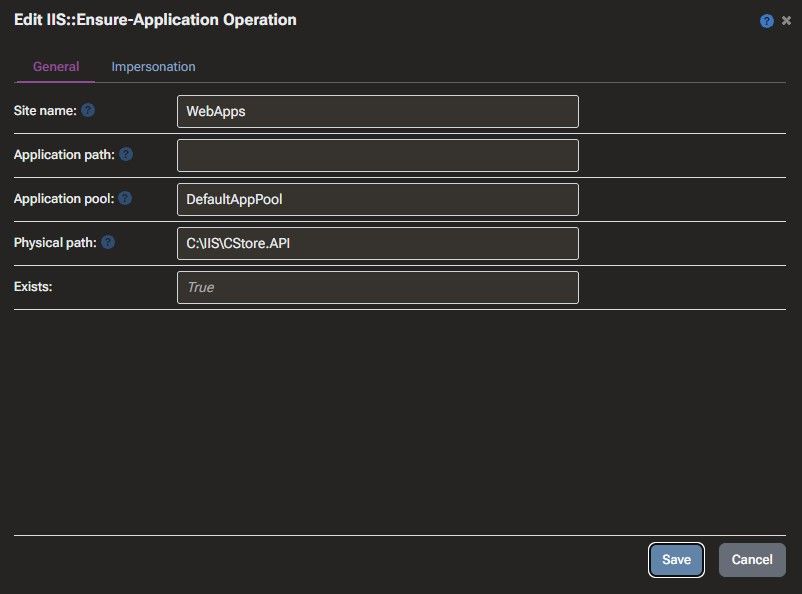
You'll notice there is no record of the Name (/CStore.API). If I fill in Application path on that form, save it, and flip back to the text editor you get this:
IIS::Ensure-Application /CStore.API
(
    Name: /CStore.API,
    Site: WebApps,
    AppPool: DefaultAppPool,
    PhysicalPath: C:\IIS\CStore.API
);
Name is still there but now you can see that same value is added else where. I'm hoping this is something you are willing to fix so I can use the Wizard as it claims to be instead of having to use a custom script. Let me know if there is anything else I can do to help.
For the record after finishing this post I went ahead and saved my manual change to the script that I did via the UI for the above info and it worked when I tested it again. I realize I have a work around but the wizard is an important feature for maintenance. I'm ok if the fix isn't quick as long as it can be added to the to do list.
Thank you,
Brandon -
Feature Request: Allow IBS for DotNet::Test
Hi @inedo-engineer,
In working on my project I set up a build for a .NET 6 application. I used the .NET Build Wizard and I selected to use IBS (Image Based Service). This worked great and I don't have to worry about the build server having every version of the .NET SDK we use installed, at least for that step. Now, I'm not sure what would happen if I used the option to run the unit test from within the wizard, but I couldn't because I need to pass in a filter for the tests. Due to that I created a manual script that simply just runs the unit tests with the filter. I found that there was no IBS option on DotNet::Test. I'm hoping you can add that to the list of future to dos (and hopefully not to far out). Because I had already created a BuildMaster extension I went ahead updated it to add a custom version of DotNet::Test that added that property and executed it appropriately. Took me about 15 minutes. I was hoping with it being that easy and straightforward you wouldn't mind making it an official feature.Thank you,
Brandon -
Using npm:Install with Image-based Services doesn't work
Hi @inedo-engineer,
I'm starting to set up Image-based Services to keep from having to have so many things installed on the build server. This is working great for the .NET builds but when I tried to use it for npm::Install I ran into a problem. Apparently when you activate Imaged-based Services for npm::Install it tries to execute at the root of the container which fails with Tracker "idealTree" already exists. According to my research when you the docker run command you need an additional argument of "<workdir>:/var/buildmaster-ibs" but I'm not sure how to do that with your software. I was hoping someone could give me instructions or maybe report this as a bug to be fixed.Thank you,
Brandon -
RE: Image-based Services (Containerized Builds) failing on "Build .NET Project"
Hi @stevedennis,
I appreciate the reply but I will be honest and say it doesn't really make any sense. To my knowledge I'm not using docker desktop for this feature. I installed WSL on my machine and I'm assuming it is using that. One of the things I learned in this process is that docker desktop doesn't allow the same command line usage that WSL does. I still have Docker Desktop as well, but I'm using that for running the results of what BuildMaster is building, not anything BuildMaster itself is doing.As far as the Id command and git, I've always had git installed. Apparently the directory with that utility is not part of the normal path. There is another directory in the install of git that is part of the path but it doesn't include the Id command. I just added the other directory to the path manually.
Either way, the question I was trying to get answered was regardless of my set up, what is the requirements for someone trying to use this feature as expected. From my digging the Inedo code is trying to run a Linux command (Id) on the box hosting the agent (not a docker container). The code is trying to get a user to apparently use in running the docker command. This is where I was hoping you or someone at Inedo could fill in the gaps.
I just want to be able to tell my company that if they want to use that feature should the have an agent running an Linux box (VM or a real one). Good news is I at least proved it "can" run on a windows box.
Thank you,
Brandon -
RE: Image-based Services (Containerized Builds) failing on "Build .NET Project"
I was finally able to get it to work. I'm not sure how you "expect" it to work so I am curious what you'll say about my solution. After some research I found out that if you install git for windows there is a directory with some utilities which includes an id command for windows as a part of that. I added that directory to my path and the Image based service finally worked. Is there a better way to get this to work? Perhaps this was an oversite in the coding as maybe this is standard on your computers so the the third-party dependency wasn't mentioned? I'll be curious to hear your explanation.
Thank you,
Brandon -
RE: Image-based Services (Containerized Builds) failing on "Build .NET Project"
I would like to try and "reopen" this topic. I didn't get back to this right away but I did some more work on this today and I'm curious if someone at Inedo might be able to supply some more details if I provide more details on what I've learned since the last posting.
I used cursor to try and understand more of what was going on since I wasn't really following everything being said above. What it basically told me was that it has nothing to do with interacting with docker. Apparently when ImageBasedService is used it expects you are using an agent on a Linux machine as your code is explicitly calling the Id method. For the record cursor analyzed your DLLs to try and figure this out. I'm not sure how accurate it is but I'm wondering if it will at least trigger someone on your side to figure out the best way to help me or at least explain to me what is going on and what my options are.
Here is the code it looked at
string HostPath = ((!(await exec.GetEnvironmentVariableValueAsync("USER") != "root")) ? null : (await GetCurrentUserIdAsync(exec, context.CurrentLogScope, cancellationToken)));private static async Task<string?> GetCurrentUserIdAsync(IRemoteProcessExecuter exec, ActiveNamedScope log, CancellationToken cancellationToken)
{
using IRemoteProcess p = exec.CreateProcess(new RemoteProcessStartInfo
{
FileName = "id",
Arguments = "-u"
});
// ... read stdout, then StartAsync
}code_textThank you,
Brandon -
RE: Retention Policies for PR Builds
Hi @dean-houston,
I think there might be a little bit of a misunderstanding. I'm not really evaluating the product. I'm selling the product. I've been using BuildMaster for over 10 years (I'm thinking 14 or 15) and most of which as a paying customer. I started a new job last year and I'm once again I've decided to try to sell your product to my employer. Previously I've just had to do a presentation on the product to get the company on board. Here, unfortunately, I need to do a little more show-n-tell rather than talk about the product. Not only that but this is the first place I've worked at that has a workflow quite like it does so it has brought up questions I didn't have to deal with, but I've never had any doubt I could/would accomplish what I needed. Since I know how hard of a sell this will be I'm trying to put extra effort in to coming up with the best demo possible and is leading to some of the questions.Thankfully I think I'm near the end of building what I need to build so hopefully will not be doing too many more posts on the forum. I really do appreciate all the time you and others have given to respond to my posts but I do feel a bit bad for how many and how complex my posts of been. Unfortunately I do not really know when I'll finally do the demo/presentation to my superiors, and I am kind of hoping I can wait until 2026 comes out before I do. I hate to sell a product and the version my pitch is based on is no longer the newest :-).
Thank you,
Brandon -
RE: Retention Policy - Ability to have policy run per group (e.g. Application)
Hi @dean-houston,
I totally misunderstood what you wanted to the pull request for (I should have looked at the link closer). I did create one though. I made a few corrections to what I put in this post.
Thank you,
Brandon -
RE: Retention Policy - Ability to have policy run per group (e.g. Application)
Hi @dean-houston,
Thank you for such a quick reply. I guess I didn't see this post as "getting it in the ether" as you would say. Maybe I was wrong about that. Certainly didn't seem to happen with the support ticket 6ish years ago, but that could be the difference been using paid support vs the open forum.As far as the documentation goes I can put up an attempt at what it could say, but I'd totally expect it to be edited if it were to be used. The blow can be put as a caution or warning block instead of part of the normal documentation.
When using the Count feature please note that it does not count per application. If you have a retention policy that is not restricted by app you can end up purging all releases for certain apps. You may want creating a retention policy for every app if you intend using this feature.I will consider looking at the code as well and coming with a suggestion for the implementation of the enhancement I have in mind.
Thank you,
Brandon -
RE: Retention Policy - Ability to have policy run per group (e.g. Application)
Hi @dean-houston,
If nothing else could you at least update the documentation. I complained about this 6 years ago after wiping out nearly all my production builds. I think you should have a warning about the fact that the conditions are not app specific when it talking about the last N item.
Also, I never asked for a timeline, just the ability to add something for consideration in the future. A lot of companies have a place where you can make a request and even have customers vote on it so they can see the interest before considering it. I just wanted the chance to have it recorded somewhere so it could be considered when you got around to it.
Thank you,
Brandon -
RE: Retention Policies for PR Builds
Hi @dean-houston,
I appreciate the info and that is actually an interesting idea. If certain things were different I might actually consider something like that too. Since I'm trying to sale your software I have to consider the customer and the fact that some part of the company might be looking for any reason to reject the software. I'm sure you can understand how change is often perceived. Even though I don't totally agree with our current process I need to show the ability to support it so they can know the software can be used without being "forced" to change their process right up front but I also plan on showing how the software could be used to improve the process as well which might eventually lead in some change.One big reason for the clean up is to keep there from being clutter making the system harder to use as well as take up more space. For your idea to work well I'd have to try and set it to a number of days that would keep the builds from being deleted too quickly but this would increase unnecessary clutter as it would force you to keep builds you don't need longer than necessary. The PR is a built in life cycle so why try to fake it with an arbitrary number of days, it doesn't make any sense from a design perspective. It allows you to have the minimum amount of stored builds necessary for what is going on. Only the odd ball PRs that are held up will have it's builds stick around longer.
When I mentioned about them rejecting your software it is because the current software already handles it. It creates the build when a PR is created or modified (which yours does to) but also deletes the build once the PR is deleted or merged. I'd hate for you (or me) to lose out on something so silly so it is worth the extra effort for me to make it work.
On the note of the repository monitor, I thought that seemed like a great idea as you already have that for creating builds so it seemed like you did 90+% of the work for having it clean them up as well. I started to build my own but went a different approach for one reason. If you only listen to when one is removed there are scenarios where the cleanup wouldn't happen. So instead I created a custom operation that can be run without app context that loops through all the apps and finds all the builds without a release and determines if the build was done on a branch that no longer has an open PR and purges it. I then created a scheduled task in BM to run this every 5 minutes. This makes the clean up it pretty much instantaneous and makes your software competitive with our current solution.
For the record, for any other users reading this post, I originally tried this same idea using just an otter script. If you were to set up a scheduled task for every app it makes it easier but that would a lot for us to maintain and set up due to the number of apps we have. For that reason I wanted the script to run for all apps we have configured. I had an otterscript (in conjunction with a few powershell scripts) that was nearly fully functional but it was getting a bit complicated running without an app context. It was easier to do with a custom operation but it does mean having a library I have to keep with out side of BM.
Sorry this was so long but wanted to include detail for anyone researching the same thing I was.
Thank you,
Brandon -
Retention Policies for PR Builds
Buildmaster,
In another post I asked about the best way to set up builds off PRs (mainly for the purpose of verifying they build before allowing them to be merged). The result of that ticket was that the build would be created without a release if it was generated off a PR. The regular builds would be done on a release as usual. This solves the one issue I was going for which is to make it clear what type of build one was if you were looking at it but it doesn't solve the clean up.I realize I could set up a build specific retention policy but in this case there isn't really any options that make sense. Once the PR and/or branch is gone there isn't really a point to keeping the build around any longer. In my opinion these PRs/Branches should be short lived and so should the builds but my company (at least at this time) may not run things in a way that would make that true which makes the cleanup that much more important to get right.
You have a the ability to define scheduled tasks and I thought this would be a great way to write a custom cleanup script. Unfortunately when you run a script from the scheduled tasks that doesn't run in the context of a release/build it becomes quite difficult to interact with the system on the release/build's behalf.
I'm curious (since I'm a .NET developer) if the best option would be to write an extension in this case. I'm currently reading documentation on that. I also played around with making rest calls to buildmaster but I have to admit it seems odd to make calls from buildmaster to exit buildmaster and come back externally to get information to use within buildmaster. Even sounds confusion when you write out
 . If I were to write an extension it would probably be a repository monitor as that would likely be the most efficient way to handle it. I actually originally thought I could the repository monitor feature that was built in but it doesn't have an option to monitor when PRs are merged/deleted. Hopefully that is something I can figure out how to write in an extension.
If you have other thoughts I'd appreciate it.
Thank you,
Brandon -
Retention Policy - Ability to have policy run per group (e.g. Application)
Hi Buildmaster,
Years ago when I was setting up BuildMaster for another company I made a huge mistake with retention policies. The documentation doesn't really state one way or another (and still doesn't) but I thought when you specified how many releases to keep that since releases were per Application it would be how many per application that the policy applied too. Turns out this was far from the truth. My policy applied to all my applications and when I set it to keep at least 5 releases or at least 3 months worth it mean 5 total through the entire build master. OOPS!!!Now that I'm attempting to set it up again at a new company I was curious what improvements were made with the latest version and it doesn't appear much has been done with retention policies since I last looked at it. I'm curious if I can put in a request for a new feature. After reading your instructions and thinking about the screen I can see why it would work the way it does but it also occurred to me there might be a way to add a feature to make them easier to maintain and work more like I was originally thinking.
Could you add a feature for the retention options where you could pick the level to apply it. If you left it unrestricted (which could be the default) it would work like it does now. But you could also specify it to run at the Application level so it would execute the retention policy per application it applies too. This would greatly reduce the amount of policies that one would have to keep up with and therefore reduce errors in setting it up and keeping it consistent across applications. Not sure if there is an official place for that feature requests but I thought I'd stop here.
Thank you,
Brandon -
RE: Interacting with releases from otterscript, especially from within a scheduled job
@atripp,
I'll be honest I'm not sure how we here completely. What I mean is that it appears that some how I've led you to the conclusion that we are using PRs but not feature branches which made it hard to get the help I needed. I appreciate the information you provided as that finally helped us figure out the disconnect.We are indeed using feature branches. The primary difference in what we are doing and what you are doing is the timing in which an automated build is generated which leads to a few other smaller differences.
When working on a ticket we create a feature branch for that ticket. At this point everything we do is local to our personal computer and we commit to save our work. Once we feel we are code complete we generate the PR and mark it ready for code review. The PR generates a build and one of the requirements on git repo is that a PR must have a successful build before it can be merged. Once the build finishes and the reviewers have approved the code it can be merged in to master which generates the official build which is first deployed to our dev/test (basically the QA environment but the call it dev) environment and then if everything is good it eventually goes to production.
Unfortunately my lack of understanding in this area of your application can me from asking direct clear questions. I had 2 core issues I was trying to figure out.
- Best way to set up the creation of these builds of a PR
- How to clean up the builds when no longer needed
Even though they are 2 distinct issues the second one is affected by the first one as I'm come to find out. Originally I thought the best thing to do was to have it create a release based on PR # so you could see the history of the builds that occurred for that PR. For example if a unit test failed so you had to do a subsequent build to fix it. The other part was to make it easy for developers to find the build they generated in case it failed so they could see why as there could be multiple developers with feature branches on the same application. This method created the issue of a release that then needed to be purged once the PR and branch were gone. I saw no built in feature for this. You have a scheduled job feature but I didn't want to have to set that up individually for every app so I tried to create a generic one but your otter commands are set up more for running in the context of app/release/build then globally and that is where this post came from.
After some experimenting I realized I could set the monitor to just create a build with a specific pipeline and that seemed to be the ticket. It doesn't clutter up the app with extra releases you have to purge and the you can still see the history of your tickets build by going to the branch and viewing builds for the branch.
I'm still not entirely sure how the clean up will work there but I'm going to cover that in a different post as I plan on having a post specifically about just the retention policy feature.
I hope that clarifies things a bit. I'm not sure if my colleagues will mind looking for things by branch of PR # but in some ways I personally think it might be nicer.
Thank you,
Brandon