Inedo Community Forums Forums
    • Recent
    • Tags
    • Popular
    • Login

    Welcome to the Inedo Forums! Check out the Forums Guide for help getting started.

    If you are experiencing any issues with the forum software, please visit the Contact Form on our website and let us know!

    Proget Integrated Auth Mixes Machine Name with User Account

    Scheduled Pinned Locked Moved Support
    27 Posts 3 Posters 49 Views
    Loading More Posts
    • Oldest to Newest
    • Newest to Oldest
    • Most Votes
    Reply
    • Reply as topic
    Log in to reply
    This topic has been deleted. Only users with topic management privileges can see it.
    • A Offline
      arozanski_1087
      last edited by

      I'm using Active Directory (LDAP). Within that configuration I only have 1 Domain listed, and only 1 DC hostname. There are not NetBios mappings, and I only have gMSA checked as an option. Search Mode is set to All Trusted Domains

      1 Reply Last reply Reply Quote 0
      • rhessingerR Offline
        rhessinger inedo-engineer
        last edited by

        Hi @arozanski_1087,

        This is really peculiar because we have an explicit filter on all of our LDAP queries to be a user, msDS-GroupManagedServiceAccount, or group. Does each user account have their own group managed service account?

        Thanks,
        Rich

        Products Engineer, Inedo

        1 Reply Last reply Reply Quote 0
        • A Offline
          arozanski_1087
          last edited by

          I verified this with our IT department: user accounts do not have their own gMSA. When I test the search feature it shows me the correct user in the dropdown when I select options. Further testing shows that when I explicitly look for any machine name account, it fails to find it. Truly peculiar.

          1 Reply Last reply Reply Quote 0
          • atrippA Offline
            atripp inedo-engineer
            last edited by

            Hello, we haven't seen this before, so it's a bit strange to diagnose.

            Can you share exactly what version of ProGet you're using, as well as some screenshots showing the step-by-step? There are some subtle ways different things are displayed, and that might clue us in where to look next.

            cheers,
            Alana

            1 Reply Last reply Reply Quote 0
            • A Offline
              arozanski_1087
              last edited by

              Absolutely.

              Im in the users and tasks menu adding a permission. Everything looks normal here. ecda5082-3220-4b77-a1c7-6c6cb7ea45d9-image.png
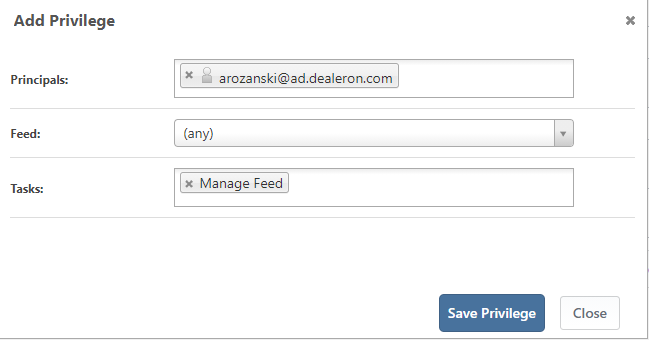
              It adds my machine account instead after I click save. Does this for every user in that domain.

              8e1c26c1-d275-49ec-8c78-a0f2f1127222-image.png .

              1 Reply Last reply Reply Quote 0
              • rhessingerR Offline
                rhessinger inedo-engineer
                last edited by

                Hoi @arozanski_1087,

                Can you please tell us what version of ProGet you are running and also, can you please tell us what version of the InedoCore extension is installed on your ProGet instance?

                Thanks,
                Rich

                Products Engineer, Inedo

                1 Reply Last reply Reply Quote 0
                • A Offline
                  arozanski_1087
                  last edited by

                  Product Version: Version 5.3.15 (Build 2)
                  Extension Version: 1.7.10

                  1 Reply Last reply Reply Quote 0
                  • rhessingerR Offline
                    rhessinger inedo-engineer
                    last edited by

                    Hi @arozanski_1087,

                    Thanks for sending that over. I took a look into the code and checked some things and I don't see anything that would look up the computer name. Can you look at the [Privileges] table in the ProGet database? Do the usernames include the $ in there also? Also, do you have any sort of reverse-proxy sitting in front of ProGet?

                    Thanks,
                    Rich

                    Products Engineer, Inedo

                    1 Reply Last reply Reply Quote 0
                    • A Offline
                      arozanski_1087
                      last edited by

                      No Reverse-Proxy in front of my server.

                      RE: [Privileges]

                      My account is the only account in this user domain that I have explicitly specified, and it has a $ in the name.

                      Other data fields for my entry are as follows:

                      | PrincipalType_Code |  Role_Id | Feed_Id | PrivilegeType_Code | UserDirectory_Id |
                      |G                   |    4     | NULL	  |  G 	               | 6                |
                      

                      I'm going to take a wild guess and assume then that the PrincipalType_Code value means group account, as actual user accounts show up with code U, and the actual group accounts which contain the users I want to have in the various roles also show up as G.

                      1 Reply Last reply Reply Quote 0
                      • rhessingerR Offline
                        rhessinger inedo-engineer
                        last edited by

                        Hi @arozanski_1087,

                        You are correct. G is for group or gMSA. The only thing that makes sense is that your AD has a group or a gMSA for your user account with the same name and it is return the group first. You could manually change the DB record to remove the $ and that should then work. But that is an annoying manual step. Can you please verify that the user you are testing with does not have a Group of gMSA named as AROZANSKI$ in AD?

                        Thanks,
                        Rich

                        Products Engineer, Inedo

                        1 Reply Last reply Reply Quote 0
                        • A Offline
                          arozanski_1087
                          last edited by

                          @rhessinger absolutely. my IT team tells me no, and I am in AD looking at the account via Active Directory Users and computers and I do not find anything. I can confirm without a doubt that there isn't a gMSA for this user.

                          1 Reply Last reply Reply Quote 0
                          • rhessingerR Offline
                            rhessinger inedo-engineer
                            last edited by

                            Hi @arozanski_1087,

                            I apologize for all the back and forth I'm struggling a bit to recreate this issue. I have even tried to just add a computer by searching it by name and I still cannot recreate this. Would you be able to perform a test search in the Advanced Settings of your Active Directory provider? Does that also return the computer accounts?

                            Thanks,
                            Rich

                            Products Engineer, Inedo

                            1 Reply Last reply Reply Quote 0
                            • A Offline
                              arozanski_1087
                              last edited by

                              My searches were all done in the advanced search window, and that did not return computer accounts. I also tried in active directory to just look up computer accounts (instead of users) and couldn't return any.

                              1 Reply Last reply Reply Quote 0
                              • rhessingerR Offline
                                rhessinger inedo-engineer
                                last edited by

                                Hi @arozanski_1087,

                                I think I may have finally tracked this issue down. Would you be able to manually install the Inedo Core 1.7.11-CI.1 extension and see if that fixes your issue? There is one spot that does not properly apply the user and group filter upon saving and I'm thinking I may have fixed it.

                                Thanks,
                                Rich

                                Products Engineer, Inedo

                                1 Reply Last reply Reply Quote 0
                                • A Offline
                                  arozanski_1087
                                  last edited by arozanski_1087

                                  Trying to install it, but it causes this error when I load the web portal:

                                  [InvalidCastException: Unable to cast object of type 'System.Byte[]' to type 'System.String'.]
                                     Inedo.Extensions.UserDirectories.Entry.ExtractGroupNames() +260
                                     Inedo.Extensions.UserDirectories.ActiveDirectoryUser.IsMemberOfGroup(String groupName) +120
                                     System.Linq.WhereArrayIterator`1.MoveNext() +71
                                     System.Linq.Buffer`1..ctor(IEnumerable`1 source) +492
                                     System.Linq.<GetEnumerator>d__1.MoveNext() +116
                                     System.Linq.Buffer`1..ctor(IEnumerable`1 source) +281
                                     System.Linq.Enumerable.ToArray(IEnumerable`1 source) +90
                                     System.Collections.Concurrent.ConcurrentDictionary`2.GetOrAdd(TKey key, Func`2 valueFactory) +87
                                     Inedo.ProGet.Web.Security.TaskChecker.FindPrivilege(IUserDirectoryUser user, ScopedTask& scopedTask) +42
                                     Inedo.Security.UserContext.CanPerformTask(ScopedTask& task) +162
                                     Inedo.ProGet.WebApplication.Security.WebUserContext.IsAuthorizedForTask(ProGetSecuredTask task, Nullable`1 feedId) +199
                                     Inedo.ProGet.WebApplication.Pages.RootPage.CreateTopPanel() +1006
                                     Inedo.ProGet.WebApplication.Pages.<CreateChildControlsAsync>d__2.MoveNext() +871
                                     System.Runtime.ExceptionServices.ExceptionDispatchInfo.Throw() +31
                                     System.Runtime.CompilerServices.TaskAwaiter.HandleNonSuccessAndDebuggerNotification(Task task) +60
                                     Inedo.ProGet.WebApplication.Pages.<InitializeAsync>d__10.MoveNext() +621
                                     System.Runtime.ExceptionServices.ExceptionDispatchInfo.Throw() +31
                                     System.Runtime.CompilerServices.TaskAwaiter.HandleNonSuccessAndDebuggerNotification(Task task) +60
                                     Inedo.Web.PageFree.<ExecutePageLifeCycleAsync>d__46.MoveNext() +234
                                     System.Runtime.ExceptionServices.ExceptionDispatchInfo.Throw() +31
                                     System.Runtime.CompilerServices.TaskAwaiter.HandleNonSuccessAndDebuggerNotification(Task task) +60
                                     Inedo.Web.PageFree.<ProcessRequestAsync>d__45.MoveNext() +240
                                     System.Runtime.ExceptionServices.ExceptionDispatchInfo.Throw() +31
                                     System.Runtime.CompilerServices.TaskAwaiter.HandleNonSuccessAndDebuggerNotification(Task task) +60
                                     System.Web.TaskAsyncHelper.EndTask(IAsyncResult ar) +59
                                     Inedo.Web.Handlers.AsyncHandlerWrapper.EndProcessRequest(IAsyncResult result) +33
                                     System.Web.CallHandlerExecutionStep.System.Web.HttpApplication.IExecutionStep.Execute() +648
                                     System.Web.HttpApplication.ExecuteStepImpl(IExecutionStep step) +213
                                     System.Web.HttpApplication.ExecuteStep(IExecutionStep step, Boolean& completedSynchronously) +131
                                  

                                  I've rolled it back by deleting the .upack file i added to the /Extensions folder and restoring the one I had put in the recycle bin, but I'm still facing this error.

                                  1 Reply Last reply Reply Quote 0
                                  • rhessingerR Offline
                                    rhessinger inedo-engineer
                                    last edited by

                                    Hi @arozanski_1087,

                                    Did you restart IIS or the Integrated Web Server after copying the upack file back? Also, did your upack file have a version number in the name? Or was it just InedoCore.upack? I doubt this, but can you navigate directly to /administration/extensions? Could you also take a screen shot of the files in the Extensions folder?

                                    Thanks,
                                    Rich

                                    Products Engineer, Inedo

                                    1 Reply Last reply Reply Quote 0
                                    • rhessingerR Offline
                                      rhessinger inedo-engineer
                                      last edited by

                                      Hi @arozanski_1087,

                                      You can also try flipping back to the Built-in User Directory by reseting the base admin account. You won't lose any AD users you have setup, it just simply switches ProGet to use the Built-in directory and resets the Admin password back to Admin.

                                      Thanks,
                                      Rich

                                      Products Engineer, Inedo

                                      1 Reply Last reply Reply Quote 0
                                      • A Offline
                                        arozanski_1087
                                        last edited by

                                        • I restarted both the service and the IIS webserver after I rolled it back. When I found that did not fix the issue I kicked the OS entirely.
                                        • My upack file name that I installed matched what you had me download off of that feed.
                                        • Extensions Page in the UI:
                                          24be8ee1-45b7-4b5c-8894-69f11b856d88-image.png
                                        • Extensions folder on the VM: 09c03c39-7d6e-4201-be98-58dd9204aed9-image.png
                                        1 Reply Last reply Reply Quote 0
                                        • rhessingerR Offline
                                          rhessinger inedo-engineer
                                          last edited by

                                          Hi @arozanski_1087,

                                          Glad a reboot of the OS fixed it. Can you try renaming the downloaded version to InedoCore.upack. I noticed ProGet gave me some issues installing the extension manually when leaving the version number on there.

                                          Thanks,
                                          Rich

                                          Products Engineer, Inedo

                                          1 Reply Last reply Reply Quote 0
                                          • A Offline
                                            arozanski_1087
                                            last edited by

                                            @rhessinger --
                                            I did forget to add: I was able to resolve it all after I reset the admin password and reset the services. Once logged in It prompted me to clear cookies for my name account since I am the only one that's been using it.

                                            I have done ask you asked in your last reply. It looks as though renaming the file to just be InedoCore.upack is the solution.

                                            I have since logged back into my instance of Proget and re-enabled LDAP using an administrative service account. From there, it sent be back to the login, where I logged in as myself. In the Permissions page for users and groups, I have added a user in the directory where the users reside, and can confirm that his username does NOT get replaced with his MACHINEACCOUNT$ object. Testing on a few other users seems to indicate that the issue is solved.

                                            Thank you very much for your help.

                                            1 Reply Last reply Reply Quote 0

                                            Hello! It looks like you're interested in this conversation, but you don't have an account yet.

                                            Getting fed up of having to scroll through the same posts each visit? When you register for an account, you'll always come back to exactly where you were before, and choose to be notified of new replies (either via email, or push notification). You'll also be able to save bookmarks and upvote posts to show your appreciation to other community members.

                                            With your input, this post could be even better 💗

                                            Register Login
                                            • 1
                                            • 2
                                            • 1 / 2
                                            • First post
                                              Last post
                                            Inedo Website Home • Support Home • Code of Conduct • Forums Guide • Documentation
