Hi, gdivis!!
I followed your advices and it's works, thank you a lot!
But i think there is necessary to change the doc little bit:
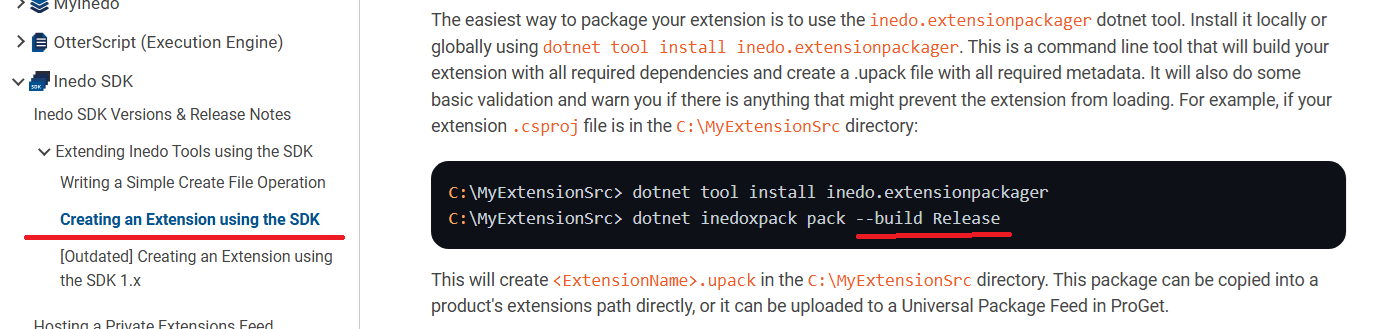
Anyway, thank you one more time!
Welcome to the Inedo Forums! Check out the Forums Guide for help getting started.
If you are experiencing any issues with the forum software, please visit the Contact Form on our website and let us know!
Hi, gdivis!!
I followed your advices and it's works, thank you a lot!
But i think there is necessary to change the doc little bit:
Anyway, thank you one more time!
I used next command line:
PS C:\Projects\BuildMasterTestExt\BuildMasterTestExt> dotnet inedoxpack pack --build
Executing dotnet publish for BuildMasterTestExt.csproj (net9.0)...
No extensions were found in C:\Users\Administrator\AppData\Local\Temp\inedoxpack\1ea02a181d38472a8e7df22454cef502
But earlier I tried the variants as in documentation:
PS C:\Projects\BuildMasterTestExt\BuildMasterTestExt> dotnet inedoxpack pack --build Release
Unhandled exception. System.IO.DirectoryNotFoundException: Could not find a part of the path 'C:\Projects\BuildMasterTestExt\BuildMasterTestExt\Release'.
at System.IO.Enumeration.FileSystemEnumerator1.CreateDirectoryHandle(String path, Boolean ignoreNotFound) at System.IO.Enumeration.FileSystemEnumerator1.Init()
at System.IO.Enumeration.FileSystemEnumerable`1..ctor(String directory, FindTransform transform, EnumerationOptions options, Boolean isNormalized)
at System.IO.Enumeration.FileSystemEnumerableFactory.UserFiles(String directory, String expression, EnumerationOptions options)
at System.IO.Directory.InternalEnumeratePaths(String path, String searchPattern, SearchTarget searchTarget, EnumerationOptions options)
at Inedo.ExtensionPackager.Program.PackAsync(InputArgs inputArgs) in C:\ProgramData\BuildMaster\Temp\Service_E436979\Inedo.ExtensionPackager\Program.cs:line 67
at Inedo.ExtensionPackager.Program.PackAsync(InputArgs inputArgs) in C:\ProgramData\BuildMaster\Temp\Service_E436979\Inedo.ExtensionPackager\Program.cs:line 232
at Inedo.ExtensionPackager.Program.Main(String[] args) in C:\ProgramData\BuildMaster\Temp\Service_E436979\Inedo.ExtensionPackager\Program.cs:line 25
at Inedo.ExtensionPackager.Program.<Main>(String[] args)
2.
Then this two:
PS C:\Projects\BuildMasterTestExt\BuildMasterTestExt> dotnet inedoxpack pack --build .\bin\Release
No .csproj files were found in C:\Projects\BuildMasterTestExt\BuildMasterTestExt.\bin\Release and --build was specified.
PS C:\Projects\BuildMasterTestExt\BuildMasterTestExt> dotnet inedoxpack pack --build bin\Release
No .csproj files were found in C:\Projects\BuildMasterTestExt\BuildMasterTestExt\bin\Release and --build was specified.
Hello!
I've got the problem with inedoxpack error:
No extensions were found in C:\Users\Administrator\AppData\Local\Temp\inedoxpack\9ceaae0893bc46e8b9ec31c0108cea18
I tried as global so and local installation.
The command was executed in powershell v5.1.17763.592 (Windows Server 2019 Standard)
Can anyone help me with it?