Inedo Community Forums Forums
    • Recent
    • Tags
    • Popular
    • Login
    1. Home
    2. viceice
    3. Posts

    Welcome to the Inedo Forums! Check out the Forums Guide for help getting started.

    If you are experiencing any issues with the forum software, please visit the Contact Form on our website and let us know!

    V Offline
    • Profile
    • Following 0
    • Followers 0
    • Topics 6
    • Posts 53
    • Groups 0

    Posts

    Recent Best Controversial
    • RE: docker login failed via https reverse proxy

      As for the security concern: maybe add an environment config option to pass trusted proxy ips like traefik supports forwardedHeaders.trustedIPs

      Maybe another option is to use the ASP.NET Core proxy config options to solve the issue.

      Ok, my reverse proxy isn't able to rewrite headers 😕 traefik/traefik#6047

      So i will go with setting BaseUrl and hope that the licensing issues get fixed in a later version.
      I only see the issues when using an admin user, which we normally not use.
      I also hope you won't block this usage scenario in a future version whithout a proper solution. 🙃

      posted in Support
      V
      viceice
    • RE: docker login failed via https reverse proxy

      @rhessinger said in docker login failed via https reverse proxy:

      Thanks for testing this for me. I think I may see your issue. When the Web.BaseUrl is set to https://proget-test.kriese.eu, the connector should use the URL https://proget-test.kriese.eu/nuget/b/v3/inedx.json. If you set it up that way, do you still get the license violations?

      yes, i can use https://proget-test.kriese.eu/nuget/b/v3/index.json or http://localhost/nuget/b/v3/index.json and always get licensing issues. (baseUrl=https://proget-test.kriese.eu)

      So i'll set the BaseUrl on our other proget too and get starting licensing issues, even if the connector url matches the BaseUrl.

      One thing to note is, if i set the BaseUrl to https://proget-test.kriese.eu all requests from proget connector will go through the proxy. So i think this is causing the licensing issue.

      posted in Support
      V
      viceice
    • RE: docker login failed via https reverse proxy

      ok, setting BaseUrl fixes the docker login but causes new license violations

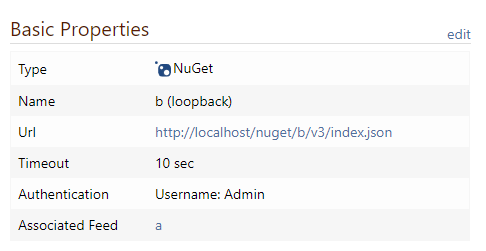
      I now have 2 feeds a and b and configured a loopback connector on a to feed b
      cdbe602b-31df-4b98-9b06-156dadc0ece2-image.png

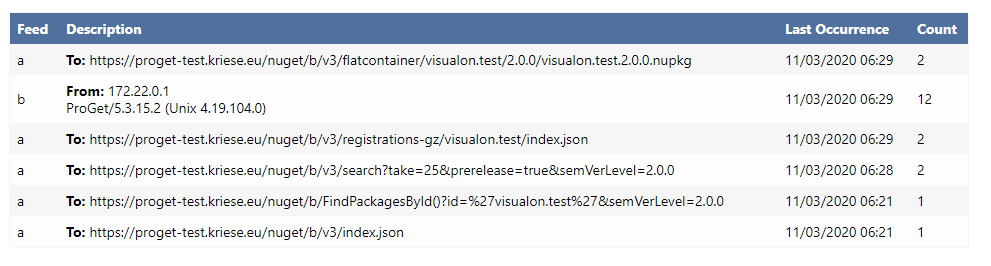
      Errors / Warnings:
      802d1e47-0cdb-4836-a0ef-92422c4f86b6-image.png

      The visualon.test test nuget packages was added to feed b

      btw: license issues are only go away, if i configure a diffrent license key. If i simply try to update existing key, license violations aren't removed. So the docu is wrong.

      I think the solution would be that the licensing code checks passed request url against the configured baseUrl and ignore those requests.

      posted in Support
      V
      viceice
    • RE: A 500 error occurred in d: Could not find a part of the path '/var/proget/packages/.docker/F1

      Ok, next issue with a new nuget feed:

      proget    | Unable to open file VisualOn.NCrontab.Advanced/VisualOn.NCrontab.Advanced.2.0.0.nupkg: System.IO.DirectoryNotFoundException: Could not find a part of the path '/var/proget/packages/.nugetv2/F3'.
      proget    |    at System.IO.Enumeration.FileSystemEnumerator`1.CreateDirectoryHandle(String path, Boolean ignoreNotFound)
      proget    |    at System.IO.Enumeration.FileSystemEnumerator`1.Init()
      proget    |    at System.IO.Enumeration.FileSystemEnumerator`1..ctor(String directory, Boolean isNormalized, EnumerationOptions options)
      proget    |    at System.IO.Enumeration.FileSystemEnumerable`1..ctor(String directory, FindTransform transform, EnumerationOptions options, Boolean isNormalized)
      proget    |    at System.IO.Enumeration.FileSystemEnumerableFactory.FileSystemInfos(String directory, String expression, EnumerationOptions options, Boolean isNormalized)
      proget    |    at System.IO.DirectoryInfo.InternalEnumerateInfos(String path, String searchPattern, SearchTarget searchTarget, EnumerationOptions options)
      proget    |    at System.IO.DirectoryInfo.EnumerateFileSystemInfos()
      proget    |    at Inedo.ProGet.Extensions.FileSystems.DirectoryFileSystem.ListContentsAsync(String path) in C:\InedoAgent\BuildMasterTemp\192.168.44.60\Temp\_E75101\Src\ProGetCoreEx\Extensions\FileSystems\DirectoryFileSystem.cs:line 77
      proget    |    at Inedo.ProGet.Extensions.FileSystems.CaseInsensitiveFileSystem.ListItemsInternalAsync(String path)
      proget    |    at Inedo.ProGet.Extensions.FileSystems.CaseInsensitiveFileSystem.<>c__DisplayClass12_0.<<OpenFileAsync>g__getAllMatchesAsync|0>d.MoveNext() in C:\InedoAgent\BuildMasterTemp\192.168.44.60\Temp\_E75101\Src\ProGetCoreEx\Extensions\FileSystems\CaseInsensitiveFileSystem.cs:line 212
      proget    | --- End of stack trace from previous location where exception was thrown ---
      

      Workaround again: create directory manually docker exec -t proget mkdir -p /var/proget/packages/.nugetv2/F3

      posted in Support
      V
      viceice
    • RE: Proget cannot be accessed in Linux

      @csyy321_2677 You need to forward to port 80 instead of 8080, eg docker run .... -p 8080:80 .../proget. The linux proget docker container is listening on port 80 as root.

      posted in Support
      V
      viceice
    • RE: docker login failed via https reverse proxy

      Hi @atripp

      My BaseUrl is empty, so proget is correctly assuming the hostname from headers.
      But as you said, it isn't respecting the X-Forward* headers.
      That why proget falsy returns a http url, because the reverse proxy is doing http to proget.

      If i add the baseUrl, i'll get licensing issues for a nuget v3 loopback connector, so i was told to empty baseUrl. see https://forums.inedo.com/topic/3037/how-to-configure-the-proget-free-with-self-connector/13

      So my assumption would be, that proget will respect the X-Forward* headers as already doing in other feeds.

      Another options would be, if we can configure proget to listen on https with a provided tls certificate, so i would have end-to-end tls encryption.

      posted in Support
      V
      viceice
    • RE: docker login failed via https reverse proxy

      Hi @rhessinger,

      Sorry my bad, it's a typo, first request is going to https://proget-test.kriese.eu/v2/ and second is going to http://proget-test.kriese.eu/v2/_auth

      The second request is expected by docker to go to http because of the wrong www-authenticate header

      posted in Support
      V
      viceice
    • RE: docker login failed via https reverse proxy

      @viceice said in docker login failed via https reverse proxy:

      www-authenticate: Bearer realm="http://proget-test.kriese.eu/v2/_auth",service="proget-test.kriese.eu"

      docker login proget-test.kriese.eu make a get request to http://proget-test.kriese.eu/v2/ which return the header www-authenticate: Bearer realm="http://proget-test.kriese.eu/v2/_auth",service="proget-test.kriese.eu.
      Then docker is maoking a reuest to http://proget-test.kriese.eu/v2/_auth as told in the response, which fails, because protokoll changed from https to http.

      The proget auth header should be like:
      www-authenticate: Bearer realm="https://proget-test.kriese.eu/v2/_auth",service="proget-test.kriese.eu

      The http://proget-test.kriese.eu/v2/_auth is not available, as i do not forward these insecure http requests from proxy to proget

      for reference my daemon.json

      {
        "registry-mirrors": [],
        "insecure-registries": [],
        "debug": true,
        "experimental": false
      }
      

      pretty default config

      posted in Support
      V
      viceice
    • RE: docker login failed via https reverse proxy

      I've created a new minimal test setup to reproduce the login issue (docker desktop on windows 10).

      • login to to localhost:8082 works
      • login to to localhost:8083 works
      • login to to proget-test.kriese.eu fails, because docker tries to login with http instead of https which failes, because my proget does not listen to http://proget-test.kriese.eu

      Here is the compose file i use for testing:

      version: "2.4"
      services:
        proget:
          image: proget.inedo.com/productimages/inedo/proget:5.3.15
          restart: unless-stopped
          container_name: proget
          environment:
            SQL_CONNECTION_STRING: Data Source=mssql; Initial Catalog=proget; User ID=proget; Password=proget
          volumes:
            - proget-packages:/var/proget/packages
          ports:
            - 8082:80/tcp
          networks:
            - mssql
            - default
          labels:
            - "traefik.http.routers.proget.rule=Host(`proget-test.kriese.eu`) || Host(`localhost`)"
            - traefik.enable=true
            - traefik.http.services.proget.loadbalancer.server.port=80
            - traefik.docker.network=proget
      
        whoami:
          image: containous/whoami
          restart: unless-stopped
          labels:
            - "traefik.http.routers.whoami.rule=Host(`wai-test.kriese.eu`)"
            - traefik.enable=true
            - traefik.docker.network=proget
      
        proxy:
          image: traefik:2.3.2
          restart: unless-stopped
          command:
            - --entryPoints.web.address=:80
            - --entryPoints.websecure.address=:443
            - --api.insecure=true
            - --providers.docker.exposedByDefault=false
            - --providers.file.directory=/etc/traefik.d
            - --providers.file.watch=true
            - --accesslog=true
            - --accesslog.format=json
            - --accesslog.fields.defaultmode=keep
            - --accesslog.fields.headers.names.RequestAddr=keep
          volumes:
            - /var/run/docker.sock:/var/run/docker.sock
            - ./conf:/etc/traefik.d:ro
            - ./letsencrypt:/etc/letsencrypt:ro
          ports:
            - 443:443/tcp
            - 8083:80/tcp
            - 8084:8080/tcp
      
      volumes:
        proget-packages:
      
      networks:
        default:
          name: proget
        mssql:
          external: true
      

      and the traefik tls config file ./conf/tls.yml

      tls:
        certificates:
          - certFile: /etc/letsencrypt/live/kriese.eu/fullchain.pem
            keyFile: /etc/letsencrypt/live/kriese.eu/privkey.pem
      
      posted in Support
      V
      viceice
    • RE: A 500 error occurred in d: Could not find a part of the path '/var/proget/packages/.docker/F1

      thanks, this is low prio, as there is a simple workaround.

      posted in Support
      V
      viceice
    • RE: docker login failed via https reverse proxy

      I'm using proget.inedo.com/productimages/inedo/proget:5.3.15

      If i set Web.BaseUrl, i get license errors, because of loopback nuget v3 connector :-(

      posted in Support
      V
      viceice
    • RE: A 500 error occurred in d: Could not find a part of the path '/var/proget/packages/.docker/F1

      I've installed a fresh proget instance and added a single docker feed.

      Yes, I've used docker exec proget mkdir /var/proget/packages/.docker/F1 to create folder.

      posted in Support
      V
      viceice
    • docker login failed via https reverse proxy

      If i put a reverse proxy for https termination infront of proget, docker client can't login because a wrong www-authenticate header. the response tries to redirect to http instead of https which isn't allowed

      passed proxy headers (fetched via containous/whoami docker image)

      Hostname: 68ff07e4f3c9
      IP: 127.0.0.1
      IP: 172.22.0.4
      RemoteAddr: 172.22.0.2:60372
      GET / HTTP/1.1
      Host: wai-test.kriese.eu
      User-Agent: Mozilla/5.0 (Windows NT 10.0; Win64; x64) AppleWebKit/537.36 (KHTML, like Gecko) Chrome/86.0.4240.111 Safari/537.36
      Accept: text/html,application/xhtml+xml,application/xml;q=0.9,image/avif,image/webp,image/apng,*/*;q=0.8,application/signed-exchange;v=b3;q=0.9
      Accept-Encoding: gzip, deflate, br
      Accept-Language: en-US,en;q=0.9,de-DE;q=0.8,de;q=0.7
      Cache-Control: max-age=0
      Dnt: 1
      Sec-Fetch-Dest: document
      Sec-Fetch-Mode: navigate
      Sec-Fetch-Site: none
      Sec-Fetch-User: ?1
      Upgrade-Insecure-Requests: 1
      X-Forwarded-For: 172.22.0.1
      X-Forwarded-Host: wai-test.kriese.eu
      X-Forwarded-Port: 443
      X-Forwarded-Proto: https
      X-Forwarded-Server: ee3e7e9207a9
      X-Real-Ip: 172.22.0.1
      

      proget response header

      curl -sv https://proget-test.kriese.eu/v2/
      *   Trying 192.168.158.122:443...
      * TCP_NODELAY set
      * Connected to proget-test.kriese.eu (192.168.158.122) port 443 (#0)
      * ALPN, offering h2
      * ALPN, offering http/1.1
      * successfully set certificate verify locations:
      *   CAfile: /etc/ssl/certs/ca-certificates.crt
        CApath: /etc/ssl/certs
      * TLSv1.3 (OUT), TLS handshake, Client hello (1):
      * TLSv1.3 (IN), TLS handshake, Server hello (2):
      * TLSv1.3 (IN), TLS handshake, Encrypted Extensions (8):
      * TLSv1.3 (IN), TLS handshake, Certificate (11):
      * TLSv1.3 (IN), TLS handshake, CERT verify (15):
      * TLSv1.3 (IN), TLS handshake, Finished (20):
      * TLSv1.3 (OUT), TLS change cipher, Change cipher spec (1):
      * TLSv1.3 (OUT), TLS handshake, Finished (20):
      * SSL connection using TLSv1.3 / TLS_AES_128_GCM_SHA256
      * ALPN, server accepted to use h2
      * Server certificate:
      *  subject: CN=kriese.eu
      *  start date: Sep 13 03:22:32 2020 GMT
      *  expire date: Dec 12 03:22:32 2020 GMT
      *  subjectAltName: host "proget-test.kriese.eu" matched cert's "*.kriese.eu"
      *  issuer: C=US; O=Let's Encrypt; CN=Let's Encrypt Authority X3
      *  SSL certificate verify ok.
      * Using HTTP2, server supports multi-use
      * Connection state changed (HTTP/2 confirmed)
      * Copying HTTP/2 data in stream buffer to connection buffer after upgrade: len=0
      * Using Stream ID: 1 (easy handle 0x564ea06937c0)
      > GET /v2/ HTTP/2
      > Host: proget-test.kriese.eu
      > user-agent: curl/7.68.0
      > accept: */*
      >
      * TLSv1.3 (IN), TLS handshake, Newsession Ticket (4):
      * Connection state changed (MAX_CONCURRENT_STREAMS == 250)!
      < HTTP/2 401
      < cache-control: private
      < content-type: application/json
      < date: Thu, 29 Oct 2020 15:17:28 GMT
      < docker-distribution-api-version: registry/2.0
      < server: Kestrel
      < vary: Authorization
      < www-authenticate: Bearer realm="http://proget-test.kriese.eu/v2/_auth",service="proget-test.kriese.eu"
      < x-proget-version: 5.3.15.2
      < content-length: 145
      <
      * Connection #0 to host proget-test.kriese.eu left intact
      {"errors":[{"code":"UNAUTHORIZED","message":"Anonymous is not permitted to perform the Feeds_ViewFeed task for the current scope.","detail":[]}]}
      
      posted in Support
      V
      viceice
    • A 500 error occurred in d: Could not find a part of the path '/var/proget/packages/.docker/F1

      fresh installed proget free on as docker container
      trying to push a image

      commands

      ❯ docker push localhost:8082/d/alpine
      The push refers to repository [localhost:8082/d/alpine]
      ace0eda3e3be: Layer already exists
      received unexpected HTTP status: 500 Internal Server Error
      

      proget log

      proget    |       Request starting HTTP/1.1 PUT http://localhost:8082/v2/d/alpine/manifests/latest application/vnd.docker.distribution.manifest.v2+json 528
      proget    | A 500 error occurred in d: Could not find a part of the path '/var/proget/packages/.docker/F1'.
      

      found in settings of feed the following storage path: /var/proget/packages/.docker/common

      docker compose file

      version: "2.4"
      services:
        proget:
          image: proget.inedo.com/productimages/inedo/proget:5.3.15
          mem_limit: "2g"
          memswap_limit: "2g"
          restart: unless-stopped
          container_name: proget
          environment:
            SQL_CONNECTION_STRING: Data Source=mssql; Initial Catalog=proget; User ID=proget; Password=proget
          volumes:
            - proget-packages:/var/proget/packages
          ports:
            - 8082:80/tcp
          networks:
            - mssql
            - default
      
      volumes:
        proget-packages:
      
      networks:
        mssql:
          external: true
      

      Workaround manually create the missing folder

      posted in Support
      V
      viceice
    • RE: Docker: 5.3.12 (dotnet core) hung

      Now moved to docker based sql server 2019 and it works. but now i get a new error in logs:

      Product activation error: machine UID mismatch.
      Expected: 5.3; Actual: G2fKz***redacted***tHtI=
      
      posted in Support
      V
      viceice
    • RE: Docker: 5.3.12 (dotnet core) hung

      test on local docker host now and it works as expected, so it must be something with the old sql server

      docker run --name proget-sql \
            -e 'ACCEPT_EULA=Y' -e 'MSSQL_SA_PASSWORD=ProGetTest!1234' \
            -e 'MSSQL_PID=Express' -p 1433:1433 \
            -d mcr.microsoft.com/mssql/server:2019-latest
      
      # restore db
      
      docker run \
          -e SQL_CONNECTION_STRING='Data Source=docker-m01; Initial Catalog=Proget; User ID=sa; Password=ProGetTest!1234;Connection Timeout=10' \
          -e Logging__LogLevel__Default='Trace' --rm -p 8085:80 -t --name proget \ 
          proget.inedo.com/productimages/inedo/proget:5.3.12
      
      posted in Support
      V
      viceice
    • RE: Docker: 5.3.12 (dotnet core) hung

      SQL Server is installed on a Windows Server 2012 R2 Core vm. That is directly accessable via IPv4 and IPv6. Nothing special here.

      I'll more a copy of the db to a single docker host and try running sql server and proget on same docker host.
      I'll also test Connection Timeout=30 to my connection string, so i should get a timeout while trying to connect.

      posted in Support
      V
      viceice
    • RE: Docker: 5.3.12 (dotnet core) hung

      No, I don't change anything. We are using the official docker image.
      I can reproduce it even on a plain docker container, so kubernetes isn't the cause.
      I can also reproduce it on a similar vm, where nothing else is running.

      posted in Support
      V
      viceice
    • RE: Docker: 5.3.12 (dotnet core) hung

      We are also deprecating / migrating the sql server in near future.

      So i can move the database to a linux docker sql server to check, if there are any changes.

      Another thing is the proget database is pretty old. it was migrated since 2014-08-27 12:19:06.093.

      posted in Support
      V
      viceice
    • RE: Docker: 5.3.12 (dotnet core) hung

      The host is a hyper-v virtual machine running on a dual socket amd opteron 6300 server with 256GB RAM. ~50% physical memory used.

      Our prod proget server is running in k3s kubernetes v1.18.9+k3s1 (630bebf9). But i tested the simple docker command posted above, which fails too.

      VM stats:

      • 8 cores
      • 16GB ram (no swapfile)
      • ubuntu 18.04.5 with linux-azure kernel 5.4.0-1025-azure
      • k3s v1.18.9+k3s1 (630bebf9)
      • docker-ce 19.03.13 (btrfs)

      let me know if you need more specs.

      posted in Support
      V
      viceice
    • 1 / 1