Inedo Community Forums Forums
    • Recent
    • Tags
    • Popular
    • Login
    1. Home
    2. Stephen.Schaff
    3. Posts

    Welcome to the Inedo Forums! Check out the Forums Guide for help getting started.

    If you are experiencing any issues with the forum software, please visit the Contact Form on our website and let us know!

    S Offline
    • Profile
    • Following 0
    • Followers 0
    • Topics 36
    • Posts 80
    • Groups 0

    Posts

    Recent Best Controversial
    • Docker _catalog and tags calls do not respect tokens

      I am having problem with getting the catalog of docker repositories. Here is an example of the call I am trying:

      curl -X GET -u api:mytokenhere  -v https://myproget.company.net/v2/_catalog
      

      This returns only the repositories that are setup to allow anonymous access. The token I am using is setup specifically for one repository. But that one is not in the list.

      To say it another way, I get the exact same results if I run it without a user.

      curl -X GET -v https://myproget.company.net/v2/_catalog
      

      I thought it might be my token user, so I made a new token with full control (over all of Proget) and got the exact same results.

      I then thought to try listing tags, like this:

      curl -u api:mytokenhere https://myproget.company.net/v2/myfeed/prefix/container-here/tags/list
      

      I got this error:

      {"errors":[{"code":"UNAUTHORIZED",
                  "message":"Anonymous is not permitted to perform the Feeds_ViewFeed task for the current scope.",
                  "detail":[{"Type":"repository","Name":"myfeed/prefix/container-here","Action":"pull"}]}]}
      

      My token is setup with "Feed (use certain feeds)", and then I have selected my feed in the next level down. It has the checkboxes "View/Downlaod" and "Add/Repackage" checked. "Promote" and "Overwrite/Delete" are unchecked.

      How can I get the _catalog and tags call to show me more than just anonymous results?
      posted in Support
      S
      Stephen.Schaff
    • Suggestion: Show total container image size

      When I look at a container image in ProGet, I can see each layer's size (which is great!). It would be nice to also show the total size. It can be a bit of a pain to add all the numbers up when I have a container with a lot of layers.

      Just a suggestion.

      posted in Support
      S
      Stephen.Schaff
    • Promotion of Docker Image does not promote if only tag is different

      We use the ProGet API to promote docker images from a PreRelease feed to a Release feed. This API takes a version property in the request body that is the Tag of the container image.

      Today we ran into an issue where we needed to promote a container image, but it did not promote. Further investigation found that the container image was already in the Release feed, but it did not have the tag that we were trying to promote. We assume that ProGet saw that the container was already in the target feed and so ignored the request.

      We tested this using the UI and found that it also ignored our promotion request.

      We were able to work around this issue by using the UI to manually add an additional tag to the container image.

      However, we use tags in our process to refer to container images. Even though we know that the image is actually uniquely defined by its digest, the tag is very important to us.

      I would like to requests that when a Docker Image promotion request arrives to ProGet, if it sees that the container image is already in the target feed, that it looks at the tag that was used in the request, and if the tag is not on the container image in the target feed, it adds the tag to the image.

      So it would follow this logic structure:

      1. A container image promotion requests arrives to ProGet (via the UI or the API)
      2. ProGet checks if the container image already exists in the target feed. If not, normal promotion logic occurs.
      3. If yes, then ProGet checks if the tag used to request the container image promotion is on the container in the target feed.
      4. If not, then ProGet adds the tag to the container in the target feed.

      If this is not acceptable, then I would suggest that the request to do the promotion API respond with a 403 - Already Exists response. That way we can know that the promotion was of something that was already there and know to go add the tag.

      posted in Support
      S
      Stephen.Schaff
    • RE: Upgrading from 5 to 6 causes API Key to stop working

      @atripp

      I got this working. Here is my PowerShell script to get a Docker Token from ProGet:

      function GetDockerToken() {
      
          param (
              [string] $packageName = $(throw "-packageName is required.  This is the namespace and image name.  For example: library/my-container-image"),
              [string] $feed = $(throw "-feed is required"),
              [string] $actionToAuthorize = $(throw "-action is required.  This is the docker action to be authorized (pull, push, delete, etc)"),
              [string] $apiKey = $(throw "-apiKey is required"),       
              [string] $progetBaseUrl = $(throw "-progetBaseUrl is required. "),
      	[string] $service	
          )
      
      
      	if ($service -eq "") {
                # This expects that $progetBaseUrl is prepended with "https://"  If you are using "http://" then change 8 to 7 below.
      	  $service = $progetBaseUrl.SubString(8,$progetBaseUrl.Length-8)
      	}
      	
      	$base64AuthInfo = [Convert]::ToBase64String([Text.Encoding]::ASCII.GetBytes(("{0}:{1}" -f "api","$apiKey")))
      	$response = Invoke-WebRequest -Uri "$progetBaseUrl/v2/_auth?service=$service&scope=repository`:$feed/$packageName`:$actionToAuthorize" -Headers @{Authorization=("Basic {0}" -f $base64AuthInfo)} 
      	if ($response.StatusDescription -eq "OK") {
      		$token = ($response.Content | ConvertFrom-Json).token
      		$token
      	}
      }
      

      This can then be used like this:

      $pullToken = GetDockerToken -feed $toFeed -packageName $packageName -actionToAuthorize "pull" -apiKey $apiKey -progetBaseUrl $progetBaseUrl
      $manifest = Invoke-WebRequest -Uri "$progetBaseUrl/v2/$fromFeed/$packageName/manifests/$fromVersion" -Method GET -Headers @{Authorization=("Bearer {0}" -f $pullToken)}
      

      Since this using the API Key for calls like this is no longer supported in ProGet 6, you may want update your documentation here: https://docs.inedo.com/docs/proget-docker-semantic-versioning

      This page has a script I wrote a while back to repackage a container image that uses API Keys on the ProGet Docker API. I posted an update to the script using Docker Tokens on the original thread that caused its creation: https://forums.inedo.com/topic/3255/api-to-apply-an-alternate-tag-to-docker-container-image/4

      If you like, you can update the documentation with the updated script that is compatible with the removal of API Keys functionality on the ProGet 6 Docker API.

      posted in Support
      S
      Stephen.Schaff
    • RE: API to apply an Alternate Tag to Docker Container Image

      Version 6 of ProGet removes the ability to make calls to the docker API via a ProGet API Key.

      As such the code posted above no longer works. I updated it to work using the Docker Token based Authentication system. I am posting it here in case someone comes along this post and wanted to use this code:

      function RepackageContainerImage() {
      
          param (
              [string] $packageName = $(throw "-packageName is required.  This is the namespace/image-name"),
              [string] $fromFeed = $(throw "-fromFeed is required"),
              [string] $toFeed = $(throw "-toFeed is required"),
              [string] $fromVersion = $(throw "-fromVersion is required.  This is the current tag on the image in the fromFeed."),
              [string] $toVersion = $(throw "-toVersion is required.  This is the tag to be applied after the image is promoted."),
              [string] $comments = "Promoted by automation",
              [string] $apiKey = $(throw "-apiKey is required"),
              [string] $progetBaseUrl = $(throw "-progetBaseUrl is required")
          )
          
      	# Promote the Container Image
          $postBody = @{
              packageName="$packageName";
              groupName="";
              version="$fromVersion";
              fromFeed="$fromFeed";
              toFeed="$toFeed";
              comments="$comments"
          }         
          $promoteResponse = Invoke-WebRequest -Uri "$progetBaseUrl/api/promotions/promote" -Method POST -Body $postBody -Headers @{"X-ApiKey"="$apiKey"}
          
          # Retag the container image by downloading the manifest and then re-uploading it as the new version
          $pullToken = GetDockerToken -feed $toFeed -packageName $packageName -actionToAuthorize "pull" -apiKey $apiKey -progetBaseUrl $progetBaseUrl
          $manifest = Invoke-WebRequest -Uri "$progetBaseUrl/v2/$fromFeed/$packageName/manifests/$fromVersion" -Method GET -Headers @{Authorization=("Bearer {0}" -f $pullToken)}
          	
          $pushToken = GetDockerToken -feed $toFeed -packageName $packageName -actionToAuthorize "push" -apiKey $apiKey -progetBaseUrl $progetBaseUrl
          Invoke-WebRequest -Uri "$progetBaseUrl/v2/$toFeed/$packageName/manifests/$toVersion" -Method PUT -Body $manifest.ToString() -Headers @{Authorization=("Bearer {0}" -f $pushToken)}
      }
      
      
      function GetDockerToken() {
      
          param (
              [string] $packageName = $(throw "-packageName is required.  This is the namespace and image name.  For example: library/my-container-image"),
              [string] $feed = $(throw "-feed is required"),
              [string] $actionToAuthorize = $(throw "-action is required.  This is the docker action to be authorized (pull, push, delete, etc)"),
              [string] $apiKey = $(throw "-apiKey is required"),
              [string] $progetBaseUrl = $(throw "-progetBaseUrl is required"),
      	[string] $service	
          )
      
      	if ($service -eq "") {
      	  $service = $progetBaseUrl.SubString(8,$progetBaseUrl.Length-8)
      	}
      	
      	$base64AuthInfo = [Convert]::ToBase64String([Text.Encoding]::ASCII.GetBytes(("{0}:{1}" -f "api","$apiKey")))
      	$response = Invoke-WebRequest -Uri "$progetBaseUrl/v2/_auth?service=$service&scope=repository`:$feed/$packageName`:$actionToAuthorize" -Headers @{Authorization=("Basic {0}" -f $base64AuthInfo)} 
      	if ($response.StatusDescription -eq "OK") {
      		$token = ($response.Content | ConvertFrom-Json).token
      		$token
      	}
      }
      
      posted in Support
      S
      Stephen.Schaff
    • RE: Upgrading from 5 to 6 causes API Key to stop working

      @atripp do you have any docs on how to do this token authentication with proget? I just need a way to curl or otherwise do a GET to see if the container is there already.

      posted in Support
      S
      Stephen.Schaff
    • Upgrading from 5 to 6 causes API Key to stop working

      We recently upgraded from ProGet 5.3.38 to 6.0.6. It worked fine for a few days, but then part of our automation tried to use an API Key to check if a container exists in an repository exists. This check was working fine before we upgraded, but now is failing.

      Here is the command that was run (in PowerShell):

      $manifestResponse = Invoke-WebRequest -Uri "https://myProGetServer.net/v2/MyFeed/PackageLibraryHere/PackageNameHere/manifests/1.0.0" -Method GET -Headers @{"X-ApiKey"="___API_KEY_HERE__";"accept"="application/vnd.docker.distribution.manifest.v2+json"}
      

      Now when this runs it returns:

      {"errors":[{"code":"UNAUTHORIZED","message":"Anonymous is not permitted to perform the Feeds_ViewFeed task for the current scope.","detail":[{"Type":"repository","Name":"MyFeed/PackageLibraryHere/PackageNameHere","Action":"pull"}]}]}
      

      Prior to upgrading this API Key had a user that it ran as. After upgrading to version 6, it seems to have been auto-converted to a "Personal" API Key. It still has the correct user on it post upgrade and the API Key seems to be unchanged (though I can't really verify that).

      To see if it was specific to this user, I created a Feed API Key (assigned to my feed). When I tried the call with that API Key (which looks longer than the old ones), it still failed with the same "Anonymous is not permitted" error.

      I want to reiterate that this was tested and was all working fine before we upgraded to version 6.

      How can I get this call to check if a Container is already uploaded working correctly again?

      posted in Support
      S
      Stephen.Schaff
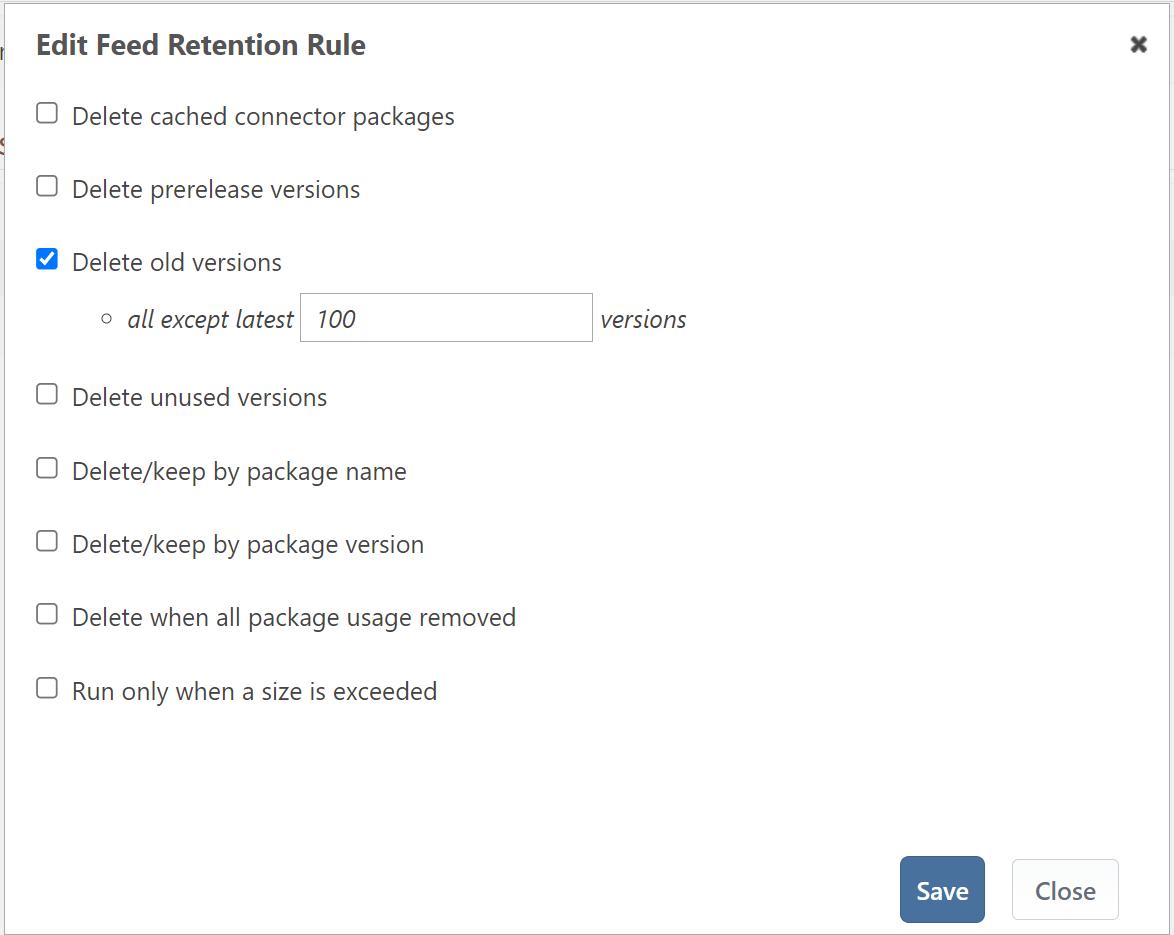
    • How does "Delete old versions" work?

      Say I have a Helm feed with 20 different charts in it.

      If I setup that feed like below (delete all but the latest 100 versions):

      f24bc92d-cba0-4f24-9106-3acb67f37511-image.png

      Will that keep the newest 100 helm chart version in the feed (up to 100 in total)? Or will it keep the newest 100 versions in each chart (up to 2,000 charts in total)?

      posted in Support
      S
      Stephen.Schaff
    • Feature Suggestion: Allow Notes on Permissions

      I had to get into my permissions for ProGet again today. As I am doing so, I end up wondering why I have some permissions set the way they are. I then have to try to figure it out again (and hope I don't miss anything).

      I would like to suggest that you allow adding a comment/note next to permission entries. This will allow explanations of permissions for future maintainers.

      Basically it would hold comments like:

      • Don't add normal users to to this feed, it contains sensitive information
      • This restriction is needed to keep the "general use" api key user out of this feed.
      • This feed's department requests to be contacted before new users are added to the feed.

      This is not a high priority need, but would be useful (at least to me).

      posted in Support
      S
      Stephen.Schaff
    • RE: User with permissions Publish permissions is denied

      I created a new feed and then I added the publish permission for that feed to an existing user. Then I had to wait 30 minutes for it to take effect.

      I am running 5.3.39 (Build 2). I only run a single ProGet server instance (no HA cluster).

      Again, this is not a really big issue. Waiting does cause it to start working, but I would suggest firing an update to your cache when a user's permissions are changed.

      posted in Support
      S
      Stephen.Schaff
    • RE: User with permissions Publish permissions is denied

      I hit this again today. While waiting 30 minutes does work, it is a bit frustrating.

      If not not a lot of work, I would suggest adding a button somewhere to force the update for a given user.

      posted in Support
      S
      Stephen.Schaff
    • RE: Latest tag not applied (but not consistently)

      @atripp - That worked!

      A bit odd to me that removing the Container Image and re-adding did not work, but adding a tag did.

      Either way, I have a work around for when this happens in the future.

      Thank you!

      posted in Support
      S
      Stephen.Schaff
    • RE: Latest tag not applied (but not consistently)

      @rhessinger,

      How many tags does the build/ops-dotnet-6.0 have?

      The build/ops-dotnet-6.0 repository has only one container image it it and it has only the 1.0.1 tag.

      Does the base-prerelease registry also have strict versioning enabled?

      Yes it does. And the latest tag is working there.

      Do you have your Sonatype vulnerability source attempting to scan your Docker registry?

      We are configured to use OSS Index as a scanning source.

      I removed any scanning, deleted the container image and repository and then re-promoted the container. As you indicated it would, this did not fix the problem. (The latest tag is still not applied to the container.)

      Any ideas on how I can get the latest tag to be auto applied?

      posted in Support
      S
      Stephen.Schaff
    • Latest tag not applied (but not consistently)

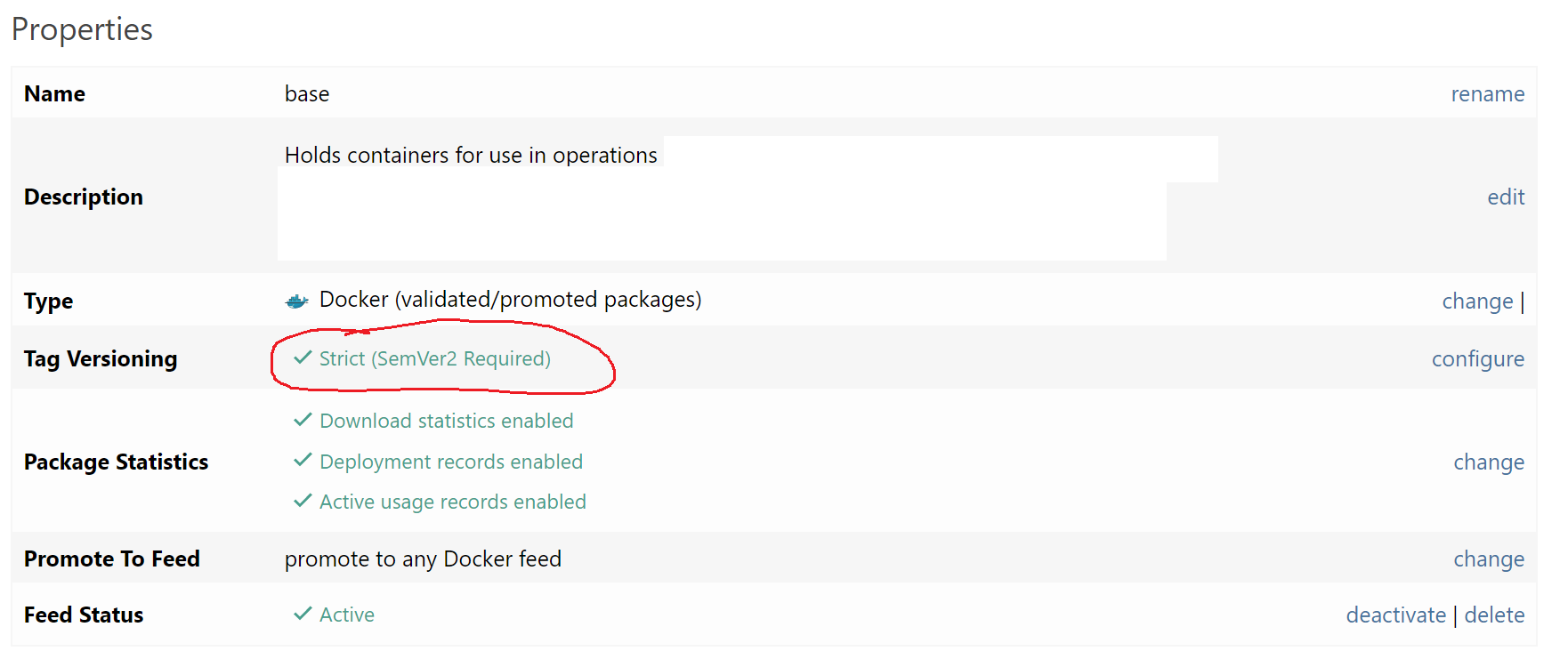
      I have a docker feed. It is called base. (Because it holds my base images.)

      I have this feed setup to use SemVer 2:

      0a9812d9-7d80-4ff3-bc48-b176b9e99d3c-image.png

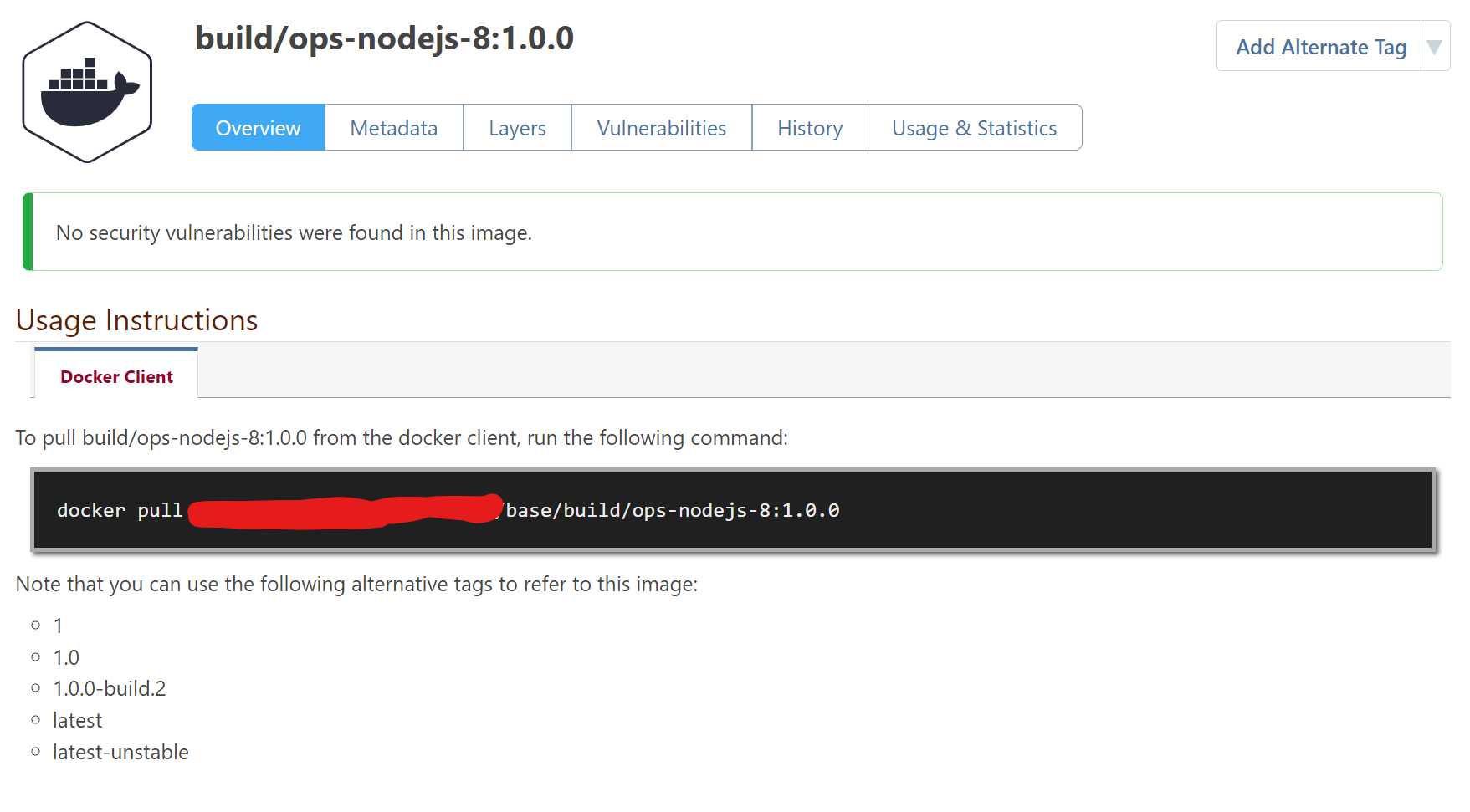
      And for most of my repositories in that feed, it works just fine. Here is an example:

      639194b1-fd16-4994-955c-20f4870c0b54-image.png

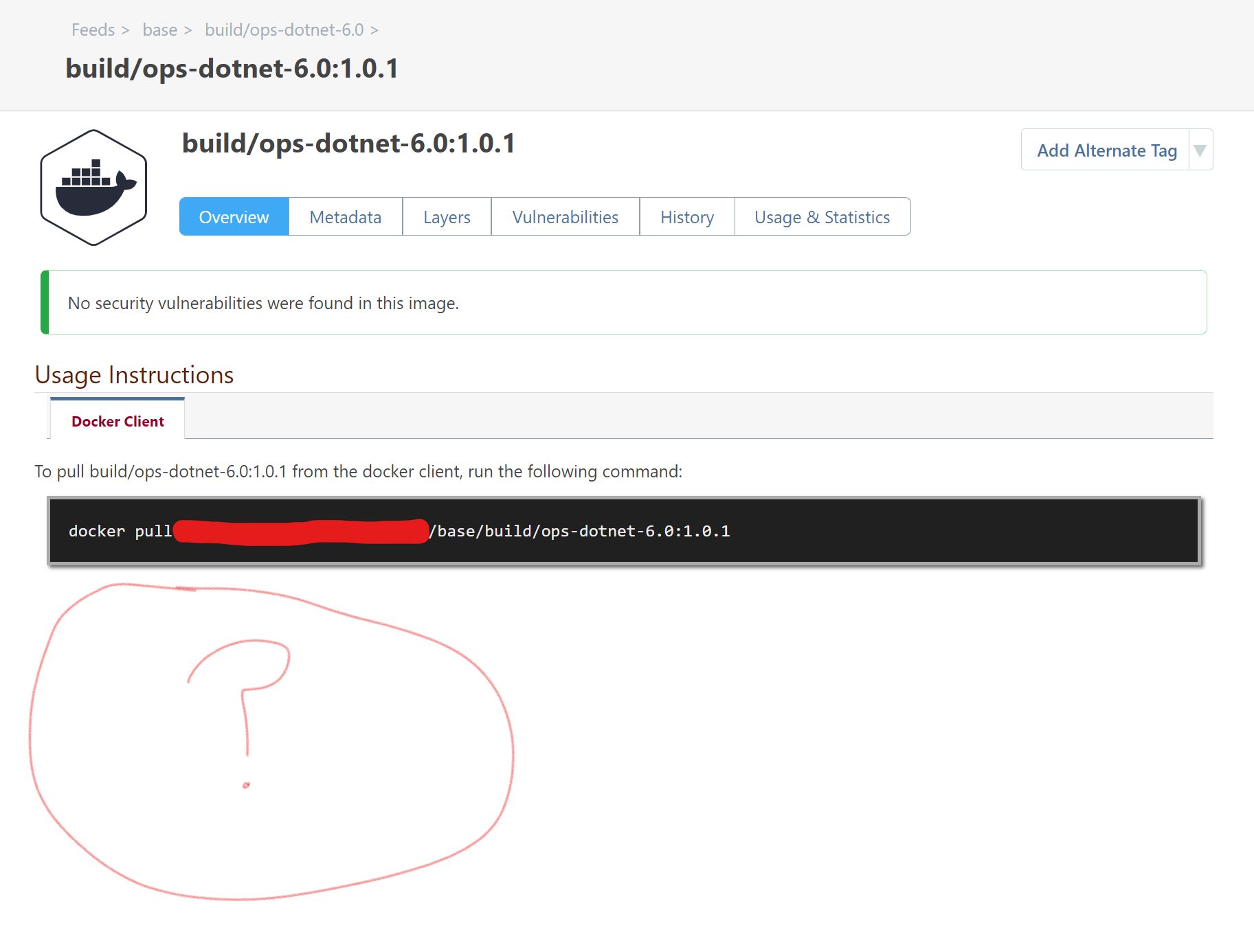
      However, for one of my repositories, it is not working:

      5d765197-0ba0-4c3c-820e-3c0f79e07eba-image.png

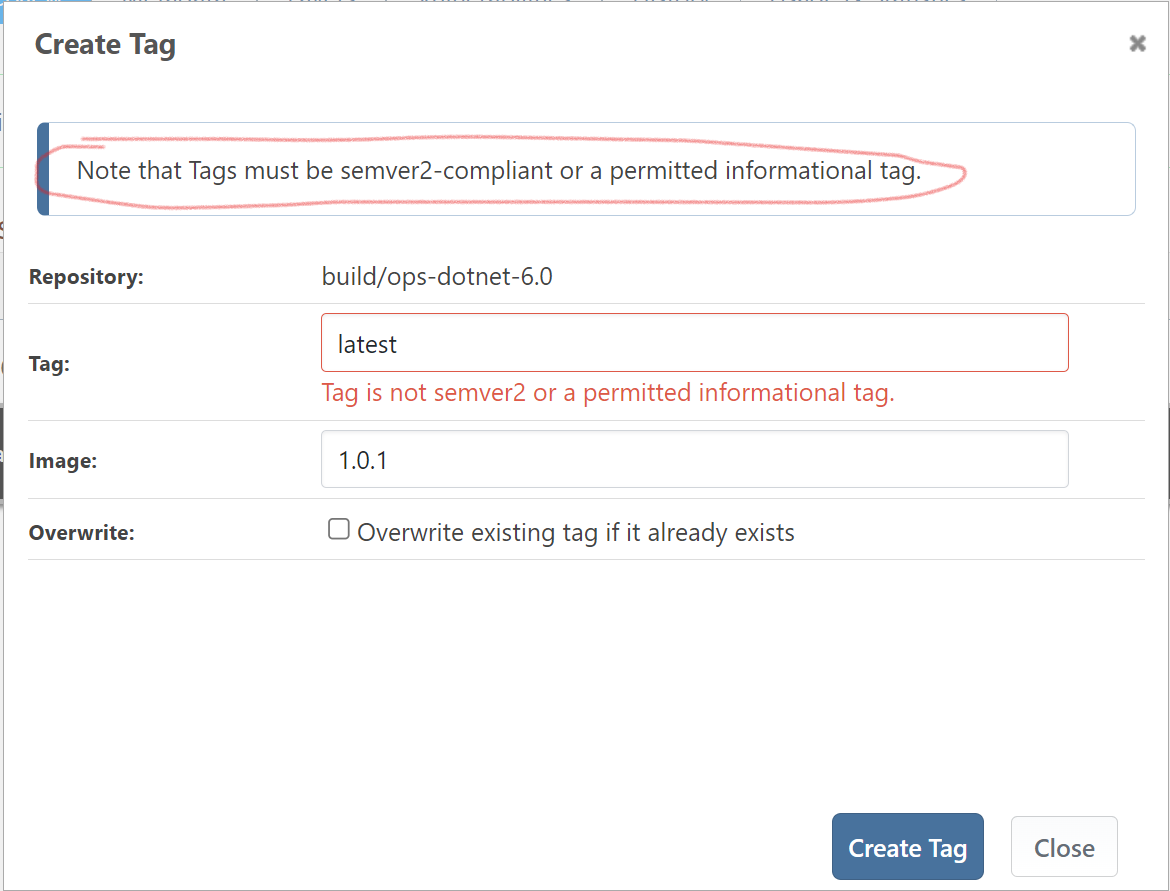
      And if I try to add the latest tag, it will not work, because of the SemVer 2 restrictions!:

      ecef58f6-aef8-4f0b-b8b4-e97ffedb4155-image.png

      So it knows it should be doing SemVer 2, but it is not applying the latest tag.

      Note: I tried to just pull the latest tag directly, to ensure that it was not just a UI issue. It gave me an error:

      dfd5c21e-05b0-47a6-99fc-4d8ebde46fa7-image.png

      But if I put in the actual tag for the only container image that is in that repository, it works:

      00243e42-8299-42ea-b1de-3754c8034ddc-image.png

      What can I do to get this repository to apply the latest tag?

      NOTE: incase it is needed, we are running version 5.3.39 (Build 2)

      Update:
      I tried deleting the container images in the build/ops-dotnet-6.0 repository, and then deleting the repository itself.

      I then promoted the container image from my base-prerelease feed. (Note that in that repository, the latest tag is correctly applied.) When I promoted it, the build/ops-dotnet-6.0 repository was created again, with the container image in it (tagged with 1.0.1). But the latest tag was not applied.

      So deleting and recreating does not seem to fix the problem...

      Update 2:

      Digging a bit deeper, I noticed this message in the logs:

       Logged: 12/14/2021 8:51:00 PM
       Level: Warning
       Category: Web
       Message: Could not update vulnerabilities on demand for package base:build/ops-dotnet-6.0:<redacted>: Object reference not set to an instance of an object.
       Details: System.NullReferenceException: Object reference not set to an instance of an object.
      at Inedo.Extensions.Sonatype.VulnerabilitySources.OSSIndexVulnerabilitySource.<>c.<GetCoordinateChunks>b__15_0(IVulnerabilityPackage p)
      at System.Linq.Enumerable.WhereSelectArrayIterator`2.MoveNext()
      at System.Linq.Enumerable.Sum(IEnumerable`1 source)
      at Inedo.Extensions.Sonatype.VulnerabilitySources.OSSIndexVulnerabilitySource.<GetCoordinateChunks>d__15.MoveNext()
      at Inedo.Extensions.Sonatype.VulnerabilitySources.OSSIndexVulnerabilitySource.<GetVulnerabilitiesAsync>d__14.MoveNext()
      --- End of stack trace from previous location where exception was thrown ---
      at System.Runtime.ExceptionServices.ExceptionDispatchInfo.Throw()
      at System.Runtime.CompilerServices.TaskAwaiter.HandleNonSuccessAndDebuggerNotification(Task task)
      at Inedo.ProGet.Feeds.Docker.DockerFeed.<>c__DisplayClass30_0.<<GetVulnerabilitiesForContainerAsync>b__1>d.MoveNext()
      

      Maybe the vulnerability scan failing is causing it to fail to set the latest tag? If so, how can I fix this failure?

      posted in Support
      S
      Stephen.Schaff
    • Show full description in ProGet?

      Currently, when I load a package in ProGet it looks like this:

      018d3971-3694-4b44-94a6-e2da06ffdc87-image.png

      When I load it at NuGet.org it looks like this:

      d7a282f2-5c48-413f-8a08-fec118fb7506-image.png

      The full description is on the main page for the package on NuGet.org. ProGet shows part of the description, but it is truncated. I know I can drill into a version an get the full description, but I was wondering if I can get that on the Homepage for the package (so I can match the functionality of NuGet.org in ProGet.)

      (I ask this because we are considering locking down NuGet.org at my company and forcing all package acquisition to go through ProGet.)

      posted in Support
      S
      Stephen.Schaff
    • Get Docker Alternate Tags for a Docker Image

      Kubernetes has an issue where if you use the latest tag, it sometimes will not pull the image, even when it has changed. So I am trying to write a script that will get a different, more unique tag, for use in my helm charts.

      The standard Docker REST API does not have anything that can do in in a reasonable number of calls. (You have to get a list of ALL the tags, and then iterate through them one at a time looking to see which ones have a digest that matches the "latest" tag.)

      I am wondering if ProGet has something better built into it. Does ProGet have a way to get the other tags on a Docker Image?

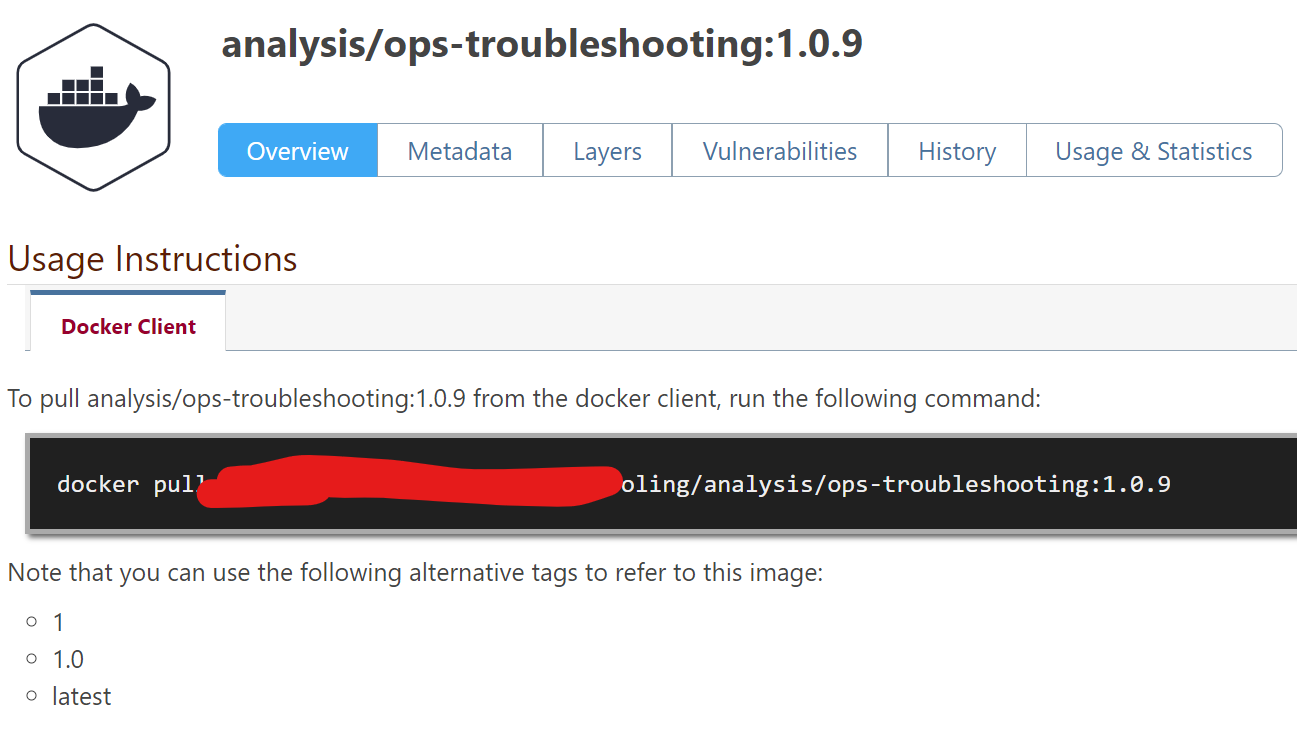
      Basically, I am looking for the list of tags found on this page:

      80ea17fa-b99f-4e96-9b49-049655e874ac-image.png

      Except that I would start with the latest tag and end up with the 1.0.9 tag as the result.

      posted in Support
      S
      Stephen.Schaff
    • Allow restricting feeds to "userless" api keys

      API Keys have the ability to emulate a user. This allows restricting the feeds that an API Key can connect to (very useful).

      I find I am submitting a lot of tickets to my System Admins to get network users made, just so I can make an API Key have limited permissions.

      In reality the user does not need to exist anywhere except logically in ProGet. The connection uses the API Key, which then uses the user's permissions in ProGet to restrict their permissions. The user's password is never used and the user is never logged in.

      I would like to request that a way be made that I could restrict an API Key to specific feeds without needing to create a user in my domain.

      One possible way of doing this is to make an option for the name of the Key to be a "user" on the permissions page. That way it can have permission restrictions.

      NOTE: I think this would be easier if I was not using active directory, as I could just make the user in Proget. But with active directory as my user provider, I cannot just add a user.

      posted in Support
      S
      Stephen.Schaff
    • RE: Request ability to delete a Helm repository

      That works too.

      Basically, I need a way to get rid of all versions of one chart.

      posted in Support
      S
      Stephen.Schaff
    • Request ability to delete a Helm repository

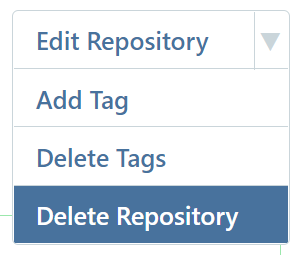
      My docker repositories have a button in the top corner that looks like this:

      2ada16b4-09d8-4b13-9b09-fe6897bff3ef-image.png

      The "Delete Repository" option allows me to delete the repository in one action.

      There is no similar button for a Helm repository. This leaves me with the tedious task of having to delete each an every chart version one at a time. While a viable workaround, it is frustrating and slow for a repository that has had a lot of versions.

      Please consider adding a "Delete Repository" type feature to the Helm side of things.

      As an additional note, after a chart is deleted, ProGet loads a 404 page. Instead, I would recommend redirecting to the list of versions for the Helm chart repository, since that is likely the page they were using before deleting the chart.

      posted in Support
      S
      Stephen.Schaff
    • 1 / 1