Yes, I do understand that is was user error. Not sure what a good solution for it would be.
Showing a dry-run or a confirmation prompt before the deletion might have helped in my case, but that is just annoying when using the tool as intended 
Or perhaps preventing me from installing it in a "shared" folder is better, if it should always be installed in a new/empty folder anyway?
Welcome to the Inedo Forums! Check out the Forums Guide for help getting started.
If you are experiencing any issues with the forum software, please visit the Contact Form on our website and let us know!
R
Offline
Latest posts made by rickard.hagelin_7259
-
RE: pgutil upack remove wiped most of my home folder.
-
pgutil upack remove wiped most of my home folder.
I wanted to share a little adventure I had with your pgutil tool version 2.1.2.0 on Ubuntu 24.04.
What Happened:
I was debugging a pipeline and wanted to try it locally, I ran:
pgutil upack install --package=prod-tool --version=2.0.6 --feed=tools --target=.Here I fucked up by installing to . which was currently my home folder.
I then wanted to remove it:pgutil upack remove --package=prod-toolMuch to my surprise, instead of just removing the package, it wiping out almost everything in my home folder. It even managed to remove symlinks in my .config folder and folders like Downloads.
Command Output:
pgutil upack remove --package=prod-tool

Removing package from registry...

Deleting content of /home/rhagelin.creatorctek.local...

Unhandled exception. System.IO.IOException: Directory not empty: '/home/rhagelin.creatorctek.local/.config/teams-for-linux/Partitions/teams-4-linux'

   at System.IO.FileSystem.RemoveDirectoryRecursive(String)

   at System.IO.FileSystem.RemoveDirectory(String, Boolean)

   at System.IO.DirectoryInfo.Delete(Boolean)

   at PgUtil.Program.UpackCommand.RemoveAsync(RegisteredUniversalPackage package, UniversalPackageRegistry registry, CancellationToken cancellationToken)

   at PgUtil.Program.UpackCommand.RemoveCommand.ExecuteAsync(CommandContext context, CancellationToken cancellationToken)

   at ConsoleMan.Command.ExecuteAsync(String[])

   at PgUtil.Program.Main(String[] args)

   at PgUtil.Program.<Main>(String[] args)

zsh: IOT instruction (core dumped)

pgutil upack remove --package=prod-tool
Thankfully it it stopped there.
I did not dare to test it with the lasted version of pgutil,
While this mishap was probably due to my user error, the enthusiastic removal of my home folder's contents seemed worth reporting. :) -
pgutil showing incorrect buildnr
When i download the latest pgutil version v2.1.2.1 and run it, there is a mismatch between the downloaded version and the reported version.
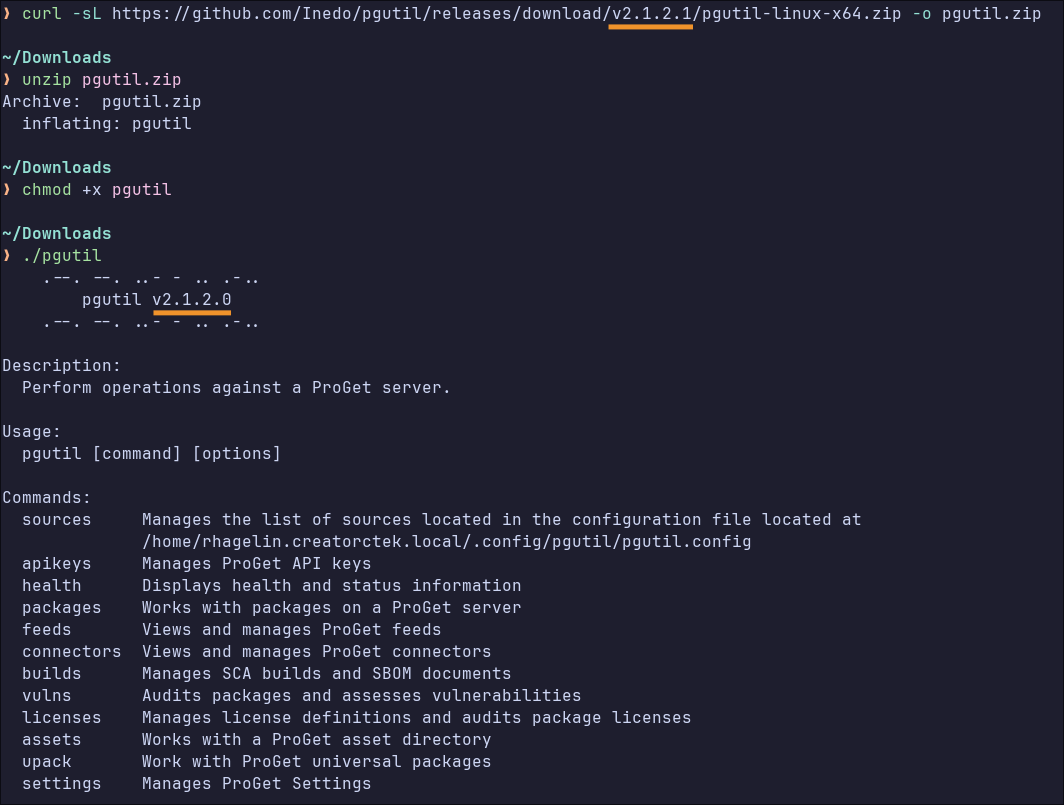
I tried with a few older releases and noticed they always displays 0 on buildnr.
download v2.1.1.3 -> displays v2.1.1.0
download v2.0.6.1 -> displays v2.0.6.0Is this intended?