Navigation

    Inedo Community Forums

    Forums

    • Login
    • Search
    • Categories
    • Recent
    • Tags
    • Popular
    • Users
    • Groups
    1. Home
    2. rhessinger
    3. Posts
    • Profile
    • Following
    • Followers
    • Topics
    • Posts
    • Best
    • Groups

    Posts made by rhessinger

    • RE: Proget docker registry - multiple connectors?

      Hi @aclauss,

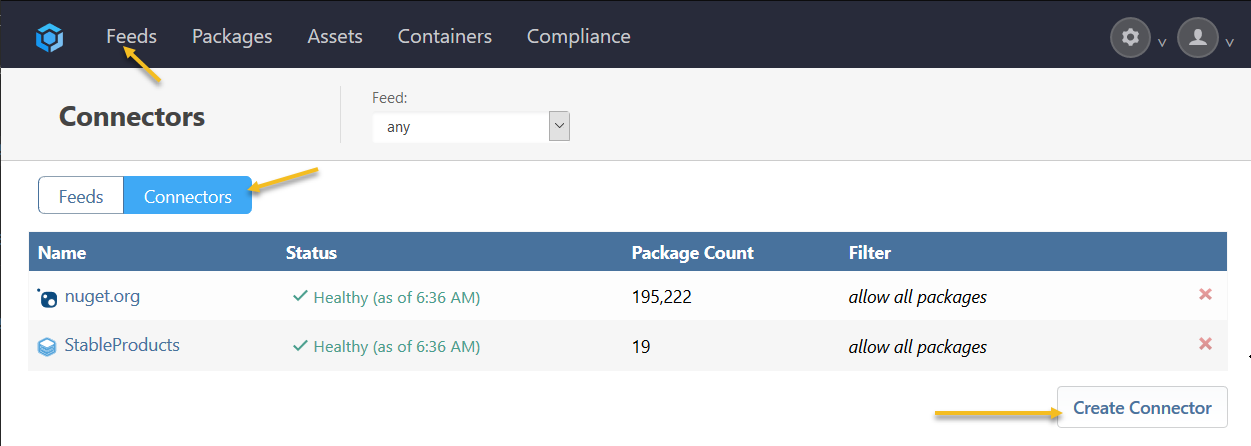
      If you go to the feeds page in ProGet, in the upper left corner you should see a toggle button that has two options: Feeds and Connectors. Please click the Connectors button and you should see a list of your connectors. From there you can click Create Connector to create a new connector.

      cfde39c9-4c9d-4212-be2f-bfc6e64776be-image.png

      Once you create the connector, you can tie it to your feed by going back to the manage feed page, click connectors, and now that connector dropdown you see before should contain the connector you recently created.

      Hope that helps!

      Thanks,
      Rich

      posted in Support
      rhessinger
      rhessinger
    • RE: $PSCredential- round two

      Hi @Jonathan-Engstrom ,

      Have you tried wrapping your PSEnsure inside of a with block to force everything to run as a specific Resource Credential?

      Example using a resource credential named AdAdminResourceCredentials:

      with credentials = AdAdminResourceCredentials
      {
      	PSEnsure
      	(
      	    Key: RSHStuff,
      	    Value: True,
      	    Collect: >>
      
      	        $ErrorActionPreference = 'SilentlyContinue'
      	        $TargetOU = 'Users'
      	        $Value = (Get-ADComputer -Identity $env:COMPUTERNAME).DistinguishedName -match $TargetOU
      	        $CurrentValue = (Get-ADComputer -Identity $env:COMPUTERNAME).DistinguishedName
      	        ((($Value -eq $true) -and (($env:COMPUTERNAME) -match 'MyComputerName')) -or ($env:COMPUTERNAME -notmatch 'MyComputerName')) 
      	        >>,
      	    Configure: >>
      	                
      	        $samAccountName = $ServerName
      	        $newOU = [adsi]"LDAP://$TargetOU"
      	        $comp= ([adsisearcher]"samaccountname=$($ServerName)$").FindOne()
      	        Write-Host $comp.GetDirectoryEntry()
      	                                
      	                                >>,
      	    Debug: true,
      	    Verbose: true
      	);
      }
      

      Please note that my PowerShell in collect and configure is not 1 to 1 with yours, I would replace my PowerShell script with yours in those two properties.

      I also was talking with one of the solutions architects on a similar Otter execution question. He suggested that sometimes it is easier to figure out PowerShell issues by running PSExec under the local system account and attempting to run your PowerShell commands that way. It will sometimes show you more detailed errors than Otter. I would try running PSExec -s powershell, which will open up a PowerShell console as the local system account, and then typing in the lines of PowerShell you have had trouble with.

      Thanks,
      Rich
      posted in Support
      rhessinger
      rhessinger
    • RE: $PSCredential- round two

      Hi @Jonathan-Engstrom ,

      What version of PowerShell do you have installed on your SQL server? I'm running 5.1.18362.628.

      Thanks,
      Rich

      posted in Support
      rhessinger
      rhessinger
    • RE: $PSCredential- round two

      Hi @Jonathan-Engstrom ,

      I have noticed the $ServerName uses the name of my server configured in Otter, not the actual computer name. Have you tried running the remediation using $env.computername instead of $ServerName? Or can you verify the Server Name in Otter matches the computers name?

      Thanks,
      Rich

      posted in Support
      rhessinger
      rhessinger
    • RE: $PSCredential- round two

      Hi @Jonathan-Engstrom ,

      The $TargetOU was intentionally malformed to force a configuration drift. In the Configure property, it did not matter because I did not actually run the MoveTo operation. That was the only thing I didn't actually do. But according to your error:

      Exception calling "FindAll" with "0" argument(s): "An operations error occurred.
      "
      You cannot call a method on a null-valued expression.`.

      The only line that could have caused that error was ([adsisearcher]"samaccountname=$($ServerName)$").FindOne(). I actually decompiled the MoveTo method from Microsoft to verify that it did not call a FindAll or FindOne method. I did verify that Microsoft calls FindAll from within FindOne by decompiling FindOne.

      If you are trying to verify which line it actually threw the error on, you could use Write-Host in your PowerShell between each line and enable Debug and Verbose on your PSEnsure operation. The execution log will then show you the Write-Host outputs.

      Currently, my best guess is that the machine and user combination that you are remotely attempting to run this on either does not have access to query/update the domain or does not have adsisearcher library installed on that machine for that user.

      Thanks,
      Rich

      posted in Support
      rhessinger
      rhessinger
    • RE: $PSCredential- round two

      Hi @Jonathan-Engstrom ,

      I'm stumped on this one. I took your Otter script and put it in my local version of otter. I swapped sql for my computer name and didn’t run the actual .MoveTo operation and everything runs perfectly fine in my instance.

      Here is my OtterScript:

      PSEnsure
      (
          Key: RSHStuff,
          Value: True,
          Collect: >>
      
              $ErrorActionPreference = 'SilentlyContinue'
              $TargetOU = 'Users'
              $Value = (Get-ADComputer -Identity $env:COMPUTERNAME).DistinguishedName -match $TargetOU
              $CurrentValue = (Get-ADComputer -Identity $env:COMPUTERNAME).DistinguishedName
              ((($Value -eq $true) -and (($env:COMPUTERNAME) -match 'MyComputerName')) -or ($env:COMPUTERNAME -notmatch 'MyComputerName')) 
              >>,
          Configure: >>
                      
              $samAccountName = $ServerName
              $newOU = [adsi]"LDAP://$TargetOU"
              $comp= ([adsisearcher]"samaccountname=$($ServerName)$").FindOne()
              Write-Host $comp.GetDirectoryEntry()
                                      
                                      >>,
          Debug: true,
          Verbose: true
      );
      

      Thanks,
      Rich

      posted in Support
      rhessinger
      rhessinger
    • RE: $PSCredential- round two

      Hi @Jonathan-Engstrom

      I'm sorry, I should have clarified. I have a local install of Otter and I put that PowerShell inside a PSEnsure operation in my configuration for my server. It ran without issue for me, outside of the small tweaks I had to make to the syntax that I noted earlier. Would you be able to post your Otter Script operation for the PSEnsure block? Also, when you are testing the PowerShell directly, are you testing it using the same account that the otter service (or agent) is running as?

      Thanks,
      Rich

      posted in Support
      rhessinger
      rhessinger
    • RE: HOWTO Get the list of files in Artifact ?

      Hi @PhilippeC

      You could create a PowerShell script in BuildMaster and call that from your Otter Script Plan. Here is an example:

      PowerShell Script

      param ([string] $Path, [ref] $ArtifactFiles)
      
      $files = @()
      foreach($name in (get-childitem $Path | where {$_.extension -eq ".zip"}).Name) {
          $files += $name
      }
      $ArtifactFiles = $files
      

      Otter Script Plan:

      Deploy-Artifact Files
      (
          To: target
      );
      
      PSCall AppName::GetZipFiles
      (
          Path: target,
          ArtifactFils => @files
      );
      
      foreach $file in @files
      {
          # Do something with $file
      }
      

      Hope this helps!

      Thanks,
      Rich

      posted in Support
      rhessinger
      rhessinger
    • RE: $PSCredential- round two

      Hi @Jonathan-Engstrom,

      I entered your PowerShell locally on my computer this way

      $newOU =  [adsi]"LDAP://$TargetOU"
      $comp= ([adsisearcher]"samaccountname=$($ServerName)$").FindOne()
      $comp.GetDirectoryEntry().MoveTo($newOU)
      

      And that seems to work for me. The main thing I did have to change was adding in parentheses after FindOne and GetDirectoryEntry and I had to change $test to $comp. Is it possible that your PowerShell has the same issues?

      Thanks,
      Rich

      posted in Support
      rhessinger
      rhessinger
    • RE: $PSCredential- round two

      Hi @Jonathan-Engstrom,

      Can you try switching up your PowerShell a bit to this:

      $samAccountName = $ServerName
      $newOU =  [adsi]"LDAP://$TargetOU"
      $test = ([adsisearcher]"samaccountname=$($samAccountName)$").FindOne()
      $comp.GetDirectoryEntry.MoveTo($newOU)
      

      Thanks,
      Rich

      posted in Support
      rhessinger
      rhessinger
    • RE: $PSCredential- round two

      Hi @Jonathan-Engstrom ,

      Sorry for the delay. I'm working on recreating the error locally. I'll follow up with you once I have more information.

      Thanks,
      Rich

      posted in Support
      rhessinger
      rhessinger
    • RE: $PSCredential- round two

      Hi @Jonathan-Engstrom,

      In the log I see:

      @Jonathan-Engstrom said in $PSCredential- round two:

      Exception calling "FindAll" with "0" argument(s): "An operations error occurred.
      "
      You cannot call a method on a null-valued expression.

      Can you please include the OtterScript PowerShell command you are calling? Also, do you see any errors in the Diagnostic Center found at http://{YOUR_OTTER_SERVER}/administration?

      Thanks,
      Rich

      posted in Support
      rhessinger
      rhessinger
    • RE: $PSCredential- round two

      Hi @Jonathan-Engstrom,

      Could you please reply with the log output from the failed PowerShell operation?

      Thanks,
      Rich

      posted in Support
      rhessinger
      rhessinger
    • RE: $PSCredential- round two

      Hi @Jonathan-Engstrom,

      You will need to create a Resource Credential named MyCredential and then you can use that within your psensure PowerShell like this:

      Move-ADObject -Identity (Get-ADComputer -Identity $env:COMPUTERNAME).ObjectGuid -Server $pdc -TargetPath $TargetOU -Credential $PSCredential(MyCredential)
      

      By using a Resource Credential in Otter, the username and password will be securely stored in the Otter database. Please let me know if this does not work for you.

      Thanks,
      Rich

      posted in Support
      rhessinger
      rhessinger
    • RE: $PSCredential- round two

      Hi @Jonathan-Engstrom ,

      I'm sorry about this, but it looks like our documentation was out of date. We just updated our documentation and this should help to answer your question. $PSCredential now can be called in two different ways; with a username and password or by passing the resource credential name.

      In order to use a resource credential within your PowerShell, you would just need to pass your resource credential name. For example:

      # convert a resource credential named MyCredential to a PSCredential object
      PSCall MyPowerShellScript
      (
          Credentials: $PSCredential(MyCredential)
      );
      

      Please let me know if this doesn't work for you.

      Thanks,
      Rich

      posted in Support
      rhessinger
      rhessinger
    • RE: How do deployments get recorded for a ProGet package?

      Hi @mhull_0872,

      We just released the latest version of ProGet 5.2.26 on 2/28/2020 which includes the new Package Deployment API. You can learn more about the package deployment tracking feature here. We also have documentation on how to use the API endpoint here.

      Thanks,
      Rich

      posted in Support
      rhessinger
      rhessinger
    • 1
    • 2
    • 12
    • 13
    • 14
    • 15
    • 16
    • 16 / 16