Hello @atripp ,
oh ok, I thought that will be available, reading your last reply from last year.
Anyway, that information is not even stored in database ?, so means, I need to use the Nuget api to get that information ?
Best regards,
Pedro
Welcome to the Inedo Forums! Check out the Forums Guide for help getting started.
If you are experiencing any issues with the forum software, please visit the Contact Form on our website and let us know!
Hello @atripp ,
oh ok, I thought that will be available, reading your last reply from last year.
Anyway, that information is not even stored in database ?, so means, I need to use the Nuget api to get that information ?
Best regards,
Pedro
Hello @atripp
Sorry to open an old topic.
While checking the content of the result of GetPackageMetadataAsync (PackageMetadata), I don't see any reference to the Dependencies.
The public APi has changed ? Or there is a new way to get the dependencies information ?
Best Regards,
Pedro
@atripp now is working :)
Thank you!
@atripp said in Connector for accessing Jfrog pypi feed:
application/vnd.pypi.simple.v1+json, application/vnd.pypi.simple.v1+html;q=0.2, text/html;q=0.01
Hello @atripp ,
yes, with that header, is working :)
Hi @stevedennis ,
thank you for fast reply. After checking the result with a proxy, is cleaer that the problem is the Accept Header.
As you can see in the pictures, proget is sending a value which jfrog do not accept.
Proget call, which results in a HTTP 406:
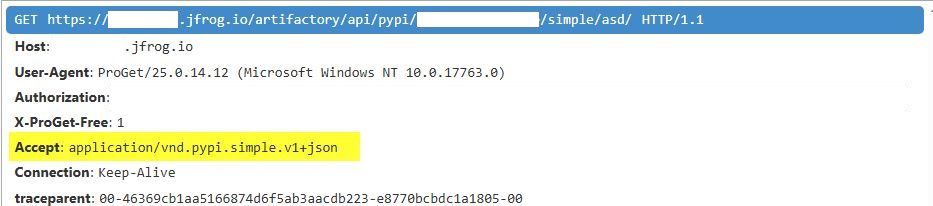
Chrome/Postman call, which results in HTTP 200:
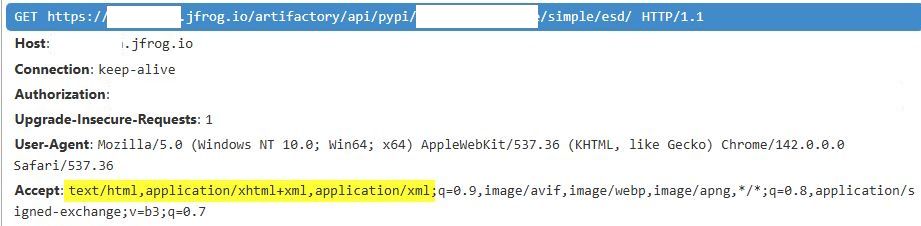
Is possible to somehow, manipulate this value in the configuration ? or somewhere else ?
Best regards,
Pedro Magno
Hello,
I'm trying to setup a pypi feed, with a connector which connects to a jfrog pypi repo.
When querying for a package, I'm getting 406 http error. I suppect the problem is the Accept Headers.
Is possible to log all calls that are made by ProGet to visualize the problem ? Do you advice any solution without changing something on jfrog repo ?
Best Regards,
Pedro
@atripp Looks good!
For my clarification, the property DependencyGroups, will be a list of all the (main) dependencies of the package ?
Best Regards,
Pedro
Re: Get package license with ProGetClient
the pgutils packages metadata + API end point to be used in Inedo.Proget lib is what I need :)
Do you have a timeline for the implementation ?
Best Regards,
Pedro
Re: Get package license with ProGetClient
Sorry to recover an old topic, but what I want is to be able to read the package metadata including the license (LicenseUrl, LicenseType, or LicenseExpression) assigned in ProGet, which is MIT (the license assigned to the package in ProGet).
The PackageVersionInfo (https://docs.inedo.com/docs/proget/api/packages#package-version) does not contain the license information.
Best Regards,
Pedro
Hello,

the version 25.0.9 of proget is not present in the inedo feed, and the hub is not able to find: https://proget.inedo.com/feeds/Products/InedoReleases/ProGet/versions/all
Best Regards,
Pedro
Hi @atripp ,
thank you for the update. I reverted to 2025.07 and I will wait for the next maintenance release.
@power_pille thank you too, for your findings and suggestions.
I'm having the same problem, and I can see in the database the duplicated entries.
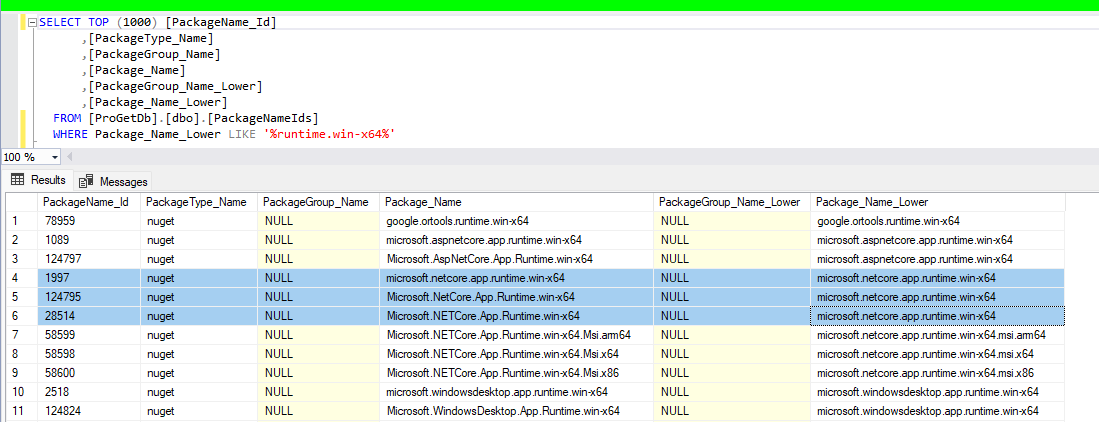
Hello,
Is it possible to get the Package Policies with ProGetClient? I'm interested in the License Rules.
Best Regards,
Pedro
Hello,
I was trying to use ProGetClient to get the license information from a NuGet package present on a feed, but I didn't find any method to get that information.
I know I can use the NuGet CLI to get that information, but if the license is set on ProGet GUI, the returned license is not what we have on ProGet, but what is present in the package metadata.
As an example, the System.Memory 4.5.5 has a URL license, and on ProGet, it was set to MIT.
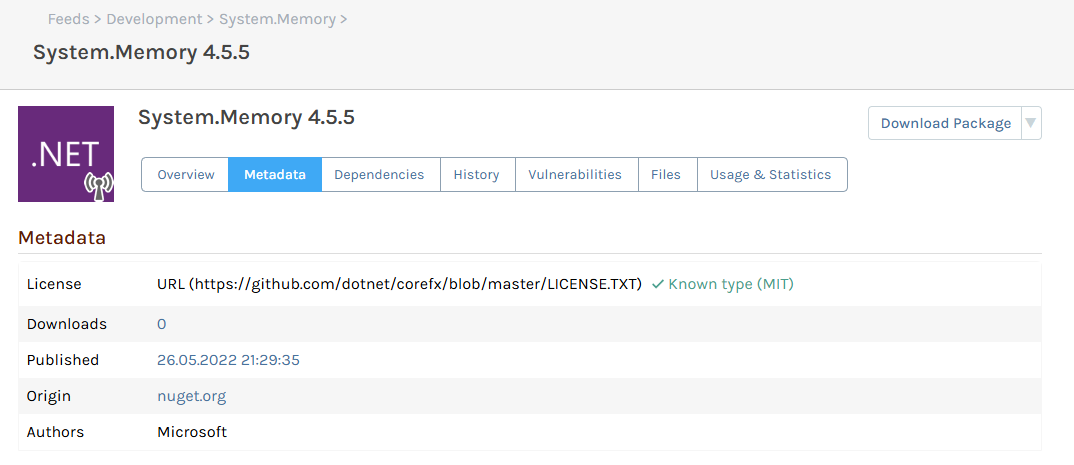
Best Regards,
Pedro
Hello @atripp ,
Thank you for your help.
We have an intermediate certificate (proxy), which I think, as you point out, can be the problem. I will clarify with our IT department. Anyway, after reading a little bit more, there is a variable to force Kaniko to use HTTP/1.1.
 variables:
    GODEBUG: "http2client=0"
After adding that, everything works :)
Thank you!
Best Regards,
Pedro
Hello,
I'm trying to publish a Docker image from Gitlab pipeline using Kaniko to Proget.
With HTTP, everything goes smoothly, but with HTTPS, an error occurs: stream error: stream ID 47; HTTP_1_1_REQUIRED; received from peer
I checked all certificates, and they are valid.
Do you have any advice on continuing the troubleshooting?
The full error:
Pushing image to xxx.lokal:8625/dev-images/image-name:latest
error pushing image: failed to push to destination xxx.lokal:8625/dev-images/image-name:latest: Head "https://xxx.lokal:8625/v2/dev-images/image-name/blobs/sha256:944cb9daf72b35ac4c2a49b5ad6d66fd45e201e5fd2a67b47cb5d4b4c838f19e": stream error: stream ID 47; HTTP_1_1_REQUIRED; received from peer
Best Regards,
Pedro
Hello,
while trying to access the asset or re-index, we receive the following error:
INFO : 2025-02-25 16:13:57Z - Performing verification for Asset feed 3: ToolChainAssets
INFO : 2025-02-25 16:13:57Z - Deactivating feed.
INFO : 2025-02-25 16:13:57Z - Re-activating feed.
ERROR: 2025-02-25 16:13:57Z - Unhandled exception: Microsoft.Data.SqlClient.SqlException (0x80131904): FOR XML konnte die Daten für den CreatedBy_User_Name-Knoten nicht serialisieren, weil ein in XML unzulässiges Zeichen (0x0000) enthalten ist. Um diese Daten mithilfe von FOR XML abzurufen, konvertieren Sie sie in den Datentyp "binary", "varbinary" oder "image", und verwenden Sie die BINARY BASE64-Direktive.
   at Microsoft.Data.SqlClient.SqlConnection.OnError(SqlException exception, Boolean breakConnection, Action`1 wrapCloseInAction)
   at Microsoft.Data.SqlClient.SqlInternalConnection.OnError(SqlException exception, Boolean breakConnection, Action`1 wrapCloseInAction)
   at Microsoft.Data.SqlClient.TdsParser.ThrowExceptionAndWarning(TdsParserStateObject stateObj, Boolean callerHasConnectionLock, Boolean asyncClose)
   at Microsoft.Data.SqlClient.TdsParser.TryRun(RunBehavior runBehavior, SqlCommand cmdHandler, SqlDataReader dataStream, BulkCopySimpleResultSet bulkCopyHandler, TdsParserStateObject stateObj, Boolean& dataReady)
   at Microsoft.Data.SqlClient.SqlDataReader.TryConsumeMetaData()
   at Microsoft.Data.SqlClient.SqlDataReader.get_MetaData()
   at Microsoft.Data.SqlClient.SqlCommand.FinishExecuteReader(SqlDataReader ds, RunBehavior runBehavior, String resetOptionsString, Boolean isInternal, Boolean forDescribeParameterEncryption, Boolean shouldCacheForAlwaysEncrypted)
   at Microsoft.Data.SqlClient.SqlCommand.CompleteAsyncExecuteReader(Boolean isInternal, Boolean forDescribeParameterEncryption)
   at Microsoft.Data.SqlClient.SqlCommand.EndExecuteReaderInternal(IAsyncResult asyncResult)
   at Microsoft.Data.SqlClient.SqlCommand.EndExecuteReaderAsync(IAsyncResult asyncResult)
   at System.Threading.Tasks.TaskFactory`1.FromAsyncCoreLogic(IAsyncResult iar, Func`2 endFunction, Action`1 endAction, Task`1 promise, Boolean requiresSynchronization)
--- End of stack trace from previous location ---
   at Inedo.Data.SqlServerDatabaseContext.SqlServerCommand.ExecuteReaderAsync(CancellationToken cancellationToken)
   at Inedo.Data.DatabaseContext.DbResult.CreateAsync(IGenericDbCommand command, DatabaseContext context, DateTimeOffset startTime, Stopwatch stopwatch)
   at Inedo.Data.DatabaseContext.ExecuteInternalAsync(String storedProcName, GenericDbParameter[] parameters, DatabaseCommandReturnType returnType)
   at Inedo.Data.SqlServerDatabaseContext.ExecuteInternalAsync(String storedProcName, GenericDbParameter[] parameters, DatabaseCommandReturnType returnType)
   at Inedo.Data.DatabaseContext.ExecuteNonQueryAsync(String storedProcName, GenericDbParameter[] parameters)
   at Inedo.Data.DatabaseContext.ExecuteScalarAsync[TResult](String storedProcName, GenericDbParameter[] parameters, Int32 outParameterIndex)
   at Inedo.ProGet.Feeds.Assets.AssetFeed.EnsureDirectoryAsync(String fullPath, Nullable`1 created, Nullable`1 modified, IEnumerable`1 userMetadata)
   at Inedo.ProGet.Feeds.Assets.AssetFeed.EnsureDirectoryAsync(String fullPath, Nullable`1 created, Nullable`1 modified, IEnumerable`1 userMetadata)
   at Inedo.ProGet.Feeds.Assets.AssetFeed.<>c__DisplayClass53_0.<<VerifyFeedAsync>g__checkDirAsync|1>d.MoveNext()
--- End of stack trace from previous location ---
   at Inedo.ProGet.Feeds.Assets.AssetFeed.<>c__DisplayClass53_0.<<VerifyFeedAsync>g__checkDirAsync|1>d.MoveNext()
--- End of stack trace from previous location ---
   at Inedo.ProGet.Feeds.Assets.AssetFeed.<>c__DisplayClass53_0.<<VerifyFeedAsync>g__checkDirAsync|1>d.MoveNext()
--- End of stack trace from previous location ---
   at Inedo.ProGet.Feeds.Assets.AssetFeed.VerifyFeedAsync(IFeedVerificationContext context, CancellationToken cancellationToken)
   at Inedo.ProGet.Executions.VerifyFeedExecution.ExecuteAsync(IManualExecutionContext context)
   at Inedo.ProGet.Executions.VerifyFeedExecution.ExecuteAsync(IManualExecutionContext context)
   at Inedo.ProGet.Service.Executions.ActiveManualExecution.ExecuteAsync()
ClientConnectionId:1cd23f85-8aa0-4309-b006-edd39297c935
Error Number:6841,State:1,Class:16
This seems to happen after the update to version 24.0.24, but unfortunately, I'm not 100% sure because we don't use this very often.
We are currently running version 24.0.27 and the problem is still there.
Best Regards,
Pedro
Hello @NanciCalo ,
thank you for the clarification.
So, as I wrote, the only way to have the expected behavior is to disable the cache from the feed/connector right ? Then the search mechanism will not search for local packages.
Best Regards