Inedo Community Forums Forums
    • Recent
    • Tags
    • Popular
    • Login
    1. Home
    2. paul_6112
    3. Posts

    Welcome to the Inedo Forums! Check out the Forums Guide for help getting started.

    If you are experiencing any issues with the forum software, please visit the Contact Form on our website and let us know!

    P Offline
    • Profile
    • Following 0
    • Followers 0
    • Topics 26
    • Posts 72
    • Groups 0

    Posts

    Recent Best Controversial
    • BuildMaster Dark Theme

      Hi Support,
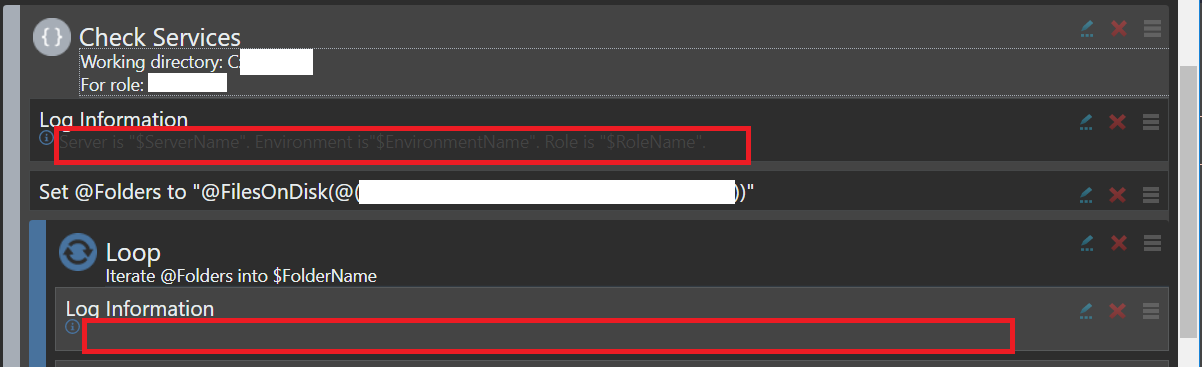
      Dark Theme is great, only issue I have found is the 'Log Information' text, if I have multiple blocks, the Log Information text font colour can end up the same colour as the background of the statement.

      Could you take a look at this please ?
      Maybe just make the font white to match all the other text as its also a bit hard to read even at the first level ?

      1549bcb4-ed6b-4e26-a56d-731f06d94bfd-image.png

      Thanks,
      Paul

      posted in Support
      P
      paul_6112
    • BuildMaster Path Browser

      Hi Support,
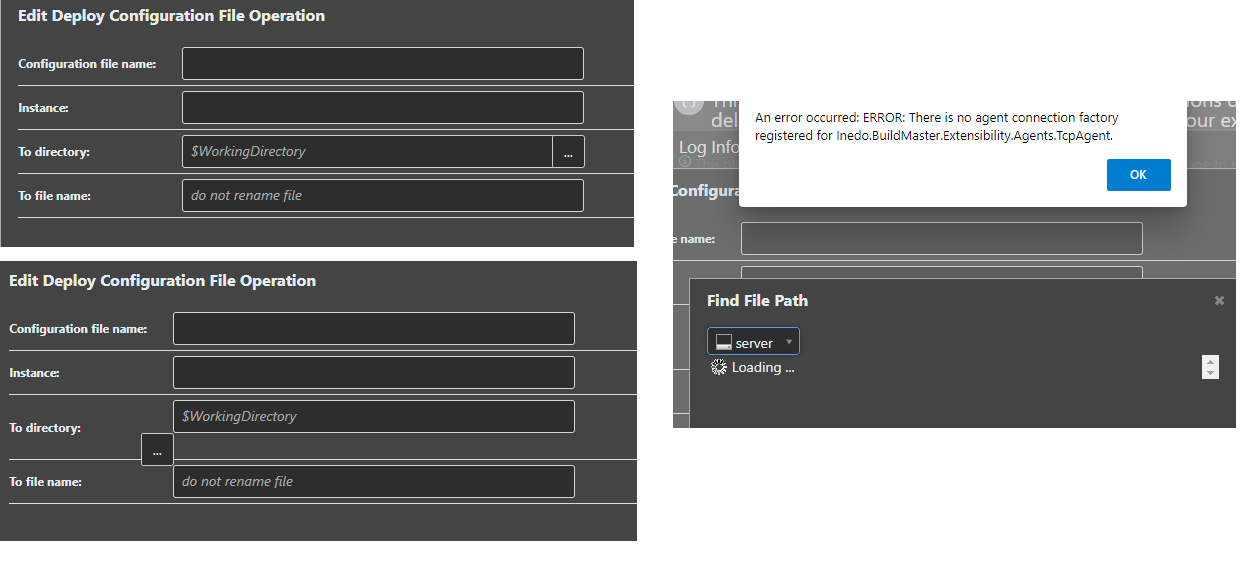
      On the Operations that allow a Directory to be selected, there appears to be a minor glitch on the GUI that causes the '...' browse button to loose its placement.
      This can be tested by clicking on the button then hitting cancel, or selecting a valid path.

      As shown in the left hand on the screen capture.

      Also, should browsing a remote server path work ?
      I can successfully browse 'localhost' folder structure, but if I select a remote server, the error shown in right hand on the screen capture is shown.
      "An error occured: ERROR: There is no agent connection factory registered for Inedo.BuildMaster.Extensibility.Agents.TcpAgent.

      This is shown on screen only and does not appear in the Diagnostic Center as a trace.

      a07633d9-6557-49dd-91dd-b438b8656a07-image.png

      Thanks,
      Paul

      posted in Support
      P
      paul_6112
    • BuildMaster Configuration File Deployment

      Hi Support,
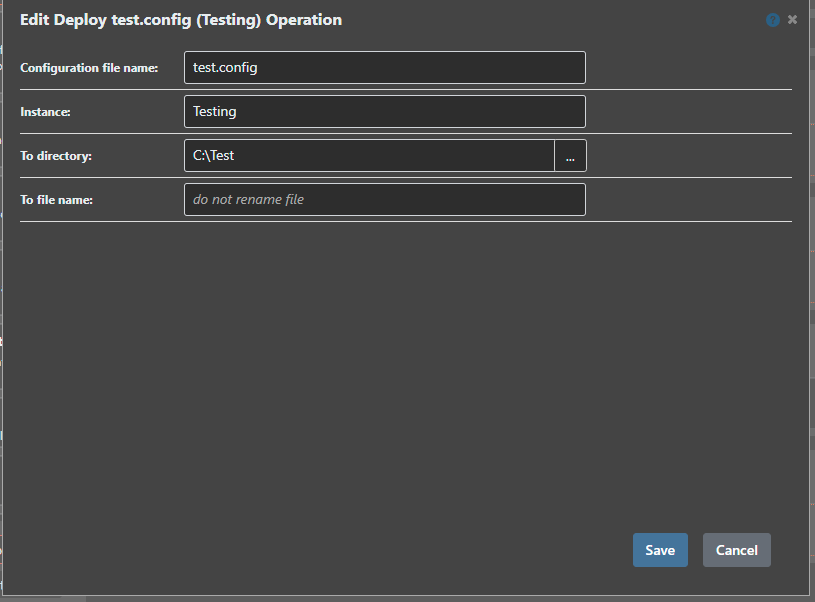
      When using the 'Deploy Configuration File' operation, if I have a configuration file with multiple Templates (using Key Value Pairs) it appears its not possible to select which Template is used only the Instance ?

      Would this be something you could add please?

      My use case is I have a config file that has additional settings depending on the server role, so I can use an 'If' block to deploy from the correct template.

      The workaround seems to be using multiple configuration files and using the rename file; but this seems to defeat the purpose of multiple templates, given it is the same configuration file ?

      Thanks,
      Paul

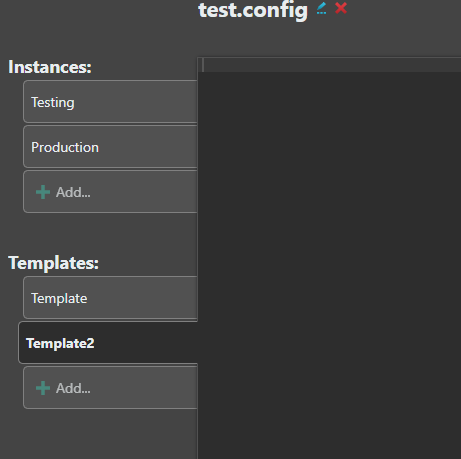
      For example test.config has two Instances with two Templates :
      e1bac214-7aeb-46b0-be9a-a175977c645b-image.png

      Only the Instance however can be selected on the deployment :
      26370c38-1d33-446b-94d8-28f4807c3de3-image.png

      posted in Support
      P
      paul_6112
    • RE: BuildMaster Configuration File Template is not saved

      @rhessinger
      Hi Rich,
      I've tested 7.0.6-rc.2, this is now saving the template, thankyou.

      Regards,
      Paul

      posted in Support
      P
      paul_6112
    • RE: BuildMaster Pipeline Stage View

      @rhessinger
      Hi Rich,
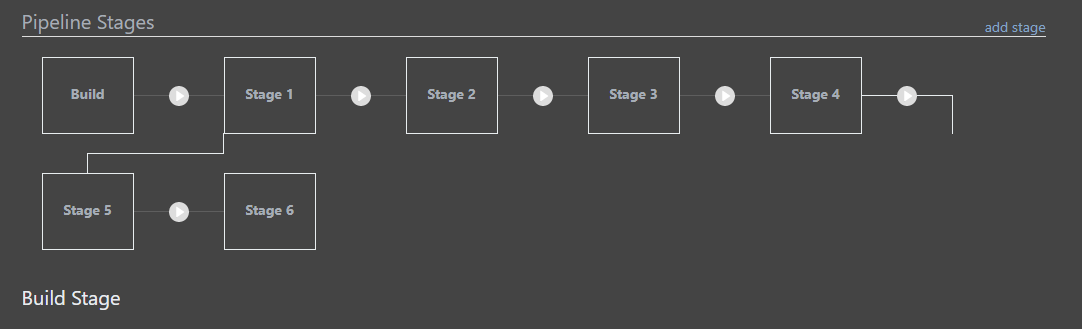
      Shrinking the width, it seems as though its hardcoded to 5 stages per row, as it just squashes the width of the first row of stages.
      This is the minim width I can make the window :
      40b8b2f1-d3af-4e10-a632-e4414c500491-image.png

      This behaviour does seem consistent across multiple rows :
      398a8f91-b608-4370-9297-cee9e2835b46-image.png

      Thanks,
      Paul

      posted in Support
      P
      paul_6112
    • BuildMaster Pipeline Stage View

      Hi Support,
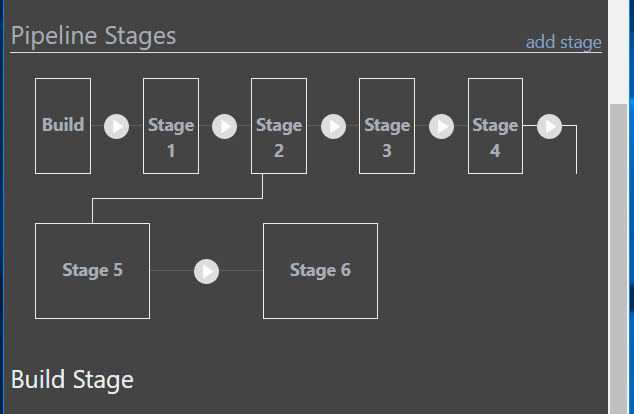
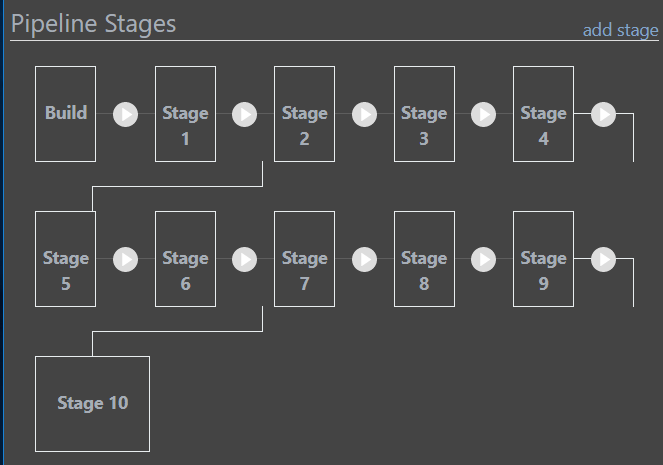
      Can anything be done to improve the view of the pipeline stages once you have more than one row please ?
      I get what its trying to do, but it looks like Stage 5 is connected to Stage 1 !

      7973bdc7-2933-4d77-9fe1-efda09d68a92-image.png

      Thanks,
      Paul

      posted in Support
      P
      paul_6112
    • RE: BuildMaster Configuration File Template is not saved

      Hi @atripp ,
      I can only see 7.0.6-rc.1 at the moment...I'll keep checking...

      Thanks,
      Paul

      posted in Support
      P
      paul_6112
    • BuildMaster Configuration File Template is not saved

      Hi,
      When trying to create a new Configuration File the contents of the Template is not being saved.
      I have tested this on v7.0.3 and v7.0.5.

      I am using a Template with a Key/Value Pair.

      I can paste the template in, add a replacement key, select the Instance, add the missing key and Value and save the config file.

      However, subsequently editing the config file shows the Template contents as blank !

      Thanks,
      Paul

      posted in Support
      P
      paul_6112
    • RE: PSCall does not work for script created at application level

      @atripp Hi Alana,
      Sorry for the delay; I had not checked in as I was watching for the v7.0.5 release..
      Extension v1.10.5 looks good to me in solving this problem; thank you.

      Regards,
      Paul

      posted in Support
      P
      paul_6112
    • RE: PSCall does not work for script created at application level

      @atripp Hi Alana,
      On Extension 1.10.3 the stack trace on my original post was from the Diagnostic Centre.

      On 1.10.4 its just an error that is displayed on the GUI; it doesn't log the message into the Diagnostic Center.
      So you have 'fixed' something :-)

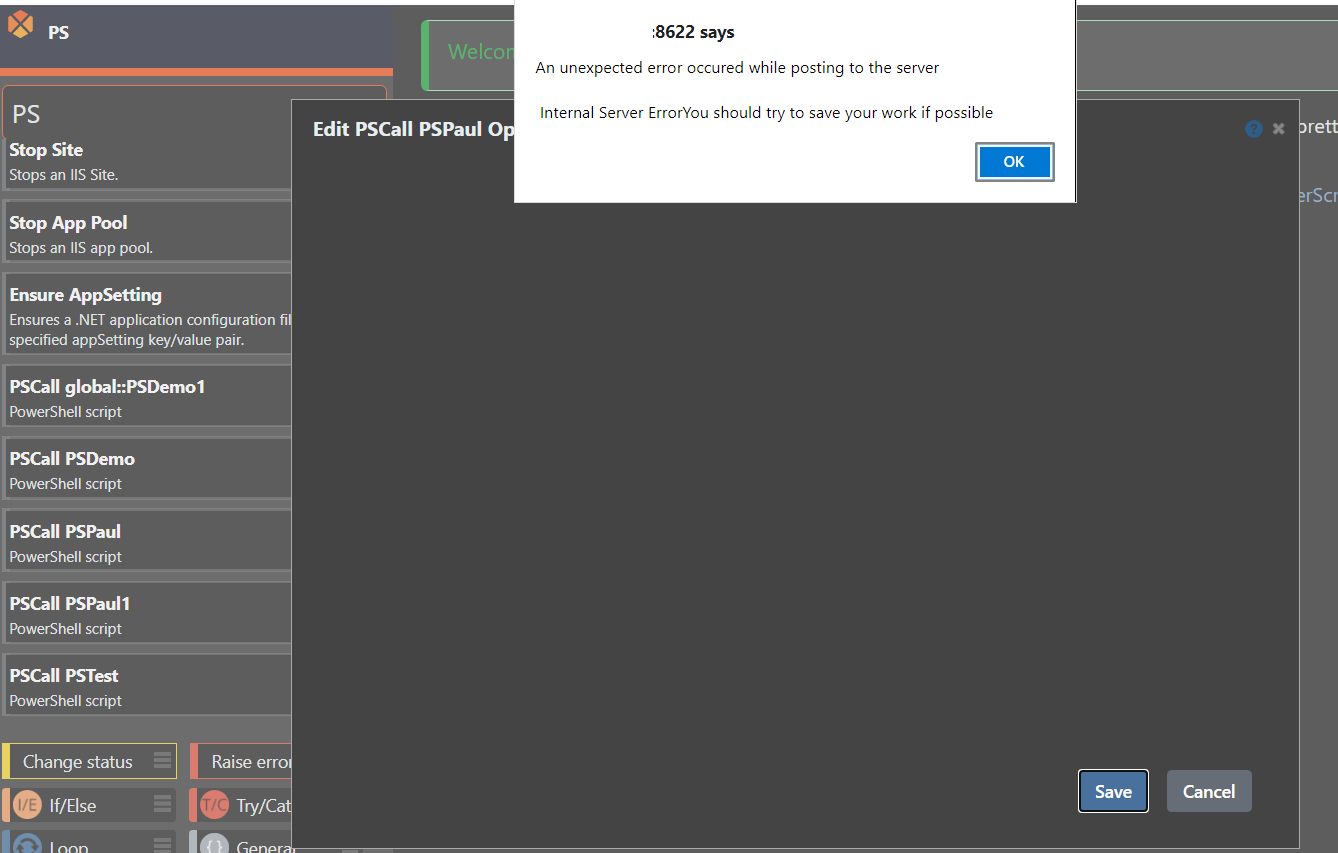
      This is the error when just dragging a PowerShell script defined in the Application.
      pstest.png

      Dragging the PSCall global::PSDemo1 works perfectly as this is defined in the Global Script respository.

      I've tried simple scripts with and without parameters...
      These are my two test Powershell Scripts which are cut down from your Otter demo..

      <#
      .SYNOPSIS
      Demo Script
      
      .PARAMETER YourName
      When specified
      #>
      
      param([string]$YourName)
      
      if ($YourName){
          Write-Output @"
          Hello $YourName
      "@
      } else {
          Write-Output @"
          Hello from PowerShell !
      "@
      }
      
      <#
      .SYNOPSIS
      Demo Script
      
      #>
          Write-Output @"
          Hello from PowerShell !
      "@
      

      One further thing I have noticed, if I edit my Otterscript in Text Mode, I can add the local application powershell by prefixing the application name i.e.

      # General
      {
          PSCall Test::PSPaul1
          (
              YourName: Paul
          );
      }
      

      Therefore the issue seems to be the GUI is okay with either

      PSCall Global::PSPaul1
      

      or

      PSCall Application::PSPaul1
      

      But doesn't like the short name

      PSCall PSPaul1
      

      Which from my screenshot you can see if how the local Application Scripts are defined.

      I've also tried creating a new test script under v1.10.4 in case this wasn't saving something properly, but this is also broken.

      Hope this helps,
      Thanks,
      Paul
      posted in Support
      P
      paul_6112
    • RE: PSCall does not work for script created at application level

      @atripp Hi Alana,
      I've installed that updated Extension and I now get a message "An unexpected error occurred while posting to the server"
      "Internal Server ErrorYou should try to save your work if possible."
      If I try and drag the Local Application Script in the GUI.

      I manually downloaded the extension and copied onto the server and restarted both BuildMaster and the Web services.

      Thanks,
      Paul

      posted in Support
      P
      paul_6112
    • PSCall does not work for script created at application level

      Hi,
      When trying to add a PowerShell Script Asset defined at the application level to a BuildMaster OtterScript(Plan)

      PSCall PSDemo
          (
              YourName: Paul
          );
      

      I'm getting an error :
      "PSDemo.ps1" is not a valid Script identifier for the "global" scope.
      The Visual Mode Designer will also not allow drag and drop of the script.

      The same script defined at the Global Level works

      PSCall global::PSDemo1
          (
              YourName: Paul
          );
      

      BuildMaster 7.0.3 (Build 1)

      Full Stack Trace Message
      An error occurred in the web application: "PSDemo.ps1" is not a valid Script identifier for the "global" scope.

      Full Stack Trace Details
      URL: http://server:8622/0x44/BuildMaster.WebApplication/Inedo.BuildMaster.WebApplication.Pages.Plans.Editor.PlanEditorPage/RebuildStatement
      Referrer: http://server:8622/plans/edit?planId=Default::Test::DeploymentPlan::Deploy
      User: Admin
      User Agent: Mozilla/5.0 (Windows NT 10.0; Win64; x64) AppleWebKit/537.36 (KHTML, like Gecko) Chrome/91.0.4472.114 Safari/537.36 Edg/91.0.864.59
      Stack trace: at Inedo.BuildMaster.Rafts.RaftItemId.Parse(RaftItemType itemType, ApplicationId applicationId, String appRelativeId)
      at Inedo.BuildMaster.BuildMasterSdkConfig.Config.GetRaftItem(RaftItemType type, String itemId, Object context)
      at Inedo.Extensions.Scripting.PowerShell.PowerShellScriptInfo.TryLoad(LooselyQualifiedName scriptName)
      at Inedo.Extensions.Scripting.Operations.PowerShell.PSCallOperation.GetDescription(IOperationConfiguration config)
      at Inedo.Extensibility.Operations.Operation.GetDescription(Type operationType, ActionStatement statement)
      at Inedo.BuildMaster.PlanEditor.TsStatement.FromDynamicStatement(ActionStatement statement)
      at Inedo.BuildMaster.PlanEditor.TsStatement.FromStatement(Statement statement)

      Thanks,
      Paul

      posted in Support
      P
      paul_6112
    • 1 / 1