Inedo Community Forums Forums
    • Recent
    • Tags
    • Popular
    • Login
    1. Home
    2. felfert
    3. Posts

    Welcome to the Inedo Forums! Check out the Forums Guide for help getting started.

    If you are experiencing any issues with the forum software, please visit the Contact Form on our website and let us know!

    felfertF Offline
    • Profile
    • Following 0
    • Followers 0
    • Topics 11
    • Posts 57
    • Groups 0

    Posts

    Recent Best Controversial
    • RE: proget 500 Internal server error when pushing to a proget docker feed

      Just trying to help. This is a wireshark analysis of the tcp stream where it happens:

      POST /v2/testing/xts-addon-webui/blobs/uploads/ HTTP/1.1
      Host: proget.graudatastorage.intern
      User-Agent: containers/5.35.0 (github.com/containers/image)
      Content-Length: 0
      Authorization: ----REDACTED----
      Docker-Distribution-Api-Version: registry/2.0
      Accept-Encoding: gzip
      
      
      HTTP/1.1 202 Accepted
      Date: Thu, 28 Aug 2025 07:11:37 GMT
      Server: Kestrel
      Content-Length: 0
      Cache-Control: private
      Location: /v2/testing/xts-addon-webui/blobs/uploads/2006612a-8f6d-4d13-8781-6ceaa1f808fb
      Vary: Accept-Encoding,Authorization
      X-ProGet-Version: 25.0.8.17
      X-ProGet-Edition: free
      Docker-Distribution-API-Version: registry/2.0
      Range: 0-0
      Docker-Upload-UUID: 2006612a-8f6d-4d13-8781-6ceaa1f808fb
      
      
      PATCH /v2/testing/xts-addon-webui/blobs/uploads/2006612a-8f6d-4d13-8781-6ceaa1f808fb HTTP/1.1
      Host: proget.graudatastorage.intern
      User-Agent: containers/5.35.0 (github.com/containers/image)
      Transfer-Encoding: chunked
      Authorization: ----REDACTED----
      Content-Type: application/octet-stream
      Docker-Distribution-Api-Version: registry/2.0
      Accept-Encoding: gzip
      ---- Binary BLOB data in chunked encoding redacted ----
      
      
      PUT /v2/testing/xts-addon-webui/blobs/uploads/2006612a-8f6d-4d13-8781-6ceaa1f808fb?digest=sha256%3Acf93e1bb05f4874a5923244a5600fbc0091ef87879b6c780e7baced4b409daa0 HTTP/1.1
      Host: proget.graudatastorage.intern
      User-Agent: containers/5.35.0 (github.com/containers/image)
      Content-Length: 0
      Authorization: ----REDACTED----
      Content-Type: application/octet-stream
      Docker-Distribution-Api-Version: registry/2.0
      Accept-Encoding: gzip
      
      
      HTTP/1.1 500 Internal Server Error
      Date: Thu, 28 Aug 2025 07:11:50 GMT
      Server: Kestrel
      Content-Length: 90
      Content-Type: application/json
      Cache-Control: private
      Content-Range: 0-32281444
      Vary: Accept-Encoding,Authorization
      X-ProGet-Version: 25.0.8.17
      X-ProGet-Edition: free
      Docker-Distribution-API-Version: registry/2.0
      Connection: close
      
      {"errors":[{"code":"UNKNOWN","message":"Nullable object must have a value.","detail":[]}]}
      

      The 500 happens only after the very last PUT request. Depending on the image being uploaded,
      there might be uploads of other image layers before that which always use a PATCH request first for the actual blob and after that a PUT request with Content-Length: 0
      Since those previous PUT requests are the same (except the URI of course) and they do NOT get a 500 response, i suspect this must be some code which only runs at the very end of the image upload.
      NOTE: This was done before I updated to 25.0.9-ci.6
      posted in Support
      felfertF
      felfert
    • RE: proget 500 Internal server error when pushing to a proget docker feed

      @atripp said in proget 500 Internal server error when pushing to a proget docker feed:

      25.0.9-ci.6

      Just tested this 25.0.9-ci.6. Unfortunately, there is neither a stacktrace shown in GUI nor in stdout/stderr on the docker container that runs proget itself :-(

      posted in Support
      felfertF
      felfert
    • RE: proget 500 Internal server error when pushing to a proget docker feed

      @atripp, @thomas_3037

      Update:

      It's getting more weird: Now the podman push fails too even with that compression-format option. So it seems unrelated.

      Cheers
      -Fritz

      posted in Support
      felfertF
      felfert
    • RE: proget 500 Internal server error when pushing to a proget docker feed

      @atripp said in proget 500 Internal server error when pushing to a proget docker feed:

      I have no idea what that parameter does

      Maybe this sheds some light on the problem (from the containers.conf(5) manpage):

      "Specifies the compression format to use when pushing an image. Supported values are: gzip, zstd and zstd:chunked. This field is ignored when pushing images to the docker-daemon and docker-archive formats. It is also ignored when the manifest format is set to v2s2. zstd:chunked is incompatible with encrypting images, and will be treated as zstd with a warning in that case."

      The regular docker has an option --output=type=image,compression=zstd for setting image compression to zstd when running docker build and I tried that here whithout success. This leaves the chunked part. My guess is: It enables chunked http transfer encoding during the actual upload of the image blobs. You can verify that by looking at the http headers sent by the client. If my guess is correct, there should be a Header Content-Transfer-Encoding: chunked in the PUT request of the client. Just a guess for now. Will do a wireshark session of some push with podman and report back.

      Cheers
      -Fritz

      posted in Support
      felfertF
      felfert
    • RE: proget 500 Internal server error when pushing to a proget docker feed

      @thomas_3037 said in proget 500 Internal server error when pushing to a proget docker feed:

      Hey Fritz,

      a colleague find out that the parameter "--compression-format zstd:chunked" in the podman push command helped.

      You can also set this option globally.

      Hi Marc,

      Many thanks for that workaround. Works perfectly with podman.
      Unfortunately, I did not find an equivalent option for the regular docker.

      posted in Support
      felfertF
      felfert
    • proget 500 Internal server error when pushing to a proget docker feed

      Hi guys,

      I recently updated from 25.0.8-ci.3 to the latest (25.0.8) proget docker image.
      With the latest proget, I just found another problem when pushing docker images.
      I tried both podman on fedora and a real docker client on ubuntu and both report
      HTTP status: 500 Internal Server Error at the end of the push

      When I look at the proget gui in the diagnostic center, there is nothing logged,
      but when I look on the host in the stdout/stderr of the container running proget (using journalctl of the service), I can see the following:

      Aug 27 10:56:45 gsg1repo.graudatastorage.intern systemd-proget[226868]:       Request starting HTTP/1.1 PUT http://proget.graudatastorage.intern/v2/XTS-docker/xts-addon-webui/blobs/uploads/4aa77b08-f058-4f1f-a6a4-6ff2e5a85f0f?digest=sha256%3A2372176015642ce79b416bed3a8b58832f222f02108a268a740c
      6d321d57a1a8 - application/octet-stream 0
      Aug 27 10:56:45 gsg1repo.graudatastorage.intern systemd-proget[226868]: A 500 error occurred in XTS-docker: Nullable object must have a value.
      Aug 27 10:56:45 gsg1repo.graudatastorage.intern systemd-proget[226868]: info: Microsoft.AspNetCore.Hosting.Diagnostics[2]
      Aug 27 10:56:45 gsg1repo.graudatastorage.intern systemd-proget[226868]:       Request finished HTTP/1.1 PUT http://proget.graudatastorage.intern/v2/XTS-docker/xts-addon-webui/blobs/uploads/4aa77b08-f058-4f1f-a6a4-6ff2e5a85f0f?digest=sha256%3A2372176015642ce79b416bed3a8b58832f222f02108a268a740c6d321d57a1a8 - 500 90 application/json 40.3088ms
      

      This happens regardless of using an existing docker-feed which has worked befor as well as on a newly created docker feed.

      Out of curiosity:
      Is there a way to increase proget's debugging output (specifically: The name of that Nullable object mentioned in the error log?)

      Cheers
      -Fritz

      posted in Support
      felfertF
      felfert
    • RE: ProGet bug - Regression: RPM feed repodata broken since 25.0.8

      @gdivis Thanks for the update

      -Fritz

      posted in Support
      felfertF
      felfert
    • ProGet bug - Regression: RPM feed repodata broken since 25.0.8

      Hi,

      Just noticed after update to proget (docker) 25.0.8:

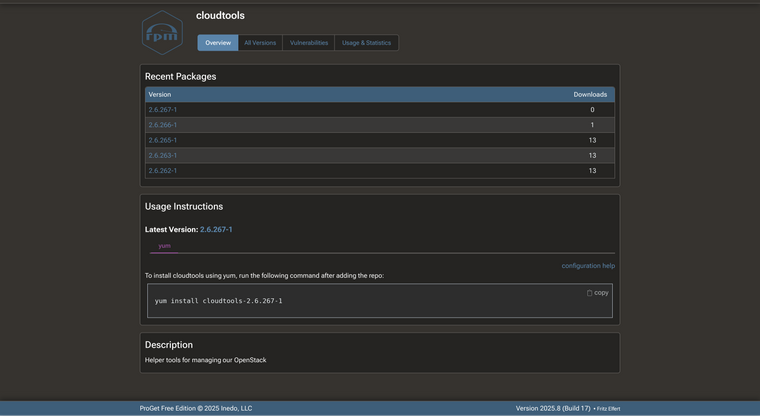
      In the gui, the version of a rpm package is displayed correctly:
      Screenshot 2025-08-20 at 09-39-47 cloudtools Versions.png

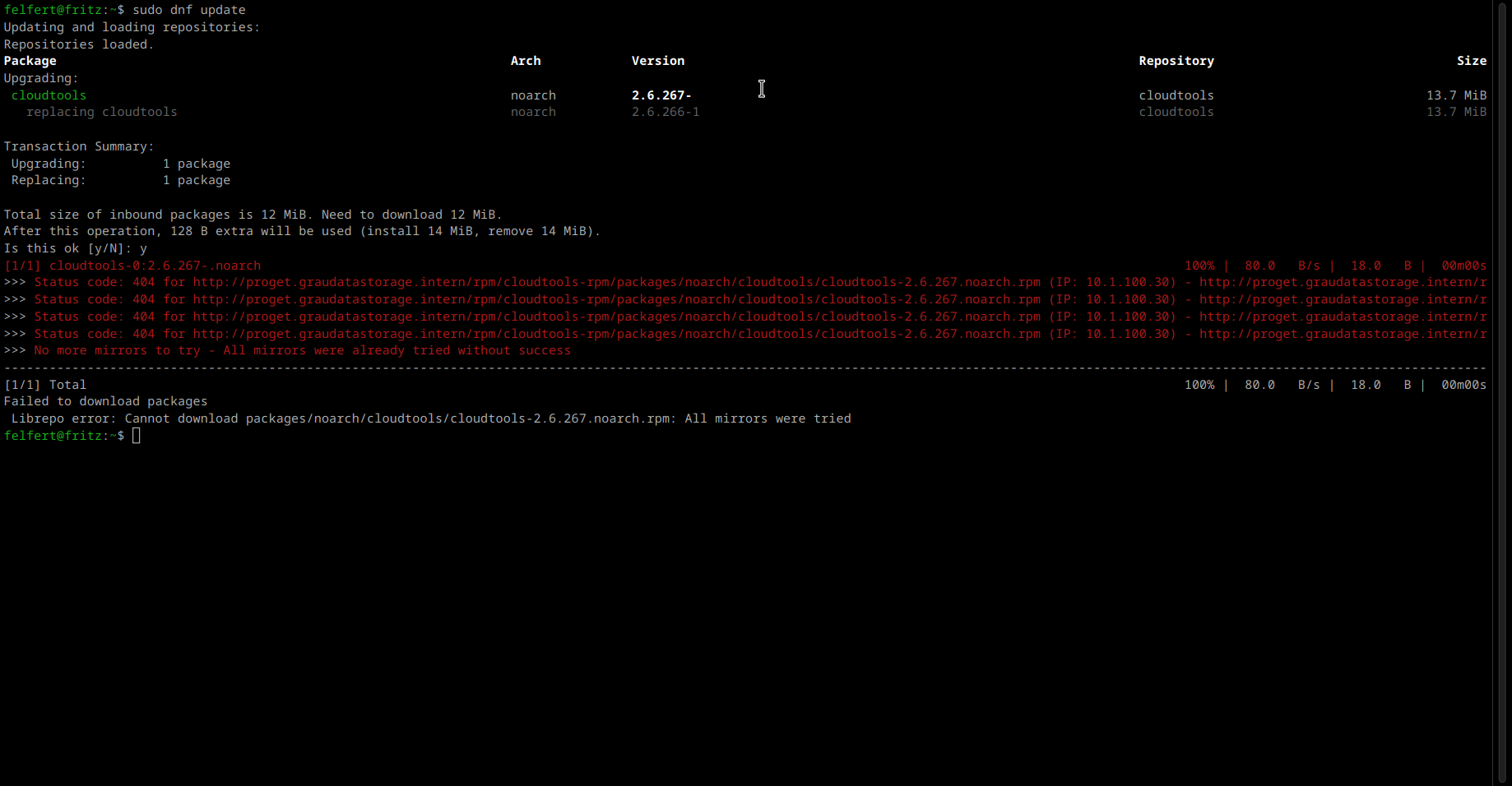
      But dnf (or yum) cannot find the package anymore. sudo dnf update should update the locally installed cloudtools, but instead the following is displayed:
      Screenshot_20250820_094822.png

      Notice the release number in the listing is cut off (dash remains) and when the actual download is attempted, both the dash and the number are missing.

      Suspect: PG-3074 (just a gut feeling 😏)

      Cheers,
      -Fritz

      posted in Support
      felfertF
      felfert
    • RE: ProGet bug - Duplicate custom Feed Usage Instructions for Debian feeds

      @rhessinger said in ProGet bug - Duplicate custom Feed Usage Instructions for Debian feeds:

      I plan to work on these early this week. If you want, I can provide you with a CI release as soon as these are ready if you want to test them early.

      I would appreciate that very much :-)

      Thanks
      -Fritz

      posted in Support
      felfertF
      felfert
    • RE: ProGet bug - Duplicate custom Feed Usage Instructions for Debian feeds

      @rhessinger said in ProGet bug - Duplicate custom Feed Usage Instructions for Debian feeds:

      In the latest updates for the updated Debian feed, most customers were still using the legacy way for adding ProGet as a source.

      Actually this feature (signed-by) is quite old. It just was badly documented for a long time (See this question) and therefore nobody used it.

      So, for ubuntu, it should work since 16.04. On older systems however, the directory where the keys are to be stored did not exist and the recommended path of that directory changed over time.
      The implementation in apt works with any directory (as long as it is readable by apt).
      Therefore, a slightly modified command for downloading/generating of the key file should help (first line of existing instructions) like this:

      Old:

      curl -fsSL http://my.proget.dom/debian/my-repo/keys/my-repo.asc | sudo gpg --dearmor  -o /etc/apt/keyrings/my-repo.gpg
      

      New:

      sudo mkdir -p /etc/apt/keyrings; curl -fsSL http://my.proget.dom/debian/my-repo/keys/my-repo.asc | sudo gpg --dearmor  -o /etc/apt/keyrings/my-repo.gpg
      

      This should work even on older systems.

      Sorry I forgot to mention that in the first place.

      Cheers
      -Fritz

      posted in Support
      felfertF
      felfert
    • RE: ProGet bug - Duplicate custom Feed Usage Instructions for Debian feeds

      @rhessinger said in ProGet bug - Duplicate custom Feed Usage Instructions for Debian feeds:

      Hi @inedo_1308,

      Thanks for sending this over to us. I created a ticket, PG-3069, to fix the exception with editing. I'll also get the feed usage instruction and our documentation updated with the signed by parameter.

      Thanks,
      Rich

      Hi Rich,
      I just looked at the ticket you created and I think, I was not clear enough in my description.
      (I can see the ticket title only, so forgive me, i I'm overly pedantic :-)

      • The original culprit is that the "Duplication" actually does not duplicate but triples the description in the first place. The following error/exception (not being able to edit) is just a logical consequence.
      • Furthermore, this happens with debian feeds only.
      posted in Support
      felfertF
      felfert
    • RE: ProGet bug - Duplicate custom Feed Usage Instructions for Debian feeds

      Also: the actual reason for always requiring custom instructions is, that the built-in instructions are missing an important detail:

      Existing example (2nd line):

      echo "deb http://...
      

      should read:

      echo "deb [signed-by=/etc/apt/keyrings/key.gpg] http://...
      

      where key.gpg is the name of the key generated by the first line.

      I remember that already being reported here by another user in the past.
      Maybe you can change the builtin instructions, so that the custom edit is not necessary anymore.

      Cheers
      -Fritz

      posted in Support
      felfertF
      felfert
    • ProGet bug - Duplicate custom Feed Usage Instructions for Debian feeds

      I first noticed this in 2025.2 and still happens after updating to 2025.6:

      How to reproduce:

      1. Create a new debian feed
      2. In the feed properties, click on the link "Integrate with apt (built-in)"
      3. Click on the link "duplicate this instruction" at the top (or the "Duplicate" button at the bottom.
      4. Click on the "Save" Button (no need to change anything before that)

      Result:
      The duplication happens twice, resulting in a total of 3 Feed Usage Instructions.
      After that, clicking on any of the 2 "duplicated" instances in order to edit it, triggers the following error dialog:

      (500) Server Error
      Sequence contains more than one matching element
      
      For more information, visit the Error Log Page.
      

      The error log shows the following:

      An error occurred in the web application: Sequence contains more than one matching element
      
      URL: http://proget.graudatastorage.intern/feed/edit-usage-instructions?feedId=28&feedUsageInstructionId=14&duplicate=False
      Referrer: http://proget.graudatastorage.intern/feed/manage?feedId=28
      User: felfert
      User Agent: Mozilla/5.0 (X11; Linux x86_64; rv:141.0) Gecko/20100101 Firefox/141.0
      Stack trace:    at System.Linq.ThrowHelper.ThrowMoreThanOneMatchException()
         at System.Linq.Enumerable.TryGetSingle[TSource](IEnumerable`1 source, Func`2 predicate, Boolean& found)
         at System.Linq.Enumerable.SingleOrDefault[TSource](IEnumerable`1 source, Func`2 predicate)
         at Inedo.ProGet.WebApplication.Pages.Feeds.CreateOrUpdateFeedUsageInstructionsPage.CreateChildControls() in C:\Users\builds\AppData\Local\Temp\InedoAgent\BuildMaster\192.168.44.60\Temp\_E578130\Src\src\ProGet\WebApplication\Pages\Feeds\CreateOrUpdateFeedUsageInstructionsPage.cs:line 30
         at Inedo.ProGet.WebApplication.Pages.ProGetSimplePage.InitializeAsync() in C:\Users\builds\AppData\Local\Temp\InedoAgent\BuildMaster\192.168.44.60\Temp\_E578130\Src\src\ProGet\WebApplication\Pages\ProGetSimplePage.cs:line 70
         at Inedo.Web.PageFree.SimplePageBase.ExecutePageLifeCycleAsync()
         at Inedo.Web.PageFree.SimplePageBase.ProcessRequestAsync(AhHttpContext context)
         at Inedo.Web.AhWebMiddleware.InvokeAsync(HttpContext context)
      
      ::Web Error on 07/30/2025 10:30:28::
      

      So: The custom instructions can not be edited anymore. Deleting one of them deletes both.

      Note:
      DB is postgres (was migrated after v2025 was released), running in a docker container

      Regards
      -Fritz

      posted in Support
      felfertF
      felfert
    • proget-postgres test does not survive container disposal/recreation

      Hi,

      I know this is experimental Hopefully this helps you guys improving this cool feature.

      I was testing proget in a podman/quadlet environment running on a virtualized Rocky9 (RHEL9 clone). First startup with mssql and migration to postgres went well and everything worked so far. However when the container is stopped&destroyed and then recreated, the postgres process does not startup.

      I made the following observations:

      • Initially, the postgres db is created in (/var/proget/packages/database) and it belongs to uid/gid 101/104 which matches postgres/postgres inside the container. Also the special files .preferpgsql and .pgsqlconn are created.
      • When the new container instance is starting, this changes ownership of the whole hierarchy to root/root which then - obviously - cannot be used by postgres anymore.
      • Either the postgres process is not startetd at all, or it terminates immediately.
        Consequently, proget complains in the log like this:
      Cannot connect to database; will retry in 1 second... Full error: Failed to connect to 127.0.0.1:5728
      
      • I can remedy the situation manually by running the following (first line enters a shell inside the running container, rest runs inside the container):
      podman exec -it systemd-proget /bin/bash
      chown -R postgres:postgres /var/proget/packages/database
      rm -f /var/proget/packages/database/postmaster.pid
      su -g postgres postgres -c ". /var/proget/packages/database/postmaster.opts"
      

      My conclusions:

      • The existence of /var/proget/packages/database/postmaster.pid suggests an unclean termination of postgres
      • The change of ownership of the db directory during startup should be fixed. Perhaps it would be wiser, NOT to use a subdir of the packages, but a separate volume.
      • Is there an attempt to start the postgres process at all?

      Cheers
      -Fritz

      Forgot to mention the image i used:
      proget.inedo.com/productimages/inedo/proget-postgres:24.0.37-ci.2

      posted in Support
      felfertF
      felfert
    • RE: Proget - Migration of Legacy Debian feed to "normal" Debian feed is broken

      Many thanks, Alana!

      I can confirm, that the proget:24.0.37-ci.2 container image works like a charm ☺

      Thanks for the quick fix!

      • Fritz
      posted in Support
      felfertF
      felfert
    • Proget - Migration of Legacy Debian feed to "normal" Debian feed is broken

      Just tried migration of an old legacy Debian feed to a normal Debian feed. No errors were reported during the migration and in proget's web-UI, everything looks fine. However the feed is unusable with apt on any distro.

      When running apt-get update (or apt update), it complains about the Packages file not being parsable like this:

      Reading package lists... Error!
      E: Encountered a section with no Package: header
      E: Problem with MergeList /var/lib/apt/lists/proget.graudatastorage.intern_debian_XTC-deb_dists_jammy_main_binary-amd64_Packages
      E: The package lists or status file could not be parsed or opened.
      

      If I look at the file mentioned above, It turns out, apt is correct in that there are multiple errors:

      • Each package record MUST begin with the Package: field. Proget puts this field in between the other fields.
      • Between the Size: field and the Filename: field, Proget puts an empty line which does not belong there. Empty line are reserved as record separators.

      I also noticed some inconvenience with the Migration itself:

      When migrating, proget uses the name of the legacy feed as Distro for the new feed. So if I want one of the usual Distro names (e.g. like bookworm), then I have to rename the old feed accordingly before starting the Migration. This might impact availability. It would be easier, if the Distro name could be entered manually when starting the migration.

      Proget version: 2024.36 (Build 5) running in a docker container
      Cheers
      -Fritz

      posted in Support
      felfertF
      felfert
    • 1
    • 2
    • 3
    • 3 / 3