Thanks for the quick reply! We'll await the next release then.
Welcome to the Inedo Forums! Check out the Forums Guide for help getting started.
If you are experiencing any issues with the forum software, please visit the Contact Form on our website and let us know!
E
Offline
Posts
-
RE: Conda feeds: some packages not visible in WebGUI
-
Conda feed: extension in WebGUI and download-URL incorrect
In Proget 2024.25, when I upload the "pint" package from this webshare:
https://nextcloud.marin.nl/index.php/s/nmPCLszf6PNMoQCIt shows up in the WebGUI with a
*.tar.bz2extension rather than with a.condaextension. The file I upload - as you can see in the webshare folder - has the.condaextension (and it should stay that way when uploaded to ProGet).This is only a problem with the WebGUI I think, because when I use
conda searchto search for thispintpackage on my channel, I get the proper URL: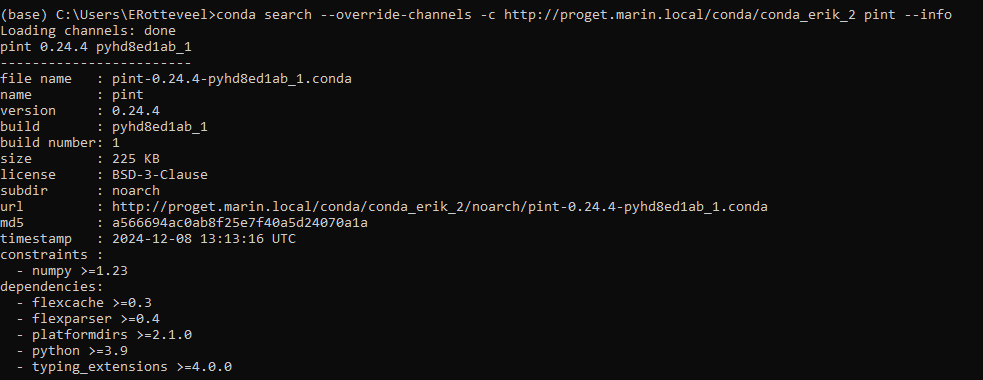
But in the WebGUI it looks like this:
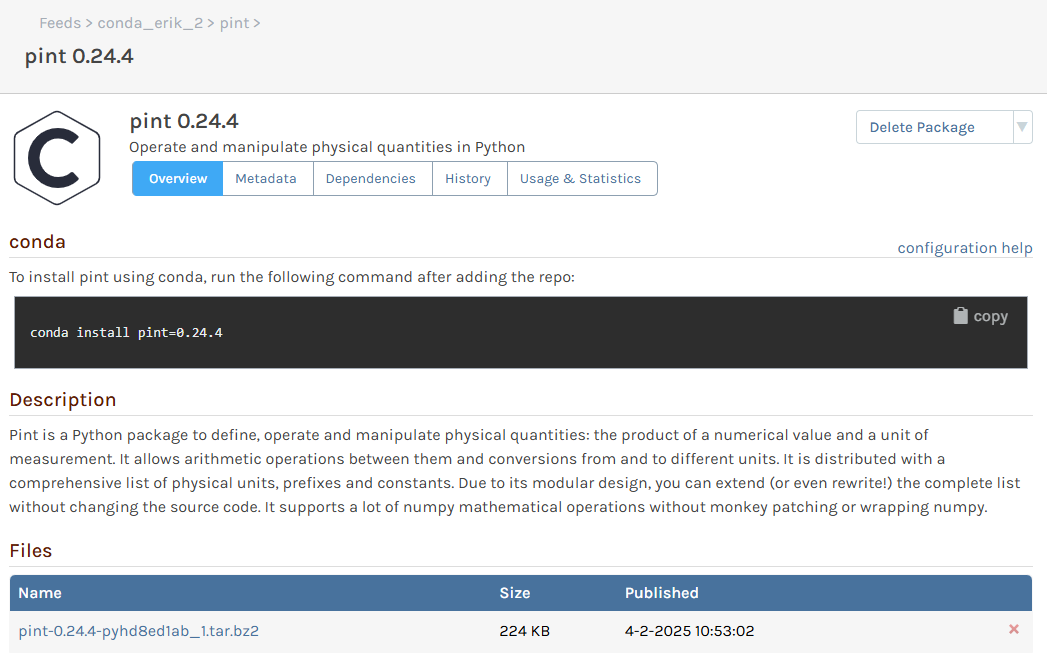
And when clicking on the file to download, it will try to download
http://proget.marin.local/conda/conda_erik_2/noarch/pint-0.24.4-pyhd8ed1ab_1.tar.bz2which does not work. But when I change the extension to.condait will work. -
Conda feeds: some packages not visible in WebGUI
We have proget 2024.25.
I have a conda feed where I uploaded the package files in this folder:https://nextcloud.marin.nl/index.php/s/nmPCLszf6PNMoQC
However, only the "pint" package is visible in the WebGUI, the others are not. My feeling is that there's something about the version normalization that prevents the packages from showing up in the GUI.
The
repodata.jsonfiles in thewin-64andnoarchsubfolders look OK though. So when using the Proget channels for installing packages with conda, all seems to work fine.repodata.json in noarch subfolder:
{"info":{"subdir":"noarch"},"packages":{},"packages.conda":{"pint-0.24.4-pyhd8ed1ab_1.conda":{"build":"pyhd8ed1ab_1","build_number":1,"depends":["flexcache \u003E=0.3","flexparser \u003E=0.4","platformdirs \u003E=2.1.0","python \u003E=3.9","typing_extensions \u003E=4.0.0"],"constrains":["numpy \u003E=1.23"],"license":"BSD-3-Clause","license_family":"BSD","md5":"a566694ac0ab8f25e7f40a5d24070a1a","name":"pint","sha256":"4595b54c19a46a8fc320d01e71000cee8bbfa47d9494fd2c8041d5c86f721b09","size":230217,"subdir":"noarch","summary":"Operate and manipulate physical quantities in Python","timestamp":1733663596173,"version":"0.24.4"},"tzdata-2024b-h04d1e81_0.conda":{"build":"h04d1e81_0","build_number":0,"depends":[],"constrains":[],"license":"CC-PDDC OR BSD-3-Clause","license_family":"BSD","md5":"9be694715c6a65f9631bb1b242125e9d","name":"tzdata","sha256":"9fdd287b55be4c475789a69d3b94cdb73f756583a6d7306da1706e43eee573da","size":117432,"subdir":"noarch","summary":"The Time Zone Database (called tz, tzdb or zoneinfo)","timestamp":1728062827250,"version":"2024b"}},"repodata_version":1}repodata.json in win-64 subfolder:
{"info":{"subdir":"win-64"},"packages":{},"packages.conda":{"re2-2022.04.01-hd77b12b_0.conda":{"build":"hd77b12b_0","build_number":0,"depends":["vc \u003E=14.1,\u003C15.0a0","vs2015_runtime \u003E=14.16.27012,\u003C15.0a0"],"constrains":[],"license":"BSD-3-Clause","md5":"6c4e835222173ecd5bf0a39896690470","name":"re2","sha256":"367717268b970471cd38cc0435fcede36b1cc74343e3245c48d05239f6b94479","size":382871,"subdir":"win-64","summary":"RE2 is a fast, safe, thread-friendly alternative to backtracking regular expression\nengines like those used in PCRE, Perl, and Python. It is a C\u002B\u002B library.\n","timestamp":1652432364793,"version":"2022.04.01"}},"repodata_version":1}Thanks for looking into this!
-
RE: Conda: Add "track_features" and "app_own_environment" to repodata.json output(s)
Thanks for putting this on the issue tracker!
As for "app_own_environment": I only found it in the sourcecode of Anaconda Navigator - a GUI package manager for conda environments. It seems a useful feature but I cannot find any other package that uses it.
So if you cannot add "app_own_environment" without having extra info, you can just leave it out. It was just a nice-to-have.
Looking forward to a new version with "track_features" added to the index output!
-
RE: Conda: Add "track_features" and "app_own_environment" to repodata.json output(s)
A good example for "track_features" is this package: https://anaconda.org/main/_low_priority, which directly explains the idea of "track_features": packages that "activate" features (either because they have "track_features" specified themselves or because their dependencies do so) will get a lower priority. The attribute is useful when you have a GPU build and a CPU build of the same package, and you want to prioritize one over the other.
In our case, we wish to do exactly that: use track_features to prioritize a CPU version of a certain package over a GPU version because the former runs on any PC, while the latter only works with a proper GPU available.
Some additional reading material is here: https://docs.conda.io/projects/conda/en/stable/user-guide/concepts/packages.html#track-features
In any case, the "track_features" attribute can be found in the
index.jsonfile that is in a conda package.About the
meta.yaml: that is a specification/configuration when building a package. The build process then generates theindex.jsonfile (and theabout.json) and puts it in the package (under theinfofolder) for repositories to extract useful information from. I think that for ProGet, theindex.jsonis more important than theabout.json.Finally, this method gives a quite complete overview of all keys that may be in the index.json. They are not all neccessarily there, though. Here is the method/code:
https://github.com/conda/conda-build/blob/8df6493565dae517165754bd75d7d74de1522dc3/conda_build/metadata.py#L1803Hope this helps!
-
Conda: Add "track_features" and "app_own_environment" to repodata.json output(s)
First of all; we've been using ProGet for our more-and-more internal package distribution for more than a year now, and pretty happy about it!
I recently tried to add some more metadata to a package, but two items are not taken over by ProGet: "track_features" and "app_own_environment". The first is simply a string, the second is a boolean. Both are available in a conda package's "index.json" file.
Can these be added? Thanks!
-
RE: Conda feed not generating repodata.json for win-64 subdir
Sorry for my late reply, but we have since installed version 2023.16 and repodata.json works perfectly fine now! Thanks for including this in your updates.
-
Last-Modified Header on conda-feed channeldata.json & repodata.json incorrect
Conda uses the "If-Modified-Since" header to know if the repodata should be downloaded (or not), but it seems the ProGet server does not provide the correct value for the "Last-Modified" response header.
I just uploaded a new package to a channel (both via API and a different one via manual upload), but the Last-Modified header says repodata.json (and channeldata.json) were last modified on February 23....
Thanks for looking into this!
We're currently on ProGet 2023.16 -
RE: Conda feed not generating repodata.json for win-64 subdir
Thanks for the effort again!
I just tried with one of the numpy packages on the main conda channel:
https://repo.anaconda.com/pkgs/main/win-64/numpy-1.23.5-py39h6917f2d_1.tar.bz2And I get the same problem with the
win-64/repodata.jsonURL.It went okay with one of our own packages though (but not with another). But even after comparing the metadata for both packages in detail I was not able to find problematic data or characters (none that I could think of).
Looking forward to the fix!

-
Cannot upload conda package with same version but different build via CURL
Conda has the concept of package builds on top of package versions. I can image other package managers offer similar features. The idea is that you can build your package in different ways, linking it to different versions of binary libraries, for instance. You keep the same version because your source code is the same, but the build-string (conda generates a hash from your dependencies) differs, and you produce multiple packages.
This seems to work OK-ish now in ProGet. Using the manual upload in the WebGUI, I can upload a package with a version that is already on the server, but with a different build-number/string. But if I try this via CURL (and an API key), it does not work.
I uploaded some example files here:
https://nextcloud.marin.nl/index.php/s/7zBHSDx8QYLCzfJIf you create an empty feed, then first upload
proget-package-2023.8.0-1.tar.bz2, that will work fine using either CURL or manual upload in the WebGUI. But if you then try to uploadproget-package-2023.8.0-3.tar.bz2, it will work in the WebGUI but not via CURL. Via CURL, I get the error:The package win-64/proget-package.2023.8.0 already exists and the current user or service does not have the Feeds_OverwritePackage privilege.I am using a feed API Key with CURL (so
--user api:API_KEY) for which all permissions have been enabled. But there should be no message of 'overwriting' a package at all, because it is a different build.Thanks again for looking into this. If you need more information, I'm happy to help.
-
Conda feed not generating repodata.json for win-64 subdir
First of all, @atripp : the constrains (i.e. optional dependencies) appears to be working. Thank you and your team! We're now trying to setup conda feeds with the 2023 version of ProGet and we can see the conda feed features improved!
However, the conda feed breaks down after uploading some packages. I cannot really find out what triggers the problem exactly, but I uploaded some example packages here:
https://nextcloud.marin.nl/index.php/s/7zBHSDx8QYLCzfJ
When I create a new, empty conda feed, the
repodata.jsonworks fine. I can go to one of:- https://my.proget.url/conda/my-conda-feed/win-64/repodata.json
- https://my.proget.url/conda/my-conda-feed/noarch/repodata.json
And they look fine. Of course there are no packages yet.
If I upload the
hello-inedo-triplepackage from my examples (via the manual upload in the WebGUI), the second link (noarch repodata.json) still works. But if I uploadproget-package-2023.8.0-1.tar.bz2, the win-64 repodata.json link responds with:Object reference not set to an instance of an object.Meanwhile, the channeldata.json (https://my.proget.url/conda/my-conda-feed/channeldata.json) works perfectly fine.
I hope you can look into this, thanks!
-
RE: Conda channels should also add the "constrains" from a package's index file to repodata.json
Thanks, looking forward to the next release!
With the 'constrains' option working, we can really use ProGet as our main method of distributing (python)packages within our company. It currently works great for most packages, except for so-called meta-packages with optional dependencies.
Meta-packages are nothing more than a list of dependencies. The great thing about them is that they can very effectively "lock" environments meaning that users cannot (either by accident or on purpose) install different versions of packages critical to our workflows. The anaconda package is also a meta-package. If you want to install some package with a different version than stated in the meta-package, you will need to uninstall that meta-package first.
But there are plenty of cases where you don't want users/developers to have to install all 400+ packages of interest each time they create a new conda environment. For that, the "constrains" option comes in handy: we still strongly fixate the versions of certain packages, but they do not have to be installed directly. Only when a user needs such a package later on, he will get the version we want him to have. This is great when someone starts a new project: initially they only need pandas and/or numpy, but later they want to try some machine learning and need scikit-learn or pytorch.
Good luck with the development of version 2023, I'll keep an eye on new releases.
-
RE: CURL uploads to conda channel are failing in 2022.24 - manual upload works
I now changed to 2022.25, and CURL uploads are working again. Thanks!
-
RE: CURL uploads to conda channel are failing in 2022.24 - manual upload works
Thanks for the quick reply and action!
-
RE: Proget/conda: is it possible to delete specific files (conda case: different builds of same version)?
Thanks for your reply! For these features, we'll wait for the new version. I saw on a blog page that you expect a release in Q2 (maybe Q3). Is that still the planning?
-
CURL uploads to conda channel are failing in 2022.24 - manual upload works
Hello again, since the new version (which solved some of the conda-related issues), we are now facing problems with CURL uploads. When uploading a *.tar.bz2 file to a conda feed, it gives the error:
The content has not been fully buffered yet.Looking in the ProGet logs via the UI, I see these messages:
System.NotSupportedException: The content has not been fully buffered yet.
at Microsoft.AspNetCore.WebUtilities.FileBufferingReadStream.Seek(Int64 offset, SeekOrigin origin)
at Inedo.IO.UndisposableStream.Seek(Int64 offset, SeekOrigin origin)
at System.IO.Compression.ZipArchive.ReadEndOfCentralDirectory()
at System.IO.Compression.ZipArchive..ctor(Stream stream, ZipArchiveMode mode, Boolean leaveOpen, Encoding entryNameEncoding)
at System.IO.Compression.ZipArchive..ctor(Stream stream, ZipArchiveMode mode, Boolean leaveOpen)
at Inedo.ProGet.Feeds.Conda.CondaPackageMetadata.TryOpenZip(Stream stream)
at Inedo.ProGet.Feeds.Conda.CondaPackageMetadata.ReadFromPackage(Stream stream, Stream& icon)
at Inedo.ProGet.Feeds.Conda.CondaFeed.InstallPackageAsync(Stream stream, InstallPackageOptions options, Boolean promotion, Nullable`1 downloadCount, Nullable`1 publishDate, CancellationToken cancellationToken)
at Inedo.ProGet.WebApplication.FeedEndpoints.Conda.CondaFeedHandler.ProcessRequestAsync(HttpContext context, WebApiContext apiContext, CondaFeed feed, String relativeUrl)
at Inedo.ProGet.WebApplication.FeedEndpoints.FeedEndpointHandler.FeedRequestHandler.ProcessRequestAsync(HttpContext context)
It appears to happen with any conda package I try to upload via CURL. Meanwhile, manual upload via the web-UI just work fine.
For debugging purposes, here is a package that leads to the errors:
https://nextcloud.marin.nl/index.php/s/LSXc4AQYkBmC3zQ -
RE: Conda feed: channeldata.json with non-ASCII (or non-ANSI) characters cause problems with Conda
I have justed tested some uploads with 2022.24 and it seems to work fine now, thanks!
-
Proget/conda: is it possible to delete specific files (conda case: different builds of same version)?
When I use the ProGet UI to go to the page of a specific version of a package, I can delete either that specific version or "all package versions".
However, with conda (and I guess with any package manager) you can have different builds of the same package version. This is not limited to different builds for different OS'es, but also different builds that each have slightly different dependencies**.
Does ProGet "understand" the idea of different builds for the same version of a package?
In ProGet UI, I can see a list of files per package, per version, but I don't see a way to just delete one of those files. Is this maybe possible via the API?
** about the example of dependencies: Let's say I have a package that needs the HDF5 library, but I want my package to be backwards compatible (even for latest updates). In that case, I could build my package for version 1.X and link it to different versions of the HDF5 lib, thus creating multiple builds with the same version, but a package manager on a users PC will select the proper build depending on the available HDF5 library.
-
RE: Conda feed: channeldata.json with non-ASCII (or non-ANSI) characters cause problems with Conda
Thanks for the quick reply! I'll wait for the new release and give it a try then. No hurry for this, I just noted it happening when uploading some package to it. For now, I can just prevent adding such characters to my package description/summary.
-
RE: Conda feed: channeldata.json with non-ASCII (or non-ANSI) characters cause problems with Conda
I went through Conda's code to see how it handles the
channeldata.jsonfile. Basically, you can use this to reproduce the problem:import requests import json r = requests.get('http://PROGET.BASE.URL/conda/conda_channel/channeldata.json') with open('some_file', 'wb') as f: f.write(r.content) with open('some_file') as f2: A = f2.read()Furthermore, looking at Anaconda's main repository and the
channeldata.jsonin there:
https://repo.anaconda.com/pkgs/main/channeldata.json
You will also find quite some "encoded" characters (search for "u201c" for instance)I think conda/conda-build normally make sure the
channeldata.jsonfile is as plain as possible. That should at least apply to thedescriptionandsummarykeys, but maybe to the whole file in general. It probably also applies to therepodata.jsonfile in the sub-directories such asnoarch,win-64andlinux-64.