Oh, you are totally right. I didn't notice.
Thank you so much, sorry for the trouble.
Kind regards.
Welcome to the Inedo Forums! Check out the Forums Guide for help getting started.
If you are experiencing any issues with the forum software, please visit the Contact Form on our website and let us know!
Oh, you are totally right. I didn't notice.
Thank you so much, sorry for the trouble.
Kind regards.
Hi,
I’m seeing an issue with Debian connectors in ProGet 2026.03 when using Ubuntu 20.04 and 22.04 repositories.
The connector configuration itself is valid, for example:
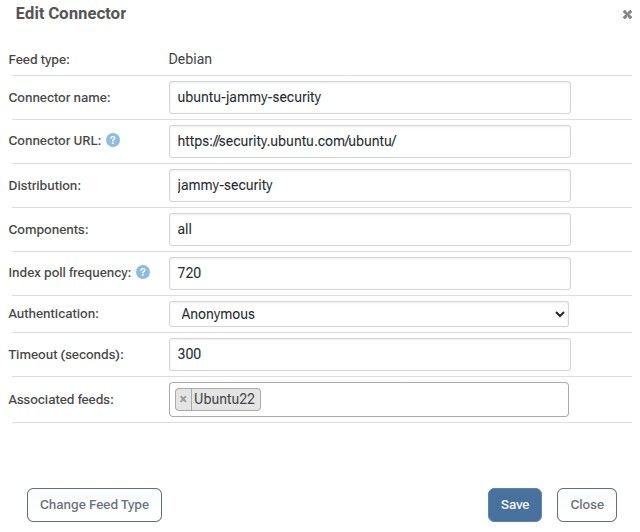
and similarly:
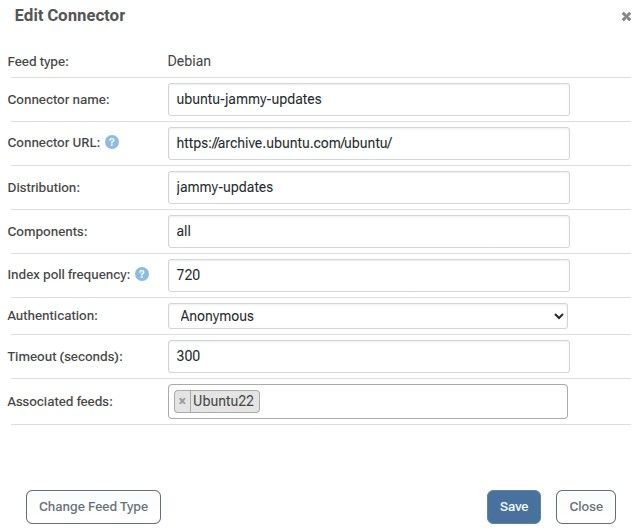
ProGet reports that the local index was successfully updated, but the connector contains no packages. The generated local index remains essentially empty, around 32 KB.
For comparison, on the same ProGet instance:
Ubuntu 22.04:
jammy -> works
jammy-updates -> empty index with Components: all
jammy-security -> empty index with Components: all
Ubuntu 24.04:
noble -> works
noble-updates -> works
noble-security -> works
Ubuntu 26.04:
resolute -> works
resolute-updates -> works
resolute-security -> works
The issue also occurs with Ubuntu 20.04.
Network connectivity does not appear to be involved. From the ProGet host, the Ubuntu repository metadata can be downloaded successfully.
I also deleted the ProGet local connector index and allowed ProGet to rebuild it. ProGet again reported that the local index had been updated successfully, but the resulting index still contained no packages.
The local index sizes made the issue clear:
ubuntu-jammy -> 134 MB
ubuntu-jammy-updates -> 32 KB
ubuntu-jammy-security -> 32 KB
ubuntu-noble -> 152 MB
ubuntu-noble-security -> 34 MB
ubuntu-noble-updates -> 44 MB
I then changed the affected connectors from:
Components: all
to:
Components: main restricted universe multiverse
After doing this, ProGet indexed the packages correctly and the repositories started working normally.
So the issue seems to be specifically related to the special all value for Debian connector components. It works correctly for newer Ubuntu releases such as 24.04 and 26.04, but produces an empty local index for Ubuntu 20.04 and 22.04.
The particularly confusing part is that ProGet reports the local index as successfully updated even though no packages were indexed.
Thank you for your time and help.
Kind Regards.
@stevedennis I understand. Thank you for your fast Reply and explanation.
I see why it can be troublesome and actually go against Proget's core functionality to allow what I was talking about. Thanks!
Regards.
@stevedennis I see, Thank you for your fast reply. Regards.
Hello,
This is more like a suggestion.
I would find it really helpful if it was possible to add tags to packages and/or feeds. I looked around Proget for a feature like this but didn't find anything.
Feed Groups are great but it would be really convenient if it were possible to add personalized tags to specific packages and somehow filter through them. For example, I have my feeds grouped by project but It would be really helpful if I could tag different packages inside each feed with Tags that allow me to relate them. In case I wanted to locate all packages related to a specific theme for example, or with a Specific function.
I don't really know if the scope of what I am talking about is really big for what it can provide. It's just a suggestion of a feature I would find really useful.
Thank you for your time!
Kind regards.
Adding to this, I just noticed it also modifies the file's permissions. For example, it removes the "+x" from a .sh file.
Hello.
This is a rather specific issue.
I am using Proget Free edition, version 2025.15.
When Adding a package to a Universal Feed, if you select "Create a Package", when you select a file to add, either by drag and dropping it or by selecting it with the button "or click here to select files" it does load correctly but when you check the package contents the file's name is changed to lowercase.
As you can see in the following images, the file is called "TEST_test.txt".
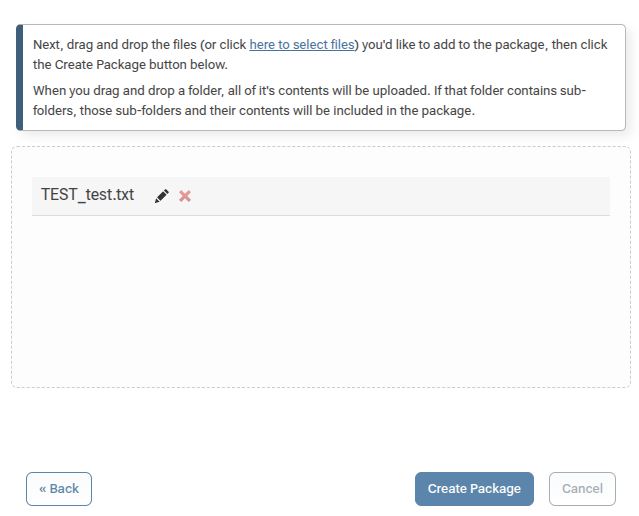
But when I check it's contents in the version's files tab, it's all lowercase:
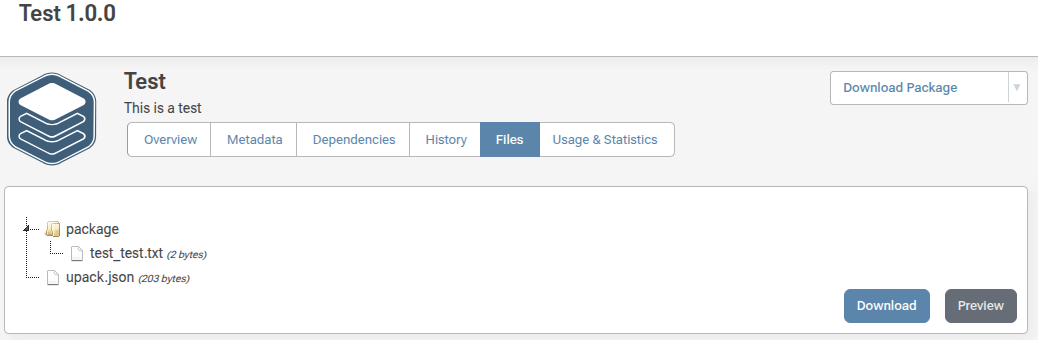
This does not happen when uploading a new package using PGutils nor when uploading an already created .upack file.
I know it's a very specific issue but it's causing trouble in naming standarization for me since some users only use proget via its web interface.
Thanks in advance for your help.
Kind regards.
@dean-houston I just upgraded to the latest version and it worked perfectly now. I can update packages of more than 2 GBs without any problems.
Thanks you so much!
@dean-houston I see... Ok, thank you very much for your support.
Hello Everyone, first of all thank you for your help.
I am running a self hosted instance of ProGet on a Docker container over a Ubuntu machine. It works really well since it's a relatively small instance but I ran into a problem.
I mainly use Universal Package feeds to manage my artifacts but when editing the description of some of them I get the following error:
An error occurred in the web application: Stream was too long.

URL: http://10.1.0.186/universal-packages/edit-package?feedId=20&pUrl=pkg%3Aupack%2FFeederlink_FW%402.4.0
Referrer: http://10.1.0.186/universal-packages/edit-package?feedId=20&pUrl=pkg%3Aupack%2FFeederlink_FW%402.4.0
User: (unknown)
User Agent: Mozilla/5.0 (X11; Linux x86_64) AppleWebKit/537.36 (KHTML, like Gecko) Chrome/135.0.0.0 Safari/537.36
Stack trace:    at System.IO.MemoryStream.Write(Byte[] buffer, Int32 offset, Int32 count)
   at System.IO.Stream.CopyTo(Stream destination, Int32 bufferSize)
   at Inedo.ProGet.WebApplication.Pages.Universal.Packages.EditUniversalPackagePage.<>c__DisplayClass12_0.<<CreateChildControlsAsync>b__1>d.MoveNext() in C:\Users\builds\AppData\Local\Temp\InedoAgent\BuildMaster\192.168.44.60\Temp\_E550814\Src\ProGet.WebApplication\Pages\Universal\Packages\EditUniversalPackagePage.cs:line 189
--- End of stack trace from previous location ---
   at Inedo.Web.PageFree.SimplePageBase.ExecutePageLifeCycleAsync()
   at Inedo.Web.PageFree.SimplePageBase.ProcessRequestAsync(AhHttpContext context)
   at Inedo.Web.AhWebMiddleware.InvokeAsync(HttpContext context)

::Web Error on 04/30/2025 09:36:10::
They are pretty hefty files, this particular package is 2,520 MB. I can edit the description of smaller files without a problem, so I think it has something to do with the size of the file.
Is there any way I can fix this? Maybe the Host machine isn't powerfull enough? (It has a 4 thread CPU with 8 GB of RAM). Or is it a problem in a config parameter in the aplication itself?
Thanks in advance guys. Have a nice day :)