Inedo Community Forums Forums
    • Recent
    • Tags
    • Popular
    • Login
    1. Home
    2. dan.brown_0128
    3. Posts

    Welcome to the Inedo Forums! Check out the Forums Guide for help getting started.

    If you are experiencing any issues with the forum software, please visit the Contact Form on our website and let us know!

    D Offline
    • Profile
    • Following 0
    • Followers 0
    • Topics 12
    • Posts 43
    • Groups 0

    Posts

    Recent Best Controversial
    • RE: NPM Package name case sensitivity

      I wonder if its an issue if the old JSONPath was pulled locally first, then jsonpath was pulled. Right now, we just have a workaround by disabling npm audit support in ProGet, which allows our builds to run, but that disables a legitimate feature because of this one edge case.

      My guess is that some DB cleanup would need to happen to purge JSONPath and jsonpath from all memory?

      posted in Support
      D
      dan.brown_0128
    • RE: NPM Package name case sensitivity

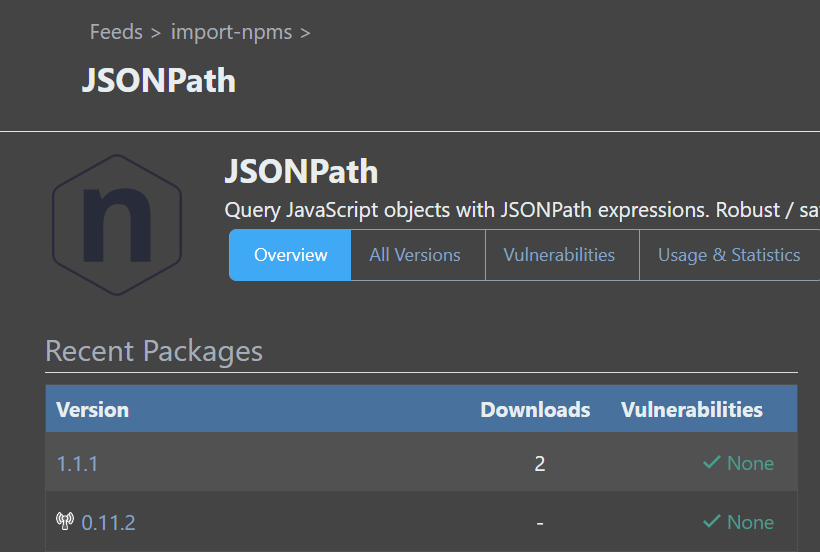
      Thanks for the details. We did delete jsonpath and JSONPath from our local feed, but once ProGet caches the jsonpath package locally, it starts to display as JSONPath on the ProGet site. Is there a way to force the site to recognize it as jsonpath instead since v1.1.1 is the only one locally?

      8fba51ad-4137-47f8-a635-ae5177a7a933-image.png

      posted in Support
      D
      dan.brown_0128
    • RE: NPM Vulnerability with Exception

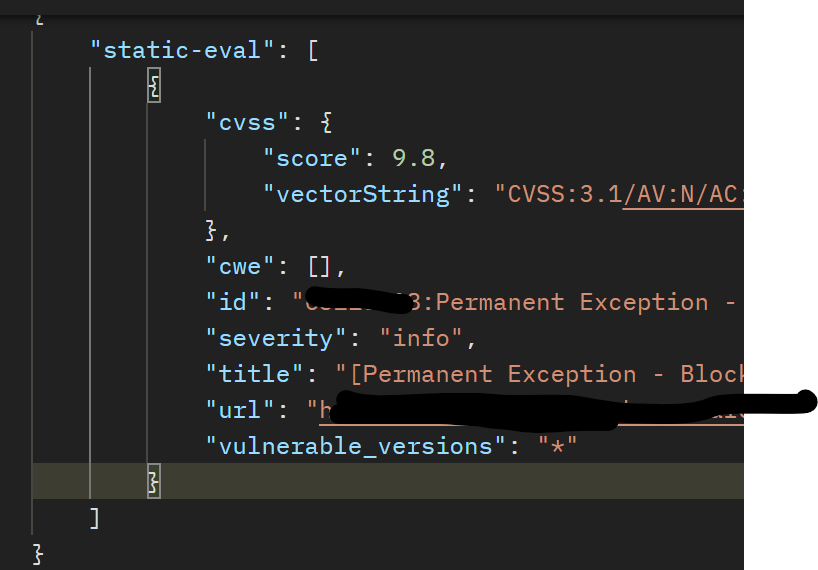
      The vulnerability has already been assessed as "Not Applicable" and that's where the "info" comes up, as shown by your code snippet. The problem is that NPM does not have info as a classification and cannot parse it

      posted in Support
      D
      dan.brown_0128
    • RE: NPM Package name case sensitivity

      Part of the issue here is that the results from ProGet do not match that of the public registry. Yes, it is an edgecase where there are 2 packages with the same name but different capitalization, but its also a fairly common package.

      npm audit is a step that is run by default as part of npm install and other standard functions. This is to advise of package updates, end of support, and vulnerabilities by priority. Simply replacing NPM with pgutil is not a small feat, especially with standard common tooling already in use across the field.

      The fact that our builds fail because of the mismatch is problematic, and shows that two unique packages are being mixed by ProGet. The audit caught it, and prevented the two from being crossed

      posted in Support
      D
      dan.brown_0128
    • NPM Vulnerability with Exception

      We ran into an issue when a NPM package has a vulnerability, but an exception has been made to allow the package download. The example we have was static-eval v 2.1.1

      We have an exception on the PGV-2133354 vulnerability since it has been withdrawn.

      npm audit and npm install fail because the severity level of the vulnerability with exception is info which is not a supported level by NPM. the output from npm is:

      npm ERR! undefined is not iterable (cannot read property Symbol(Symbol.iterator))
      

      NPM Audit Severity Levels
      And you can see in the NPM Audit code that it does not expect info as a severity level

      Output from ProGet npm/v1/security/advisories/bulk endpoint:
      e7af53d3-8209-43cb-b468-0809a3b81b00-image.png

      Right now we are NOT able to build with this package without disabling vulnerability detection, which is not permitted by corporate policy. How can we correct the output from ProGet so that npm will successfully build

      posted in Support
      D
      dan.brown_0128
    • NPM Package name case sensitivity

      we recently had users having issues if their NPM project depended on the jsonpath package. Our NPM feed uses a connector to the public NPM registry, and we had pulled version 1.1.1 to our local proget. Apparently when this was done, the package was saved to ProGet as JSONPath.

      This resulted in the packument data pull in npm audit to fail since the metadata JSON (at https://progetserver/npm/feedname/jsonpath) had the name JSONPath but the package name is all lower case.

      Removing the package and all versions from ProGet and clearing it from disk does appear to work, but once we pull it back into ProGet, it will fail.

      NPM is very clear in their documentation that package names should always be all lowercase because of case sensitivity differences between OSes.

      How can we fix ProGet so that we can pull the jsonpath package locally but keep the proper naming convention?

      posted in Support
      D
      dan.brown_0128
    • RE: Debian Feed (New) connector errors

      I was finally able to try this with a mounted network drive (using SysInternals), and that works

      posted in Support
      D
      dan.brown_0128
    • RE: Debian Feed - Package can only be downloaded by apt once

      Quick update -- Just installed 2023.30 in our test environment. At first I was still not able to download packages with + in the version (despite the index being correct). After clearing the feed and re-promoting packages it does seem to work now!

      posted in Support
      D
      dan.brown_0128
    • RE: Debian Feed - Package can only be downloaded by apt once

      Oh and also to note: there is no network traffic (captured by our networking team) or from IIS logs when attempting to apt install unixodbc-common from ProGet (pulled to feed). Maybe apt is thinking that filename is invalid and skips it

      posted in Support
      D
      dan.brown_0128
    • RE: Debian Feed - Package can only be downloaded by apt once

      I'm starting to think this is related to package versions with a +. We can keep going down the road of unixodbc-common_2.3.11-2+deb12u1_all.deb for example.

      If I disable the cache and do not pull packages to proget, I can download/install just fine.

      If I promote the package to another feed, I cannot install it. BUT if I try a package without a + in the version/filename in that second feed, it does install or at least resolve (ex: bcal)

      There is one big difference in the index that might be the key... The original/upstream Debian index does not urlencode the filename but it looks like ProGet is

      debian upstream: Filename: pool/main/u/unixodbc/unixodbc-common_2.3.11-2+deb12u1_all.deb
      Proget: Filename: pool/bookworm/main/all/unixodbc-common/unixodbc-common_2.3.11-2%2Bdeb12u1_all.deb

      posted in Support
      D
      dan.brown_0128
    • RE: Debian Feed - Package can only be downloaded by apt once

      Dockerfile used:

      FROM privatedockerrepo/python:3.8-slim
      RUN apt update 
      RUN apt install -y wget gnupg2 apt-transport-https apt-rdepends
      RUN  echo 'deb https://user:pass@proget.local/debian/import-debian bookworm main contrib non-free' | \
          tee /etc/apt/sources.list.d/proget-approved-deb.list
      RUN wget -qO - https://user:pass@proget.local/debian/import-debian/keys/import-debian.asc | apt-key add -
      RUN mv /etc/apt/sources.list.d/debian.sources /etc/apt/sources.list.d/debian.sources.old
      RUN apt update && apt install unixodbc-common
      CMD ["bash"]
      

      Output from first run:

      PS> docker build .
      [+] Building 42.5s (15/15) FINISHED                                                                                                                                                                                                                               docker:default 
       => [internal] load build definition from Dockerfile                                                                                                                                                                                                                        
       => => transferring dockerfile: 1.17kB                                                                                                                                                                                                                                      
       => [internal] load metadata for privatedockerrepo/python:3.8-slim                                                                                                                                                                                                 
       => [auth] python:pull token for privatedockerrepo                                                                                                                                                                                                                
       => [internal] load .dockerignore                                                                                                                                                                                                                                           
       => => transferring context: 2B                                                                                                                                                                                                                                             
       => [internal] load build context                                                                                                                                                                                                                                           
       => => transferring context: 71B                                                                                                                                                                                                                                            
       => [1/7] FROM privatedockerrepo/python:3.8-slim                                                                                                                                          
       => [2/7] RUN apt update                                                                                                                                                                                                                                             
       => [3/7] RUN apt install -y wget gnupg2 apt-transport-https apt-rdepends                                                                                                                                                                                            
       => [4/7] RUN  echo 'deb https://user:pass@proget.local/debian/import-debian bookworm main contrib non-free' |     tee /etc/apt/sources.list.d  0.0s 
       => [5/7] RUN wget -qO - https://user:pass@proget.local/debian/import-debian/keys/import-debian.asc | apt-key add -                                                                                           
       => [6/7] RUN mv /etc/apt/sources.list.d/debian.sources /etc/apt/sources.list.d/debian.sources.old                                                                                                                                                                   
       => [7/7] RUN apt update && apt install unixodbc-common                                                                                                                                                                                                                    
       => exporting to image                                                                                                                                                                                                                                                      
       => => exporting layers                                                                                                                                                                                                                                                     
       => => writing image sha256:...                                                                                                                                                                                 
      

      Output from second run:

      PS> docker build .
      [+] Building 42.5s (15/15) FINISHED                                                                                                                                                                                                                               docker:default 
       => [internal] load build definition from Dockerfile                                                                                                                                                                                                                        
       => => transferring dockerfile: 1.17kB                                                                                                                                                                                                                                      
       => [internal] load metadata for privatedockerrepo/python:3.8-slim                                                                                                                                                                                                 
       => [auth] python:pull token for privatedockerrepo                                                                                                                                                                                                                 
       => [internal] load .dockerignore                                                                                                                                                                                                                                           
       => => transferring context: 2B                                                                                                                                                                                                                                             
       => [internal] load build context                                                                                                                                                                                                                                           
       => => transferring context: 71B                                                                                                                                                                                                                                            
       => [1/7] FROM privatedockerrepo/python:3.8-slim                                                                                                                                          
       => [2/7] RUN apt update                                                                                                                                                                                                                                             
       => [3/7] RUN apt install -y wget gnupg2 apt-transport-https apt-rdepends                                                                                                                                                                                            
       => [4/7] RUN  echo 'deb https://user:pass@proget.local/debian/import-debian bookworm main contrib non-free' |     tee /etc/apt/sources.list.d  0.0s 
       => [5/7] RUN wget -qO - https://user:pass@proget.local/debian/import-debian/keys/import-debian.asc | apt-key add -                                                                                           
       => [6/7] RUN mv /etc/apt/sources.list.d/debian.sources /etc/apt/sources.list.d/debian.sources.old                                                                                                                                                                   
       => ERROR [7/7] RUN apt update && apt install unixodbc-common                                                                                                                                                                                                              
      ------
       > [7/7] RUN apt update && apt install unixodbc-common:
      0.413
      0.413 WARNING: apt does not have a stable CLI interface. Use with caution in scripts.
      0.413
      29.70 Get:1 https://proget.local/debian/import-debian bookworm InRelease [39.1 kB]
      30.13 Get:2 https://proget.local/debian/import-debian bookworm/non-free all Packages [53.7 kB]
      30.50 Get:3 https://proget.local/debian/import-debian bookworm/contrib all Packages [27.7 kB]
      30.74 Get:4 https://proget.local/debian/import-debian bookworm/contrib amd64 Packages [66.1 kB]
      31.02 Get:5 https://proget.local/debian/import-debian bookworm/non-free amd64 Packages [125 kB]
      31.27 Get:6 https://proget.local/debian/import-debian bookworm/main amd64 Packages [10.6 MB]
      36.09 Get:7 https://proget.local/debian/import-debian bookworm/main all Packages [5719 kB]
      38.67 Fetched 16.7 MB in 38s (436 kB/s)
      38.67 Reading package lists...
      38.99 Building dependency tree...
      39.08 Reading state information...
      39.09 21 packages can be upgraded. Run 'apt list --upgradable' to see them.
      39.09 W: https://user:pass@proget.local/debian/import-debian/dists/bookworm/InRelease: Key is stored in legacy trusted.gpg keyring (/etc/apt/trusted.gpg), see the DEPRECATION section in apt-key(8) for details.
      39.10
      39.10 WARNING: apt does not have a stable CLI interface. Use with caution in scripts.
      39.10
      39.10 Reading package lists...
      39.42 Building dependency tree...
      39.51 Reading state information...
      39.52 E: Unable to locate package unixodbc-common
      ------
      Dockerfile:16
      --------------------
        14 |     RUN wget -qO - https://user:pass@proget.local/debian/import-debian/keys/import-debian.asc | apt-key add -
        15 |     RUN mv /etc/apt/sources.list.d/debian.sources /etc/apt/sources.list.d/debian.sources.old
        16 | >>> RUN apt update && apt install unixodbc-common
        17 |
        18 |     CMD ["bash"]
      --------------------
      ERROR: failed to solve: process "/bin/sh -c apt update && apt install unixodbc-common" did not complete successfully: exit code: 100 =>                                                                                                                                                                                                                                                       
      
      posted in Support
      D
      dan.brown_0128
    • Debian Feed - Package can only be downloaded by apt once

      This is an oddly specific issue I'm finding. Background info - fully standard, no customizations

      • ProGet is running on Windows Server
      • Proget v 2023.29 (Build 17)
      • New Debian connector set up with bookworm
      • debian feed called import-deb linked to above connector.
      • Debian bookworm container setup with private ProGet Debian apt source + key, public Debian feed removed

      When I build the container for the first time (works on a VM or any other Debian instance), it will successfully download and install the package from Proget (for discussion, unixodbc-common. This is good!

      If I do another build or attempt to install the same package on another computer, apt cannot locate the package. This is bad! I can, however, still see and download the package from the Proget UI and even via curl on the container/vm, ruling out network issues.

      If I then delete that package from Proget, and attempt to install via apt -- it works again, but only once. Once the package has been pulled from the Public Debian repo and saved into ProGet, it seems apt cannot find it again.

      posted in Support
      D
      dan.brown_0128
    • RE: Debian Feed (New) connector errors

      That's what I suspected. We'll do some more testing on our end about UNC/mounted drives and see what comes up. Are there any debug logs I can get from the ProGet service that might give more info?

      posted in Support
      D
      dan.brown_0128
    • RE: Debian Feed (New) connector errors

      @stevedennis - If we go the route of storing the sqlite DB onto a local disk on each node of a cluster, are there any risks that would come of that? Either packages being out of sync, or slowdowns?

      We're still researching the network path on our end

      posted in Support
      D
      dan.brown_0128
    • RE: Debian Feed (New) connector errors

      @stevedennis -- we were able to rule out antivirus and similar. Windows Defender shows no threats or actions, and nothing on our file servers.

      We were able to have success by switching the Storage.DebianPackagesLibrary path to a local path (E:\ProGetPackages\.debian vs \\server.corp\qa\progetpackages\.debian).

      With the local path, the connector passes heathcheck and I see remote packages in the feed. Unfortunately this will not work well for our production use since we're using a HA setup.

      I did try copying the connector folder (and sqlite file) back to the network share and changed the storage setting back to the network share. When I ran the heathcheck, the sqlite file was deleted. Looks to me that there's something happening specific to the Debian2 connector and storage paths using a network location (\\server\path notation). Is this something you can validate too?

      posted in Support
      D
      dan.brown_0128
    • RE: Debian Feed (New) connector errors

      I checked on the file share, and the sqllite database is not found. ProGet definitely can write to the directory, and does for all other feeds.

      Just to confirm -- even if ProGet is using SqlServer for all other database operations, does the Debian feed connector require SqlLite? Our corporate policy currently prohibits the use of sqllite and that could very well be why we don't see the file on disk

      posted in Support
      D
      dan.brown_0128
    • RE: Debian Feed (New) connector errors

      @gdivis -- We are running ProGet on Windows

      Upping the timeout doesn't seem to make a difference. The "unable to open database file" message is logged almost immediately whenever the connector healthcheck runs.

      When viewing a new Deb feed with the connector added, it only shows the message "An unexpected error occurred while listing packages: unable to open database file. Additional information has been logged in the diagnostics center." and doesn't clear (24 hours).

      Here's the stack trace that shows in the messages. Not sure what Sqlite DB it's trying to access. The main database is SqlServer

      Details:code = CantOpen (14), message = System.Data.SQLite.SQLiteException (0x800007FF): unable to open database file
      at System.Data.SQLite.SQLite3.Open(String strFilename, String vfsName, SQLiteConnectionFlags connectionFlags, SQLiteOpenFlagsEnum openFlags, Int32 maxPoolSize, Boolean usePool)
      at System.Data.SQLite.SQLiteConnection.Open()
      at Inedo.ProGet.Feeds.Debian2.Debian2ConnectorIndex.Open(String fileName, Debian2Connector connector)
      at Inedo.ProGet.Feeds.Debian2.Debian2Connector.GetIndex()
      at Inedo.ProGet.Feeds.Debian2.Debian2Connector.GetAndUpdateIndexAsync()
      at Inedo.ProGet.Feeds.Debian2.Debian2Connector.ListPackagesAsync(Nullable`1 maxCount)+MoveNext()
      at Inedo.ProGet.Feeds.Debian2.Debian2Connector.ListPackagesAsync(Nullable`1 maxCount)+System.Threading.Tasks.Sources.IValueTaskSource<System.Boolean>.GetResult()
      at Inedo.ProGet.Feeds.Debian2.Debian2Feed.GetConnectorPackagesAsync(Func`2 getPackages)+MoveNext()
      at Inedo.ProGet.Feeds.Debian2.Debian2Feed.GetConnectorPackagesAsync(Func`2 getPackages)+MoveNext()
      at Inedo.ProGet.Feeds.Debian2.Debian2Feed.GetConnectorPackagesAsync(Func`2 getPackages)+System.Threading.Tasks.Sources.IValueTaskSource<System.Boolean>.GetResult()
      at System.Linq.AsyncEnumerable.UnionAsyncIterator`1.MoveNextCore() in /_/Ix.NET/Source/System.Linq.Async/System/Linq/Operators/Union.cs:line 131
      at System.Linq.AsyncIteratorBase`1.MoveNextAsync() in /_/Ix.NET/Source/System.Linq.Async/System/Linq/AsyncIterator.cs:line 70
      at System.Linq.AsyncIteratorBase`1.MoveNextAsync() in /_/Ix.NET/Source/System.Linq.Async/System/Linq/AsyncIterator.cs:line 75
      at System.Linq.Internal.Lookup`2.CreateAsync(IAsyncEnumerable`1 source, Func`2 keySelector, IEqualityComparer`1 comparer, CancellationToken cancellationToken) in /_/Ix.NET/Source/System.Linq.Async/System/Linq/Operators/Lookup.cs:line 105
      at System.Linq.Internal.Lookup`2.CreateAsync(IAsyncEnumerable`1 source, Func`2 keySelector, IEqualityComparer`1 comparer, CancellationToken cancellationToken) in /_/Ix.NET/Source/System.Linq.Async/System/Linq/Operators/Lookup.cs:line 105
      at System.Linq.AsyncEnumerable.GroupedAsyncEnumerable`2.MoveNextCore() in /_/Ix.NET/Source/System.Linq.Async/System/Linq/Operators/GroupBy.cs:line 1094
      at System.Linq.AsyncIteratorBase`1.MoveNextAsync() in /_/Ix.NET/Source/System.Linq.Async/System/Linq/AsyncIterator.cs:line 70
      at System.Linq.AsyncIteratorBase`1.MoveNextAsync() in /_/Ix.NET/Source/System.Linq.Async/System/Linq/AsyncIterator.cs:line 75
      at Inedo.ProGet.Feeds.Debian2.Debian2Feed.GetLatestVersionOfEach(IAsyncEnumerable`1 packages)+MoveNext()
      at Inedo.ProGet.Feeds.Debian2.Debian2Feed.GetLatestVersionOfEach(IAsyncEnumerable`1 packages)+MoveNext()
      at Inedo.ProGet.Feeds.Debian2.Debian2Feed.GetLatestVersionOfEach(IAsyncEnumerable`1 packages)+System.Threading.Tasks.Sources.IValueTaskSource<System.Boolean>.GetResult()
      at System.Linq.AsyncEnumerable.SelectEnumerableAsyncIterator`2.MoveNextCore() in /_/Ix.NET/Source/System.Linq.Async/System/Linq/Operators/Select.cs:line 221
      at System.Linq.AsyncIteratorBase`1.MoveNextAsync() in /_/Ix.NET/Source/System.Linq.Async/System/Linq/AsyncIterator.cs:line 70
      at System.Linq.AsyncIteratorBase`1.MoveNextAsync() in /_/Ix.NET/Source/System.Linq.Async/System/Linq/AsyncIterator.cs:line 75
      at System.Linq.AsyncEnumerable.<ToListAsync>g__Core|424_0[TSource](IAsyncEnumerable`1 source, CancellationToken cancellationToken) in /_/Ix.NET/Source/System.Linq.Async/System/Linq/Operators/ToList.cs:line 36
      at System.Linq.AsyncEnumerable.<ToListAsync>g__Core|424_0[TSource](IAsyncEnumerable`1 source, CancellationToken cancellationToken) in /_/Ix.NET/Source/System.Linq.Async/System/Linq/Operators/ToList.cs:line 36
      at Inedo.ProGet.Feeds.Debian2.Debian2Feed.SearchPackagesAsync(String query, Int32 maxCount, Boolean includePrerelease)
      at Inedo.ProGet.WebApplication.Pages.Packages.ListPackagesPage.PackageList.InitializeAsyncInternal()
      at Inedo.ProGet.WebApplication.Pages.Packages.ListPackagesPage.PackageList.InitializeAsync()
      
      posted in Support
      D
      dan.brown_0128
    • Debian Feed (New) connector errors

      Trying to set up the new Debian feed and connector on ProGet 2023.29

      I can create the feed and connector, but the healthcheck fails with:

      Connector debian-buster health check reported error: unable to open database file
      

      Connector Settings:
      Type Debian2
      Name debian-buster
      Url http://ftp.debian.org/debian/

      I have tried restarting the Service and the ISS site and app pool, but still get the same connector error. Any ideas?

      posted in Support
      D
      dan.brown_0128
    • Debian Feeds and PGVC

      Does PGVC watch/monitor vulnerabilities that could be in Debian packages, or is it only on Nuget/Python/Java/etc?

      posted in Support
      D
      dan.brown_0128
    • PGVC URLs

      We are looking to switch from using OSS Feeds to PGVC, but are running into challenges on whitelisting locations/services on the firewall to access the repo.

      Is there a listing of URLs/IPs and ports that our ProGet instance will need access to for PGVC to work?

      posted in Support
      D
      dan.brown_0128
    • 1 / 1