@atripp got it working without the -e, just using SQL_CONNECTION_STRING for the variable.
Thanks for your help!
Welcome to the Inedo Forums! Check out the Forums Guide for help getting started.
If you are experiencing any issues with the forum software, please visit the Contact Form on our website and let us know!
@atripp got it working without the -e, just using SQL_CONNECTION_STRING for the variable.
Thanks for your help!
Trying to replicate the documentation:
docker run -d --name=inedo --restart=unless-stopped
-v proget-packages:/var/proget/packages -p 80:80 --net=proget
-e SQL_CONNECTION_STRING='Data Source=inedo-sql; Initial Catalog=ProGet; User ID=sa; Password=«YourStrong!Passw0rd»'
proget.inedo.com/productimages/inedo/proget:latest
with environment variables, seems to have no effect
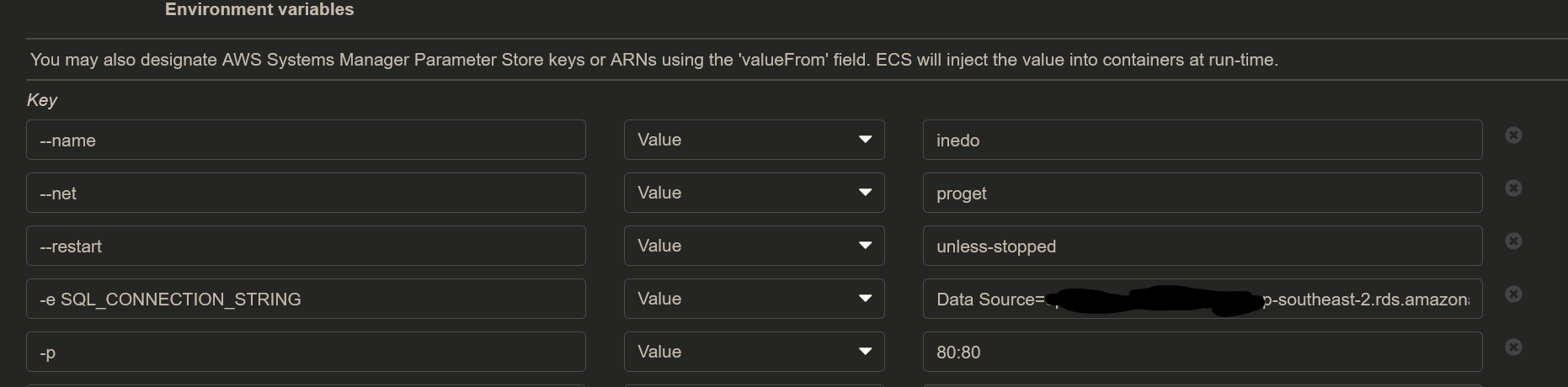
and still using the default connection string looks like:

Hello, i am trying to run ProGet on AWS Fargate using the latest image:
proget.inedo.com/productimages/inedo/proget:latest
i want to pass arguments to the service but it seems the docker image does not accept the documented ones:
/usr/local/proget/service/ProGet.Service,run,-e SQL_CONNECTION_STRING='Data Source=xxxxxx.d.ap-southeast-2.rds.amazonaws.com; Initial Catalog=ProGet; User ID=admin;Password=xxxxxxxxx'
whats are the correct arguments to pass to the docker image in aws?
Cheers.