Inedo Community Forums Forums
    • Recent
    • Tags
    • Popular
    • Login
    1. Home
    2. caterina
    3. Topics

    Welcome to the Inedo Forums! Check out the Forums Guide for help getting started.

    If you are experiencing any issues with the forum software, please visit the Contact Form on our website and let us know!


    C Offline
    • Profile
    • Following 0
    • Followers 0
    • Topics 27
    • Posts 77
    • Groups 0

    Topics

    • C

      [ProGet] Download NuGet packages with symbols

      Watching Ignoring Scheduled Pinned Locked Moved Support
      8
      0 Votes
      8 Posts
      21 Views
      C
      Hi @gdivis, thank you for your response. I think it is a little bit confusing in general. Just for clarification: We are not using any symbol packages at all (neither .symbols.nupgk nor .snupkg). We are only embedding PDBs right into our .nupgk files. But it would be nice to strip the PDBs on package download. We can achieve this on ProGet by activating the symbol server for the legacy format. I was just confused on why I have to use "legacy" for this approach since it is also standard to embedd the PDBs instead of using symbol packages. I guess normally it won't be necessary to enable a symbol server if you are using embedded PDBs. But we want to see the symbol information for our packages and we want to be able to strip the PDBs on download. It seems to be more of a hack to use the legacy symbol server for this but we achieve our goals doing so. No need to file a bug for this. Thank you, Caterina
    • C

      Scoped npm packages not listed in releases

      Watching Ignoring Scheduled Pinned Locked Moved Support
      15
      0 Votes
      15 Posts
      58 Views
      S
      Hi @rhessinger Thanks, but I don't think we will need a pre-release. The remaining problem is basically a convenience issue (getting from the report to the package's info page with one click). Everything else seems to work as expected with the latest pgscan version.
    • C

      pgscan: Different results for npm dependencies

      Watching Ignoring Scheduled Pinned Locked Moved Support
      13
      0 Votes
      13 Posts
      35 Views
      rhessingerR
      Hi @caterina, Here is the final solution: When using the auto type and scanning for NuGet and npm dependencies: The default configuration should be to omit dev dependencies and scan the node_modules directory When using the npm type and a package-lock.json file is specified The default is to only scan the specified package-lock.json file and omit dev dependencies When using the npm type and a package-lock.json file is not specified The default configuration should be to omit dev dependencies and scan the node_modules directory Each of these options would have an optional parameter to include the dev dependencies (--include-dev) Each of these options would have an optional parameter to ignore pacakge-lock.json files found under node_modules (--package-lock-only ) This has been implemented in pgscan 1.5.6 which I will be pushing shortly, and these options will be added to BuildMaster 2023.2. Thanks, Rich
    • C

      ProGet 2023.13: Delay after package upload

      Watching Ignoring Scheduled Pinned Locked Moved Support
      3
      0 Votes
      3 Posts
      23 Views
      C
      Hi @Dan_Woolf, so it seems to be a long known issue: https://github.com/NuGet/Home/issues/3116 Thank you for your help. Caterina
    • C

      pgscan: lockfileVersion 3 for npm dependencies not supported

      Watching Ignoring Scheduled Pinned Locked Moved Support
      16
      0 Votes
      16 Posts
      55 Views
      gdivisG
      Thanks! Merged and released.
    • C

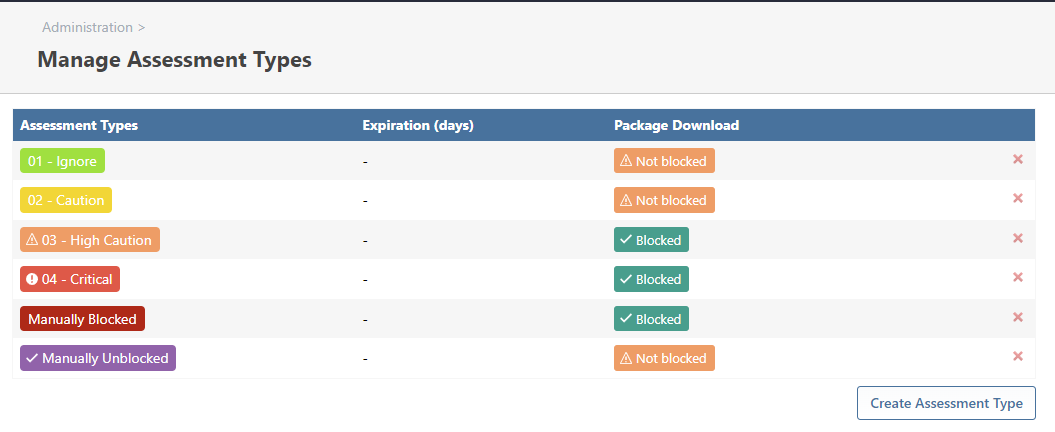
      ProGet: Vulnerability assessment types - missing vulnerabilities

      Watching Ignoring Scheduled Pinned Locked Moved Support
      2
      1
      0 Votes
      2 Posts
      14 Views
      rhessingerR
      Hello, This is most likely related to PG-2395 (ProGet 2022.30 fix) and PG-2390 (ProGet 2023.9 fix). We added support to handle when OSS Index removes vulnerabilities from their list. Unfortunately, this has brought to light the unreliability of the data returned from OSS Index. It looks like vulnerabilities are constantly removed and re-added, which caused assessments to be cleared out on vulnerabilities. In PG-2395 and PG-2390, we have updated ProGet to only add a comment if we see that OSS Index deleted it. This way the assessment is not lost when OSS Index removes the vulnerability. Thanks, Rich
    • C

      Wrong version shown in Usage&Statistics

      Watching Ignoring Scheduled Pinned Locked Moved Support
      2
      0 Votes
      2 Posts
      13 Views
      stevedennisS
      Hi @caterina , This behavior is intentional, but not ideal. It should only navigation - such as the "Usage & Statics" page on a package, or the "List Projects" page which has a "Latest Release" column. As long as the Release is active, you'll still see new issues come up. That's really what determines if a release is scanned or not - Active or not. The reason for this... an SCA Release's "Release Number" is a free-form field, which means there are no sorting rules. So we can't practically/easily determine what the "highest" number. Instead, we just use the order in which it was created for display purposes. Thanks, Steve
    • 1 / 1