Inedo Community Forums Forums
    • Recent
    • Tags
    • Popular
    • Login
    1. Home
    2. arun.ayyampillai_6007
    3. Topics

    Welcome to the Inedo Forums! Check out the Forums Guide for help getting started.

    If you are experiencing any issues with the forum software, please visit the Contact Form on our website and let us know!

    A Offline
    • Profile
    • Following 0
    • Followers 0
    • Topics 3
    • Posts 9
    • Groups 0

    Topics

    • A

      How to run a proget through fiddler ?

      Watching Ignoring Scheduled Pinned Locked Moved Support
      2
      1
      0 Votes
      2 Posts
      19 Views
      jraschJ
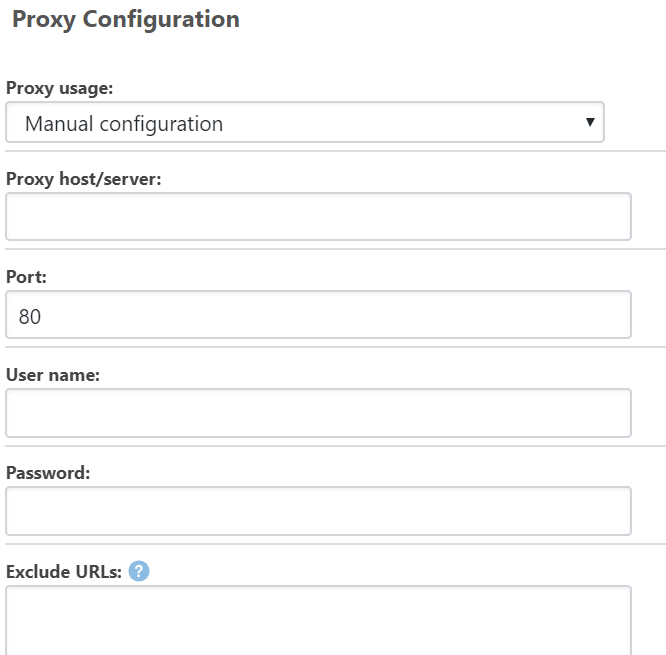
      I think by default all you need is to set the host to "localhost" and the port to "8888". If that doesn't work, check the Tools > Options > Connections tab within Fiddler for the port number.
    • A

      npm feed is not loading

      Watching Ignoring Scheduled Pinned Locked Moved Support
      11
      0 Votes
      11 Posts
      36 Views
      apxltdA
      We haven't heard any other complaints, so it leads me to think it's either your end (proxy?) or npm's end (blocking). We have no idea what their blocking mechanism could look like. For all we know, they could be doing agent-string filtering, and blocking requests from ProGet software, but not your web browser or npm client. Best bet is to run ProGet through a proxy (like fiddler or wireshark), by going to Admin > Proxy. Then you can see exact traffic.
    • A

      Proget main page is not working but the feeds page is loading.

      Watching Ignoring Scheduled Pinned Locked Moved Support
      2
      0 Votes
      2 Posts
      34 Views
      apxltdA
      The homepage will attempt to connect to inedo.com to download latest news, and it will also connect to the database to provide a summary of feeds (dashboard). However, if either of those operations times out, then you should get a prompt error. Maybe, for some reason, the request isn't even being routed to ProGet. You can connect ProGet to a proxy like Fiddler (Admin > Proxy), and then attach to SQL Server to see if anything is timing out..
    • 1 / 1
